Dbeaver: "Client home is not specified for connection"
You really gotta specify what this means in the export database window, i have no idea what to set, and no idea what it's about either.
I can't export it because of this (i think).
 MrBrax
All 50 comments
Native client home can be set in connection properties (first page).
 serge-rider
on 28 Feb 2017
serge-rider
on 28 Feb 2017
@serge-rider hmm?


MrBrax
on 28 Feb 2017
"Local client" combo. It is empty if there is no native client installed on your machine (or DBeaver can't find it).
You can specify path where mysqldump resides manually (Browse->Add home).
serge-rider
on 28 Feb 2017
That's a really weird workflow, why do i need all that? Why can't i just select a filename and it would dump it there?
Now i gotta find that 'mysqldump.exe' too...
edit: i can't even find a simple download for it, this is not very good design
MrBrax
on 28 Feb 2017
Because this is native mysql tool. It is different for every MySQL version and every platform.
And this is extended functionality.
If you don't have MySQL client (or you don't want to bother with this stuff) then you can use data export (which doesn't require any native tools).
serge-rider
on 28 Feb 2017
I guess I'm too used to other MySQL tools then, which have it built in.
This IS my MySQL client, I can change data and create databases etc. The only way to get that mysqldump.exe as far as i can see, is downloading a 350MB zip file from oracle.
MrBrax
on 28 Feb 2017
Some MySQL UI clients may have builtin mysqldump, mysqlrestore, mysql.exe + set of libraries of some particular MySQL client version.
But DBeaver definitely not one of such clients.
On Windows you can install MySQL Workbench (it includes all command line tools). DBeaver will find it automatically.
On Linux you can use something like apt-get install mysql-client
serge-rider
on 28 Feb 2017
...i'll just use one of the other tools for exporting
MrBrax
on 28 Feb 2017
Sure.
DBeaver dump/restore functions are for lazy people who want to use one client for all tasks. And who don't like MySQL Workbench.
serge-rider
on 28 Feb 2017
i use phpmyadmin on xampp from the beggining and now dbeaver for mongo mysql...etc, so XAMPP/mysql/bin has all mysql command line executables. And i like to import a 400mb sql dump, and update my development copy... it is very usefull to import a sql dump,,, maybe dbeaver should include this command line files....
Im using xampp/mysql and is working perfectly

 javirebu
on 21 Apr 2017
javirebu
on 21 Apr 2017
Well, this looks wrong.
- You should set home to
c:\xampp\mysql- not to bin folder. - When you click on home in the left panel there should be some information about it in the right panel. Otherwise this is some bug and I'll need error/debug logs (https://github.com/serge-rider/dbeaver/wiki/Log-files)
serge-rider
on 22 Apr 2017
Welll... wrong are you. It Is working fine... and of course...
xampp/mysql/bin... were mysql.exe and mysqldump.exe are
El 22 abr. 2017 10:30, "Serge Rider" notifications@github.com escribió:
Well, this looks wrong.
- You should set home to c:\xampp\mysql - not to bin folder.
- When you click on home in the left panel there should be some
information about it in the right panel. Otherwise this is some bug and
I'll need error/debug logs (https://github.com/serge-
rider/dbeaver/wiki/Log-files)—
You are receiving this because you commented.
Reply to this email directly, view it on GitHub
https://github.com/serge-rider/dbeaver/issues/1361#issuecomment-296357742,
or mute the thread
https://github.com/notifications/unsubscribe-auth/AakVVMw5F7cA5X5QraOwMKRoGxoFb9V6ks5rybq_gaJpZM4MOJ6_
.
javirebu
on 22 Apr 2017
Serge c:\xampp\mysql works fine too. Intead of this folder does not contain mysql executables :+1:
javirebu
on 24 Apr 2017
This issue is still valid - I found this thread because of the error.
Can you guys please fix the error message? Just put something useful in there like "error: mysqldump missing, please fix in config"
 paulbrzeski
on 30 Aug 2017
paulbrzeski
on 30 Aug 2017
Yep, there was a bug in MySQL binaries location detection. See fix in the next version
serge-rider
on 31 Aug 2017
downloaded MySQL 5.6.37 macos version and attached to dbeaver (3.8.4) db connection local client path. mysqldump is working fine.
 vveettil
on 1 Sep 2017
vveettil
on 1 Sep 2017
I just installed DBeaver 4.2.3 and I still see this issue. Must be something I am missing, but what? Update: quick workaround is to add a symlink in mysql home folder, e.g. ln -s /usr/local/mysql mysql. Then select 'mysql' in home folder as the MySQL home.
 sandorspruit
on 26 Oct 2017
sandorspruit
on 26 Oct 2017
for me c:\xampp\mysql and c:\xampp\mysql\bin both work fine
2017-10-26 12:42 GMT+02:00 sandorspruit notifications@github.com:
I just installed DBeaver 4.2.3 and I still see this issue. Must be
something I am missing, but what?—
You are receiving this because you commented.
Reply to this email directly, view it on GitHub
https://github.com/serge-rider/dbeaver/issues/1361#issuecomment-339625754,
or mute the thread
https://github.com/notifications/unsubscribe-auth/AakVVEnowFoUbvl3AT7tgmqwrFkBqG4vks5swGIIgaJpZM4MOJ6_
.
javirebu
on 26 Oct 2017
I followed this steps on the Mac:
1- find the mysql path install
MacBook-Pro:~ root# find /usr/ -iname "mysql"
/usr//local/mysql
/usr//local/mysql-5.7.17-macos10.12-x86_64/bin/mysql
2 - Open Edit connection settings and click on Browse on Local Client
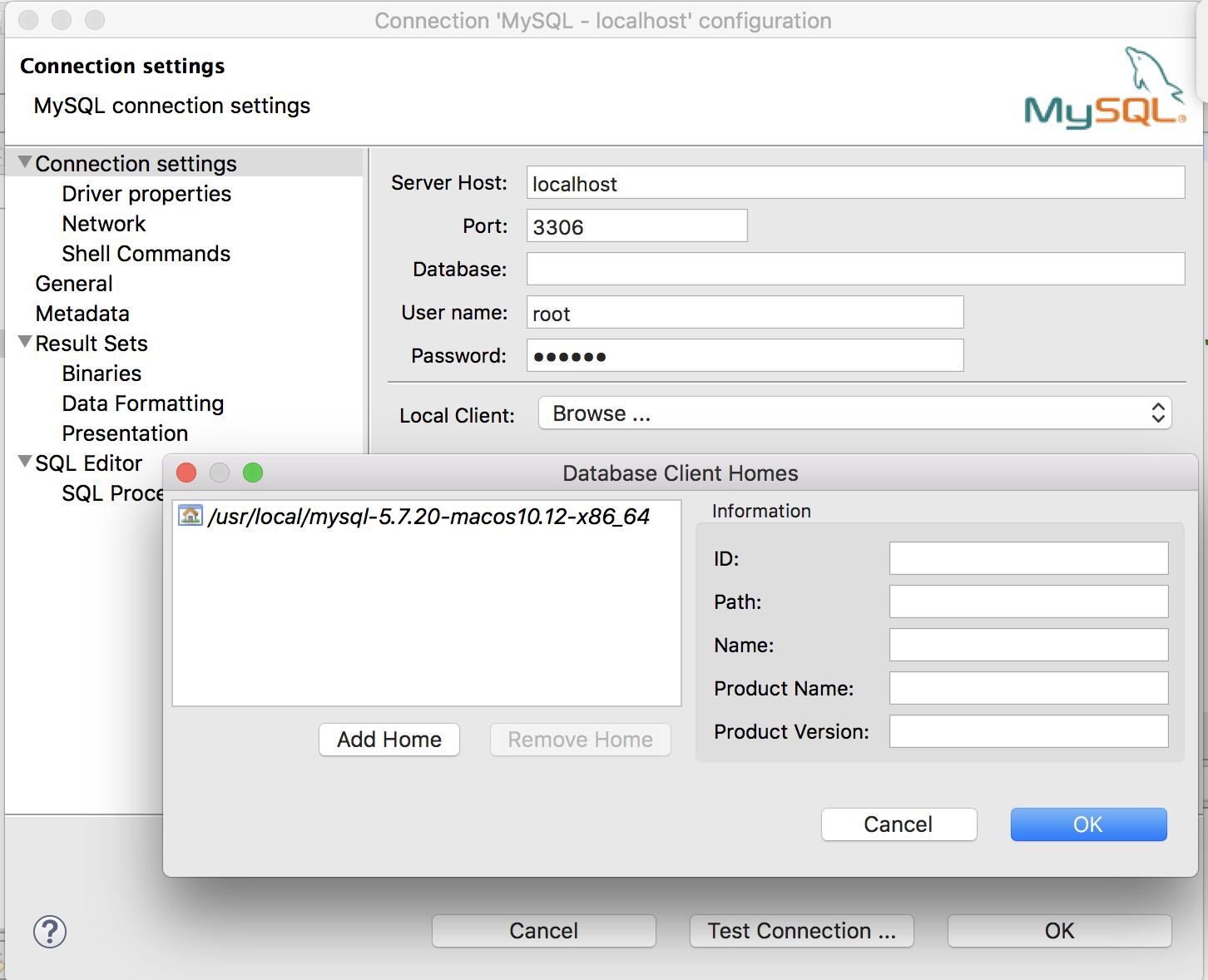
3 - After that click in add home button then use the Command+Shift+G for open the prompt for input the Mysql path location.

Done, its works fine for me!
 alesanfer
on 29 Oct 2017
alesanfer
on 29 Oct 2017
A local mysql client is needed and by default is not selected in connection properties.
So on Linux Mint I did the same as @alesanfer said: just selected "/usr" in "Local Client" row and it works good.
 BornToDrink
on 3 Apr 2018
BornToDrink
on 3 Apr 2018
Can confirm that on Windows installing MySQL Workbench solves the issue. Less stuff to install than MySQL Server.
 ztl8702
on 7 Apr 2018
ztl8702
on 7 Apr 2018
Yeah, similarly for postgres, you hit "Browse" for local client, and put in the path where the pgdump/restore executables live on your system. If you're using Postgres.app, it's:
/Applications/Postgres.app/Contents/Versions/latest/bin
 chriszrc
on 17 Apr 2018
chriszrc
on 17 Apr 2018
Why is a local client necessary? I'm connected to my database remotely and just need a path to store my dump file. Is there a reason I need one locally?
 GeeeCoin
on 25 Apr 2018
GeeeCoin
on 25 Apr 2018
@GeeeCoin afaik, you could of course ssh to your remote db server and use the export tools on that machine, but typically, if the goal is to create the backup file on your local machine, then you would use the tools on your own machine and point it at the remote db.
Even though you're "connected" to your remote db, the import/export tools are usually separate from what's exposed directly over the db connection-
chriszrc
on 25 Apr 2018
@chriszrc thanks for the quick reply, that makes total sense. My line of thinking was: dbeaver (which is great) already is that toolset which is calling on the remote db, so why not already have that functionality? Perhaps it has to do with the lowest common denominator design of dbeaver to accommodate all SQL types.
GeeeCoin
on 25 Apr 2018
After all I'm thinking about inclusion of native tools (pg_dump/pg_restore and mysql/mysqldump) into DBeaver distribution. Some DB clients do this, we also could try. Thus we won't need this native client configurations at all.
However this will require to include at least 3 versions of these binaries (Windows/Linux/MacOS).
serge-rider
on 28 Apr 2018
And this is more than 10Mb of binaries just for one OS.
Combined it is close to full DBeaver CE distribution size :(
But can be solved with automatic binaries download from DBeaver website. While EE may include them by default. Need to think about that.
Please vote if you think this makes sense..
serge-rider
on 28 Apr 2018
automatic download (more or less what happens with db drivers) seems a good way. Power users should be left the option to don't download them and just use the ones they already have installed.
 p91paul
on 29 Apr 2018
p91paul
on 29 Apr 2018
To get dbeaver data export working on OSX with PostgreSQL, I followed these steps:
Find the PostgreSQL install path
If you used homebrew to install postgresql:
$ brew info postgresql
...
/usr/local/Cellar/postgresql/10.3 (3,383 files, 39.2MB) *
...
If you installed via the installer package, the location is:
/Applications/Postgres.app/Contents/Versions/latest/bin
Add the location to the database config
Right click the top-level connection in the "Database Navi" pane (on the left), and select "Edit Connection"

Click the empty drop-down next to "Local Client", then click "Browse" from within the dropdown.
In the popup, click "Add Home", which will show a file-selector prompt.
Press Command+Shift+G, then paste in the PostgreSQL install path.
Hi Ok, Ok, Ok.

Export / Backup
Expand the top-level connection in the "Database Navi" pane (on the left), then right click on the database name you want to export/backup.
Select Tools > Backup.
In the popup, select at least one item from the "Objects" section, then the individual items you want to export from the second section.
Click "Next" (not "Start") to select the directory to save to, by editing the "Output folder" option.
Click "Start" to generate the export.
 jesstelford
on 10 May 2018
jesstelford
on 10 May 2018
@jesstelford thanks sir
 erlangp
on 7 Sep 2018
erlangp
on 7 Sep 2018
To anyone confused by this process and message on first encounter like me:
- Edit connection settings
- On first screen there is [Local Client] drop down, choose 'MySQL Binaries' and save connection.
Nothing happens at this point, it's ok.
- Navigate to a db then _"Tools >> Dump"_. Select as you like and [Next] through the wizard. When you [Start] _now_ dbeaver will download and install the binaries. It's pretty quick and painless from here.
 maphew
on 17 Jan 2019
maphew
on 17 Jan 2019
In ubuntu make sure you install local client
- apt install mysql-client
In dbeaver when you browse local client choose this folder
- /usr/bin/
 ridhoashari
on 25 Jan 2019
ridhoashari
on 25 Jan 2019
I think rather than including the native tools or providing automatic downloads for them, DBeaver just needs to explain clearly what "Client Home" means in the dump database wizard, and provide a quick way to configure it from there.
 hagabaka
on 12 Apr 2019
hagabaka
on 12 Apr 2019
@hagabaka Totally agree about better explanation and easier config. However I still think we should keep providing auto-download of client files.
5716
serge-rider
on 12 Apr 2019
Wow. I really really really miss SequelPro. Ugh.
 brooke-heaton
on 20 Apr 2019
brooke-heaton
on 20 Apr 2019
ok guys, im using Docker for mysql ....
and how should i specify mysqldump file location ?
even if you find a way to specify path ( dont say me it will be "docker exec" ...) i should change it all the time for the every container ?
 seugenev
on 23 Apr 2019
seugenev
on 23 Apr 2019
Now we provide automatic client download for Windows (for PostgreSQL and MySQL). But not for MacOS yet (as it is a bit more complicated to use raw binaries there).
Anyway, if you think this makes sense - please create a feature request.
@seugenev And I agreed that we need global configuration for this. Just made a FR (#5779).
serge-rider
on 23 Apr 2019
Application has been improved a lot. Since i made this question I've set it up properly and it works great!
Completely stopped using SQLYog since then.
MrBrax
on 23 Apr 2019
@seugenev did you figure out how to solve your issue.
I am having the exact same issue.
I have specified client home correctly for mairadb, however the instance I connect to is inside docker.
For my local instance the dump database option works fine. However for the docker instance it gives the following error:

I would appreciate any help thanks. :)
 Nosherwan
on 1 May 2019
Nosherwan
on 1 May 2019
@seugenev did you figure out how to solve your issue.
I am having the exact same issue.
I have specified client home correctly formairadb, however the instance I connect to is inside docker.
For my local instance thedump databaseoption works fine. However for the docker instance it gives the following error:
I would appreciate any help thanks. :)
hello, yes, i found how to solve the issue.
i'm using phpMyAdmin when i need dump of course as a docker container :D
seugenev
on 1 May 2019
Ok thanks. I am on mac and I used sequel pro, easiest tool to backup mysql/mariadb.
Nosherwan
on 2 May 2019
For Postgres SQL installed using Enterprise DB installer on Mac OS, pg_restore will be located in "/Library/PostgreSQL/10/bin".. So select this location in DBeaver, it worked for me..
 Sanal567
on 16 Aug 2019
Sanal567
on 16 Aug 2019
If you are using postgre installed with brew on mac, just add native client url: /usr/local/bin and it will locate the postgre binary. Worked fine for me.
 carlosedof
on 18 Mar 2020
carlosedof
on 18 Mar 2020
removed this PoS
 tpoxa
on 17 Apr 2020
tpoxa
on 17 Apr 2020
I know this has been explained before, and I'm fine using the tools that are available elsewhere.
I think that this use-case can be useful to the developers.
I have a remote db server, and i have a local one where i want to import a dump.
However,
the local server is in a docker container (you can only access the filesystem on a linux docker host).
It would be great to be able to use the remote mysqldump if the connection is over ssh.
just 2c.
 visualex
on 5 May 2020
visualex
on 5 May 2020
@serge-rider any solution for postgres running in docker. how can we provide native client path for pg_dump/pg_restore while restoring the data. it is not mac but linux distribution and does not automatically downloads the libs as quoted here
 mayank-kapoor
on 1 Jun 2020
mayank-kapoor
on 1 Jun 2020
In MacOS, we need to point mysql installation to /usr/local/mysql-5.7.15-osx10.11-x86_64. The problem is, when we browse it, the /usr directory is not visible. Either we have to make it visible to Mac UI, or we create symbolic link to that directory, i.e. ln -s /usr/local/mysql-5.7.15-osx10.11-x86_64/ mysql-5.7.15-osx10.11-x86_64 to any location we like (mine is ~/UserLib).
 firanto
on 29 Jun 2020
firanto
on 29 Jun 2020
Sure.
DBeaver dump/restore functions are for lazy people who want to use one client for all tasks. And who don't like MySQL Workbench.
Dev of database UI app: "You are lazy for using a database UI app"
k
 toastyghost
on 7 Jul 2020
toastyghost
on 7 Jul 2020
This is nonsense, what about if I don't want to install MySQL locally because I have docker installed
 medioseureka
on 16 Oct 2020
medioseureka
on 16 Oct 2020
i have the same problem on popos even thou my /bin/mysqldump exists and even /usr/bin/mysqldump exists
 u007
on 11 Nov 2020
u007
on 11 Nov 2020
Related issues
 sonntagd
·
54Comments
sonntagd
·
54Comments
 christophemacabiau
·
32Comments
christophemacabiau
·
32Comments
 ced75
·
39Comments
ced75
·
39Comments
 osrojas
·
29Comments
osrojas
·
29Comments
 dpsspatial
·
34Comments
dpsspatial
·
34Comments
Most helpful comment
To get dbeaver data export working on OSX with PostgreSQL, I followed these steps:
Find the PostgreSQL install path
If you used homebrew to install postgresql:
If you installed via the installer package, the location is:
Add the location to the database config
Right click the top-level connection in the "Database Navi" pane (on the left), and select "Edit Connection"
Click the empty drop-down next to "Local Client", then click "Browse" from within the dropdown.
In the popup, click "Add Home", which will show a file-selector prompt.
Press
Command+Shift+G, then paste in the PostgreSQL install path.Hi Ok, Ok, Ok.
Export / Backup
Expand the top-level connection in the "Database Navi" pane (on the left), then right click on the database name you want to export/backup.
Select Tools > Backup.
In the popup, select at least one item from the "Objects" section, then the individual items you want to export from the second section.
Click "Next" (not "Start") to select the directory to save to, by editing the "Output folder" option.
Click "Start" to generate the export.