Dbeaver: Geometry Viewer for Spatial Data Query Results
Could DBeaver implement a similar viewer for geometry / geography data types in a query result set, much like the recently released PGAdmin 4 Geometry Viewer for PostGIS?
This feature can also be found in the MS SQL Server Management Studio 'spatial results' tab in query results.
As per @serge-rider, 'This can be added in DBeaver, and this is not too hard as there are map widgets already.'
Thanks!!!
 dpsspatial
All 34 comments
cc @chriszrc
dpsspatial
on 14 Sep 2018
It is a great functionality to work with spatial data
 georaul
on 3 Jan 2019
georaul
on 3 Jan 2019
Even the horrid pgadmin 4 has a spatial viewer now-
https://www.compose.com/articles/geofile-pgadmin-4-and-the-geometry-viewer/
 chriszrc
on 3 Jan 2019
chriszrc
on 3 Jan 2019
Well, I think we'll use pretty the same technique.
Use embedded browser + JS libraries leaflet (https://leafletjs.com/) and maybe wkx (https://github.com/cschwarz/wkx)
 serge-rider
on 12 Jan 2019
serge-rider
on 13 Mar 2019
serge-rider
on 26 Mar 2019
serge-rider
on 12 Jan 2019
serge-rider
on 13 Mar 2019
serge-rider
on 26 Mar 2019
Geotools looks like a good option. uDig is built on top of GeoTools.
We might ask people from geotools (@ianturton, @jodygarnett, @aaime) for some help/advise, if necessary.
I'll try to help with this issue (and with #4651)
 jgrocha
on 26 Mar 2019
jgrocha
on 26 Mar 2019
@jgrocha Thanks for the info, this could be really helpful 👍
I'll write some comments once we'll move to implementation.
At the moment we are trying to adapt web-based UI for GIS visualization and then will probably try Java based approaches.
serge-rider
on 29 Mar 2019
Did version 6.0.2 implement a GIS data viewer as per the release notes:
https://github.com/dbeaver/dbeaver/releases/tag/6.0.2
How do I test it?
 HeikkiVesanto
on 8 Apr 2019
HeikkiVesanto
on 8 Apr 2019
- Enable the 'Value' Panel
- Pull the little drop-down to switch from "Text" to "Graphic"
- Run a query in PostgreSQL(PostGIS) that returns geometry
- Click a value in the results panel to show the map in the Value panel
Looking good so far!!!
dpsspatial
on 9 Apr 2019
That's amazing, thanks a lot!
Next step will be to reproject geom if necessary for the viewer, because currently we need to reproject our data with ST_Transform(geom, 4326) AS geom (= we cannot preview no WGS84 geom in tables as it).
Keep going good work!
 rbovard
on 9 Apr 2019
rbovard
on 9 Apr 2019
@rbovard Yep. Different projections (SRIDs) and 3D rendering is what we are working on right now.
serge-rider
on 9 Apr 2019
My QGIS is wheeping already as it 'll become secondary... great work!
 HannesMas
on 9 Apr 2019
HannesMas
on 9 Apr 2019
* Enable the 'Value' Panel

* Pull the little drop-down to switch from "Text" to "Graphic"

* Run a query in PostgreSQL(PostGIS) that returns geometry

* Click a value in the results panel to show the map in the Value panel
Looking good so far!!!
A GIF or a short video somewhere? Not enough familiar with DBeaver at the moment
 ThomasG77
on 9 Apr 2019
ThomasG77
on 9 Apr 2019
Wow! This is really great. The least I can do is help out with a gif for @ThomasG77
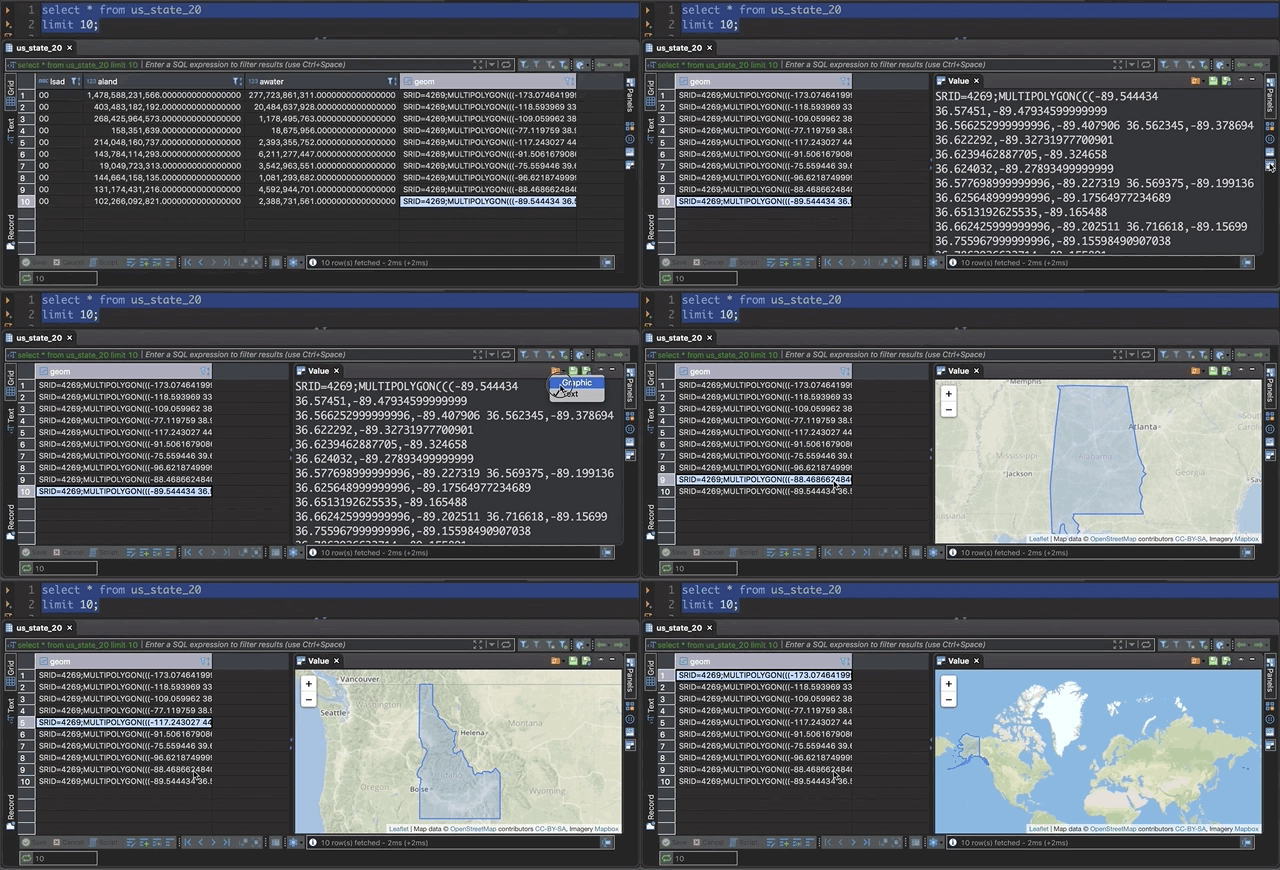
Has there been any discussion of adding a way to see the full result of the query yet?
This is very exciting, I can finally recommend dbeaver over pgadmin 4 without reservation now!
chriszrc
on 9 Apr 2019
+1 about seeing full query results... again, could be early in development to get too picky...
@chriszrc Thanks for creating the animation - what software are you using to do that ??
Wow! This is really great. The least I can do is help out with a gif for @ThomasG77
Has there been any discussion of adding a way to see the full result of the query yet?
This is very exciting, I can finally recommend dbeaver over pgadmin 4 without reservation now!
dpsspatial
on 9 Apr 2019
@dpsspatial Hi, I use this program on my mac, it's really easy and simple - https://giphy.com/apps/giphycapture
chriszrc
on 9 Apr 2019
So I'm using Windows, and SQL Server and tested with a geography field. I don't get the drop down for graphic results like @chriszrc

Granted this is far from apples to apples, but I guess I don't know, does this need to be a geometry type or PostGIS or both? Looks like his results are in WKT. I also tried this using the .STAsText() function to return WKT and that didn't give me the ability for graphic either.

 alexmahrou
on 17 Apr 2019
alexmahrou
on 17 Apr 2019
I'm pretty sure this only works with PostGIS so far...
So I'm using Windows, and SQL Server and tested with a geography field. I don't get the drop down for graphic results like @chriszrc
Granted this is far from apples to apples, but I guess I don't know, does this need to be a geometry type or PostGIS or both? Looks like his results are in WKT. I also tried this using the .STAsText() function to return WKT and that didn't give me the ability for graphic either.
dpsspatial
on 17 Apr 2019
it is also necessary to install svg library
 eriveltonguedes
on 18 Apr 2019
eriveltonguedes
on 18 Apr 2019
@alexmahrou Yes, for this works only for PostGIS. We going to add support of MySQL, SQL Server and Oracle later but before 6.1 release.
serge-rider
on 19 Apr 2019
@serge-rider thank you! Please ping me if you need anyone to test this out for SQL Server. I'd be happy to.
alexmahrou
on 19 Apr 2019
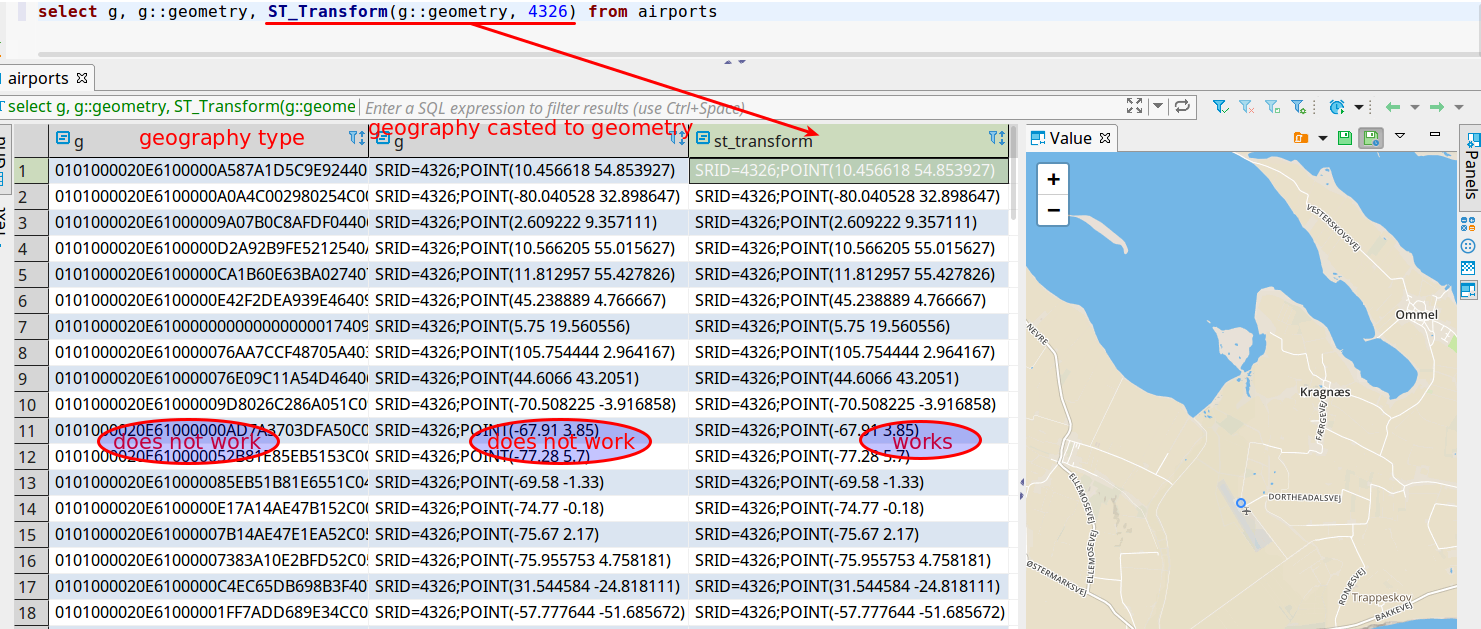
PostGIS geography type is not supported. Geography casted to geometry is not supported too. Only casted and transformed. It would be great if one of the next releases will support PostGIS geography type.
 sk-dataocean-online
on 20 Apr 2019
sk-dataocean-online
on 20 Apr 2019
I just tested the latest version 6.0.3 and it's great. I like the multiple selection.
I noticed two things:
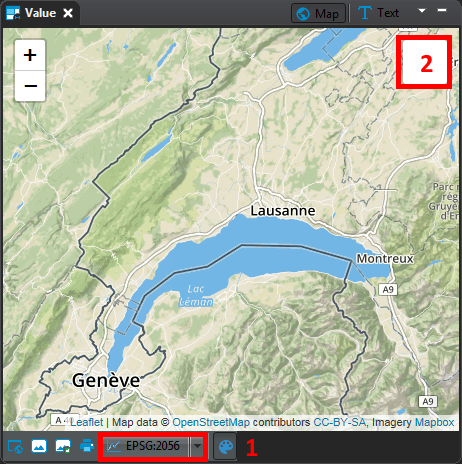
- Are the non 4326 projections handled? I set the value to my native projection, but the features are not correctly displayed
- Is there a missing icon for the layer swicher? And is it possible to add light basemap, to have a neutral background?
Thanks a lot for this amazing feature!
rbovard
on 23 Apr 2019
@rbovard Yes, we support non-4236 SRIDs but there is bug in translation, it will be fixed in the next version (or you can already test it in Early Access version).
SRID transforms is one of main features in GIS viewer in the next version.
@sk-dataocean-online Good point, we'll try to adapt Geography data type as well.
serge-rider
on 25 Apr 2019
(whoops sorry about closing this... was trying to cancel a comment)
dpsspatial
on 25 Apr 2019
This is a great feature.
add support of MySQL, SQL Server and Oracle later
I'd love to see this for SpatiaLite too!
 ar-jan
on 26 Apr 2019
ar-jan
on 26 Apr 2019
@sk-dataocean-online Good point, we'll try to adapt Geography data type as well.
Would love to see this as well, was pleasantly surprised when I recently found out Geometry types could be previewed on the map panel, having the same for Geography types would be very helpful.
 tvandervorm
on 27 Apr 2019
tvandervorm
on 27 Apr 2019
@serge-rider - everything is looking AMAZING here, so I don't want to rock the boat too much...
However, semantically, can we remove terms like 'GIS' and 'shape', and instead use 'spatial' and 'geometry'?
For example, in the Data panel of a table properties, the Grid and Text buttons now show the GIS tab. Can we simply call that 'Spatial' instead? This would allow the accomodation of both geometry and geography data types going down the road.
Besides, the term "GIS" is more and more for proprietary software that utilizes a silo'd group of GUI-driven tools, whereas DBeaver is a relational database tool accessing multiple types of data, spatial data being just another type. I think it would do disservice to these tools to simply call them 'GIS' tools...
MANY THANKS for all the work done on the spatial data results viewer!!!
dpsspatial
on 29 Apr 2019
@dpsspatial Agreed, this sounds reasonable.
serge-rider
on 29 Apr 2019
Further improvements if spatial data viewer/editor will be tracked in separate tickets.
serge-rider
on 13 May 2019
For the record, I can say that in 6.1.3 I am able to visualize geometries from SQL Server on Linux. The one restriction is that geometries must be present as WKT:
select geometry::Point(longitude, latitude, 4326).STAsText()
from some_points;
So I'm using Windows, and SQL Server and tested with a geography field. I don't get the drop down for graphic results like @chriszrc
Granted this is far from apples to apples, but I guess I don't know, does this need to be a geometry type or PostGIS or both? Looks like his results are in WKT. I also tried this using the .STAsText() function to return WKT and that didn't give me the ability for graphic either.
 jest
on 22 Jul 2019
jest
on 22 Jul 2019
@jest I just installed 6.2.4 and have had no luck viewing geometries from SQL Server on Linux. Compared to the screenshots from those that have this working, here is what I have:
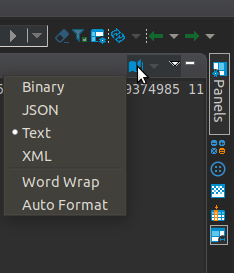
Are there and additional libs that need to be installed?
 mccarthyryanc
on 13 Nov 2019
mccarthyryanc
on 13 Nov 2019
@jest I just installed 6.2.4 and have had no luck viewing geometries from SQL Server on Linux. Compared to the screenshots from those that have this working, here is what I have:
A step-by-step of what I do:
- Execute
with some_points as (select 19 as longitude, 52 as latitude) select geometry::Point(longitude, latitude, 4326).STAsText() geo from some_points; - Right-click on the value and choose
Column view / Set "geo" format / Geometry - Confirm the transformer settings
- Map is displayed in
Valueview
jest
on 13 Nov 2019
Related issues
 GiantCrocodile
·
30Comments
GiantCrocodile
·
30Comments
 zejji
·
33Comments
zejji
·
33Comments
 19edison
·
71Comments
19edison
·
71Comments
 sonntagd
·
54Comments
sonntagd
·
54Comments
 BruceJL
·
29Comments
BruceJL
·
29Comments
Most helpful comment
@rbovard Yep. Different projections (SRIDs) and 3D rendering is what we are working on right now.