Dbeaver: Cancel pending query retrieving data
In the current version of DBeaver, it takes a long time to cancel a query which is currently fetching data from a remote server. For example: If run locally, a query would bring 100k results in about 2 seconds. If run remotely, it takes upwards of 20 seconds, due to limited connection speed. Cancelling this open request usually takes the time it would take to bring all rows, were it were not cancelled.
DB is PostgreSQL, any version from 8.3 to 10.1
 lrweck
All 38 comments
Do you use max rows limit? (200 by default)
If not then PostgreSQL driver will fetch all rows on server side.
If you use max rows limit then cancel should work quickly. In that case please provide more details (what DBeaver version and PG driver version do you use)
 serge-rider
on 3 Jan 2018
serge-rider
on 3 Jan 2018
Yes, if I use limit it works quite fast. Unfortunately, Sometimes I need all results, so it's not a solution.
DBeaver version is 4.3.1 and I tested with JDBC 9.4.1212.jre7 (provided) and v42.1.4
lrweck
on 4 Jan 2018
You can fetch all rows only when you need this.
There is a special command for that in the bottom toolbar:

serge-rider
on 4 Jan 2018
Also you can execute query using Select all rows command:

serge-rider
on 4 Jan 2018
Yes, both of them bring all the rows. However when a query is inherently heavy/costly, using 'limit' doesn't help.
lrweck
on 4 Jan 2018
+1
I came here to report the same issue, but I see it is already here.
Just my 2 cents to clarify - sometimes I do not expect SQL to take so long and it does, because I made some mistake. So the problem is not to limit the number of rows, which there are multiple ways to do, the problem is that cancel does not really cancel and one has to wait (presumably) until the long query finishes or as I do - kill DBeaver.
So I would like cancel button to cancel immediately and stop fetching results.
 raqua
on 14 May 2018
raqua
on 14 May 2018
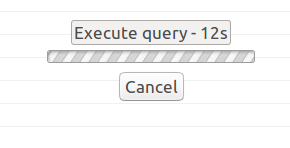
@raqua You can click on Cancel button
 rpanai
on 13 Sep 2018
rpanai
on 13 Sep 2018
@rpanai Do you really think I have not tried it? It does nothing. Or at least did nothing when I reported it, I have not tried it in the latest version, but since this is not closed, I presume nothing was changed yet.
raqua
on 13 Sep 2018
Here is a visual example of what we are saying. The real problem is that we use complex queries unlike "select * from table", and being able to cancel it immediately would be a big advantage, for me at least.

lrweck
on 13 Sep 2018
@raqua Given that I'm coming from another software I found the button in a weird position. No reasons to be mean.
@lrweck I just tried with a not basic query that returns about 300M rows and the button was working fine for me. DBeaver version is 5.11
rpanai
on 13 Sep 2018
@rpanai I apologize, I did not intended to be mean, just sarcastic. :) Maybe this is database specific. Does not work for me in Oracle. What DB are you trying it with?
raqua
on 13 Sep 2018
@raqua No problems. I'm using Redshift (PostgreSQL).
rpanai
on 13 Sep 2018
Yes, session cancel (aka statement interruption) doesn't work for some Oracle servers.
Unfortunately I can't say for which version exactly. And I don't know any workaround.
For instance for Oracle 12.2 on Windows it works fine, for the same version for Linux (CentOS) it doesn't work. It is driver-specific and I'm afraid there is nothing we can do..
serge-rider
on 13 Sep 2018
@rpanai maybe it's connection (speed) dependent?
lrweck
on 13 Sep 2018
@lrweck given what @serge-rider said I'd say that it depends on DB. I'm happy to share connection speed if you like.
rpanai
on 13 Sep 2018
@serge-rider I am on CentOS, Oracle 12. Also DBeaver is run from Linux machine. Can you just forcefully close the session/thread ? That should be under your control.
raqua
on 13 Sep 2018
Yes, session cancel (aka statement interruption) doesn't work for some Oracle servers.
Unfortunately I can't say for which version exactly. And I don't know any workaround.For instance for Oracle 12.2 on Windows it works fine, for the same version for Linux (CentOS) it doesn't work. It is driver-specific and I'm afraid there is nothing we can do..
Do you see a way to make it work with Postgres? For example, using psql I can cancel any query immediatelly. Unfortunatelly, I have no idea what kind of black magic it uses
lrweck
on 13 Sep 2018
@raqua Given that I'm coming from another software I found the button in a weird position. No reasons to be mean.
@lrweck I just tried with a not basic query that returns about 300M rows and the button was working fine for me. DBeaver version is 5.11
just reiterating: the button does work, it just takes a (relatively) long time to free the connection.
lrweck
on 13 Sep 2018
I'm using Oracle server version 11.2 on linux servers and cancel is mostly not working for me. I usually just close the editor that has become useless. For very messed up queries, this meant leaving the query running for weeks until I had it killed by sysadmins. That's because killing the client does not kill the session itself.
@serge-rider do you think that can be solved with another Oracle client version or is fully server-side?
The option to just stop the query client side after a timeout and automatically start a new connection on the same editor would be good (like you did with the close and invalidate connection timeouts), that would at least avoid the need to open a new editor tab and copy the query (or queries) to the new tab before closing the old one. And also it would remove the running query from the "progress" window.
 p91paul
on 13 Sep 2018
p91paul
on 13 Sep 2018
@lrweck It should work in PostgreSQL (at least when you use default PG driver).
Here how it is usually looks like:

there is no any magic, it just works out of the box. But maybe you have some specific case. Could you post an example of query (e.g. with system tables) which cannot be canceled?
I usually test it on select pg_sleep(20)
serge-rider
on 13 Sep 2018
@p91paul No, client driver change doesn't help, it is server-specific.
I use 100% the same config on client and the same version of Oracle server but on different OSes.
Usually sessions are killed by server on client disconnect but some are not. You also could try to kill them using session manager.
serge-rider
on 13 Sep 2018
@serge-rider all of them can be cancelled. Some only take a while to do so.
lrweck
on 13 Sep 2018
@serge-rider the situation is a lot less perceptible on local connections. That's why I believe it is connection/network related.

lrweck
on 13 Sep 2018
After all I can't figure out what exactly this ticket is about.
It is more like a question than some feature request or enhancement.
serge-rider
on 4 Oct 2018
I wanted DBeaver to be able to cancel the running query immediatelly after clicking "Cancel". What happens is: Depending on how much data DBeaver is transferring and the network speed between the Postgres server and my computer, it can take minutes to be able to run something else.
If you want to try for yourself, please create a scenario where your connection to the server is slow, query some large amount of data, click cancel and wait for it to finish.
What would be ideal is, when clicking "Cancel", DBeaver should drop the transferring of data instantaneously.
I hope this makes it clearer.
lrweck
on 4 Oct 2018
Agreed, this makes sense.
The problem I see:
Actual cancel may take a long time. As a workaround we can kill the connection once user presses "Cancel" (instead of real query cancel).
Pros:
- This will work in all drivers.
- Responsive UI (cancel will happen immediately)
Cons:
- This will terminate any other queries/tasks for this connection. Maybe it is not a problem (most drivers don't even support multiple simultaneous queries in a single connection).
- Killing connection will terminate current transactions (and this is actually not obvious and unexpected).
WDYT?
I can make this configurable (but I'd rather not to)
serge-rider
on 4 Oct 2018
I am OK with that solution as I usually have to kill and restart the whole DBeaver in order to be able to continue and that has the same effect.
raqua
on 4 Oct 2018
This would be ideal for me aswell. Hovewer the 2nd Con is a big one. It is obviously less than ideal to drop transactions without the users knowledge. Can we really solve this without some parameter or configuration? Maybe we can tie this to the autocommit feature (since there probably aren't any other pending transactions)? If it's enabled, terminate the connection on the "Cancel" button click.
lrweck
on 4 Oct 2018
I like the idea with auto-commit. Some extra config will be also required.
I'll try this, hopefully till 5.2.2 release.
serge-rider
on 4 Oct 2018
For now I've added extra parameter - timeout after which DBeaver will kill active connection.
You could try to set it to, say, 1000-3000 (1-3 sec) and see how it works (5.2.2 will be released Oct 08).
If it'll be good enough then I'll set non-zero default for this parameter. Tested on PG - works good enough, although I didn't test in a very slow network env.

serge-rider
on 6 Oct 2018
There is something wrong with the "cancel". I had to reinstall previous version.
When I cancel with the V5.2.2, it takes forever. I tried to use the new pref to close the connection, but it doesn't seems to be a good idea, since the request continue to run in the background even if disconnected.
 hackenspp
on 10 Oct 2018
hackenspp
on 10 Oct 2018
@hackenspp You are right, I just forgot to revert code comment :(
So this whole feature is broken in 5.2.2. Sorry, that's my fault.
Fix is committed and Early Access version is published (https://dbeaver.io/files/ea)
serge-rider
on 10 Oct 2018
the original solution works for me. and the new fix too. Could you perhaps reconnect automatically after the timeout?
lrweck
on 11 Oct 2018
Actually, I encountered this problem in also in Oracle SQL Developer, but found a solution here:
https://www.thatjeffsmith.com/archive/2013/04/die-or-how-to-cancel-queries-in-oracle-sql-developer/
Cite:
"The database is coded to listen for cancel requests in various places. Apparently for JDBC connections, it’s not listening in as many places as you may like. But, there’s a ‘fix!’"
- setting to use "OCI/Thick driver" (instead of the default JDBC driver) and path to Oracle Client.
"Anyways, once you have this sorted, start a new connection, and if you have a compatible Oracle Client on your machine, we’ll use the Oracle Call Interface (OCI) via the ocijdbc driver. Now, one of the few advantages here is that there are MORE ‘listen’ points in the database code for query cancellation requests. I’ve suggested this route for many of our users, and it seems to have done the trick for all of them."
After I set the SQL Dev to use Oracle "Thick" Client, I am able to cancel the LRQ immediately without problem.
So, as I understand it, the problem is apparently the Oracle DB not listening for queries of JDBC connections to be cancelled. The solution is using Oracle "Thick" Client, which unfortunately is not supported in DBeaver any more (even though it was in some previous versions).
 indrakt
on 15 Oct 2018
indrakt
on 15 Oct 2018
Agreed, this makes sense.
The problem I see:
Actual cancel may take a long time. As a workaround we can kill the connection once user presses "Cancel" (instead of real query cancel).Pros:
- This will work in all drivers.
- Responsive UI (cancel will happen immediately)
Cons:
- This will terminate any other queries/tasks for this connection. Maybe it is not a problem (most drivers don't even support multiple simultaneous queries in a single connection).
- Killing connection will terminate current transactions (and this is actually not obvious and unexpected).
WDYT?
I can make this configurable (but I'd rather not to)
Another possibility would be to try to cancel it normally on the first button press, and then change the button title to "Kill connection" so the user has always the choice.
 jmstark
on 27 Feb 2019
jmstark
on 27 Feb 2019
Actually, I encountered this problem in also in Oracle SQL Developer, but found a solution here:
https://www.thatjeffsmith.com/archive/2013/04/die-or-how-to-cancel-queries-in-oracle-sql-developer/Cite:
"The database is coded to listen for cancel requests in various places. Apparently for JDBC connections, it’s not listening in as many places as you may like. But, there’s a ‘fix!’"* setting to use "OCI/Thick driver" (instead of the default JDBC driver) and path to Oracle Client."Anyways, once you have this sorted, start a new connection, and if you have a compatible Oracle Client on your machine, we’ll use the Oracle Call Interface (OCI) via the ocijdbc driver. Now, one of the few advantages here is that there are MORE ‘listen’ points in the database code for query cancellation requests. I’ve suggested this route for many of our users, and it seems to have done the trick for all of them."
After I set the SQL Dev to use Oracle "Thick" Client, I am able to cancel the LRQ immediately without problem.
So, as I understand it, the problem is apparently the Oracle DB not listening for queries of JDBC connections to be cancelled. The solution is using Oracle "Thick" Client, which unfortunately is not supported in DBeaver any more (even though it was in some previous versions).
Can Confirm this behaviour in SQL Developer
 dariopnc
on 15 Mar 2019
dariopnc
on 15 Mar 2019
Same issue for Teradata cancel button press request lasts for 100s of minutes, even setting additional options highlighted like close connection after timeout, and explicitly also pressing disconnect does not do anything. The Execute query with a running timer and "Canceled" greyed out button keeps showing. Only option at that point is to quit the application and restart, losing all interim work and open result tabs.
 ausiddiqui
on 9 Apr 2019
ausiddiqui
on 9 Apr 2019
Setting the error handler disconnect timeout does not work for me. I'm using Oracle databases over a VPN. The only way I can cancel is to disconnect my VPN, or force-quit the application. I'm on dbeaver V5.3.4 Windows 10.
I'd like the idea of press cancel once to try and gracefully quit, press twice to kill it dead in its tracks (I'm fine with loosing uncommited transactions. Its no worse than the current behavior)
 alexnerd123
on 14 Aug 2019
alexnerd123
on 14 Aug 2019
Related issues
 GiantCrocodile
·
30Comments
GiantCrocodile
·
30Comments
 zejji
·
33Comments
zejji
·
33Comments
 ajpuerta
·
65Comments
ajpuerta
·
65Comments
 MrBrax
·
50Comments
MrBrax
·
50Comments
 nheilbuth
·
40Comments
nheilbuth
·
40Comments
Most helpful comment
@rpanai Do you really think I have not tried it? It does nothing. Or at least did nothing when I reported it, I have not tried it in the latest version, but since this is not closed, I presume nothing was changed yet.