Dbeaver: Can't edit data in Data Editor for SQL Server connections
System information:
- Windows 10
- DBeaver 6.3.1 - 6.3.2
- Java 1.8.0_201
Connection specification:
- Database name and version: SQL Server
- Driver name: MS SQL Server / SQL Server
- Do you use tunnels or proxies (SSH, SOCKS, etc)? No
Describe the problem you're observing:
I cannot edit the data in the "Data Editor" on any SQL Server connection, always appears the message "Column is read only". It's impossible to generate SQL insert statement too. If I install the 6.2.1 version all works well with the same settings.
Check 'Read-only connection' is always disabled.
Steps to reproduce, if exist:
- Create a SQL Server connection.
- Run a select and try to edit any value in the "Data Editor"
- The message "Column is read-only" appears.
Thank you.
 ajpuerta
All 65 comments
- Thank you for the bug report regarding possibility to edit data in ResultSet.
- What way do you use to generate SQL INSERT statement? I can do it using Context menu of DB Navigator.

 kseniiaguzeeva
on 10 Jan 2020
kseniiaguzeeva
on 10 Jan 2020
I select a row in the resultset and then use context menu, in last versions isn't working. In the editor the table hyperlink isn't working neither.
On the other hand, generate SQL and edit data works in the table data resultset.
ajpuerta
on 10 Jan 2020
I have the same problem with version 6.3.1, 6.3.2, 6.3.3. Inline cell editor doesn't work. I'm using Fedora 31, SQL Server 2014, Java 1.8.0_131
 garrizano
on 20 Jan 2020
garrizano
on 20 Jan 2020
Could you send error stacktrace (or log file)?
https://github.com/dbeaver/dbeaver/wiki/Log-files
 uslss
on 21 Jan 2020
uslss
on 21 Jan 2020
Could you send error stacktrace (or log file)?
https://github.com/dbeaver/dbeaver/wiki/Log-files
There is no errors.
I just can't edit cell inline.

garrizano
on 21 Jan 2020
I'm getting this as well for databases I routinely used to use the Edit Cell feature (double click and edit inline) and also the delete row record. Now it appears as if its readonly. This happened as soon as I upgraded to DBeaver 6.3.2. The previous version of DBeaver didn't have this issue and worked fine. I tried to upgrade java to 13.0.2 and it didn't help.
There is no error message, the behaviour is that you click on it, it briefly looks like you can edit, and then it decides to render it as readonly and you cannot further edit anything.
System information:
OSX 10.14.6
DBeaver 6.3.2.202001051908
Java 13.0.2
 dirkesquire
on 29 Jan 2020
dirkesquire
on 29 Jan 2020
Having the same problem with SQL Server 2014 and 2016 (Express versions). Issue is also present in 6.3.4. Logfiles are looking okay. We always had this problem with the new JDBC driver.
It does work if I use the fully qualified name (dbname.schemaname.table)
Windows 10 pro 1903
Dbeaver 6.3.1 - 6.3.4 with bundled jre
 crapp
on 3 Feb 2020
crapp
on 3 Feb 2020
It does work if I use the fully qualified name (dbname.schemaname.table)
It's true! Using the fully qualified name it works
ajpuerta
on 4 Feb 2020
I downgraded back to dbeaver-community 6.3.0 and the inline cell editing is working again :)
dirkesquire
on 7 Feb 2020
With the last version appears a tooltip that says: (Read-only: No corresponding table column).
The sentence SQL I've executed was a simple SELECT * FROM table
Using the fully qualified table name it works
ajpuerta
on 17 Feb 2020
@ajpuerta
- is your table in
dboschema? - do you use both database and schema names in fully qualified name? what if you will use only schema prefix?
- what driver (MS or jTDS) do you use?
 serge-rider
on 17 Feb 2020
serge-rider
on 17 Feb 2020
- My table is in imp schema
- _database.schema.table_ it works, _schema.table_ not
- Microsoft/mssql-jdbc
ajpuerta
on 17 Feb 2020
Latest version now provides some more context on these ""Read Only" Columns
Read-only: No corresponding table column
@serge-rider Just to make sure this information is not lost. I have a connection (old driver jTDS) to a SQL Server instance. Editing cells in the data viewer worked perfect until DBeaver 6.3.0. I did not need to provide a fully qualified table name. Since 6.3.1 this no longer the case (regardless which driver I use)
crapp
on 17 Feb 2020
Same behavior for Windows 10, Dbeaver 6.3.5
 evgeniyluzman
on 20 Feb 2020
evgeniyluzman
on 20 Feb 2020
@ajpuerta I have the same exact issue with mssql jdbc driver. database.schema.table works, schema.table doesn't.
DBeaver 6.3.2
Windows 10
 altquant
on 20 Feb 2020
altquant
on 20 Feb 2020
Version 7 is affected as well.
I did also try to use the latest jdbc driver version (8.2.1) from Microfsoft. Doesn't help.
SELECT SCHEMA_NAME();
returns the correct default schema of my user.
crapp
on 4 Mar 2020
I'm going to stay with using version 6.3.0 until this is resolved. For me, any other feature improvements, aren't worth losing this feature.
dirkesquire
on 4 Mar 2020
@serge-rider
I just compared the two tags for 6.3.0 and 6.3.1 on github and found changes regarding sql server default schemas
https://github.com/dbeaver/dbeaver/issues/5172
Could a code change for the mentioned issue cause this trouble?
crapp
on 4 Mar 2020
@crapp good point.
Eventually I found the bug. It was in target table search.
You can test the fix in Early Access version (https://dbeaver.io/files/ea)
serge-rider
on 5 Mar 2020
@serge-rider
I have installed Version 7.0.0.202003050802 ( windows x64) but still have the problem.
Tried with jdbc 8.2.1 and old MS driver
crapp
on 5 Mar 2020
@crapp Does your table has a space in its name? For example "test 160320".
Have you checked latest release 7.0.0?
kseniiaguzeeva
on 16 Mar 2020
@kseniiaguzeeva There are no spaces in the table name and I installed the version I found here https://dbeaver.io/files/ea/
crapp
on 16 Mar 2020
Please try the latest release https://dbeaver.io/download/
The issue "database.schema.table it works, schema.table not" does not reproduce on this version.
If the issue is still actual for you in the latest release, please reopen the ticket.
kseniiaguzeeva
on 17 Mar 2020
@kseniiaguzeeva The problem still exists in the early access version released on march 5th. I won't reinstall the regular 7.0.0 release because @serge-rider found a bug in that version.
crapp
on 17 Mar 2020
version 7.0.1 is also not working, I went back to 6.1.0, as a colleague mentioned, with this feature I don't need any other.
 weslylopes
on 26 Mar 2020
weslylopes
on 26 Mar 2020
Do you have any steps to reproduce? Could you give a query example?
Which schema is selected in SQL Editor, which schema is active? Which schema does the table belong to?
kseniiaguzeeva
on 27 Mar 2020
Hi @kseniiaguzeeva, it's working only when you use scheme.table but not when you only write the table name.
SELECT * FROM imp.table (it's working)
SELECT * FROM table (not)
ajpuerta
on 27 Mar 2020
What's schema your table in?
What schema is active?
kseniiaguzeeva
on 27 Mar 2020
As I said in issue #8201
"My tables are in imp schema and I connect with imp user. Conversely, the scheme active in DB Navigator tree is dbo@xxxxx"
ajpuerta
on 27 Mar 2020
Same problem for me. try a
SELECT SCHEMA_NAME();
This will show you your users default schema and is in my case not dbo. Nevertheless dbo seems to be the active schema.
crapp
on 27 Mar 2020
Partially fixed in #8222 (table recognition was broken for table names in square brackets).
serge-rider
on 30 Mar 2020
Current schema detect fixed.
Please check how it works in Early Access version (https://dbeaver.io/files/ea)
serge-rider
on 30 Mar 2020
I can confirm that the problem is fixed in latest EA-version, but not when the schema name has brackets.
E.g. database.[62b].table -> still read-only
 d3claes
on 31 Mar 2020
d3claes
on 31 Mar 2020
@d3claes unfortunately @Jsqlparser doesn't support such syntax (schema name which start with number in square brackets). Hopefully next version will.
Workaround: use double quotes: database."62b".table
Perhaps we need to use double quotes by default for SQL Server. Or add an extra parameter.
serge-rider
on 31 Mar 2020
OS: macOS Mojave 10.14.6
Version: 6.3.0.201912042122
SQL: select * from ml.Comment
Results: Can edit cells, insert new rows, delete rows.
Version: 6.3.2.202001051908, 6.3.5.202002151353
SQL: select * from ml.Comment
Results: New record and delete record buttons disabled, can enter edit cell, but it will not persist.
Version: 7.0.1.202003211804
Results: Can edit cells, insert new rows, delete rows.
Nice work! Well done!!!!
dirkesquire
on 31 Mar 2020
I can confirm that latest ea version 7.0.2 does recognize the correct schema
But I can still not edit cells in the data editor when I made a select without any schema.
SELECT * from bla
where bla is in schema blubb.
crapp
on 31 Mar 2020
@crapp Is blubb is you active schema? It is in the active schema selector in the main toolbar.
serge-rider
on 1 Apr 2020
@serge-rider Okay here is the thing. If I create a new SQL Editor for my connection it shows the correct connection but only the database (blubb) is shown in the schema selector. Autocompletion does not work and Result Sets are read only.
If I then change the active schema to something else and back to my schema the schema selector dropdown shows blubb@blubb and now everything works.
crapp
on 1 Apr 2020
One more issue with default schema init fixed.
serge-rider
on 2 Apr 2020
Closed. Please create a new ticket if some of the issues is still actual for 7.0.2.
kseniiaguzeeva
on 4 Apr 2020
I am using 7.1.0 (Windows 10) and I am experiencing this issue.
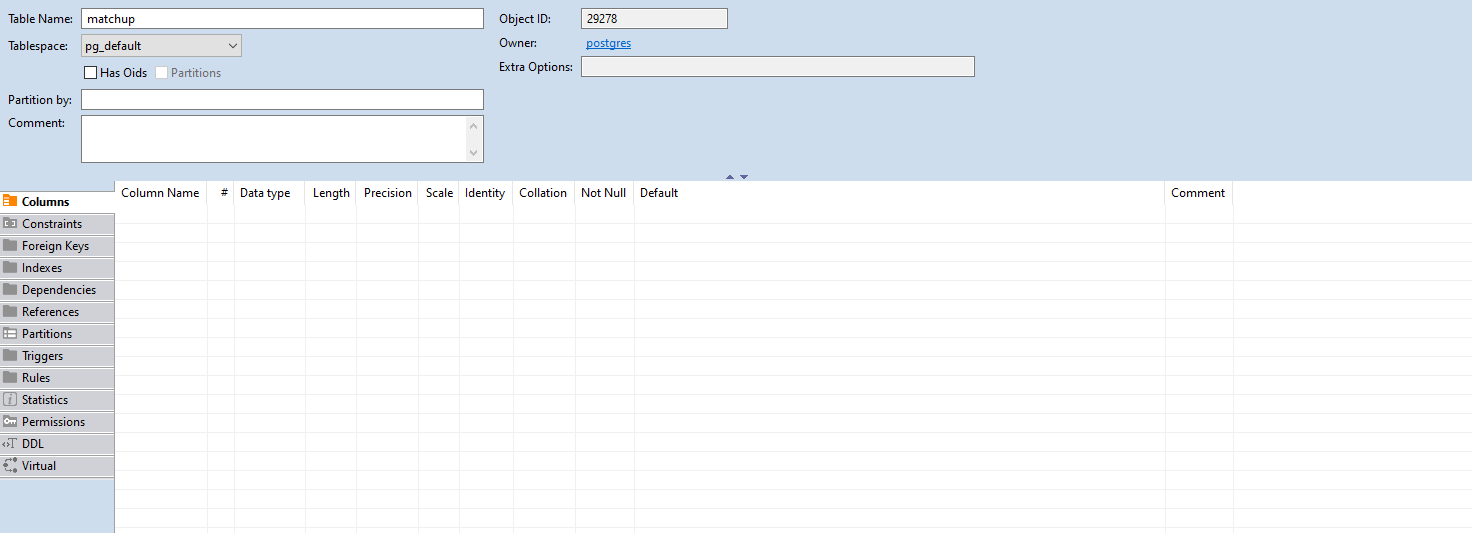
While there is data inside of this table, clicking on View Table tells me that the table has no columns. I cannot view the data through a select statement and then edit it.
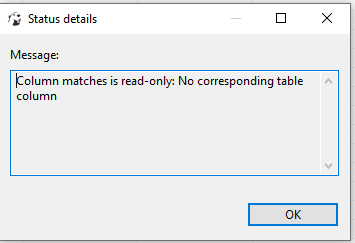
Tells me there is no corresponding table column.
EDIT:
I refreshed the database and then was able to edit the data inside of the table. Is there any indication to tell me that the database is out of sync with DBeaver?
 chasen-bettinger
on 15 Jun 2020
chasen-bettinger
on 15 Jun 2020
Please create a new ticket and write steps to reproduce.
kseniiaguzeeva
on 22 Jun 2020
I have the same issue with the latest version
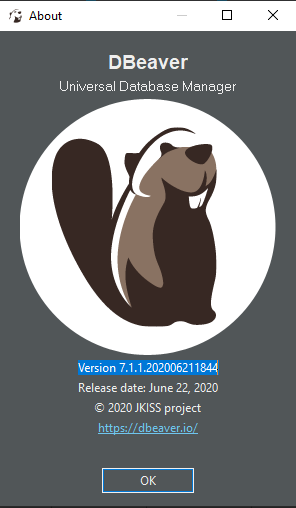

 Cesar10n
on 26 Jun 2020
Cesar10n
on 26 Jun 2020
Same here on an Oracle Database, using DBeaver IDE 7.1.1.202006211844 (Eclipse plugin):
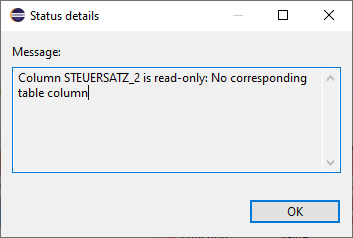
 michael-van-der-kamp
on 29 Jun 2020
michael-van-der-kamp
on 29 Jun 2020
@michael-van-der-kamp hotfix was published to solve this Oracle issue. Please try to dowload 7.1.1 again https://dbeaver.io/download/
@Cesar10n Please create new ticket and describe your situation. I can edit SQL Server tables in 7.1.1. Which schemas do you use?
kseniiaguzeeva
on 30 Jun 2020
@kseniiaguzeeva I downloaded the 7.1.1 again following your suggestion and I still have the issue.
I downloaded this and I got Version 7.1.1.202006211844, which is the same as @michael-van-der-kamp (even if mine is not the plugin). I'm with Oracle too.
Which version should have the fix?
I would like to add that I have the "No corresponding table column" from both a query in the SQL Editor and from the Table data itself.
@michael-van-der-kamp hotfix was published to solve this Oracle issue. Please try to dowload 7.1.1 again https://dbeaver.io/download/
@Cesar10n Please create new ticket and describe your situation. I can edit SQL Server tables in 7.1.1. Which schemas do you use?
 deepskyblue86
on 1 Jul 2020
deepskyblue86
on 1 Jul 2020
Same issue here, Version 7.1.1.202006211844, Oracle DB. Fully qualified name doesn't help.
 GTmAster
on 1 Jul 2020
GTmAster
on 1 Jul 2020
Same issue here, Version 7.1.1.202006211844, Oracle DB. Fully qualified name doesn't help.
@GTmAster I downgraded and that one works: https://dbeaver.io/files/7.1.0/
deepskyblue86
on 1 Jul 2020
Also had this problem but only on Oracle connections - downgraded to 7.1.0 as per @deepskyblue86 and it now works.
 paul-green
on 6 Jul 2020
paul-green
on 6 Jul 2020
Could you please try the latest 7.1.2? https://dbeaver.io/download/
kseniiaguzeeva
on 6 Jul 2020
Yes this now works as expected for me. Thanks @kseniiaguzeeva
paul-green
on 7 Jul 2020
@kseniiaguzeeva Works like a charm. Thanks!
GTmAster
on 7 Jul 2020
In version 7.1.2, the same error occurs in the Tibero connection using the jdbc driver.
When I type the user name in front of the table name, the result was inquired in a modifiable state.
In the previous version, just the table name was enough.
Which version should I downgrade to?
(cf. The running environment is MacOS Mojave (10.14.6).)

 aterilio
on 15 Jul 2020
aterilio
on 15 Jul 2020
Struggling with the same on 7.1.3 version.
 jazzfog
on 3 Aug 2020
jazzfog
on 3 Aug 2020
Struggling with the same on
7.1.3version.
yeah i think i got the same problem here, got this error after update
 cacing69
on 4 Aug 2020
cacing69
on 4 Aug 2020
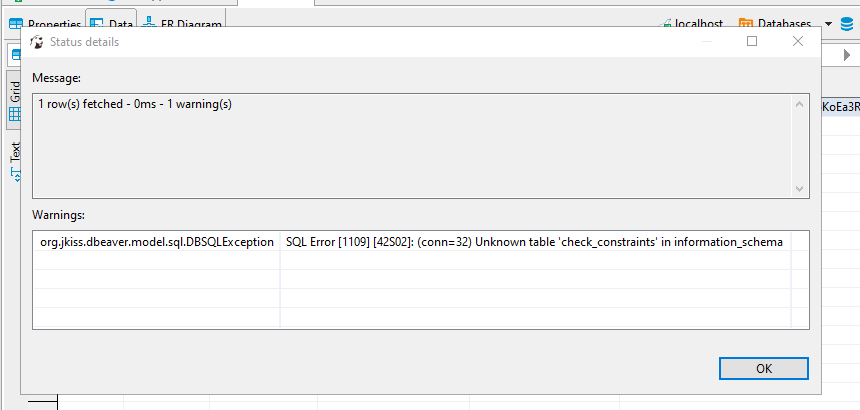
cacing69
on 4 Aug 2020
I was able to get that column updated after I switched to Properties tab and reloaded the data on it (the column I was trying to update was relatively new and it was not on the Properties tab back when it was initially opened (column was added by other means)).
jazzfog
on 4 Aug 2020
I was able to get that column updated after I switched to
Propertiestab and reloaded the data on it (the column I was trying to update was relatively new and it was not on the Properties tab back when it was initially opened (column was added by other means)).
This also removed the read-only state from my columns. Thanks.
 madmatt112
on 18 Aug 2020
madmatt112
on 18 Aug 2020
@jazzfog , @madmatt112 , @cacing69 please answer:
which database do you use?
Do you query for default/non default schema?
Could you please give a query example?
kseniiaguzeeva
on 18 Aug 2020
@jazzfog , @madmatt112 , @cacing69 please answer:
which database do you use?
Do you query for default/non default schema?
Could you please give a query example?
i used mariadb, forget about version, later i will tell u
used a default schema and not using query there @kseniiaguzeeva
cacing69
on 18 Aug 2020
I used either mariadb or MySQL, can't recall now.
I was not querying anything manually, it was the data view tab.
jazzfog
on 18 Aug 2020
Thank you for your help. Finally I could reproduce it (MariaDB and SQL Server were tested).
Steps:
- Open a table in Data Editor
- Open SQL Editor and create a column for this table
- Go back to the table Data Editor and refresh it
Actual result: new column appears in read-only mode.
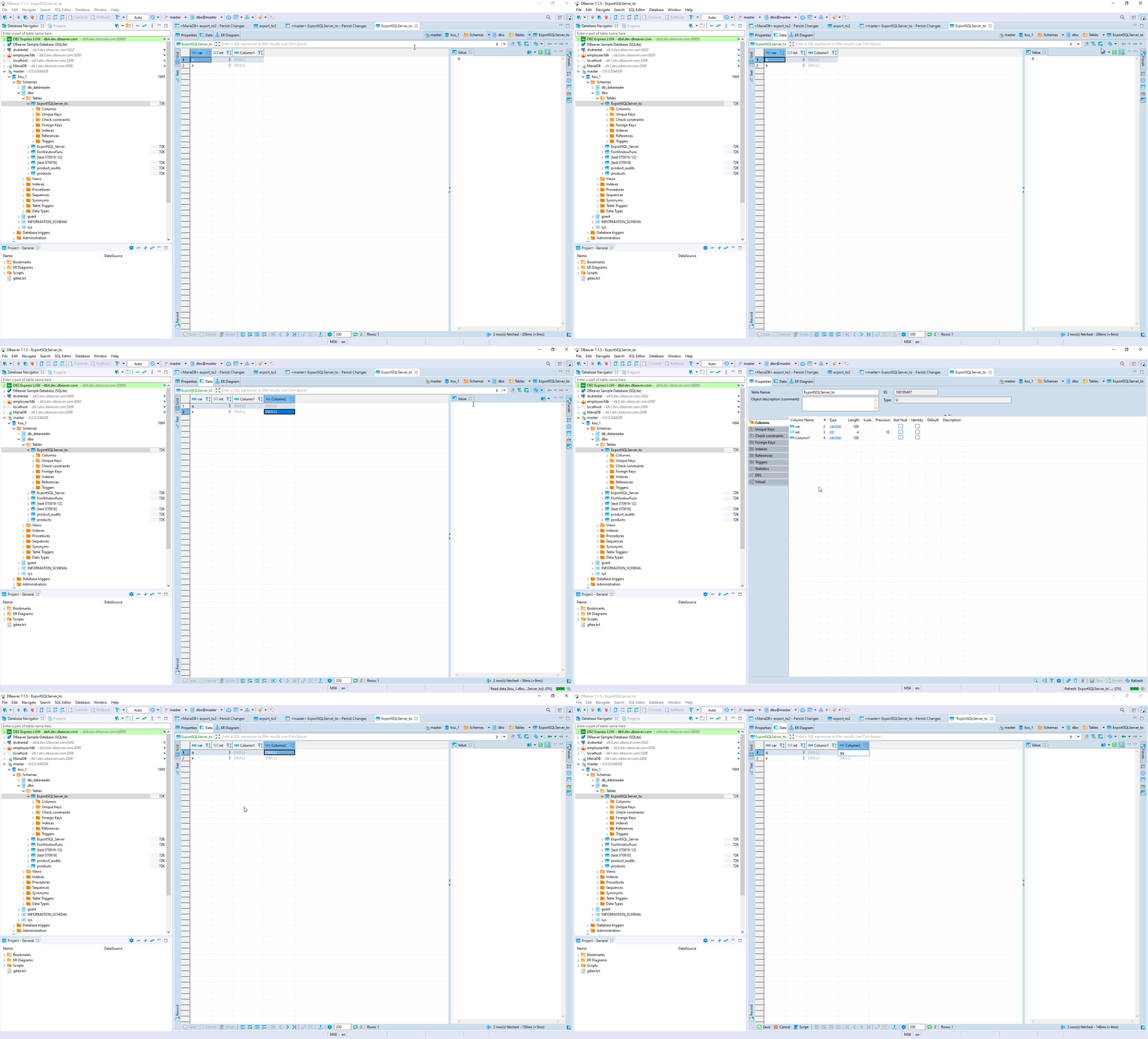
kseniiaguzeeva
on 18 Aug 2020
A little investigating was needed. This behaviour is "expected" for now. Such FR already exists https://github.com/dbeaver/dbeaver/issues/9283.
The ticket is closed as a duplicate.
P.S. If any other issues happen with turning on read-only mode, please create new tickets. This one already has many different cases.
Thank you!
kseniiaguzeeva
on 19 Aug 2020
windows dbeaver (free) 7.3.0 connect to remote sqlserver the same problem.
 yjd
on 3 Dec 2020
yjd
on 3 Dec 2020
windows dbeaver
DB sybase
Driver JTDS
same problem im downgrading... DBbearer 7.3 >6.3
 Qleoz12
on 7 Dec 2020
Qleoz12
on 7 Dec 2020
Related issues
 dmlogic
·
36Comments
dmlogic
·
36Comments
 RooyeKhat
·
32Comments
RooyeKhat
·
32Comments
 christophemacabiau
·
32Comments
christophemacabiau
·
32Comments
 BruceJL
·
29Comments
BruceJL
·
29Comments
 osrojas
·
29Comments
osrojas
·
29Comments
Most helpful comment
I'm going to stay with using version 6.3.0 until this is resolved. For me, any other feature improvements, aren't worth losing this feature.