Dataverse: Customization of home html pages and css
Hello. I want to have my custom home page and logo by adding a few changes to the current HTML pages. Can u direct me to the location of current HTML and CSS of dataverse?
 MohanaPriyaNarapareddy
All 29 comments
@MohanaPriyaNarapareddy hi! Do these links help?
- http://guides.dataverse.org/en/4.14/installation/config.html#custom-homepage
- http://guides.dataverse.org/en/4.14/installation/config.html#custom-navbar-logo
- http://guides.dataverse.org/en/4.14/installation/config.html#custom-stylesheet
Maybe I'm not sure what you're asking. 😄
 pdurbin
on 12 Jun 2019
pdurbin
on 12 Jun 2019
thanks for your reply. I also want the current styling sheets of the dataverse.
MohanaPriyaNarapareddy
on 12 Jun 2019
Sure, as mentioned at http://guides.dataverse.org/en/4.14/style/foundations.html the main file is structure.css and you can find the latest released version at https://github.com/IQSS/dataverse/blob/v4.14/src/main/webapp/resources/css/structure.css
pdurbin
on 12 Jun 2019
Thank you.
MohanaPriyaNarapareddy
on 12 Jun 2019
Thanks @pdurbin for responding and @MohanaPriyaNarapareddy for the questions. I'm going to close this one out as it looks like it's all set.
 djbrooke
on 12 Jun 2019
djbrooke
on 12 Jun 2019
@pdurbin I couldn't find the HTML and CSS sheets of the home page. The home page mentioned
here http://guides.dataverse.org/en/4.14/installation/config.html#custom-homepage seems to be different.
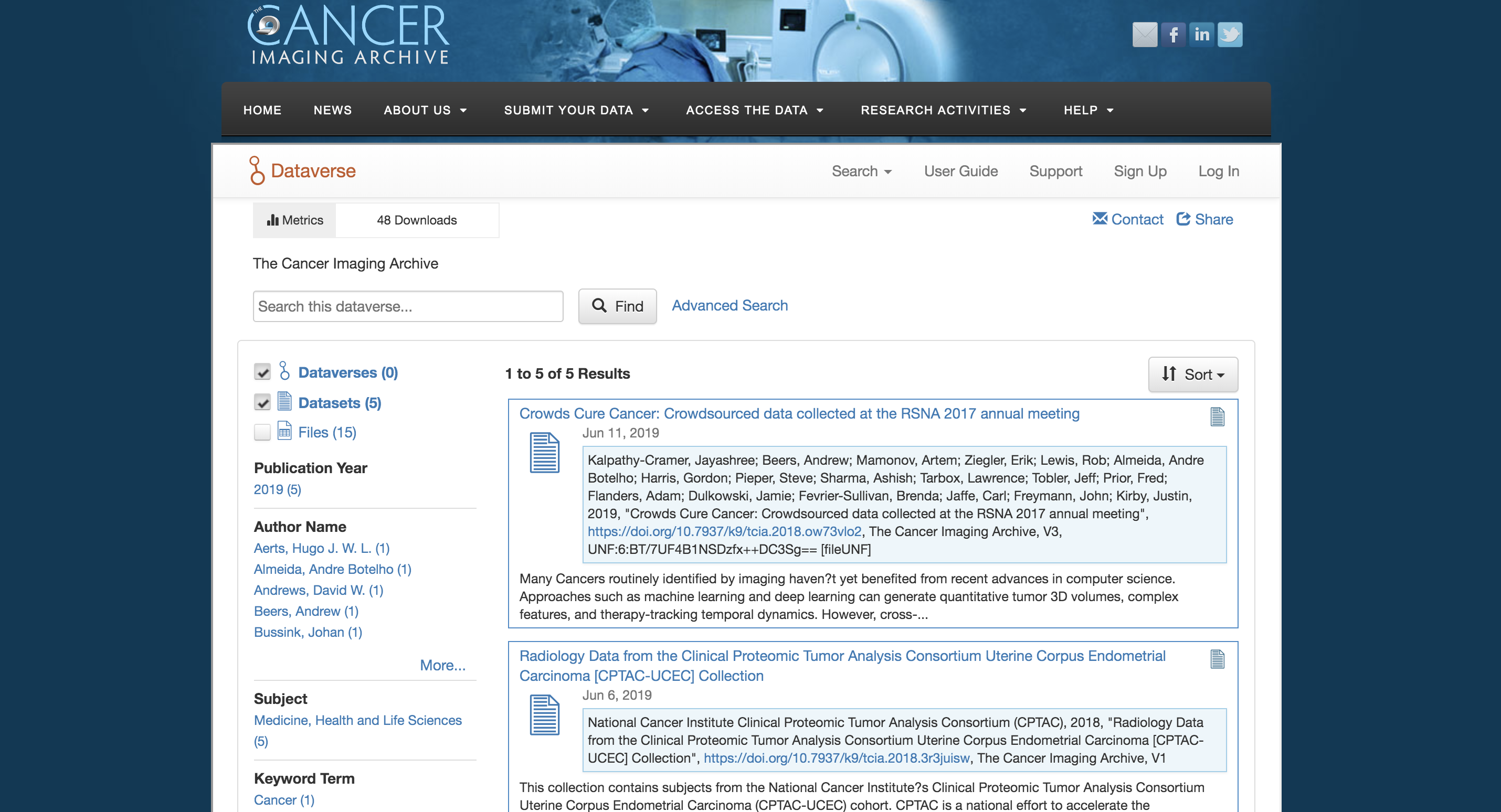
i am trying to create something like below.
MohanaPriyaNarapareddy
on 3 Jul 2019
@MohanaPriyaNarapareddy it looks like you're trying to add what we'd call a Custom Header. This is documented at http://guides.dataverse.org/en/4.14/installation/config.html#custom-header
Please let me know if this helps.
pdurbin
on 3 Jul 2019
i am not trying to add the header. I am trying to use the above dataverse home page in my custom template with the help of iframe. I am unable to locate the html and css pages of the current dataverse home page. can u direct me to the location?
MohanaPriyaNarapareddy
on 3 Jul 2019
@MohanaPriyaNarapareddy hmm. I'm confused about what you're trying to do. I would suggest emailing https://groups.google.com/forum/#!forum/dataverse-community with something like this:
"Subject: help with customization/branding
I'm looking for some help with customization/branding of my installation of Dataverse. Can you please look at https://github.com/IQSS/dataverse/issues/5939 for details?
Thanks"
@shlake recently did a lot of customization of https://dataverse.lib.virginia.edu which looks like this:
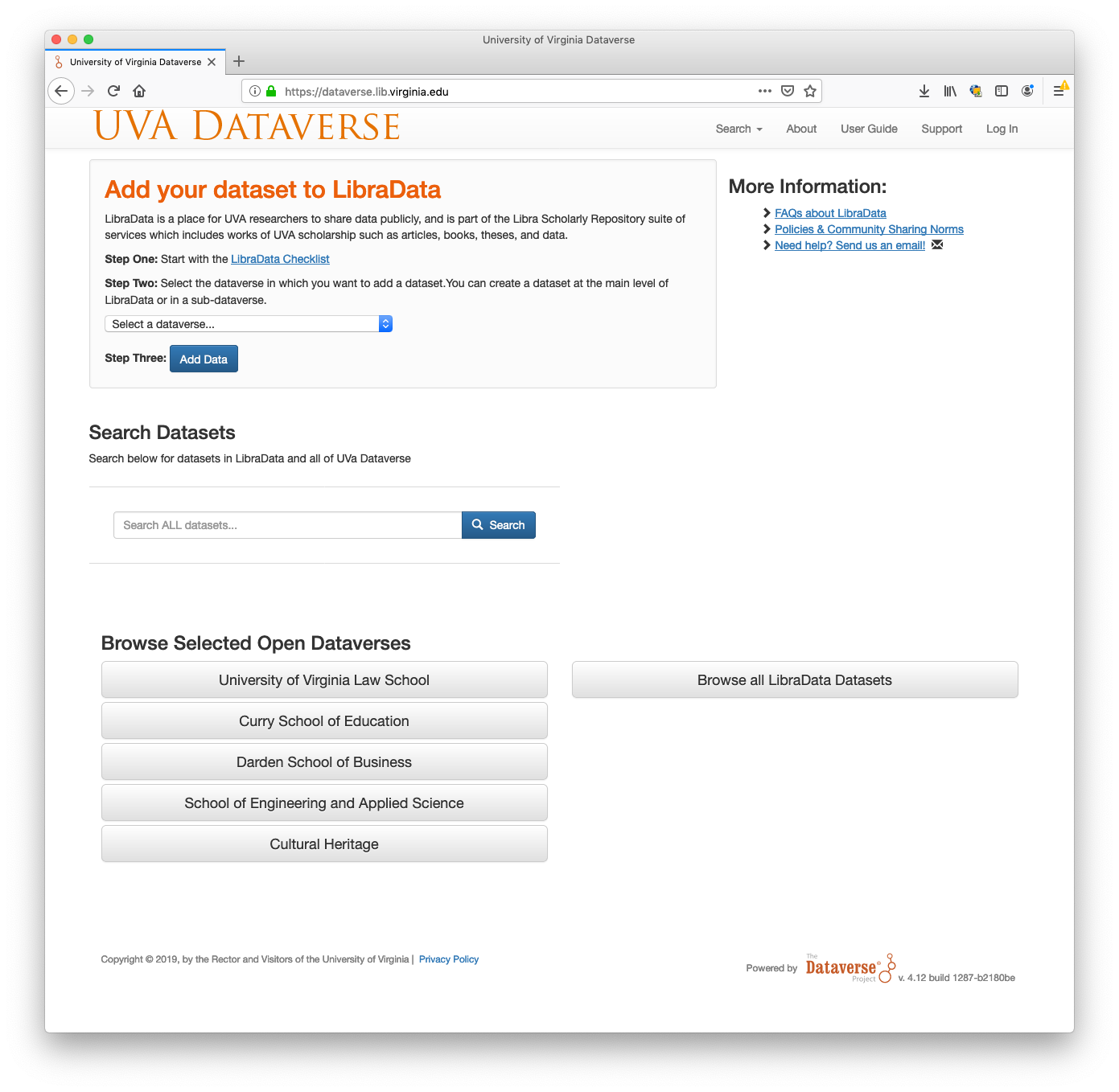
Others on that mailing list might be able to share their stories and code as well.
pdurbin
on 3 Jul 2019
Sure. will email them. I just need the styling sheets of the current dataverse home page.
Thank you.
MohanaPriyaNarapareddy
on 3 Jul 2019
Hi @MohanaPriyaNarapareddy, it sounds like you are trying to have a home page that displays all the datasets and dataverses, along with the filters on the left, as shown in the image you added earlier today. In the guides I think we call that the "root dataverse" page. We call a home page something that an installation has customized, and that appears before a root dataverse page, if there is one and a user navigates to the "top" page of your installation. If this is the case, you would not want to use a custom home page (custom-homepage.html).
 TaniaSchlatter
on 3 Jul 2019
TaniaSchlatter
on 3 Jul 2019
Hello Tania, Thanks for your response. Can u direct me to the styling sheets of the "root dataverse page"?
MohanaPriyaNarapareddy
on 3 Jul 2019
@MohanaPriyaNarapareddy hi! @TaniaSchlatter just stopped by my desk and we think you'd like to apply custom CSS to your Dataverse. Here's an example of custom CSS at https://edatos.consorciomadrono.es

Is this the sort of customization you're interested in? If so @juancorr can probably direct you to the custom CSS they are using.
pdurbin
on 3 Jul 2019
yes, can u direct me to the html and css sheet of the root dataverse page?
MohanaPriyaNarapareddy
on 3 Jul 2019
yes, can u direct me to the html and css sheet of the root dataverse page?
I believe it's all in here: https://github.com/IQSS/dataverse/blob/v4.15/src/main/webapp/resources/css/structure.css
pdurbin
on 3 Jul 2019
Have gone through this earlier. couldn't find the html of the root dataverse page
MohanaPriyaNarapareddy
on 3 Jul 2019
@MohanaPriyaNarapareddy here is the HTML for the dataset cards on the root dataverse page, for example:
https://github.com/IQSS/dataverse/blob/v4.15/src/main/webapp/search-include-fragment.xhtml#L498
pdurbin
on 3 Jul 2019
Hello @MohanaPriyaNarapareddy,
In e-cienciaDatos, we have done some changes in dataverse.xhtml (main home page) y dataverse_header.xhml . You can see the source code in https://github.com/Consorcio-Madrono/dataverse/tree/v4.11eDatos/src/main/webapp . You can compare our code with the original v4.11 dataverse code.
We have customized css, footer and header too:
https://github.com/Consorcio-Madrono/dataverse/blob/v4.11eDatos/src/main/webapp/resources/css/custom-stylesheet.css
https://github.com/Consorcio-Madrono/dataverse/blob/v4.11eDatos/src/main/webapp/resources/html/custom-footer.html
https://github.com/Consorcio-Madrono/dataverse/blob/v4.11eDatos/src/main/webapp/resources/html/custom-header.html
I hope it helps.
 juancorr
on 4 Jul 2019
juancorr
on 4 Jul 2019
@juancorr thanks! I didn't know your custom CSS file is on GitHub!
pdurbin
on 8 Jul 2019
I am trying to disable the display of the root dataverse theme, so that I can remove the dataverse logo and navigation bar, which helps my customization.
http://guides.dataverse.org/en/latest/installation/config.html#custom-header
I tried the following as mentioned above in the documentation.
curl -X PUT -d 'true' http://localhost:8080/api/admin/settings/:DisableRootDataverseTheme
But, I am getting the following error.
{ status:"error", message:"Endpoint available from localhost only. Please contact the dataverse administrator"}
MohanaPriyaNarapareddy
on 12 Jul 2019
@MohanaPriyaNarapareddy are you running that exact curl command with "localhost:8080" in it? The error you see is expected if you put the name of your server in the curl command instead. You have to ssh into your server first and then run the localhost version.
pdurbin
on 12 Jul 2019
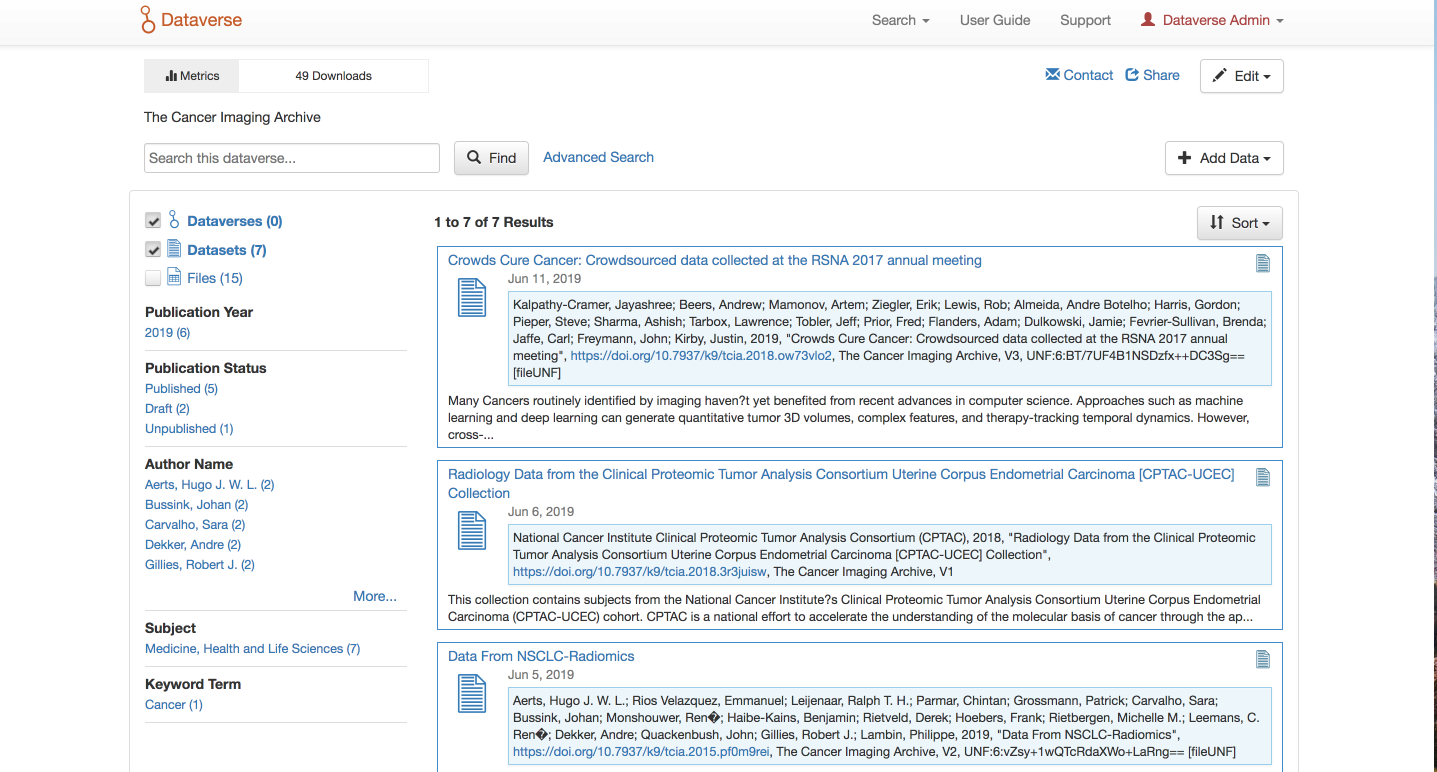
Thanks for the reply. The above issue has been resolved. I am trying to remove the dataverse logo in the below display as a part of my customization.
Can u please suggest me the appropriate way to do that?
MohanaPriyaNarapareddy
on 15 Jul 2019
@MohanaPriyaNarapareddy in a comment from @pdurbin above, he included links to the Installation Guide which cover this feature. Specifically the Custom Navbar Logo section will outline the steps to replace that navbar logo with your own custom logo image.
http://guides.dataverse.org/en/4.14/installation/config.html#custom-navbar-logo
Good luck!
 mheppler
on 15 Jul 2019
mheppler
on 15 Jul 2019
Hi @MohanaPriyaNarapareddy - I'm going to close this out. Please let us know when your dataverse installation is ready to be put on the map at dataverse.org! Thank you!
djbrooke
on 18 Jul 2019
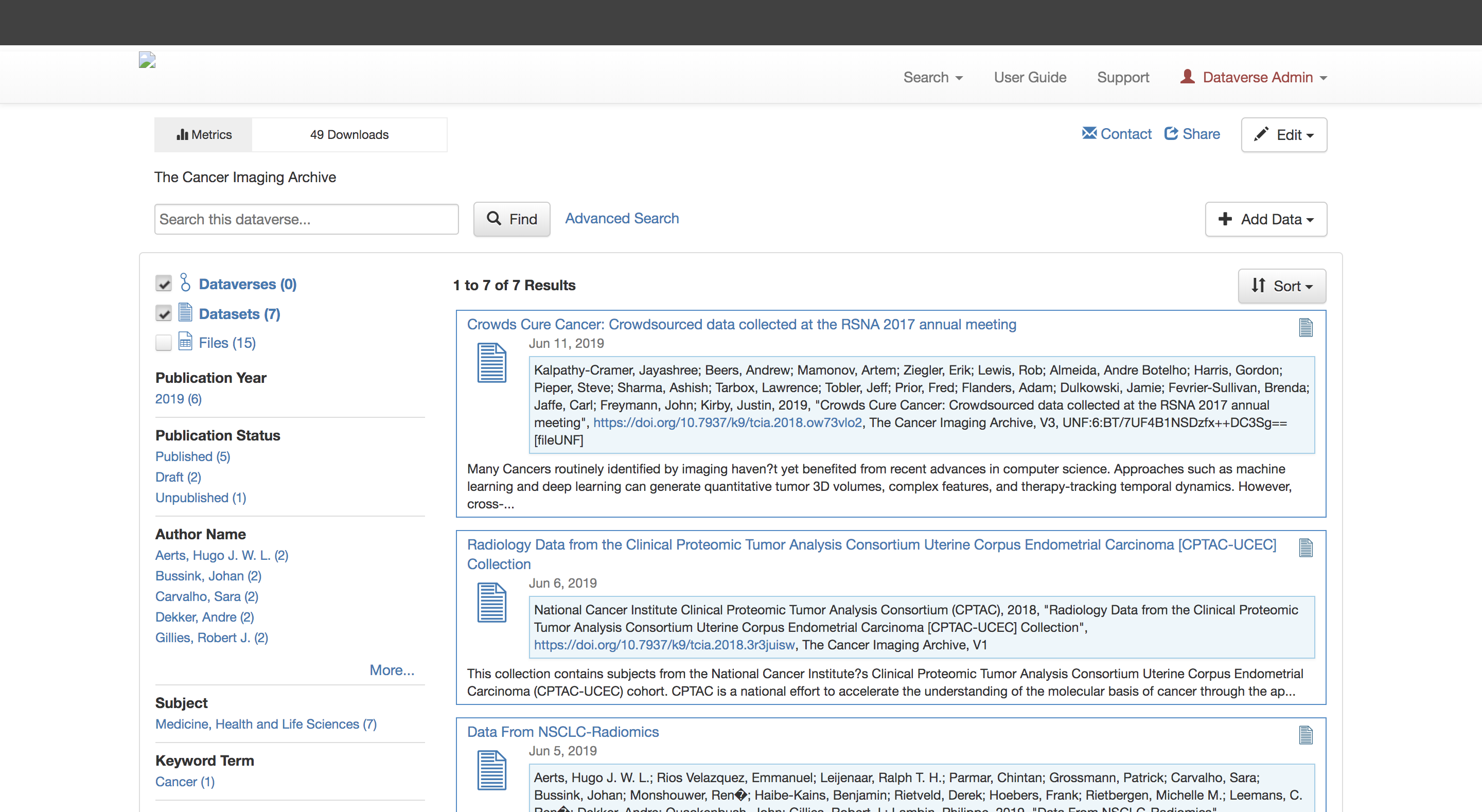
@pdurbin @mheppler I am trying to remove the header navigation bar. I tried to replace it with my custom header. But I could remove it. I tried disabling the theme of the root dataverse. Still, it doesn't seem to work.
MohanaPriyaNarapareddy
on 30 Jul 2019
@MohanaPriyaNarapareddy sorry, but there is no way to configure Dataverse and remove the navbar from the UI.
mheppler
on 30 Jul 2019
@MohanaPriyaNarapareddy if you remove the header navigation bar, your users won't be able to click "Log In".
pdurbin
on 6 Aug 2019
@pdurbin Hi, I have a question about that, its possible to customize each dataverse with different css styles?
 hblancoca
on 18 Dec 2019
hblancoca
on 18 Dec 2019
@hblancoca at the installation level you can have a custom CSS styles: http://guides.dataverse.org/en/4.18.1/installation/config.html#custom-stylesheet
I think you asking about dataverses within a Dataverse installation, however. No custom CSS files are not supported. Please see also this issue:
- Footer image and CSS customization for Sub-Dataverse #6156
pdurbin
on 18 Dec 2019
Related issues
 aculich
·
57Comments
pdurbin
·
86Comments
aculich
·
57Comments
pdurbin
·
86Comments
 scolapasta
·
49Comments
scolapasta
·
49Comments
 jggautier
·
80Comments
jggautier
·
80Comments
 bmckinney
·
75Comments
bmckinney
·
75Comments
Most helpful comment
Hello @MohanaPriyaNarapareddy,
In e-cienciaDatos, we have done some changes in dataverse.xhtml (main home page) y dataverse_header.xhml . You can see the source code in https://github.com/Consorcio-Madrono/dataverse/tree/v4.11eDatos/src/main/webapp . You can compare our code with the original v4.11 dataverse code.
We have customized css, footer and header too:
https://github.com/Consorcio-Madrono/dataverse/blob/v4.11eDatos/src/main/webapp/resources/css/custom-stylesheet.css
https://github.com/Consorcio-Madrono/dataverse/blob/v4.11eDatos/src/main/webapp/resources/html/custom-footer.html
https://github.com/Consorcio-Madrono/dataverse/blob/v4.11eDatos/src/main/webapp/resources/html/custom-header.html
I hope it helps.