Dash-to-panel: multi-monitor resutls in being highlighted wrongly for applications with icons on both windows
monitor with it actually open:
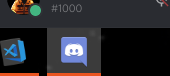
monitor with it as a favorite:

 MicleBrick
All 6 comments
Even worse if it's open on both monitor
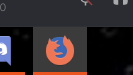
Monitor with focused window:

Monitor with minimized window:
MicleBrick
on 14 Nov 2018
I think you activated the option "Isolate monitors" in multi monitor options.
Navigate to Dash to Panel settings -> Position tab -> Click on the gear near "Display panel on all monitor" and uncheck "Isolate monitors".
 fchiacchiaretta
on 15 Nov 2018
fchiacchiaretta
on 15 Nov 2018
But I want isolate monitors on, so only the apps on each monitor show. However I might have two instances of the same app open, one on each monitor
MicleBrick
on 15 Nov 2018
It seems only the running indicator is isolated on each monitor now. The focus highlight should probably also be isolated.
 jderose9
on 16 Nov 2018
jderose9
on 16 Nov 2018
Hey guys, a fix for this was added to master. Thanks!
 charlesg99
on 16 Nov 2018
charlesg99
on 16 Nov 2018
https://github.com/home-sweet-gnome/dash-to-panel/commit/d0a519983ba77d5287c0afc916d9e02c17dc3c4a seems to have fixed it. Thanks!
MicleBrick
on 16 Nov 2018
Related issues
 Rawleenc
·
6Comments
Rawleenc
·
6Comments
 LeeGDavis
·
6Comments
LeeGDavis
·
6Comments
 BetaConnector
·
5Comments
BetaConnector
·
5Comments
 amivaleo
·
5Comments
amivaleo
·
5Comments
 bmccorm2
·
5Comments
bmccorm2
·
5Comments
Most helpful comment
Hey guys, a fix for this was added to master. Thanks!