Dash-to-panel: Where are the rounded corners?
Hi!
I'm using the latest available version of this extension on the gnome extension website, on gnome-shell 3.36.2.
Am I lost in the settings or the rounded corners can't be shown if this extension is used?
 amivaleo
All 5 comments
Hello amivaleo, thank you for the report! This is unintended, I always forget those corners when testing :facepalm: (I'm using the arc-dark theme, which has no corners). This is now fixed on the master branch, could you please install it and confirm that the corners are there? Thanks!
 charlesg99
on 3 May 2020
charlesg99
on 3 May 2020
Now they are back.
But another thing needs some fixing (sorry 😄️):
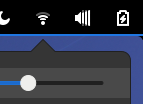
When Actvities or the the system-menu buttons are clicked, the blu underline follows the curvature of the corners.
I know this is just a very tiny thing. Can you fix it if it doesn't require too much effort?
amivaleo
on 3 May 2020
Ha yes I remembered why we removed it initially, it is causing graphical glitches unless the system menu is at the far right or the panel (stock gnome-shell). I added it back on the master branch so it should now work in that situation only (like in your screenshot). Could you please pull/install again? Thanks!
charlesg99
on 4 May 2020
Now it works fine in my specific case. I see it wouldn't for those users who put the clock at the end of the panel: in that case, the blu underline below the clock doesn't follow the curvature. 😄
I truly understand why you chose to get rid of this. :)
amivaleo
on 4 May 2020
Thanks for the feedback, yeah the following is what happens with the date menu on the right:
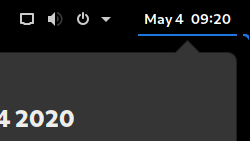
Or with the "Show desktop" button:
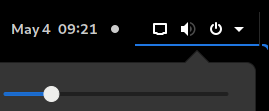
This is mostly a reminder for myself of why I removed it for elements other than the system menu :)
charlesg99
on 4 May 2020
Related issues
 MicleBrick
·
6Comments
MicleBrick
·
6Comments
 Steps65
·
5Comments
Steps65
·
5Comments
 alex285
·
6Comments
alex285
·
6Comments
 Pointedstick
·
6Comments
Pointedstick
·
6Comments
 sbadux
·
6Comments
sbadux
·
6Comments