Dash-to-dock: Dash to dock shows on lockscreen
The dash to dock isnt disabled when the screen is locked. All the icons are clickable on lockscreen. Gnome 3.26.2
Ubuntu 17.10
 shrihari007
All 43 comments
This effect appears after the first locking (the first attempt goes without any issues), and after the first locking there is an additional dock on the left side, see screenshots:

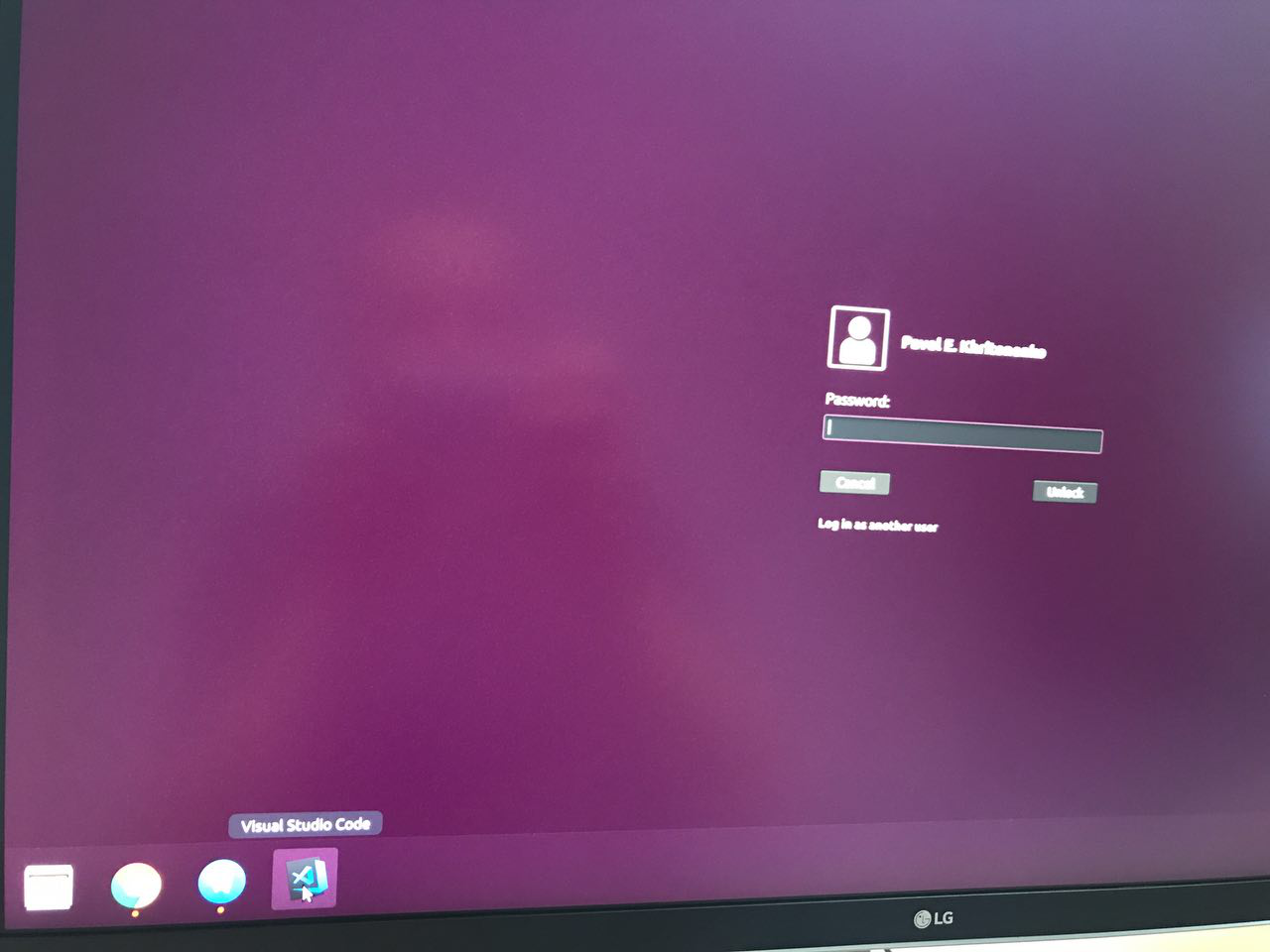
Single monitor configuration
$ gnome-shell --version
GNOME Shell 3.26.1

$ lsb_release -a
No LSB modules are available.
Distributor ID: Ubuntu
Description:    Ubuntu 17.10
Release:    17.10
Codename:   artful

$ dconf dump /org/gnome/shell/extensions/dash-to-dock/
[/]
dock-fixed=false
force-straight-corner=false
custom-background-color=false
unity-backlit-items=false
dock-position='BOTTOM'
custom-theme-shrink=false
height-fraction=0.90000000000000002
opaque-background=false
 pavel-khritonenko
on 1 Dec 2017
pavel-khritonenko
on 1 Dec 2017
Ok, resolved the issue by removing default [email protected]:
$ sudo mv /usr/share/gnome-shell/extensions/[email protected] ~/
this fixed it for me
 kwalker99
on 4 Mar 2018
kwalker99
on 4 Mar 2018
Thank you very much for your input pavelhritonenko !
 yushin59
on 8 Mar 2018
yushin59
on 8 Mar 2018
Same issue, same solution
 dylanmtaylor
on 6 Apr 2018
dylanmtaylor
on 6 Apr 2018
very good. solved
 berkson
on 17 Apr 2018
berkson
on 17 Apr 2018
I think this issue is back in Ubuntu 18.04 GNOME 3.28.1
 izhakjakov
on 8 May 2018
izhakjakov
on 8 May 2018
I'm using gnome-software 3.28.1, GNOME Shell 3.28.1, Ubuntu 18.04 LTS \n \l
and everything works fine after using the command.
berkson
on 8 May 2018
The comment I posted 3 days ago is not longer valid I reinstall the gnome-session and everything is working as it should now.
izhakjakov
on 11 May 2018
Is there a reason for moving it to the home directory? Or did you actually want to type rm instead of mv?
 yoshegg
on 26 May 2018
yoshegg
on 26 May 2018
To prevent losing the original file, obviously. You can just remove that extension using rm
pavel-khritonenko
on 26 May 2018
Should this really be a closed issue? It is a problem for all default installs of Ubuntu 18.04
 rathboma
on 13 Jun 2018
rathboma
on 13 Jun 2018
@rathboma Working for me, but I agree that default state of this is bad. Is possible fix that during install?
 landsman
on 14 Jun 2018
landsman
on 14 Jun 2018
Same error here, for me, unfortunately the mv dint help.
 kaiqueAMoraes
on 4 Aug 2018
kaiqueAMoraes
on 4 Aug 2018
Thanks, @pavel-khritonenko after executing your move command and reboot I see everything is fine Thanks man :+1:
I am using Ubuntu 18.04.1 LTS
 rakibhasansabbir
on 5 Aug 2018
rakibhasansabbir
on 5 Aug 2018
Worked for me Ubuntu 18.04 LTS.
Can someone explain the solution?
 Yazan111
on 9 Aug 2018
Yazan111
on 9 Aug 2018
Most probably because the ubuntu-dock is a system extension while your dash-to-dock is a local one (/usr/share/gnome-shell/extensions as opposed to /home/$USER/.local/share/gnome-shell/extensions)
This means you can't possibly disable it with gnome-tweaks, so as soon as you lock your session these seem to come in conflict.
IMHO you're better off with doing a slightly modified version (in order to keep ubuntu-dock):
sudo mv /usr/share/gnome-shell/extensions/[email protected] ~/.local/share/gnome-shell/extensions
sudo chown -R $USER:$USER ~/.local/share/gnome-shell/extensions/[email protected]
Once there disabling the ubuntu-dock via gnome-tweaks might work without displaying a warning sign.
Edit - The ubuntu-dock extension does not appear in gnome-tweaks, so at least you've saved it where it shall end up... I guess
 Sarki
on 17 Aug 2018
Sarki
on 17 Aug 2018
@pavel-khritonenko Thank you, i'm using Ubuntu 18.04.1 LTS and everything works fine after using the command and second step is reboot my ubuntu.
 aacassandra
on 1 Sep 2018
aacassandra
on 1 Sep 2018
On a system upgrade the ubuntu-dock reappears. Ubuntu have messed up big time here. Anyway an Ubuntu developer can actually look at fixing this?
 nsrosenqvist
on 9 Sep 2018
nsrosenqvist
on 9 Sep 2018
Uninstalling the ubuntu-dock extension with sudo apt-get remove gnome-shell-extension-ubuntu-dock also appears to fix this.
 nimne
on 25 Sep 2018
nimne
on 25 Sep 2018
@didrocks maintains the Ubuntu branch of Dash to Dock.
Please can everyone affected by this issue with the Ubuntu dock mark themselves as affected on the Ubuntu bug? Just press the button when you're on that link (you may have to log into Launchpad).

Also, this is my journalctl -f output when I lock the screen and reproduce this bug on Ubuntu 18.10.
Also note that this Issue may be a duplicate of #641
 Ads20000
on 4 Nov 2018
Ads20000
on 4 Nov 2018
Thank you so much. It works fine
 joyal618
on 11 Nov 2018
joyal618
on 11 Nov 2018
I've also notice that active apps aren't showing in the dock. This extension package has some weird habits. The workaround solution propose by @pavel-khritonenko seem to fix everything. Is their any way to propose a permanent fix for future fresh install? Thanks for the solution! :+1:
 dbrsseau
on 25 Nov 2018
dbrsseau
on 25 Nov 2018
@dbrsseau The dash to dock showing on the lockscreen issue is a bug, the active apps not showing is another bug, please run ubuntu-bug gnome-shell-extension-ubuntu-dock to report it and wait for it to be fixed. We just have to wait for the Ubuntu developers to get round to fixing the issues, unless you are able to code and fix the issue yourself. Once they have the time, if they have the time, it will be resolved for future fresh installs.
I've realized, though, that when I install Dash to Dock from GNOME Extensions and mess with the settings that then messes with (hidden) Ubuntu Dock settings, effectively, and causes a broken experience. Basically, if you're planning to revert to the default Ubuntu Dock at some point, _do not install Dash to Dock_. I don't think it's right to expect Ubuntu Dock to behave correctly in my use-case, by installing Extensions you're accepting some instability to GNOME and deviation from how the developers intended the shell to run.
Ads20000
on 26 Nov 2018
Ok, resolved the issue by removing default
[email protected]:$ sudo mv /usr/share/gnome-shell/extensions/[email protected] ~/
that's true but
but another way, we can download dash to dock from extention.ubuntu.com
and customize it,
sincerely yours
 farhadazimi
on 21 Jan 2019
farhadazimi
on 21 Jan 2019
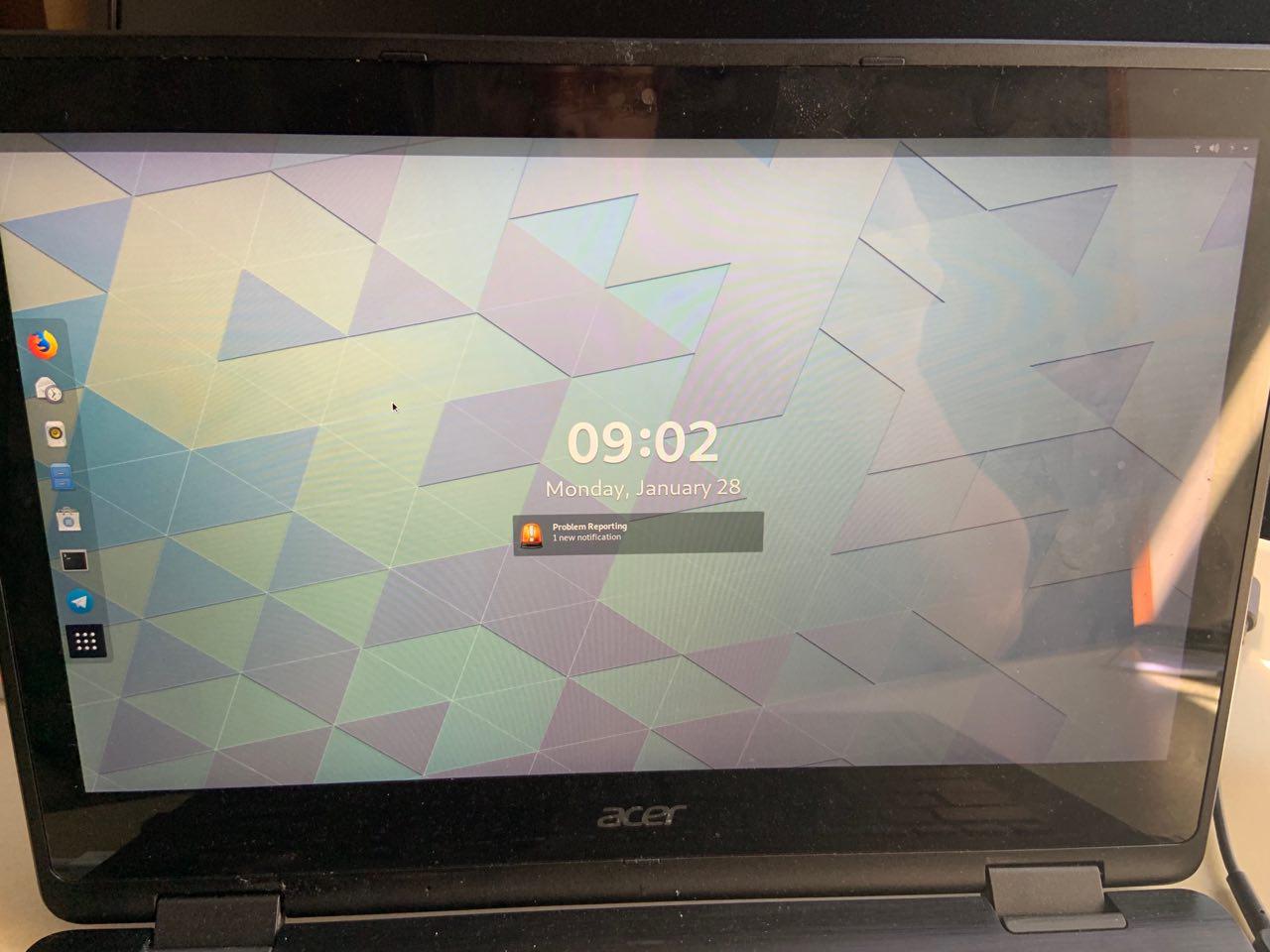
For the first time ever I have encountered this problem in Fedora 29. The dock was showing on the lockscreen like it did on my old Ubuntu install and it made parts of the shell blurry.
My attempts at taking a screenshot failed so here is a photo. I installed Dash to Dock from the Software Centre less than 24 hours ago.
 lsansco
on 28 Jan 2019
lsansco
on 28 Jan 2019
@lsansco this should be solved when @micheleg publishes a new build.
 pwd-github
on 28 Jan 2019
pwd-github
on 28 Jan 2019
Ubuntu Dock has fixed it, but it happens in Manjaro now.
 laichiaheng
on 12 Feb 2019
laichiaheng
on 12 Feb 2019
@laichiaheng Yeah, it's still waiting on @micheleg to release a new build as to fundamentally fix the problems. Ubuntu have contributed a few pertinent performance improvements.
pwd-github
on 12 Feb 2019
I have just submitted an updated version to the extensions website. It will be available following the review process (https://extensions.gnome.org/review/). It might take a while as there is a long queue.
 micheleg
on 12 Feb 2019
micheleg
on 12 Feb 2019
Oh My God! It is still at the bottom of the list
laichiaheng
on 23 Feb 2019
@micheleg When will they review it? It has been a long while.
laichiaheng
on 27 Feb 2019
@laichiaheng I tried asking in the gnome-shell IRC what we, as ordinary users, could do to help work on that review queue, but I got no responses in the first few hours of asking that question then I logged out of IRC (GNOME's IRC is unlogged (unlike, e.g., Ubuntu's) so communication there is very difficult in my opinion). I don't think they'd appreciate an 'ETA' question because presumably it's volunteers working through that queue, so the answer will be indefinite/never unless someone steps in to help speed it up. You could try asking the question also on the GNOME Reddit (as the devs do look at that, so until the Discourse is made (please +1 (hit the thumbs up button) for that one!!), that's the way to go for a forum equivalent to, e.g., the Ubuntu Community Hub). Alternatively file an Issue here!
Ads20000
on 27 Feb 2019
Distributor ID: Ubuntu
Description: Ubuntu 18.04.2 LTS
Release: 18.04
Codename: bionic
gnome-shell --version
GNOME Shell 3.28.3
gnome-core 1:3.22+9 amd64 GNOME Desktop Environment -- essential components
ii gnome-desktop3-data 3.28.2-0ubuntu1.2 all
I remove gnome-shell-extension-ubuntu-dock and gnome-shell-extension-dashtodock
I install latest ver "Dash to Dock" for my gnome-shell
Problem exists. The dock was showing on the lockscreen .....
Any real sollutions or alternative ?
 natan64
on 19 Mar 2019
natan64
on 19 Mar 2019
FYI you may not need to reboot your system after moving the ubuntu-dock dir. After moving it to a location in my home dir, I just restarted Gnome Shell with Alt + F2 and then the command: r, and the problem went away (repeated screen locks no longer display the dock).
 stratigos
on 21 Mar 2019
stratigos
on 21 Mar 2019
@dbrsseau The dash to dock showing on the lockscreen issue is a bug, the active apps not showing is another bug, please run
ubuntu-bug gnome-shell-extension-ubuntu-dockto report it and wait for it to be fixed. We just have to wait for the Ubuntu developers to get round to fixing the issues, unless you are able to code and fix the issue yourself. Once they have the time, if they have the time, it will be resolved for future fresh installs.
Sorry for late respond, but it seem to me to be related somehow but anyway, I'm not into reporting bug since I've stopped using gnome and it dock. I've use the quick fix proposed by @pavel-khritonenko and it was suffisant for me back then! Thanks again!
dbrsseau
on 4 Apr 2019
explain
yes he just removed the original system dock ( actually move because he want to backup the file )
 ywang146
on 15 Apr 2019
ywang146
on 15 Apr 2019
Reported AND closed in 2017, but its still a problem...
 EJTH
on 19 Sep 2019
EJTH
on 19 Sep 2019
This problem still exists
Distributor ID: Ubuntu
Description: Ubuntu 20.04 LTS
Release: 20.04
Codename: focal
GNOME Shell 3.36.1
 mantlecurve
on 21 Apr 2020
mantlecurve
on 21 Apr 2020
If anyone still has the problem on Ubuntu using Ubuntu's default dock, please run ubuntu-bug gnome-shell-extension-ubuntu-dock so that Ubuntu developers can fix the bug, thanks! :)
Ads20000
on 22 Apr 2020
Ok, resolved the issue by removing default
[email protected]:$ sudo mv /usr/share/gnome-shell/extensions/[email protected] ~/
Thank you! This fixed for me
 rogerpolvr
on 14 Jul 2020
rogerpolvr
on 14 Jul 2020
Ok, resolved the issue by removing default
[email protected]:$ sudo mv /usr/share/gnome-shell/extensions/[email protected] ~/
Thank You. This fixed the issue for me.
 bobeymcool
on 19 Aug 2020
bobeymcool
on 19 Aug 2020
I had the same issues (dock on lock screen and overlapping dock on the home screen).
- I removed
dash-to-dockextension and then disable ubuntu-dock from extensions as well as from gnome-tweaks (you can usesuperkey to switch between applications after removing dock). - Then install
dash-to-dockagain and select proper version of gnome-shell while installing dash-to-dock (you can rungnome-shell --versionto check version of your gnome-shell).
This process resolved above issues for me.
 menobleknight
on 7 Jan 2021
menobleknight
on 7 Jan 2021
Related issues
 omi10859
·
3Comments
omi10859
·
3Comments
 bheerssen
·
6Comments
bheerssen
·
6Comments
 Feichtmeier
·
4Comments
Feichtmeier
·
4Comments
 killown
·
3Comments
killown
·
3Comments
 ynx1800
·
6Comments
ynx1800
·
6Comments
Most helpful comment
Ok, resolved the issue by removing default
[email protected]: