Dash-to-dock: When you gonna fix this issue?
Why there are two docks.

😠😠😠😠😠😠😠😠😠😠😠😠😠😠
 ynx1800
All 6 comments
Restart GNOME Shell using Alt+F2, input r and press Enter.
 lepa22
on 14 Aug 2020
lepa22
on 14 Aug 2020
👍3
Why there are two docks.
because you did not disable the ubuntu one. its your own fault. :clinking_glasses:
gnome-extensions disable [email protected]
 paroj
on 15 Aug 2020
paroj
on 15 Aug 2020
It's already disabled, However Restarting the Gnome shell, works temporarily, but its going back to again double dock after some time.

ynx1800
on 16 Aug 2020
maybe this only works on Ubuntu 20.04. Anyway this is a duplicate of #649
paroj
on 16 Aug 2020
yes, i had that as well in 20.04, do this part as well and it will go away
gnome-extensions disable [email protected]
sudo apt remove gnome-shell-extension-ubuntu-dock
 NESC1US
on 23 Oct 2020
NESC1US
on 23 Oct 2020
It's not working for me, i tried in both 18.04 and 20.04 after I'm restarting the computer this things is still getting the same issue.
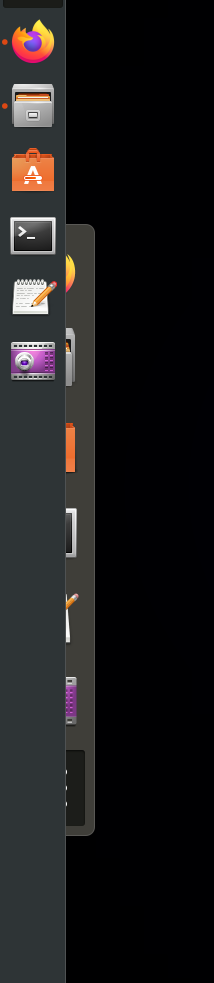
so every time Alt + F2 and then restart the shell by typing r or restart
ynx1800
on 23 Oct 2020
Was this page helpful?
0 / 5 - 0 ratings
Related issues
 pradhanharshil
·
7Comments
pradhanharshil
·
7Comments
 guenter-r
·
6Comments
guenter-r
·
6Comments
 k0rbendallas
·
7Comments
k0rbendallas
·
7Comments
 DmitryAstafyev
·
6Comments
DmitryAstafyev
·
6Comments
 killown
·
3Comments
killown
·
3Comments
Most helpful comment
Restart GNOME Shell using Alt+F2, input
rand press Enter.