Dash-to-dock: When locking Ubuntu ( Win + L ), wait till screen is suspended, the Dock will show up twice on the screen
After I had locked ubuntu and waited till the screen is dark, I woke the laptop again to enter my login credentials.
At this point already, there is a dock shown on the lockscreen.
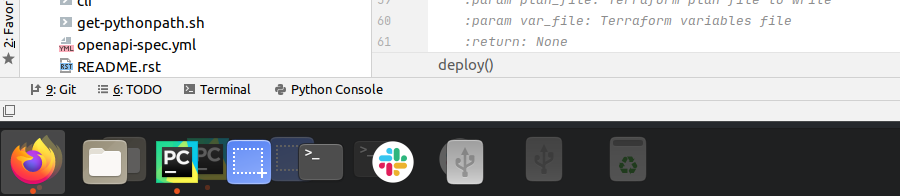
When logged back in there are pretty much two docks on the screen:

 guenter-r
All 6 comments
This is also happening for me on Ubuntu 20.04. I am using gdm3 with Wayland enabled. If I can provide further details that may be useful then please request these details in a follow-up comment on this issue.
Finally, a big THANKS to the authors/contributors of this extension, it really makes a difference in my desktop experience, I really appreciate your efforts!
 monocongo
on 27 Jul 2020
monocongo
on 27 Jul 2020
I seem to have partially resolved this issue by installing the Extensions app and then disabling Ubuntu Dock. Apparently you get bad juju if you run Ubuntu Dock and Dash to Dock simultaneously. After disabling Ubuntu Dock now when I lock the screen I still see the icons along the bottom but when I unlock the screen I no longer see the duplicated icons in the dock. So the main issue has been resolved, or it appears to have been. If things improve even further (or devolve) after a reboot I will update this issue accordingly.
This helpful page walked me through the process.
TL;DR:
$ sudo apt install gnome-shell-extensions
$ sudo gnome-extensions disable [email protected]
Thanks @monocongo, this works for me. When locking the first time its all fine, when locking a second time or more often, the dock remains on the lockscreen - the duplicate dock is gone though!
guenter-r
on 28 Jul 2020
I seem to have partially resolved this issue by installing the Extensions app and then disabling Ubuntu Dock. Apparently you get bad juju if you run Ubuntu Dock and Dash to Dock simultaneously. After disabling Ubuntu Dock now when I lock the screen I still see the icons along the bottom but when I unlock the screen I no longer see the duplicated icons in the dock. So the main issue has been resolved, or it appears to have been. If things improve even further (or devolve) after a reboot I will update this issue accordingly.
This helpful page walked me through the process.
TL;DR:
$ sudo apt install gnome-shell-extensions
$ sudo gnome-extensions disable [email protected]
Thanks @monocongo , this also works for me on Ubuntu 20.04.1 !!!
 haogroot
on 13 Aug 2020
haogroot
on 13 Aug 2020
For me, when this bug happens, the icon that causes the duplication is always the "Trash" icon, it is normally present in the normal dock, but the duplicated dock that appears never has the "Trash" on it and so it shows up as the images here show.
I'm also on Ubuntu 20.04 with stock gnome, etc.
 anonymouse64
on 14 Sep 2020
anonymouse64
on 14 Sep 2020
Facing the same issue with a fresh Install of Ubuntu 20.04. Followed @monocongo 's suggestion and worked like charm.
Cheers!
 diningPhilosopher64
on 9 Dec 2020
diningPhilosopher64
on 9 Dec 2020
Related issues
 bheerssen
·
6Comments
bheerssen
·
6Comments
 kauanmocelin
·
3Comments
kauanmocelin
·
3Comments
 nana-4
·
3Comments
nana-4
·
3Comments
 pradhanharshil
·
7Comments
pradhanharshil
·
7Comments
 Edenhofer
·
7Comments
Edenhofer
·
7Comments
Most helpful comment
I seem to have partially resolved this issue by installing the Extensions app and then disabling Ubuntu Dock. Apparently you get bad juju if you run Ubuntu Dock and Dash to Dock simultaneously. After disabling Ubuntu Dock now when I lock the screen I still see the icons along the bottom but when I unlock the screen I no longer see the duplicated icons in the dock. So the main issue has been resolved, or it appears to have been. If things improve even further (or devolve) after a reboot I will update this issue accordingly.
This helpful page walked me through the process.
TL;DR: