Darktable: filmic auto tune levels changed if next modules are applied with a preset
Describe the bug
If you combine the contrast equalizer and filmic, dark colors get too dark/black.
To Reproduce
Steps to reproduce the behavior:
- open a photo in darkroom
- deactivate the base curve
- activate filmic
- click on auto tune levels
- activate any module that has presets, e.g. the contrast equalizer
- apply the module with a preset, e.g. contrast equalizer with preset clarity
Expected behavior
values of filmic are automatically changed after the module with the preset is applied (the last entry in the history is filmic), in the case of the equalizer dark colors become black
Screenshots


Platform (please complete the following information):
- OS: MX Linux 19
- Version 3.0rc1
Additional context
Apparenlty this happans with most photos but not all.
 blitzgneisserin
All 41 comments
These are the results of bad settings.
Basically, you have set the black exposure 5 EV away of the white exposure, so filmic does exactly what you ask : remapping a 5 EV dynamic range to display. Also, the filmic curve is showing clipping (orange part of the curve), which should not happen.
Again… auto-tuning levels are based on assumptions and you need to verify that these assumptions hold true for the picture you try to apply them on. The black level is set assuming that the minimum RGB value in the picture is black. If for some reason, the min value is negative or lower than - 14 EV (because of noise, bad demosaicing, bad black level in rawspeed, or bad setting of black in exposure module), it will fail.
I never succeeded to make this autotuner work for Fuji X-Trans sensors, for example, it seems the Markesteijn demosaicing does an aweful job.
 aurelienpierre
on 16 Nov 2019
aurelienpierre
on 16 Nov 2019
@aurelienpierre ok, thanks for the feedback but if I combine filmic with local contrast, darktable never does this with dark colors. Also, darktable 2.6 does not do this with filmic + auto tune levels + equalizer (sharpen/clarity)
blitzgneisserin
on 16 Nov 2019
ok. Well, I tested with ORF's form an Olympus E-M10 and CR2's form a Canon 6D Mark2. The CR2's behaved identically.
blitzgneisserin
on 16 Nov 2019
Contrast equalizer performs frequency operations (that behave better in scene-referred spaces) in Lab (display-referred space, not suited for HDR imagery). You can move it after filmic if it solves your problem, but there is a conceptual incompatibility here anyway.
Also, what about simply raising the black level in exposure module ? Wouldn't that fix it ?
aurelienpierre
on 16 Nov 2019
@aurelienpierre
Also, what about simply raising the black level in exposure module ? Wouldn't that fix it ?
probaby it would
Well, then it is just not smart to combine filmic and contrast equalizer
Well, you know that I have a different, much practical approach because I don't really understand the science behind it
blitzgneisserin
on 16 Nov 2019
Well, then it is just not smart to combine filmic and contrast equalizer
I use them all the time together, I never got such results. Maybe the issue is elsewhere in your pipeline. Don't forget modules are streamlined, so the issue you make appear with some module at some point can very well be the consequence of a bad setting much before in the pipe. That means your whole pipeline needs to be carefully set.
aurelienpierre
on 16 Nov 2019
I did this: I tested this thoroughly with dt 2.6 (Windows) and 3.0rc1 (Linux). I only used filmic + contrast equalizer, nothing else. Each time I deleted all the xmp-files and the darktable directory in .config
Maybe someone will reproduce it eventually.
I also used filmic and equalizer together for some time, mainly for sharpening and did not notice this until yesterday. I switched from local contrast to equalizer/clarity because local contrast has issues with opencl. I don't know. Maybe some change(s) cause this that you made just very recently in filmic? I think I used filmic+equalizer in rc0
I think I'll do some more tests.
blitzgneisserin
on 16 Nov 2019
There have been no changes to the core of filmic recently (unless some bugfixes on CPU code path that didn't affected the GPU OpenCL code path). Only the UI has been changed (for example, the black level auto-setting).
aurelienpierre
on 16 Nov 2019
@blitzgneisserin Maybe you could post a link to a RAW file which is affected.
 c-h-r-i-s-t-i-a-n
on 16 Nov 2019
c-h-r-i-s-t-i-a-n
on 16 Nov 2019
ok. I did some more tests with different kinds of photos. It is a bit confusing. If I repeat the steps several times with the same photo the result does not appear to be always the same. Also, I think it is hard to say which kind of photos behave this way, but as far are as far my photos are concerned it is about 50% of them. I am not sure that bug is the right word for this but maybe something is not optimal with the auto tune levels. Is it possible that black relative exposure is not set properly with some photos? Or maybe it is something with the equalizer?
I don't know, maybe this filmic module is somehow alive and has it's own will? Or is moody?
blitzgneisserin
on 16 Nov 2019
https://mega.nz/#!1xICnIbK!noq2W3LNeWnUI65VCzjihv8fVH-l6xXu62Wxau_c8Lo
blitzgneisserin
on 16 Nov 2019
I hope you are removing the photo from your library each time you destroy the xmp file as the library contains the edit information and you may be comparing apples and oranges rather than unedited files.
 ptilopteri
on 16 Nov 2019
ptilopteri
on 16 Nov 2019
anyway I noticed this: I described the exact steps above, so filmic comes first and equalizer last. But after I activate equalizer with clarity, in the history another filmic appears as the very last step, although I did not touch filmic after the qualizer
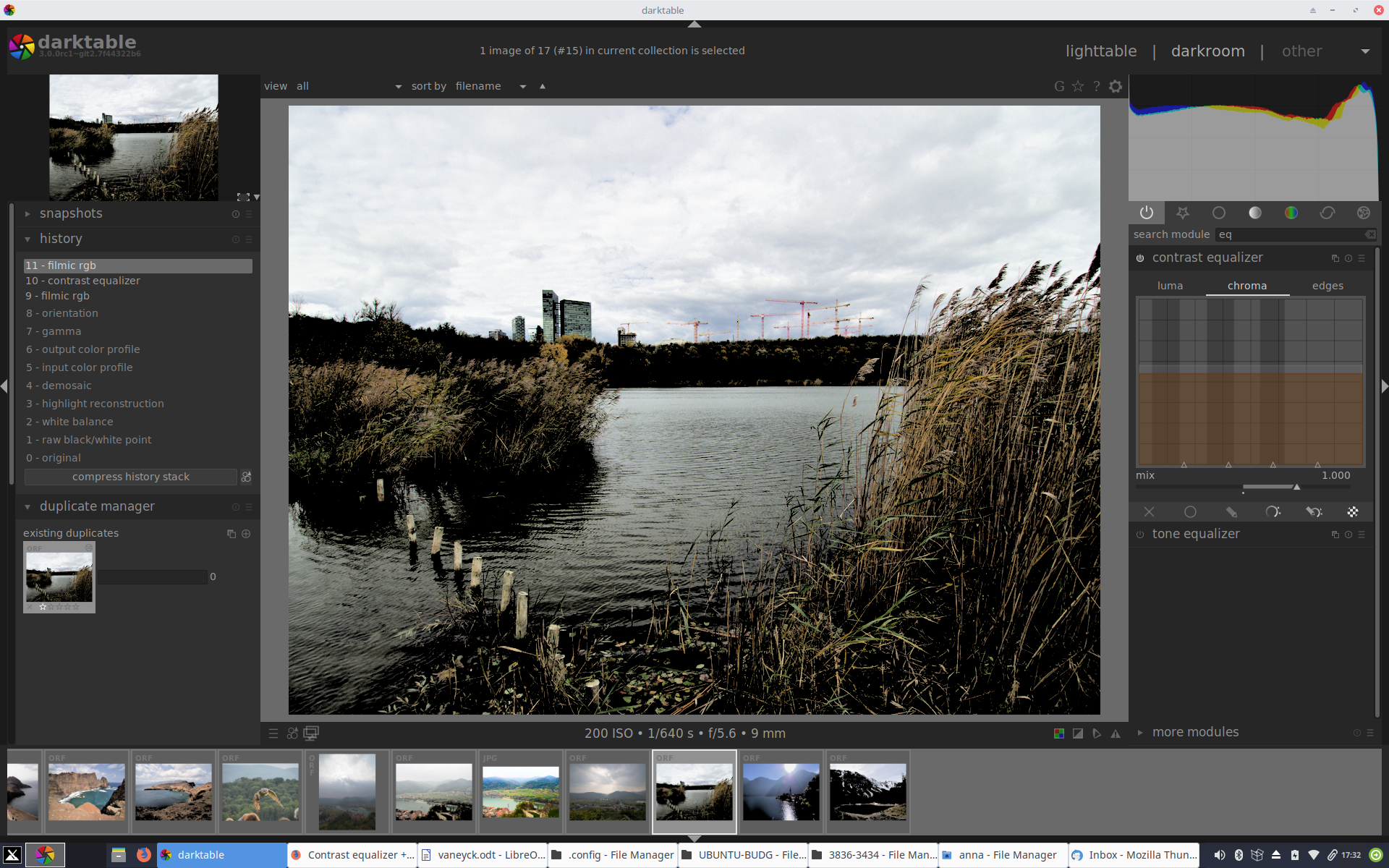
blitzgneisserin
on 16 Nov 2019
@ptilopteri I delete the xmp's and the darktable directory in .config - the database is the that directory. isn't it?
blitzgneisserin
on 16 Nov 2019
yes but maybe easier just to remove the image from the library.db,
in lighttable select subject image, in selected image "remove"
and it is no longer in your library.db
ptilopteri
on 16 Nov 2019
Well I just found out another thing which might be important: As I already said, there is another entry of filmic on top of everything after I activated and set equalizer/clarity.
Now I went back to to filmic and noticed that the values had changed: before I activated the eqaulizer the values for middle grey luminance/white relative exposure/black relative exposure and dynamaic range scaling were 6.07/+3.21/-4.47/16, after equalizer they were 6.22/3.41/-1.16/16, so black relative exposure was "automatically/magically" changed considerably.
blitzgneisserin
on 16 Nov 2019
And one more thing: the result looks good, i.e the values of filmic are not changed if I, after I produced the wrong result, click on filmic in the history, then go to the equalizer module and set it to clarity. Then the second filmic entry in the history is missing.
blitzgneisserin
on 16 Nov 2019
so filmic comes first and equalizer last.
Last in what ? Pipeline order or history order ? (because history order is irrelevant).
This is what I get when opening your picture with defaults params:
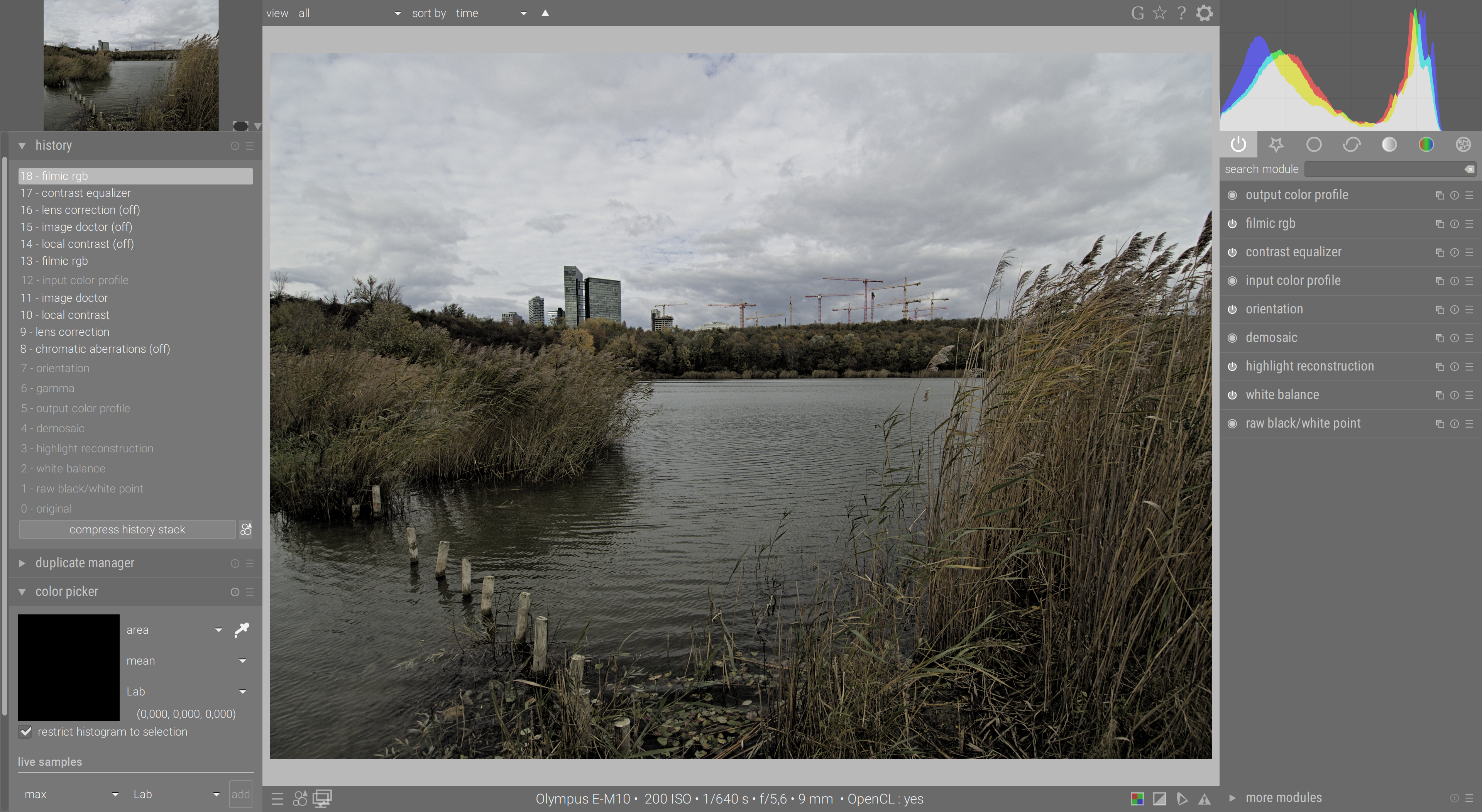
It is under-exposed by 1.28 EV. Let's fix that in exposure module:
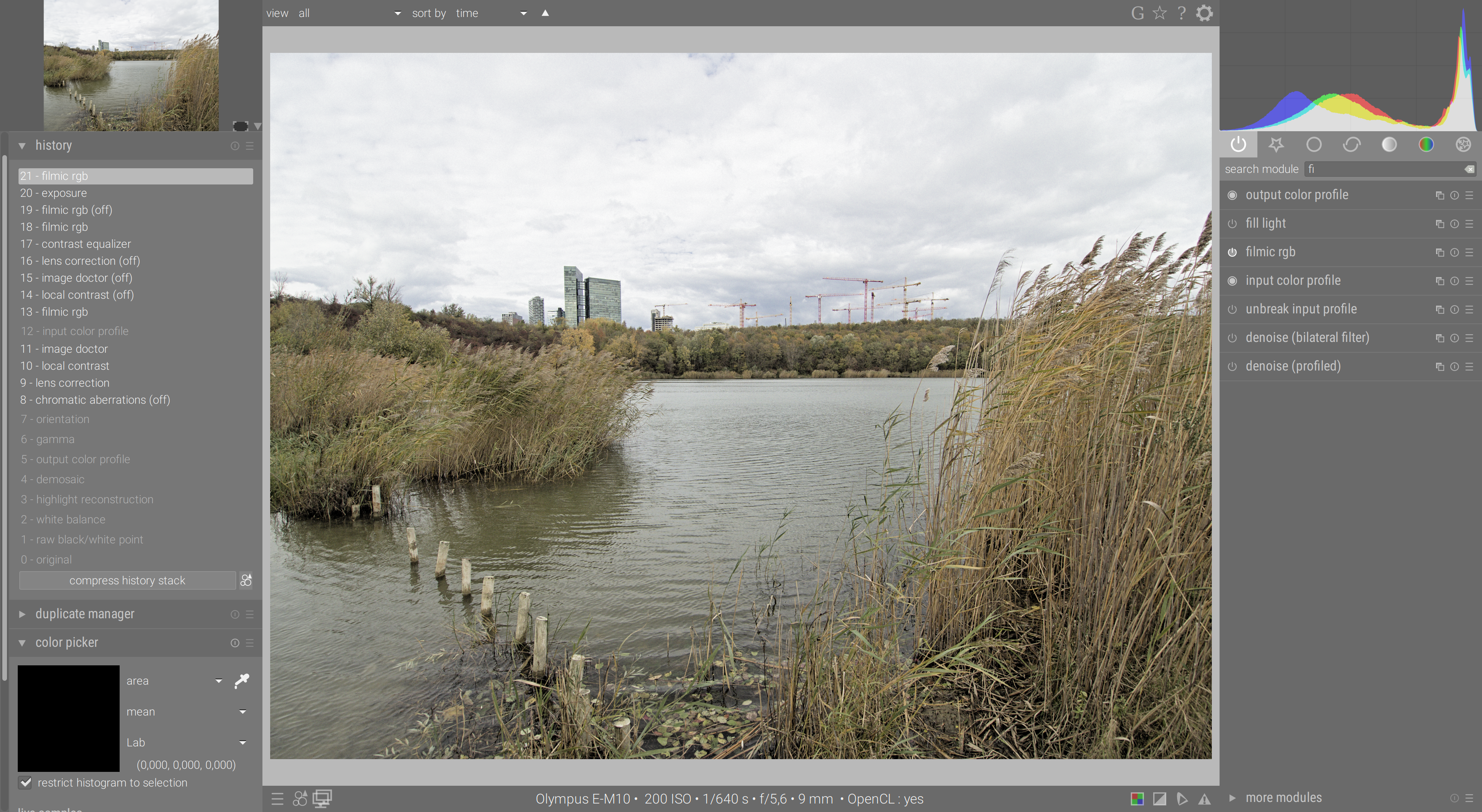
Now, run filmic auto-adjustment:

It gives you about 13 EV of dynamic range, which is consistent with the scene and contrast equalizer (enabled in all screenshots above, with preset "sharpen") behaves as it should.
Add some more saturation in colour balance, and you are god to go…
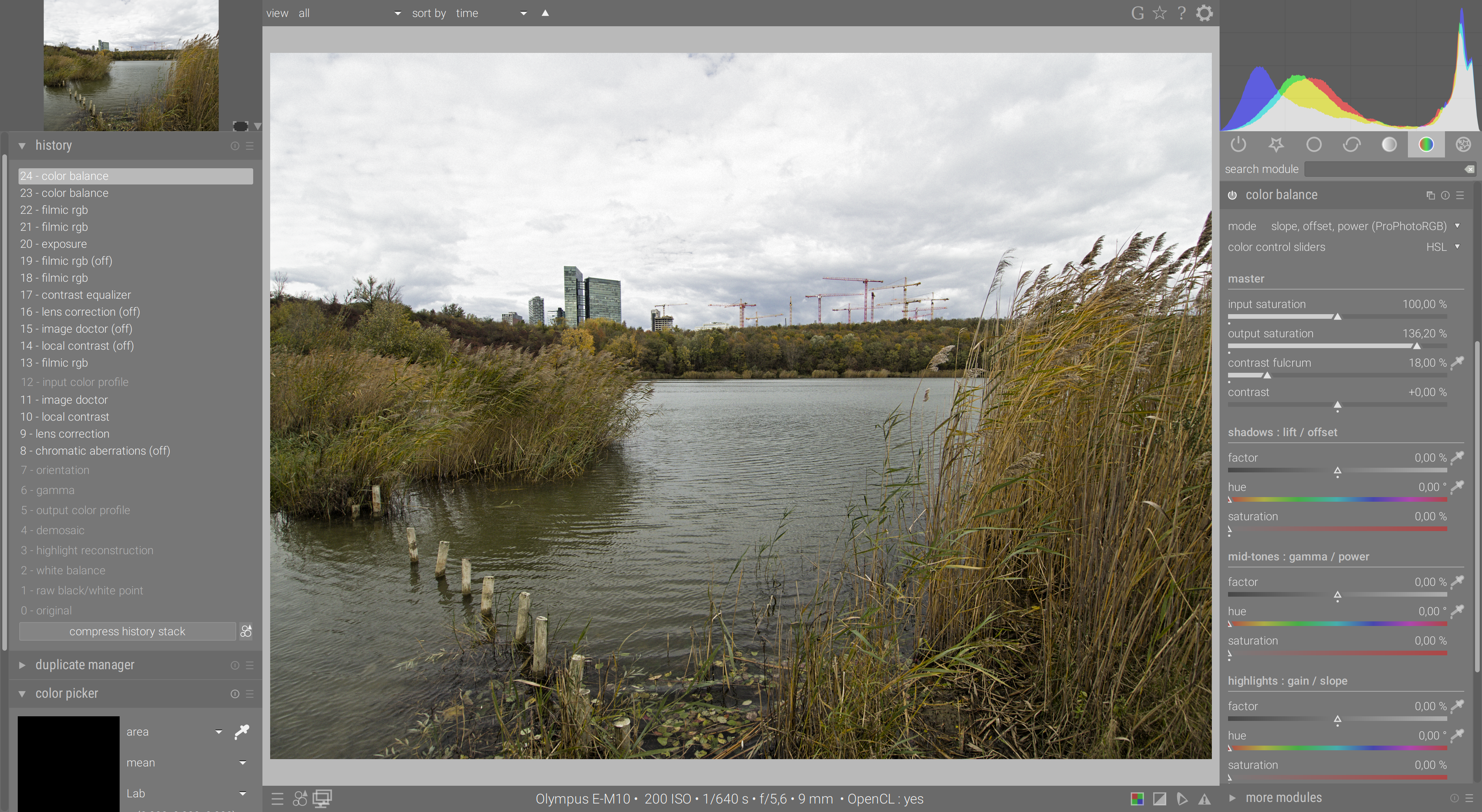
I think your problem is you didn't corrected the exposure at the beginning of the pipeline.
aurelienpierre
on 16 Nov 2019
@aurelienpierre no I did not correct the exposure, is that necessary? Did you read my last posts?
But I think you did reproduce my result following my instricutions, didn't you?
blitzgneisserin
on 16 Nov 2019
I mean, actually there is a simple "workaround": I just need to go one step back in the history, so the the "automatical" corrections in filmic get reversed.
I think this is a bug but I am really not sure the bug is in a certain module. Strange bug.
blitzgneisserin
on 16 Nov 2019
Now I went back to to filmic and noticed that the values had changed: before I activated the eqaulizer the values for middle grey luminance/white relative exposure/black relative exposure and dynamaic range scaling were 6.07/+3.21/-4.47/16, after equalizer they were 6.22/3.41/-1.16/16, so black relative exposure was "automatically/magically" changed considerably.
You mean if you don't disable the auto-tuner (colour-picker) in filmic, the settings in filmic get updated when you enable contrast equalizer ? That's only natural, you would need to disable the colour-picker to set the parameters hard. The colour-pickers work in a "toggle on/toggle off" manner.
And one more thing: the result looks good, i.e the values of filmic are not changed if I, after I produced the wrong result, click on filmic in the history, then go to the equalizer module and set it to clarity. Then the second filmic entry in the history is missing.
I think you are mistaking the history order (which reflects the order in which you have set the modules) with the pipe line order (which is the order in which a apply the modules over pixels). Modules write a new entry in history each time their parameters are changed so you can go back in history to whatever point you want, but when you start editing from that point again, you will overwrite all the steps that came later (you start over from a backup point).
@aurelienpierre no I did not correct the exposure, is that necessary?
Of course it is ! The input colour profile, the whole Lab space, and the black exposure detection in filmic will all fail with under-exposed pictures. Your whole pipeline assumes you feed it values between [0; 100] % (display-referred), and the Lab space expects 5 EV of contrast (scene-referred) between the 0 and 100% code values, but you feed it values encoded between [ 0 ; 65 ] % and tell him "oh, by the way, I have 13 EV of contrast between 0 and 65 %, so shut up and deal with it !".
I have written extensive doc on filmic v2 module, this filmic v3/rgb works essentially the same, please read what I wrote a year ago so I can avoid retyping it every week at different places of the internet. Also, my video on filmic is coming soon, I think it will be more than necessary.
aurelienpierre
on 16 Nov 2019
You mean if you don't disable the auto-tuner (colour-picker) in filmic, the settings in filmic get updated when you enable contrast equalizer ? That's only natural, you would need to disable the colour-picker to set the parameters hard. The colour-pickers work in a "toggle on/toggle off" manner.
So that's it. Thanks. However, I am quite sure that clicking a second time on the color picker was not necessary in dt 2.6.
Bug or no bug?
blitzgneisserin
on 16 Nov 2019
However, I am quite sure that clicking a second time on the color picker was not necessary in dt 2.6.
This I don't remember.
aurelienpierre
on 16 Nov 2019
I don't know about underexposure. This appears to happen with not underexposed photos as well. E.g.
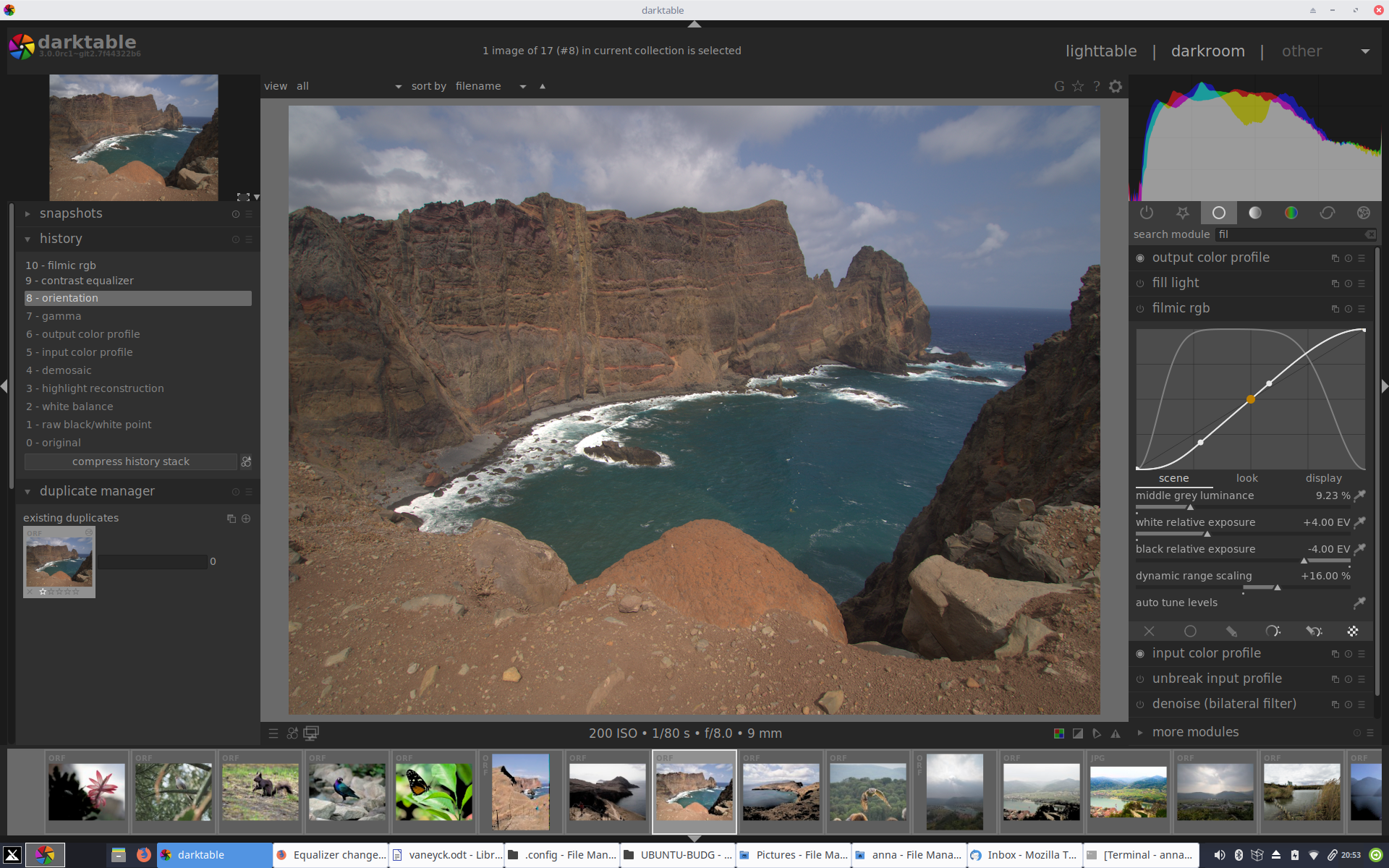
This is the real raw without base curve, not sure how "underexposed" it is.
However, the "black thing" happened now like this: first I used the equalizer (clarity) and then filmic auto tune levels. I mean, maybe that oder was totally wrong, but I am just saying. Exact same result.
Well nevertheless I hope this thread was not entirely useless (for Aurelien and others, for me it was clearly useful LOL).
blitzgneisserin
on 16 Nov 2019
The first thing you need to do is to go in exposure module, set the clipping threshold to 0%, and use the colour picker to auto-adjust your RGB values between [0; 100] %.
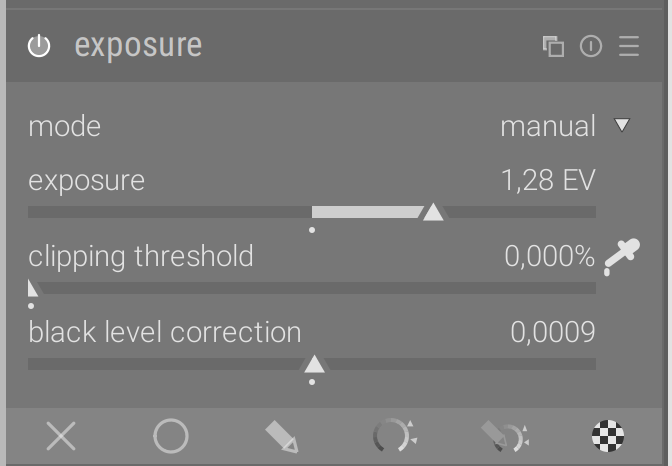
Once this is done, many things will behave better in darktable, and you can then unroll the filmic magic more reliably.
aurelienpierre
on 16 Nov 2019
The first thing you need to do is to go in exposure module, set the clipping threshold to 0%, and use the colour picker to auto-adjust your RGB values between [0; 100] %.
But isn't this basically the same thing that the base curve is doing? So why switch off the base curve?
blitzgneisserin
on 16 Nov 2019
Not at all. Exposure rescales the values by multiplying RGB values by a factor (+1 EV = multiply by 2, -1 EV = divide by 2). It's a linear operation, safe for colour preservation, and it's exactly the same as what you would see if you increased/decreased the shutter speed or the aperture directly on camera.
Base curve does a non-linear transform that affects mostly midtones, change the contrast and affects hues and saturation as a side-effect in non-trivial ways. And there is no link between base curves and actual physics or the camera settings, it's an artistic transform.
aurelienpierre
on 16 Nov 2019
Well. For me filmic only appears to work well for correcting the exposure (IF I click on auto tune levels a second time so the values do not get changed by following modules.) Would you say that filmic without exposure correction is totally wrong? I think I thought that filmic is actually a better exposure correction. And I think I will continue to use it "my way" (with that second click) ;)
blitzgneisserin
on 16 Nov 2019
Would you say that filmic without exposure correction is totally wrong?
Filmic without exposure correction is perfectly fine :
- as long as you set it up manually,
- and as long as you don't use Lab modules before filmic.
Filmic auto-tuners expect the minimum RGB value to be black, so if you want to use them, you need to feed filmic a properly exposed, denoised and demosaiced picture, otherwise the minimum RGB value will most likely be noise instead of black and you will fight forever with filmic, even possibly begin to believe it has its own mood ;-)
It's just a matter of respecting the working conditions of each module in the pipe. Each module uses a certain colour space and expects a certain range of input values in a certain state (for example : white balanced, linearly/non-linearly encoded). Try to make it work outside that range and it will fail.
The problem is people only start to realize that now that we have given them the power to change module order in the pipe (and shoot themselves in the foot). It's loo late: bad habits have been taken, we have work to do to reverse them.
What filmic does in more complicated than exposure correction. Yet, the exposure module stays an invaluable tool, basic yet robust, that should be the default go-to of every photographer to fix anything related with brightness.
aurelienpierre
on 16 Nov 2019
@blitzgneisserin Try moving the contrast-EQ in the pipeline after filmic, also lower the mix slider in the EQ clarity preset, it`s IMHO much to strong.
c-h-r-i-s-t-i-a-n
on 17 Nov 2019
is it supposed to be like this, that the auto tune levels color picker is still active when I activate a different module?
blitzgneisserin
on 19 Nov 2019
@aurelienpierre So I have found out another thing that might be important: filmic auto tune levels stays active and it's settings are changed if I apply the next modules with a preset, any module that has presets.
blitzgneisserin
on 19 Nov 2019
Same issue. The auto-tuner stays active as long as you don't disable it. If you keep changing the input of filmic when auto-tune is ON, the auto-tuner keeps changing the settings to account for the input changes. I don't understand what you don't understand…
aurelienpierre
on 19 Nov 2019
Same issue.
Yes, it is the same thing. But I think the auto-tuner is not supposed to stay active when I go to a different module, no matter if I use a preset or choose own settings/values. (If I choose own values in the next modules, the filmic auto-tuner gets disabled.)
Obviously, we see this differenty.
I really wish I could fix this. I kind of have the feeling that this would be an easy fix.
blitzgneisserin
on 19 Nov 2019
Or, the other solution: the auto-tuner needs to stay active even if I choose custom values for any of the next modules. But that is not the case.
blitzgneisserin
on 19 Nov 2019
It makes sense to disable all module color-pickers when you go to another module (I guess it equals to losing the focus?), not sure how easy it would be to implement though.
 parafin
on 19 Nov 2019
parafin
on 19 Nov 2019
Guys, I am not expecting an instant fix. Do it when you fell like it. No pressure (of this kind at least).
blitzgneisserin
on 19 Nov 2019
not sure how easy it would be to implement though.
Well as I already mentioned somewhere this issue with filmic auto tune levels is not present in dt 2.6, I think at least
blitzgneisserin
on 19 Nov 2019
All colour pickers work the same throughout all the modules, using the same API. Then, it's a matter of changing that API.
aurelienpierre
on 19 Nov 2019
Will someone mark this as bug please?
blitzgneisserin
on 21 Nov 2019
This issue did not get any activity in the past 30 days and will be automatically closed in 7 days if no update occurs. Please check if the master branch has fixed it since then.
![github-actions[bot] picture](https://avatars2.githubusercontent.com/in/15368?v=4&s=40) github-actions[bot]
on 22 Jan 2020
github-actions[bot]
on 22 Jan 2020
Related issues
 ChristopherRogers1991
·
6Comments
ChristopherRogers1991
·
6Comments
 Nilvus
·
5Comments
Nilvus
·
5Comments
 johnny-bit
·
5Comments
johnny-bit
·
5Comments
 elstoc
·
4Comments
elstoc
·
4Comments
 jpellegrini
·
3Comments
jpellegrini
·
3Comments