Darktable: parametric mask: "set range" color picker doesn't keep gradient slider area markers
If I use the "set range" color picker in a parametric mask, it also shows the applicable range of the selected area on the input/output gradient sliders, which is very useful.
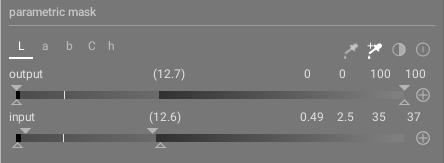
However, if I then manually move one of the sliders, this range is no longer shown
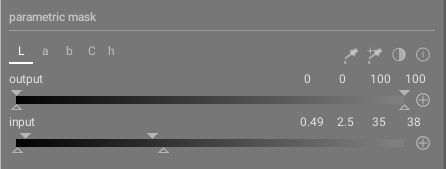
The only way to get it back is to re-select the same area with the second color picker. But it's very useful to still keep a visual representation of the selected area in order to assist with any adjustments.
I suspect this is probably more of a feature request since I see the same behaviour on 3.0.2
 elstoc
All 4 comments
@elstoc I'd been thinking that it would be useful to switch from the right color picker, which _sets_ the mask, to the left, which just shows the results for the selected range. Or to have the ranges connected. This would be a bit fiddly and probably lead to confusion, unless done really well. Implementation wise also not that trivial, but there must be a way to do it once we've decided on what the best behavior would be. Currently obviously the right picker just switches off when a further manual change is made in order to avoid overwriting it.
 dterrahe
on 29 Jun 2020
dterrahe
on 29 Jun 2020
I'd been thinking that it would be useful to switch from the right color picker, which sets the mask, to the left, which just shows the results for the selected range. Or to have the ranges connected.
Exactly what I was going to suggest.
elstoc
on 29 Jun 2020
Something to look at for 3.4...
dterrahe
on 29 Jun 2020
5634 provides the simple fix of just not disabling the color picker for the specific case that either one of the multi-value sliders gets adjusted. Please test if there are any corner cases that lead to unwanted behavior.
dterrahe
on 27 Jul 2020
Related issues
 mjut
·
5Comments
mjut
·
5Comments
 johnny-bit
·
5Comments
johnny-bit
·
5Comments
 oxpa
·
6Comments
oxpa
·
6Comments
 trougnouf
·
5Comments
trougnouf
·
5Comments
 lapineige
·
4Comments
lapineige
·
4Comments
Most helpful comment
Something to look at for 3.4...