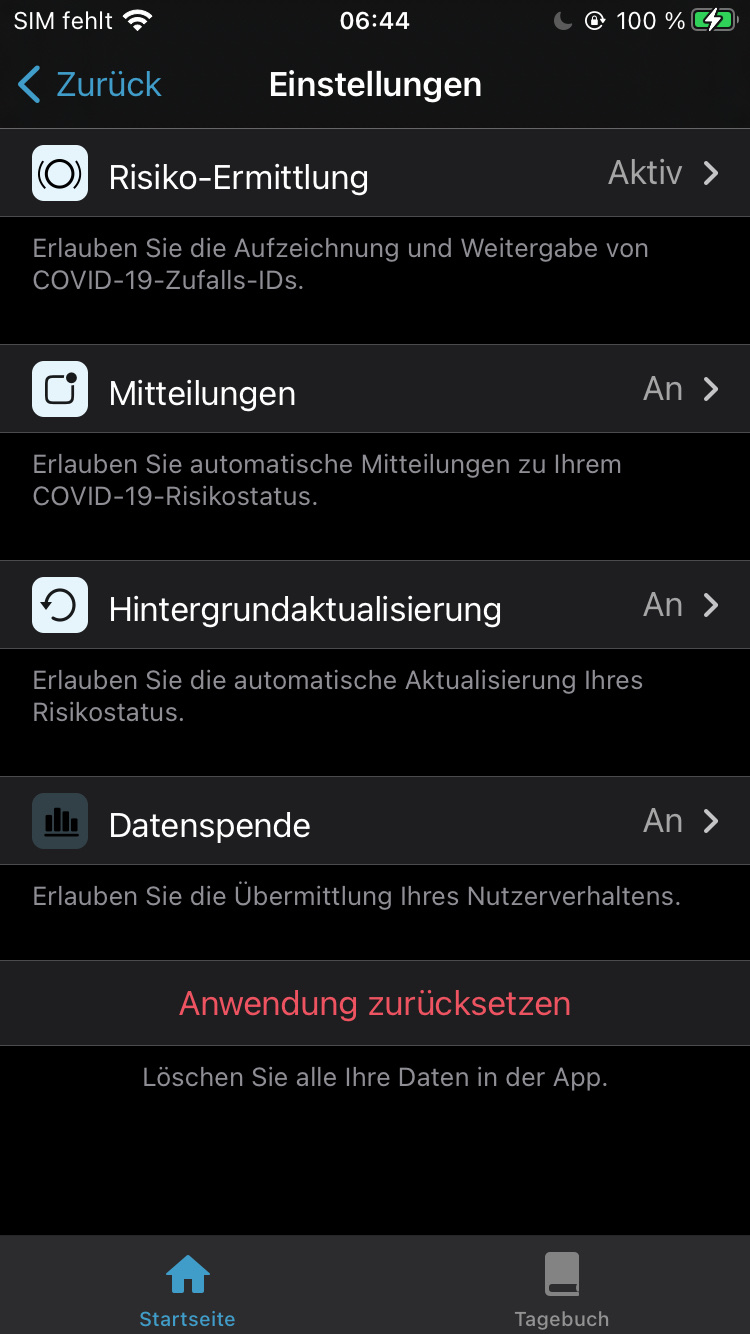
Cwa-app-ios: Icon of „Share Data“ menu in settings looks strange in dark mode
Avoid duplicates
- [x] Bug is not mentioned in the FAQ
- [x] Bug is not already reported in another issue
Technical details
- Device name: /
- iOS Version: /
- App Version: 1.13.0
Describe the bug
The icon from the "Share Data" menu in the settings is darker than the other icons. This only affects dark mode.
Steps to reproduce the issue
- Activate dark mode
- Open CWA
- Scroll down to "Settings"
- Click on "Settings"
- See strange icon from "Share Data"
Expected behaviour
Icon should match the brightness of the other icons.
Additional context
Please check the behavior under Android and move to the documentation repo if necessary.
Fix in PR: #2066
Internal Tracking ID: EXPOSUREAPP-5553
 Ein-Tim
All 7 comments
@Ein-Tim Thanks. EXPOSUREAPP-5553.
 dsarkar
on 5 Mar 2021
dsarkar
on 5 Mar 2021
EXPOSUREAPP-5179
dsarkar
on 5 Mar 2021
dsarkar
on 5 Mar 2021
Thanks @dsarkar
I forgot this PR 😅
Do you want this issue to stay open? Because I don't need it open, so feel free to close it.
Ein-Tim
on 5 Mar 2021
@Ein-Tim I suggest keeping it open until 1.14 is released.
dsarkar
on 5 Mar 2021
Version 1.14 which fixed this has been released to GitHub and is available to all users in the next 48h.
See blog post:
DE: www.coronawarn.app/de/blog/2021-03-09-corona-warn-app-version-1-14
EN: www.coronawarn.app/en/blog/2021-03-09-corona-warn-app-version-1-14
See GitHub release:
https://github.com/corona-warn-app/cwa-app-ios/releases/tag/v1.14.3
This issue will now be closed.
Ein-Tim
on 9 Mar 2021
@Ein-Tim Thanks.
dsarkar
on 10 Mar 2021
Related issues
 tibor
·
47Comments
tibor
·
47Comments
 JThoennes
·
132Comments
Ein-Tim
·
47Comments
JThoennes
·
132Comments
Ein-Tim
·
47Comments
 Krumelur
·
55Comments
Krumelur
·
55Comments
 svenkubiak
·
79Comments
svenkubiak
·
79Comments