Cwa-app-ios: Error during exposure logging / EN Code: 16
I got an alert with the following message today:
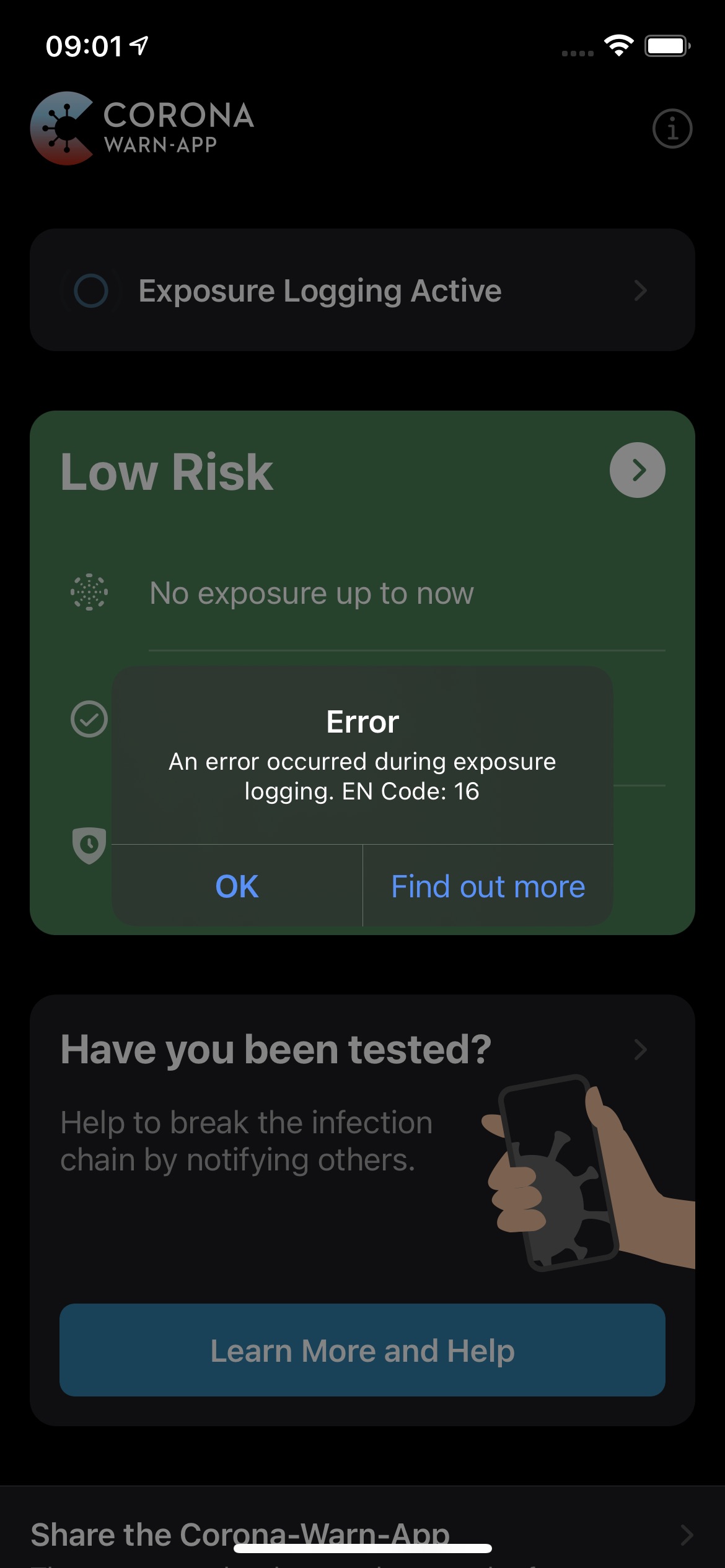
An error occured during exposure logging. EN Code: 16
Tapping on „Learn more“ wouldn’t do anything except closing the alert popup.

Is there anything I would need to do as a user?
Internal Tracking ID: EXPOSUREAPP-2018
 tibor
tibor
All 47 comments
Which version of iOS are you running?
 Ein-Tim
on 4 Aug 2020
Ein-Tim
on 4 Aug 2020
iOS 13.6 and Corona Warn App 1.1.2
tibor
on 4 Aug 2020
@GPclips could you help here please?
Ein-Tim
on 4 Aug 2020
Hello @tibor,
thanks for sharing. I will contact the development team and label it as a bug, to make sure this will be handled as soon as possible.
Meanwhile, I like to ask you to explain the steps to reproduce the issue, even if it is just that you have opened the app.
@Ein-Tim thanks for your great support!
Best Regards,
LMM
Corona-Warn-App Open Source Team
 GPclips-zz
on 5 Aug 2020
GPclips-zz
on 5 Aug 2020
Steps to reproduce: I'm not entirely sure, but I think I opened a push notification from the app and got this in app alert. It's either this or I manually opened the app.
tibor
on 5 Aug 2020
Hi @tibor ,
Thanks for your report. Does the Error 16 occurs every time, once you open the app? Or only occurred once..
 haosap
on 6 Aug 2020
haosap
on 6 Aug 2020
@haosap for now only once
tibor
on 6 Aug 2020
If it only occurs once, I think it is pretty hard to reproduce.
I suggest putting in on hold.
haosap
on 6 Aug 2020
I had the same issue today. I just manually opened the app. It apparently also just refreshed. So there might be a relation there.
The second bug is that tapping "Learn more" just closes the alert and nothing more. This actually might scare and confuse normal users. Nobody wants to hear that "something went wrong" with a sensitive health thing and then the "Learn more" button doesn't even work.
It occurred on iOS 14 Developer Beta 4 with the app version 1.1.2. It just occurred once, but, if I remember, I will open the app tomorrow evening again around the same time when the daily refresh should happen and check if it does happen again.
 yannikbloscheck
on 7 Aug 2020
yannikbloscheck
on 7 Aug 2020
Couldn't reproduce it today, but given the error explanation in the Apple documentation (if I guessed right and it's the actually framework error code) it should not be forwarded to the user, but simply handled by the app (for example retrying after a few seconds).
yannikbloscheck
on 8 Aug 2020
Got the same:

If i look in the exposure log it shows the same time.
Yesterday there was no update.
The update before today was on the day before yesterday at 22:46
 Tho-Mat
on 1 Sep 2020
Tho-Mat
on 1 Sep 2020
Got it after opening the app (I don't open the app regularly, only every now and then).
Tapping on "Find out more" does nothing.
Can not reproduce when killing and reopening the app.
The UI shows "Updated at 11:02", the same time as when I opened the app, so the error could maybe be related to the sync.
iOS 14 beta 6
Corona Warn App 1.2.1 (0)

 DerLobi
on 3 Sep 2020
DerLobi
on 3 Sep 2020
Seeing exactly the same @DerLobi
 Ben305
on 3 Sep 2020
Ben305
on 3 Sep 2020
I experienced this error as well a few days ago. It seemed to have no effect, though. The app updated itself as I tapped "Find out more" which is a no-op, as others have mentioned.
Even if it's not easily reproducable, I think we can agree that it can be handled better:
- The fact that tapping "Find out more" does nothing is definitely a bug
- According to Apple, error 16 means:
> ENError.Code.dataInaccessible
> The user must unlock the device before it can access data.
(source: https://developer.apple.com/documentation/exposurenotification/enerror/code/datainaccessible)
It seems strange to me that the device must be unlocked for Exposure Detection to take place (this again defeats the functionality of the background job).
IMHO this should be clarified with Apple. In any case it's not helpful displaying this error to the user who - at this point - obviously has unlocked the device already. 😉
 sin-azucar
on 3 Sep 2020
sin-azucar
on 3 Sep 2020
Hi, same issue here - iPhone SE (old) - latest iOS, latest corona warn app - error occurred under 13.6.1 and re-occurred after ios update to 13.7 and seems to be correlated with massive battery consumption (draining 25%+ of remaining battery charge over night in both cases). Might be stuck at attempt to connect for data update over night, supported by observation that server data was only updated after actually accessing application. Not observed, yet, with iPhone SE 2020. Update: just checked, it seems app was updated yesterday, so it seems the bug survived the update.
 git4me8you
on 6 Sep 2020
git4me8you
on 6 Sep 2020
Thank you, everyone, for the additional feedback. The internal Jira ticket was updated with your additional information.
Best regards,
SG
Corona-Warn-App Open Source Team
 svengabr
on 7 Sep 2020
svengabr
on 7 Sep 2020
Seems like I just got the same error message in my App a few minutes ago...
iOS 13.7 (iPhone Xs); App Version 1.3.0 (6)
I tried clicking onto "Mehr Erfahren" but nothing happened, the message disappeard and it didn't reappear so far.
Best regards,
Kai

 kaibader
on 15 Sep 2020
kaibader
on 15 Sep 2020
iOS 13.7 CWA 1.3.0 iPhone XR
I opened the app manually (as I do every day) and I got this. It’s not the first time either.

 m33x
on 25 Sep 2020
m33x
on 25 Sep 2020
I also got this error today after opening the app.
iPhone X, iOS 14.0.1, CWA 1.3.2

The app refreshed the same moment that error appeared.
 m-rossi
on 3 Oct 2020
m-rossi
on 3 Oct 2020
Hi, I had the same error message today and want to know what it means please. Using iPhone 8 iOS 14.0.1

 sfaxiaberlin
on 13 Oct 2020
sfaxiaberlin
on 13 Oct 2020
@sfaxiaberlin do you remember the context when this error message popped up? Did you just open the app before? Did you return from a submenu? Or was the app just open and you were looking at the status? Do you remember if the screen was locked?
And: could you please give your cwa version as well? Thanks.
 ndegendogo
on 13 Oct 2020
ndegendogo
on 13 Oct 2020
Version 1.3.2 (0)
I opened the App and the error occured. It was not possible to click "Mehr erfahren". I open the App every day to check my amount of contacts with no risk
sfaxiaberlin
on 14 Oct 2020
Disclaimer: I am not one of the project maintaimers here
@sfaxiaberlin Thanks.
The meaning of EN error 16 is explained here, including a link to the original iOS documentation.
To me it looks like a race condition during start of the app. As you open the app daily, but don't get this message regularly, I would not worry too much. Of course, such a message is not nice, and the app should give more explanations to the user (or retry silently, as was already suggested). On the other hand, this is not the highest-prio issue.
Maybe you could investigate one more detail, and check the timestamps of your checks in the ENF log file. Was the time of this error message preceded by any unexpected pattern, like overly long delay of the check?
ndegendogo
on 14 Oct 2020
I have the same problem, Background update is activated, just doesn't work.
Something about twice a week I get a Push-Notification from the app, to check my Status. Then I get the error ( Fehler [...] EN Code:16).
I use iOS 14.2 (18B92) | CWA Version 1.5.3 (1)
 Bergruebe
on 8 Nov 2020
Bergruebe
on 8 Nov 2020
@Bergruebe
But is the App working again after a restart or waiting for 24h or are you not able to use it at all?
Ein-Tim
on 8 Nov 2020
Yes it works, but not automatically. The Check is only if I open the App, not in the night automatically.
Bergruebe
on 8 Nov 2020
Okay @Bergruebe
Nice to hear that it works again, the Background check Issue is tracked here: #916 & #1227
Ein-Tim
on 8 Nov 2020
about twice a week I get a Push-Notification from the app, to check my Status. Then I get the error ( Fehler [...] EN Code:16).
@Bergruebe could you please post a screenshot of the push notification and of the error message here?
Background update is activated, just doesn't work
As @Ein-Tim already suggested. Please post a comment on this at #916 , so that the devs can pick it up and do a more detailed analysis.
ndegendogo
on 8 Nov 2020
I got a similar error message when starting the app today. The "Find out more" option shows nothing. After this error the app worked as usual.
iPhone 12, IOS 14.2.1, App 1.7.1
Thanks,
Nungu
 Nungu
on 30 Nov 2020
Nungu
on 30 Nov 2020
This ticket is now on hold since nearly 4 months ... but the issue seems to occur again and again....
I understand that this is not 100% reproducible; but several people in this thread have already analysed the meaning of this error code 16, and also given suggestions how it could be handled. See here and here.
@dsarkar could you please ask the devs if they find time to fix this?
ndegendogo
on 30 Nov 2020
@ndegendogo
I'm totally on your side, if I understand everything correctly here, "fixing" means to just hide this Issue from the User, or?
Ein-Tim
on 1 Dec 2020
@Ein-Tim
Well - it seems to be triggered from a (failed?) risk check. So maybe it is worth a retry of this check after a short waiting time.
And maybe the app already performs this retry (after all, the users have reported that they see an ENF log entry). In this case you are right, the error message need not be shown.
I am just guessing now, but maybe the root cause is a race condition at start of the app, and the risk check is sometimes started too early.
ndegendogo
on 1 Dec 2020
@ndegendogo
Yes, I think a retry is already triggered (https://github.com/corona-warn-app/cwa-app-ios/issues/1000#issuecomment-670672931 & https://github.com/corona-warn-app/cwa-app-ios/issues/1000#issuecomment-703083387) or this Error does not have influence on the already running check.
So I think, a very simple Solution would be to hide this Error-Message from the user.
I would love to take a look at the EN-Log from somebody who experienced this Issue (to see if a check was interrupted, etc.)
Maybe @Nungu, could you please upload your EN-Log here? (How to see below) This log does not contain any private data, but the number of encounters you had.
How to export Exposure Notificaiton Logs under iOS 13.7 or newer
German:
Einstellungen ➡️ Begegnungsmitteilungen ➡️ Status von Begegnungsaufzeichnungen ➡️ Begegnungsüberprüfungen ➡️ Überprüfungen exportieren
English:
Settings ➡️ Exposure Notifications ➡️ Exosure Logging Status ➡️ Exposure Checks ➡️ Export Exposure Checks
To upload the Log here, just rename the file from .json to .txt
Ein-Tim
on 1 Dec 2020
Dear @ndegendogo, @Ein-Tim, @Nungu,
Many thanks for the input from your side. We will approach the developers with this information now.
Best wishes,
DS
Corona-Warn-App Open Source Team
 dsarkar
on 1 Dec 2020
dsarkar
on 1 Dec 2020
Hi @Ein-Tim ,
here comes the log file.
I think an error message should be somehow actionable. If it's already known that this error can be ignored, then there is no need to expose it to the user, ihmo. And for this target audience "Find out more" shouldn't be just empty.
Cheers,
Nungu
Nungu
on 1 Dec 2020
for this target audience "Find out more" shouldn't be just empty
@Nungu fully agreed. Feel free to upvote #1353
ndegendogo
on 1 Dec 2020
Thanks a lot @dsarkar
ndegendogo
on 1 Dec 2020
FYI, PR https://github.com/corona-warn-app/cwa-app-ios/pull/1608.
Best wishes,
DS
Corona-Warn-App Open Source Team
dsarkar
on 1 Dec 2020
Although this will be fixed by #1608, I will quickly tell you what I found in the Log file. @Nungu
The log does not contain any checks which were stopped, so I think the EN Code: 16 doesn't even have any influence on a Risk-Check.
So hiding this Error is the best solution 👍
Ein-Tim
on 1 Dec 2020
Wow - this was fast! 😀😀😀
Thanks again, @dsarkar.
ndegendogo
on 1 Dec 2020
@ndegendogo, thanks! We will forward this also to the developers! Best wishes,
DS
Corona-Warn-App Open Source Team
dsarkar
on 2 Dec 2020
Same error here. "Find out more" only closes the dialog.
 techniker
on 2 Dec 2020
techniker
on 2 Dec 2020
Hi @techniker, Thanks for reporting. This problem is resolved and the solution will be implemented in a future release.
Best wishes,
DS
Corona-Warn-App Open Source Team
dsarkar
on 2 Dec 2020
Hi @techniker, Thanks for reporting. This problem is resolved and the solution will be implemented in a future release.
Best wishes,
DS
Corona-Warn-App Open Source Team
Thanks! :)
techniker
on 2 Dec 2020
@techniker, this should solve it https://github.com/corona-warn-app/cwa-app-ios/issues/1000#issuecomment-736485835.
dsarkar
on 5 Dec 2020
Fixed with version 1.9.1.
Ein-Tim
on 17 Dec 2020
Dear community,
Thank you for all your contributions. As @Ein-Tim says, this issue is fixed now. Thanks again! Best wishes, DS
Corona-Warn-App Open Source Team
dsarkar
on 18 Dec 2020
Related issues
 mss1010
·
3Comments
mss1010
·
3Comments
 avenius
·
3Comments
avenius
·
3Comments
 janberlin
·
3Comments
janberlin
·
3Comments
 Lhendrichs
·
3Comments
Lhendrichs
·
3Comments
 mw76
·
3Comments
mw76
·
3Comments
Most helpful comment
@ndegendogo, thanks! We will forward this also to the developers! Best wishes,
DS
Corona-Warn-App Open Source Team