Cwa-app-ios: App doesn't update risk status (in foreground)
Avoid duplicates
- [x] Bug is not mentioned in the FAQ
- [x] Bug is not already reported in another issue
Technical details
- Device name: iPhone XR
- iOS Version: 14.4
App Version: 1.11.0
Case 2 @cricketsamya: iPhone 12 Pro Max /CWA 1.11.0 (9)/iOS 14.4
Describe the bug
I opened CWA at 15:40, more than 4 hours have passed since the last check (11:27).
The app did NOT automatically carry out a risk check.
Restarting the app did not help, but deactivating background updates did.
Seems like a problem with automatic updates.
Steps to reproduce the issue
- Open App after 4 hours have passed since the last check
- See that no check happens
- Deactivate background updates in iOS Settings
- See that the check instantly happens when you reopen the app
Expected behaviour
A risk check should, if the phone is connected to WiFi, happen after 4 hours.
Additional context
No ENA entries in settings.
EN-Log:
ExposureChecks-2021-01-29.txt
Screenrecordings:
Could not reproduce this on an iPhone 6s. Will continue monitoring.
The check often happens shortly after the app was closed, in the background.
This issue persists after restarting the device.
Internal tracking ID: EXPOSUREAPP-4953
 Ein-Tim
All 47 comments
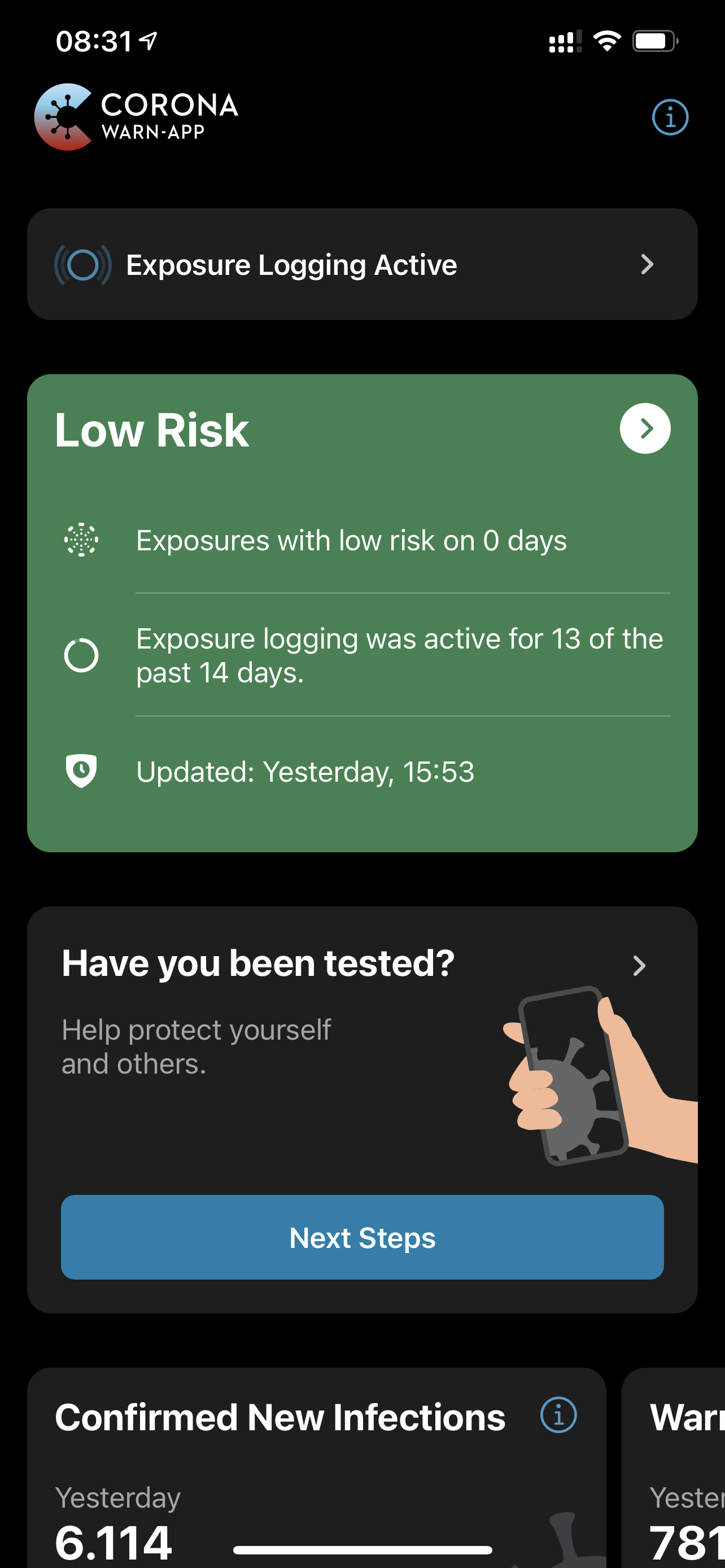
App is not updating Risk status since yesterday 01.02.2021
 cricketsamya
on 2 Feb 2021
cricketsamya
on 2 Feb 2021
@cricketsamya Are you using iOS 14.4?
Interesting is that your app is also not updating in the background, mine is only not updating in the foreground.
Did you restart your device?
Ein-Tim
on 2 Feb 2021
iPhone6s / iOS 14.4 / CWA 1.11 - cannot reproduce - I will continue observing issue.
@Ein-Tim FYI
@cricketsamya iPhone modell ? / CWA 1.11 / ios 14.4 ? Thanks for feedback.
 dsarkar
on 2 Feb 2021
dsarkar
on 2 Feb 2021
@Ein-Tim
- You reported this issue 4 days ago. Any pattern you can report?
- Can you reproduce the issue on the iPhone XR? If so, what steps?
- Can you reproduce the issue on the iPhone 6s? If so, what steps?
Thanks for reporting and the feedback. We are checking also for reports on the AppStore.
dsarkar
on 2 Feb 2021
@cricketsamya Are you using iOS 14.4?
Interesting is that your app is also not updating in the background, mine is only not updating in the foreground.
Did you restart your device?
I am using iOS 14.4. After restart, the app synced. May be it was stuck during last sync?
cricketsamya
on 2 Feb 2021
iPhone6s / iOS 14.4 / CWA 1.11 - cannot reproduce - I will continue observing issue.
@Ein-Tim FYI
@cricketsamya iPhone modell ? / CWA 1.11 / ios 14.4 ? Thanks for feedback.
@dsarkar
iPhone 12 Pro Max /CWA 1.11.0 (9)/iOS 14.4
cricketsamya
on 2 Feb 2021
@cricketsamya
I am using iOS 14.4. After restart, the app synced. May be it was stuck during last sync?
Could you provide your EN-Log here?
How to export Exposure Notificaiton Logs under iOS 13.7 or newer
German:
Einstellungen ➡️ Begegnungsmitteilungen ➡️ Status von Begegnungsaufzeichnungen ➡️ Begegnungsüberprüfungen ➡️ Überprüfungen exportieren
English:
Settings ➡️ Exposure Notifications ➡️ Exosure Logging Status ➡️ Exposure Checks ➡️ Export Exposure Checks
To upload the file here, rename it from .json to .txt
Ein-Tim
on 2 Feb 2021
@dsarkar
You reported this issue 4 days ago. Any pattern you can report?
Not really, no... The only pattern is that the check always works if I open the app with deactivated background updates.
Can you reproduce the issue on the iPhone XR? If so, what steps?
Can you reproduce the issue on the iPhone 6s? If so, what steps?
There are no special steps I do to reproduce this bug. Sometimes it works on the iPhone XR, sometimes not. I did not yet see this on the iPhone 6s.
Ein-Tim
on 2 Feb 2021
@cricketsamya
I am using iOS 14.4. After restart, the app synced. May be it was stuck during last sync?
Could you provide your EN-Log here?
How to export Exposure Notificaiton Logs under iOS 13.7 or newer
@Ein-Tim
Done! Have a look!
ExposureChecks-2021-02-02.txt
cricketsamya
on 2 Feb 2021
Thank you @cricketsamya
When looking at your EN-Log it seems like that the last check (yesterday, 15:53) was not interrupted, but the risk check just stopped working until today at 09:49.
Update from my side:
Currently I don't see this behaviour anymore, neither on the iPhone XR nor on the iPhone 6s.
I will continue to monitor and try to reproduce it.
Ein-Tim
on 2 Feb 2021
@Ein-Tim @cricketsamya Internal tracking ID: EXPOSUREAPP-4953
dsarkar
on 2 Feb 2021
I was again able to reproduce this today, @dsarkar is there anything I should do the next time this happens? Sadly there are no ENA files in the analytics files in the settings...
Ein-Tim
on 3 Feb 2021
@Ein-Tim Thanks for the info. I asked the dev he needs more info from your side. Stand by. Fix is planned for 1.12 or 1.13.
dsarkar
on 4 Feb 2021
@dsarkar
What information should I provide?
Ein-Tim
on 4 Feb 2021
@Ein-Tim Right now no further information needed from the developer's side, many thanks! There are fixed introduced in 1.12 and 1.13, so monitoring this issue then would be appreciated.
dsarkar
on 4 Feb 2021
I will continue to monitor with 1.12.
If I don't see this behaviour anymore, I will close this issue.
Ein-Tim
on 10 Feb 2021
@Ein-Tim OK, let´s do that. Thanks.
dsarkar
on 10 Feb 2021
@dsarkar
iPhone 12 Pro Max
CWA 1.12.1
iOS 14.4
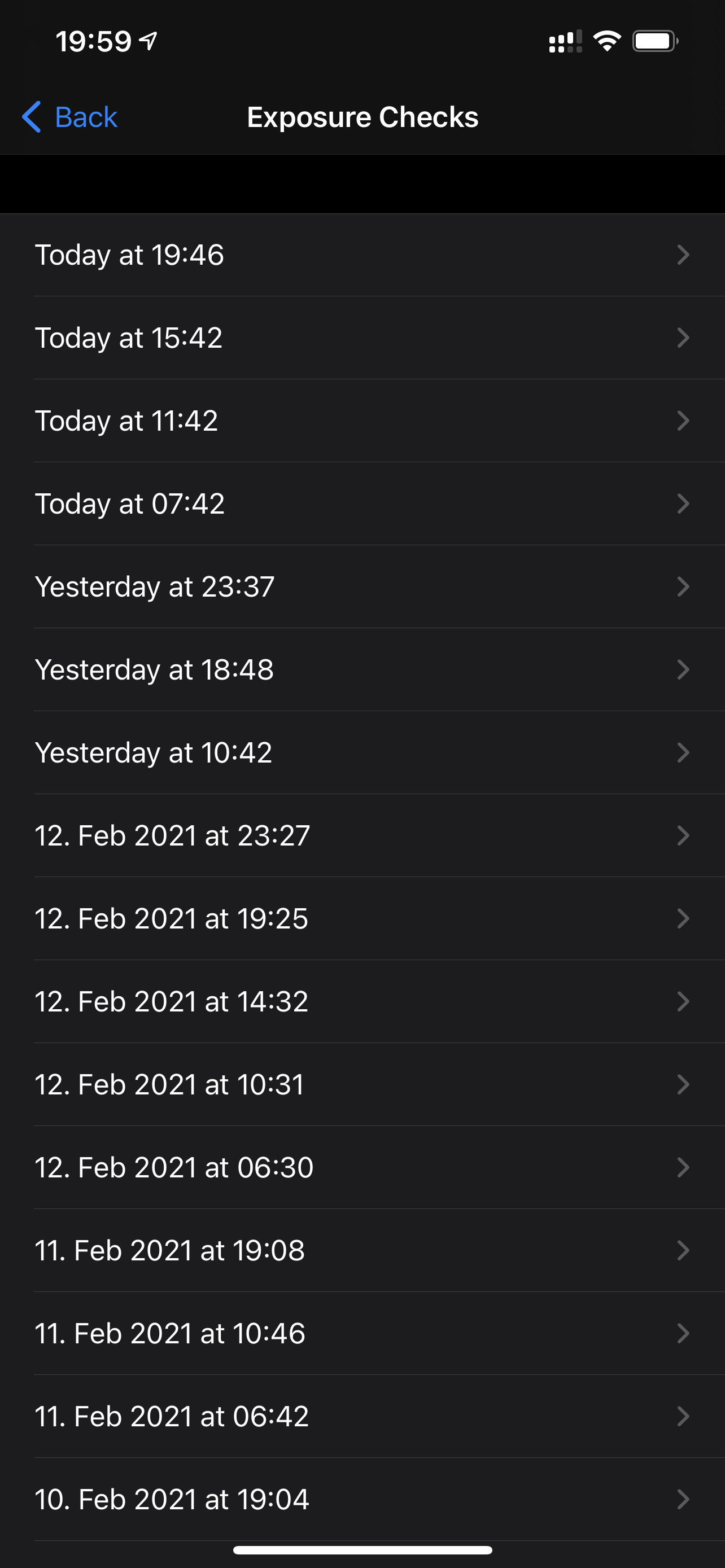
Looks like it appeared after update to CWA 1.12.1
Check exposure logs timestamps..
cricketsamya
on 14 Feb 2021
@cricketsamya ok, thanks for the screenshot. At first sight, it looks ok to me.
- If you are on wifi, 4- max 6 downloads per day are typical.
- On mobile data max one download per day
- If you use mobile data for some hours and then wifi you might have 1 - max 6 downloads per day.
So it looks fine at first sight.
You might try the following: Do not open the app for 24 h and show us then a screenshot. If there is a day missing, then it would not look right.
Thanks.
dsarkar
on 14 Feb 2021
@dsarkar I was on mobile data today for few hours. Then wifi all time.. may be that explains the missing syncs.
cricketsamya
on 14 Feb 2021
@cricketsamya
- Oh, I see, you are saying that in the morning the first check is only triggered when you open the app?
- I guess you are using wifi during the night, correct?
- In the morning, when the first check happens, wifi or mobile data?
dsarkar
on 14 Feb 2021
@dsarkar first check always happens with wifi for sure 💪🏼
cricketsamya
on 14 Feb 2021
@cricketsamya ok, maybe try this. Don't open the app for a day and report back. Feedback very much appreciated! Thanks
dsarkar
on 14 Feb 2021
@dsarkar I am talking about yesterdays last check! That happens after I opened the app! And todays last check as well..
cricketsamya
on 14 Feb 2021
@cricketsamya the last check and the check before the last check have a time difference of 4-6 hours in your case, so that looks ok so far. What called my attention, is that during the night there is a larger gap. However, as long you get 4-6 checks per day on wifi, or 1 check on data, or 1-6 check data/wifi mixed, it looks ok so far.
dsarkar
on 14 Feb 2021
I think it is normal that @cricketsamya does not have any checks at night since he deactivates Bluetooth during the night.
Ein-Tim
on 14 Feb 2021
@dsarkar @Ein-Tim yes I deactivate bluetooth. I will try the test! And report! Thanks!
cricketsamya
on 14 Feb 2021
@cricketsamya
@Ein-Tim ok, thanks for pointing that out! I was not aware of BT off during the night. So, all good. Thanks, and good night.
dsarkar
on 14 Feb 2021
I, personally, can't reproduce this anymore. I will still leave this open to further investigate @cricketsamya's case.
@dsarkar What you could maybe ask the devs if it's intended that the App does not update in the foreground if the App is opened in the foreground and 4 hours pass (I hope you understand what you mean).
Ein-Tim
on 15 Feb 2021
@Ein-Tim
(I hope you understand what you mean).
Usually, I do ;-)
What you could maybe ask the devs if it's intended that the App does not update in the foreground if the App is opened in the foreground and 4 hours pass
But, rephrase this one, not sure what you exactly mean, thanks.
dsarkar
on 15 Feb 2021
For sure @dsarkar (:
I will try to explain with an example:
Your last check was today at 14:00h, now you open the App at 17:59h and leave it open. You will see that there is no check carried out at exactly 18:00h (what I would expect). The next check happens as soon as you close the app. Now I wonder whether this is intended or not.
I hope now it's clear what I'm talking about 😁
Ein-Tim
on 15 Feb 2021
@Ein-Tim @dsarkar
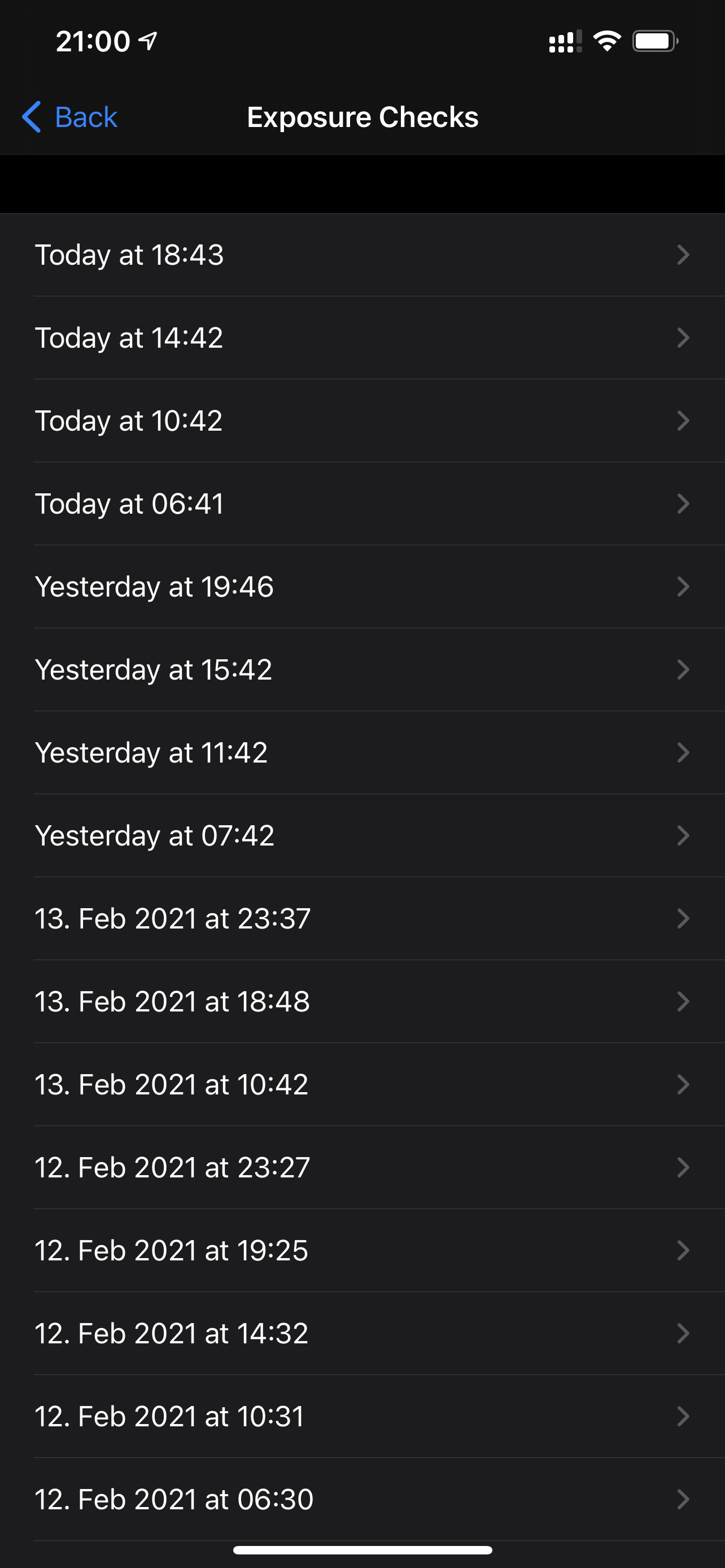
I did not open the app for 24 hours! Looks like it worked! Except risk status still says 12/14.
All good!
cricketsamya
on 15 Feb 2021
@cricketsamya
Nice to hear that everything is working as it should 👍
I will close this after my question above has been answered.
Have a nice evening!
Ein-Tim
on 15 Feb 2021
Your last check was today at 14:00h, now you open the App at 17:59h and leave it open. You will see that there is no check carried out at exactly 18:00h (what I would expect). The next check happens as soon as you close the app.
@Ein-Tim interesting. How long did you leave the app open? Because also from background I do never have exact 4 hours.
Besides that, my expectation as a user would be that it should not matter whether I just switch off the display while cwa is still open, or whether I press the home button before. Of course I expect the check to be triggered after (roughly) every 4 hours in both cases.
 ndegendogo
on 16 Feb 2021
ndegendogo
on 16 Feb 2021
@ndegendogo
How long did you leave the app open?
For at least 3-4 Minutes. But I expect a check to be triggered after exactly 4 hours if the app is opened.
Because also from background I do never have exact 4 hours
I never have exactly 4 hours in the background, but if I (in the example above) put the app in foreground at 18:00h, a check will happen.
Besides that, my expectation as a user would be that it should not matter whether I just switch off the display while cwa is still open, or whether I press the home button before. Of course I expect the check to be triggered after (roughly) every 4 hours in both cases.
I think, and I will test this, the check will be triggered after
a) pressing the home button
b) switch of the display
c) killing CWA (unsure about that).
Ein-Tim
on 16 Feb 2021
@Ein-Tim ok, I think I understand now the question you made earlier. In any case, the updates are not exactly every 4 hours. Can't find it now, but it was discussed somewhere already.
dsarkar
on 16 Feb 2021
@dsarkar But I have the stong feeling that the check will not be triggered at all in the foreground in the case I've described above. I will try it and keep you up to date.
Ein-Tim
on 16 Feb 2021
@dsarkar Interesting, I will try it ... need to wait for about 3 h now.
dsarkar
on 16 Feb 2021
@dsarkar in parallel you could try to ask the developers what is the intended behaviour.
If I remember correctly, I have seen risk check triggered from start of application and from transition to the home screen; and the timer started from closing the app. This seems inline with @Ein-Tim 's observations.
But I may well err, have misunderstood something, overseen something or din't remember well ...
ndegendogo
on 16 Feb 2021
Tested the following:
(Last check 08:08h)
- Open App at 12:07h
- No check happens at 12:08h
- No check happens between 12:08h - 12:30h if the app is left in foreground
- Either close the app, open a new view and go back to the home screen or switch off the display -> check happens
Screen recordings and screenshots
12:07h -> 12:08h:
Still no risk-check at 12:15h:
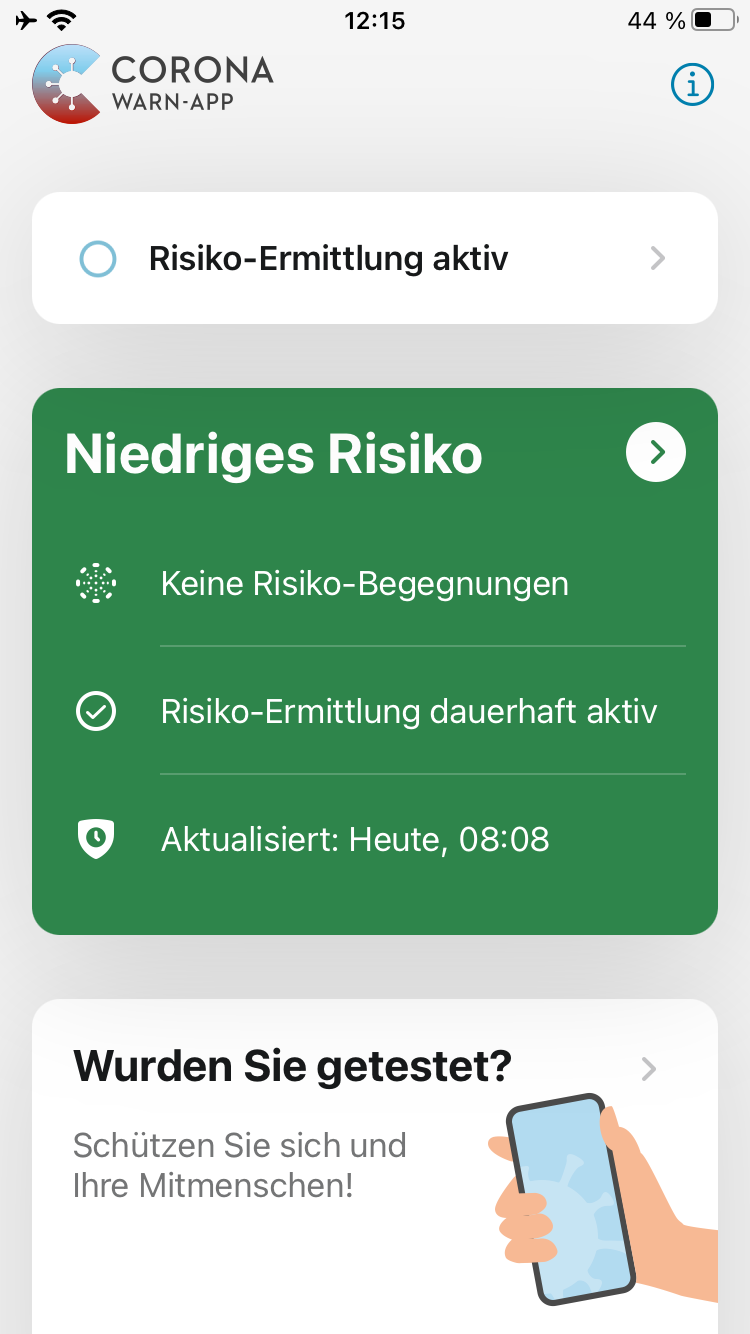
Still no risk-check at 12:30h:
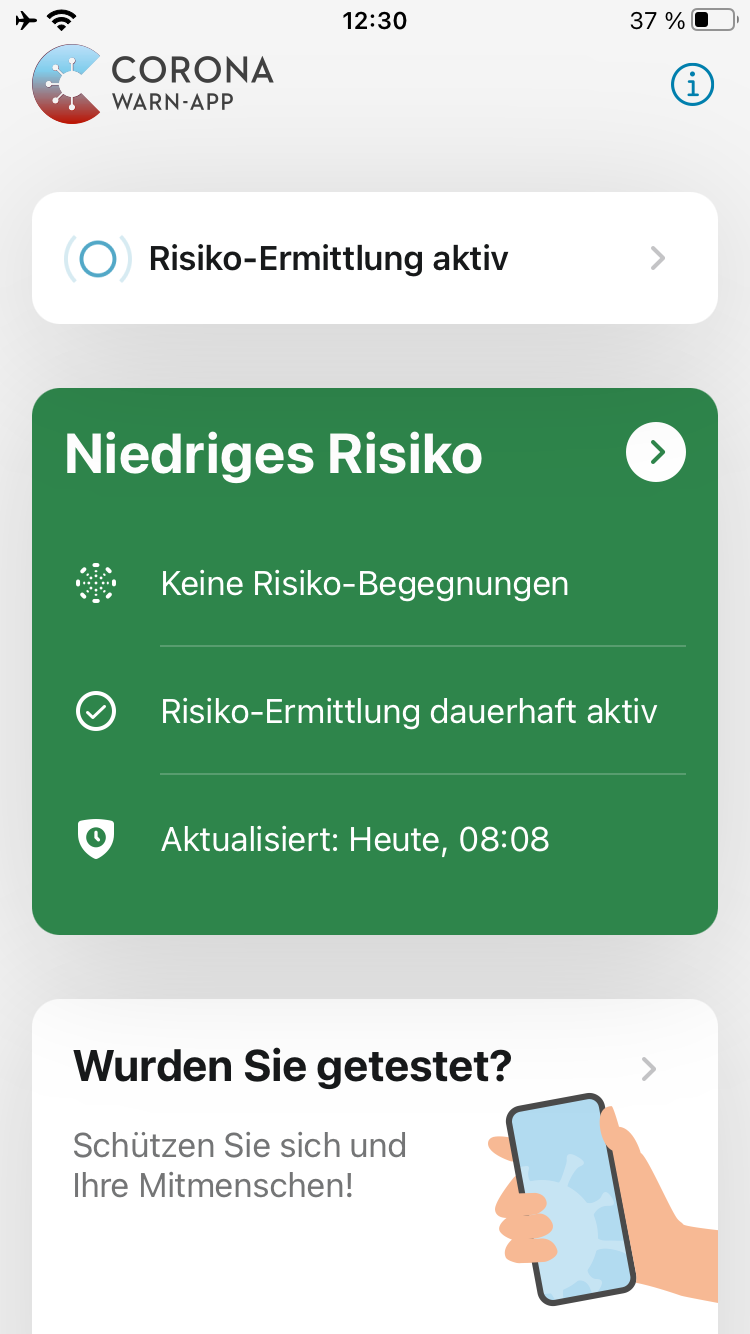
Open another view to trigger the check:
Ein-Tim
on 16 Feb 2021
@Ein-Tim Thanks for the feedback. I will also check this over a longer period of time.
dsarkar
on 16 Feb 2021
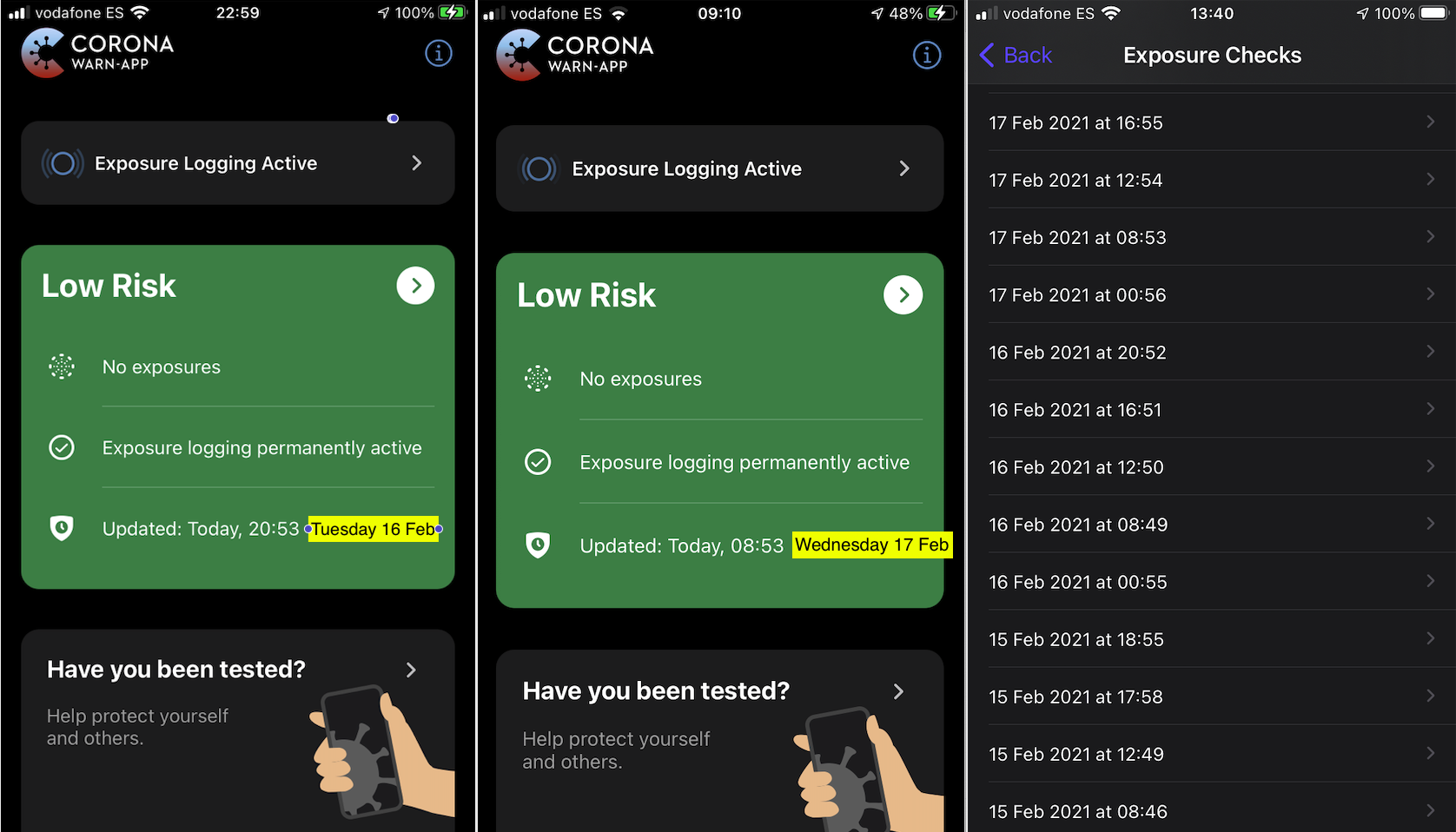
@Ein-Tim Last week Tuesday 1600 - Wednesday 1200 we run a check: CWA in the foreground, screen on. See screenshots above, checks are done regularly in the foreground.
dsarkar
on 22 Feb 2021
@dsarkar Okay, thanks, I consider this as solved now and will close it.
Ein-Tim
on 22 Feb 2021
@Ein-Tim ok! Thanks.
dsarkar
on 22 Feb 2021
@Ein-Tim did you continue to watch this? Any observations?
With 1.12 I had the feeling (although no hard data) that the background risk check was more reliable when I returned to the home screen before I pressed the home button to close the app.
When I forgot this the background check seemed unreliable ...
ndegendogo
on 6 Mar 2021
@ndegendogo
Thanks for the hint, I closed this issue since I didn't experience it anymore.
I will try it again now on 1.13, if I see this behavior again, I'll reopen the issue.
Did you experience it on 1.13?
Ein-Tim
on 6 Mar 2021
I don't have loaded 1.13 yet.
And it is a bit hard to test here - during the week I go to the office and have phases without WLAN. Also I am using the contact diary very much, so when I open the app it triggers the check again.
ndegendogo
on 6 Mar 2021
Related issues
 jonnyfux
·
3Comments
jonnyfux
·
3Comments
 felixbohnacker
·
3Comments
felixbohnacker
·
3Comments
 mss1010
·
3Comments
mss1010
·
3Comments
 Lhendrichs
·
3Comments
Lhendrichs
·
3Comments
 Applaus-Klaus
·
3Comments
Applaus-Klaus
·
3Comments
Most helpful comment
@Ein-Tim Thanks for the feedback. I will also check this over a longer period of time.