Cura: 4.5 beta - "No layers to show" popup
Please either get rid of this popup or give us a checkbox in the preferences to turn it off.
Its annoying as all get out to be in the preview and have it pop up every time you make a change.
There is already so little screen left to view the bed with all the pallets, and overlays adding this really makes it worse.
Or at the very least have it appear and AUTOMATICALLY dismiss itself after 3 seconds.
 tlhintoq
All 8 comments
Just so we know what you are talking about, is it the message that appears in the Preview tab after slicing if there are no models that are totally inside the buildvolume? It actually says Nothing to *slice* because none of the models fit the build volume or are assigned to a disabled extruder. Please scale or rotate models to fit, or enable an extruder.
 fieldOfView
on 15 Feb 2020
fieldOfView
on 15 Feb 2020
@fieldOfView
No. This new one as of 4.5 beta saying there is nothing to show, that you have to slice first.
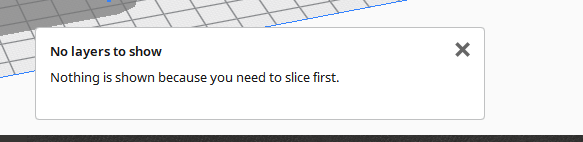
tlhintoq
on 16 Feb 2020
That is extremely annoying as it appears everything you do indeed.
 Liger0
on 16 Feb 2020
Liger0
on 16 Feb 2020
We've decided to put a checkbox there to not show it again.
 Ghostkeeper
on 18 Feb 2020
Ghostkeeper
on 18 Feb 2020
Outstanding. Thank you !
tlhintoq
on 19 Feb 2020
If you click the pop-up away it will stay away even when making changes, except when you have Slice Automatically enabled.
However, when Slice Automatically is enabled the layers will automatically get loaded.
I therefore propose to never show the message when Slice Automatically is enabled.
 BagelOrb
on 21 Feb 2020
BagelOrb
on 21 Feb 2020
Just implemented both my and @Ghostkeeper s idea.
BagelOrb
on 21 Feb 2020
Fixed for 4.5 stable.
Ghostkeeper
on 25 Feb 2020
Related issues
 jornada812
·
3Comments
jornada812
·
3Comments
 tomoinn
·
3Comments
tomoinn
·
3Comments
 ferociousdiablo
·
3Comments
ferociousdiablo
·
3Comments
 timherrm
·
3Comments
timherrm
·
3Comments
 Nemernemer
·
3Comments
Nemernemer
·
3Comments
Most helpful comment
We've decided to put a checkbox there to not show it again.