Client: K:\ drive becomes "unavailable" after a minute of starting Keybase.
The drive is still visible but Windows says it's "unavailable".
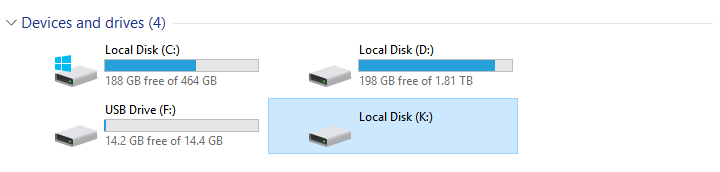
The K:\ drive works normally when I restart Keybase, but only for a minute or so.
My dokany version is 1.2.1.2000, which I installed manually.
my log id: d4949d479dcd3d65eb82251c
 HyphenSam
All 10 comments
@zanderz @taruti it seems kbfs is being restarted every two minutes or so, with an explicit shutdown call. I'm guessing the watchdog is upset about something, but I'm not sure how to interpret those logs. Can one of you please take a look?
 strib
on 1 Feb 2019
strib
on 1 Feb 2019
Someone is running keybase ctl stop repeatedly. @HyphenSam is that you? That stops all the main Keybase processes, including the ones that make files available on K:. Do you have a specific case/time you know this to have happened that you can show us in the log? If not, can you reproduce this and send the log with the exact time K: stopped working (and without issuing keybase ctl stop)? Thanks.
 zanderz
on 1 Feb 2019
zanderz
on 1 Feb 2019
Sorry for the late reply. I'm not running keybase ctl stop nor am I using any command lines.
I seem to have found a workaround. The issue seems to only occur when I start my computer, and the problem persists when I close Keybase while the K:\ drive is unavailable. If I restart Keybase and quickly close it while the K:\ drive is available, the issue no longer occurs when I open Keybase. The bug will occur again only when I restart my computer.
HyphenSam
on 15 Feb 2019
Hello, this was caused by Dokan keepalive bug and is fixed by the new Dokan release at https://github.com/dokan-dev/dokany/releases/tag/v1.2.2.1000
Closing this, if you reencounter this, please feel free to reopen the issue!
 taruti
on 20 Mar 2019
taruti
on 20 Mar 2019
I updated to Dokan 1.2.2.1000 and I am still having this issue.
My log ID is: 238d705b228fe5d3639d8b1c
 hsiktas
on 2 Apr 2019
hsiktas
on 2 Apr 2019
Ah, I forgot to leave an update on this. I'm still having this same issue after updating to Dokan 1.2.2.1000
I'll try to provide a log when I have the time.
HyphenSam
on 4 Apr 2019
@hsiktas I can confirm that your issue is real (even if it does not reproduce on my test machines...). This weeks release has added Debug logging for your issue to check where/why kbfsdokan is exiting.
Can you also please set the environment variable KEYBASE_MOUNT_FLAGS to 3. That will make our Dokan logging more verbose.
taruti
on 9 Apr 2019
I updated to version 3.2.1-20190410001004+61d9000f85 and I don't see this issue anymore. Access to K: seems to work fine. :)
hsiktas
on 10 Apr 2019
Still see the issue on version 3.2.2-20190411230550+5262f90fd9
I'd post a log but I keep getting a timeout error. I think the log is too big to send?
HyphenSam
on 5 May 2019
Seems to be fixed now.
HyphenSam
on 20 Sep 2019
Related issues
 martindevans
·
4Comments
martindevans
·
4Comments
 qntmpkts
·
3Comments
qntmpkts
·
3Comments
 dwhagar
·
3Comments
dwhagar
·
3Comments
 Alexendoo
·
3Comments
Alexendoo
·
3Comments
 kurianjacob
·
4Comments
kurianjacob
·
4Comments
Most helpful comment
@hsiktas I can confirm that your issue is real (even if it does not reproduce on my test machines...). This weeks release has added Debug logging for your issue to check where/why kbfsdokan is exiting.
Can you also please set the environment variable
KEYBASE_MOUNT_FLAGSto 3. That will make our Dokan logging more verbose.