Clarity: TypeError: Class constructor CommonStringsService cannot be invoked without 'new'
Describe the bug
After updating to version 3.0.0-next.4 just running ng serve will result in no compile errors. But you get a runtime error with CommonStringsService.
Error: Uncaught (in promise): TypeError: Class constructor CommonStringsService cannot be invoked without 'new'
TypeError: Class constructor CommonStringsService cannot be invoked without 'new'
    at new ClrCommonStringsService (clr-angular.js:707)
    at ClrCommonStringsService_Factory (clr-angular.js:709)
    at _callFactory (core.js:20068)
    at _createProviderInstance (core.js:20026)
    at resolveNgModuleDep (core.js:20001)
    at NgModuleRef_.push../node_modules/@angular/core/fesm5/core.js.NgModuleRef_.get (core.js:20677)
    at resolveNgModuleDep (core.js:20006)
    at NgModuleRef_.push../node_modules/@angular/core/fesm5/core.js.NgModuleRef_.get (core.js:20677)
    at resolveDep (core.js:21048)
    at createClass (core.js:20922)
    at resolvePromise (zone.js:852)
    at resolvePromise (zone.js:809)
    at zone.js:913
    at ZoneDelegate.push../node_modules/zone.js/dist/zone.js.ZoneDelegate.invokeTask (zone.js:423)
    at Object.onInvokeTask (core.js:25977)
    at ZoneDelegate.push../node_modules/zone.js/dist/zone.js.ZoneDelegate.invokeTask (zone.js:422)
    at Zone.push../node_modules/zone.js/dist/zone.js.Zone.runTask (zone.js:195)
    at drainMicroTaskQueue (zone.js:601)
Is clarity 3.x intended to work with angular versions pre 9.x, e.g. 8.2.0?
How to reproduce
Run ng serve and and open browser console.
Expected behavior
It should just work?
Versions
App
- Angular: 8.2.0
- Node: 13.3.0
- Clarity: 3.0.0-next.4
 spitfjre
All 33 comments
The current Clarity 3.0.0-next.4 will work with Angular 8.x until we finish upgrading to Angular 9. This should be working currently and looks like a bug. What version of the Angular CLI is your project running?
 coryrylan
on 6 Dec 2019
coryrylan
on 6 Dec 2019
I will come back to you on Monday.
spitfjre
on 8 Dec 2019
Hi. I have the same issue. My package.json
{
  "name": "web",
  "version": "0.0.0",
  "scripts": {
    "ng": "ng",
    "start": "ng serve",
    "build": "ng build",
    "build:ssr": "ng run web:server:dev",
    "test": "ng test",
    "lint": "ng lint",
    "e2e": "ng e2e"
  },
  "private": true,
 "dependencies": {
    "@angular-devkit/architect": "^0.803.20",
    "@angular-devkit/core": "^8.3.20",
    "@angular-devkit/schematics": "^8.3.20",
    "@angular/animations": "8.2.12",
    "@angular/common": "8.2.12",
    "@angular/compiler": "8.2.12",
    "@angular/core": "8.2.12",
    "@angular/forms": "8.2.12",
    "@angular/platform-browser": "8.2.12",
    "@angular/platform-browser-dynamic": "8.2.12",
    "@angular/platform-server": "8.2.12",
    "@angular/router": "8.2.12",
    "@clr/icons": "next",
    "@clr/ui": "next",
    "@clr/angular": "next",
    "@clr/core": "next",
    "@nguniversal/module-map-ngfactory-loader": "8.1.1",
    "@webcomponents/custom-elements": "^1.0.0",
    "aspnet-prerendering": "^3.0.1",
    "core-js": "^3.3.3",
    "oidc-client": "^1.9.1",
    "popper.js": "^1.16.0",
    "rxjs": "^6.5.3",
    "zone.js": "0.9.1"
  },
  "devDependencies": {
    "@angular-devkit/build-angular": "^0.803.20",
    "@angular/cli": "8.3.20",
    "@angular/compiler-cli": "8.2.12",
    "@angular/language-service": "8.2.12",
    "@types/jasmine": "~3.4.4",
    "@types/jasminewd2": "~2.0.8",
    "@types/node": "~12.11.6",
    "codelyzer": "^5.2.0",
    "jasmine-core": "~3.5.0",
    "jasmine-spec-reporter": "~4.2.1",
    "karma": "^4.4.1",
    "karma-chrome-launcher": "~3.1.0",
    "karma-coverage-istanbul-reporter": "~2.1.0",
    "karma-jasmine": "~2.0.1",
    "karma-jasmine-html-reporter": "^1.4.2",
    "typescript": "3.5.3"
  },
  "optionalDependencies": {
    "node-sass": "^4.12.0",
    "protractor": "~5.4.2",
    "ts-node": "~8.4.1",
    "tslint": "~5.20.0"
  }
}
 jkleczkowski
on 8 Dec 2019
jkleczkowski
on 8 Dec 2019
Angular CLI: 8.3.20
Node: 12.13.0
OS: linux x64
Angular: 8.2.0
... animations, common, compiler, compiler-cli, core, forms
... language-service, platform-browser, platform-browser-dynamic
... router

Package                           Version
-----------------------------------------------------------
@angular-devkit/architect         0.802.0
@angular-devkit/build-angular     0.802.0
@angular-devkit/build-optimizer   0.802.0
@angular-devkit/build-webpack     0.802.0
@angular-devkit/core              8.3.20
@angular-devkit/schematics        8.3.20
@angular/cdk                      8.2.3
@angular/cli                      8.3.20
@angular/material                 8.2.3
@ngtools/webpack                  8.2.0
@schematics/angular               8.3.20
@schematics/update                0.803.20
rxjs                              6.5.2
typescript                        3.5.3
webpack                           4.38.0
Thanks for the details, I am looking into this and will try to get a fix in for our next 3.x-next release.
coryrylan
on 10 Dec 2019
Just a note, we haven't confirmed that Clarity v3 can work with Angular v8, we are still working through issues with v9 update.
 gnomeontherun
on 13 Dec 2019
gnomeontherun
on 13 Dec 2019
I have a similar issue with Clarity V3-next.5 in Angular 9.0.0-rc.7.
"@clr/angular": "^3.0.0-next.5",
"@clr/core": "^3.0.0-next.5",
"@clr/icons": "^3.0.0-next.5",
"@clr/ui": "^3.0.0-next.5",
ng --version
 _                      _                 ____ _     ___
/ \   _ __   __ _ _   _| | __ _ _ __     / ___| |   |_ _|
/ △ \ | '_ \ / _| | | | |/ _ | '__| | | | | | |
/ ___ \| | | | (_| | |_| | | (_| | | | |___| |___ | |
/_/ __| |_|__, |__,_|_|__,_|_| ____|_____|___|
|___/
Angular CLI: 9.0.0-rc.7
Node: 12.4.0
OS: win32 x64
Angular: 9.0.0-rc.7
... animations, cli, common, compiler, compiler-cli, core, forms
... language-service, localize, platform-browser
... platform-browser-dynamic, router
Ivy Workspace: Yes
Package Version
@angular-devkit/architect 0.900.0-rc.7
@angular-devkit/build-angular 0.900.0-rc.7
@angular-devkit/build-ng-packagr 0.900.0-rc.7
@angular-devkit/build-optimizer 0.900.0-rc.7
@angular-devkit/build-webpack 0.900.0-rc.7
@angular-devkit/core 9.0.0-rc.7
@angular-devkit/schematics 9.0.0-rc.7
@ngtools/webpack 9.0.0-rc.7
@schematics/angular 9.0.0-rc.7
@schematics/update 0.900.0-rc.7
ng-packagr 9.0.0-rc.3
rxjs 6.5.3
typescript 3.6.4
webpack 4.41.2

 whizkidwwe1217
on 22 Dec 2019
whizkidwwe1217
on 22 Dec 2019
After investigation the latest CLI/Angular works with the latest 3.x Clarity but the error can occur in scenarios for misconfigured older projects. Make sure in the tsconfig.json the target is set to "target":"es2015", if set to es5 you will get the error above. In Angular 8 and CLI version 8 this was changed and the CLI automatically creates two builds one for IE11 with ES5 JavaScript and another with ES2015 for modern browsers.
coryrylan
on 22 Dec 2019
@coryrylan Your absolutely right. I changed the target from es5 to es2015 and it worked. Thanks!
whizkidwwe1217
on 22 Dec 2019
I would say misconfigured is the wrong word here. It is a totally valid configuration, as sown here. It is the easiest configuration option to opt out of differential loading.
spitfjre
on 24 Dec 2019
Thanks for the link, agree that it is a valid configuration. It looks like when using ng serve the CLI is not compiling ES2015 library dependencies when targeting ES5 but works fine when using differential loading.
It also looks like even after using the default differential loading ie11 support is broken in the latest v9 for me. Looks like its possibly due to a zone issue https://github.com/angular/angular/issues/31678
Going to mark as has tentative workaround when using differential loading and will look into the zone issue. I'll keep this issue open to see if we can get ES5 target working with ng serve.
coryrylan
on 24 Dec 2019
Blocking on the zone issue https://github.com/angular/angular/issues/31678
We will only be shipping es2015+ code for core and to allow the downstream CLIs compile to the appropriate target. We can close this once the zone issues has been verified and fixed in Angular 9.
coryrylan
on 15 Jan 2020
Same issue running Angular 9 with ivy and Clarity 3.0.0-next8. But I use target="es5".
``` "@angular/animations": "~9.0.0",
"@angular/common": "~9.0.0",
"@angular/compiler": "~9.0.0",
"@angular/core": "~9.0.0",
"@angular/forms": "~9.0.0",
"@angular/platform-browser": "~9.0.0",
"@angular/platform-browser-dynamic": "~9.0.0",
"@angular/router": "~9.0.0",
"@clr/angular": "^3.0.0-next.8",
"@clr/core": "^3.0.0-next.8",
"@clr/ui": "^3.0.0-next.8",
This is really blocking me, any know workaround for this? The zone.js trick did not work:
import 'zone.js/dist/zone.js'; // Included with Angular CLI.
(window as any).__Zone_disable_toString = true;
and I don't want differential loading to be enabled. Really struggeling here.

ERROR TypeError: Class constructor CommonStringsServiceInternal cannot be invoked without 'new'
at new ClrCommonStringsService (clr-angular.js:3008)
at Object.ClrCommonStringsService_Factory [as factory] (clr-angular.js:3010)
at R3Injector.push../node_modules/@angular/core/__ivy_ngcc__/fesm5/core.js.R3Injector.hydrate (core.js:11347)
at R3Injector.push../node_modules/@angular/core/__ivy_ngcc__/fesm5/core.js.R3Injector.get (core.js:11170)
at NgModuleRef$1.push../node_modules/@angular/core/__ivy_ngcc__/fesm5/core.js.NgModuleRef$1.get (core.js:24104)
at R3Injector.push../node_modules/@angular/core/__ivy_ngcc__/fesm5/core.js.R3Injector.get (core.js:11181)
at NgModuleRef$1.push../node_modules/@angular/core/__ivy_ngcc__/fesm5/core.js.NgModuleRef$1.get (core.js:24104)
at Object.get (core.js:22457)
at getOrCreateInjectable (core.js:3561)
at Object.ɵɵdirectiveInject (core.js:14048)
```
 alexej-strelzow
on 11 Feb 2020
alexej-strelzow
on 11 Feb 2020
@alexej-strelzow to better understand the use cases could you describe why you would not want to have differential loading for your project?
coryrylan
on 11 Feb 2020
@coryrylan thank's for getting back to me so quickly. A couple of month ago I investigated the differential loading behavior on the major 4 browsers + IE 11 (I know...) and I saw that some browsers load both bundles, but in the end execute only 1 (of course). That's the main reason - seems like only Chrome fully benefits from it.
Also, yesterday I tried target="es2015", but was not successful. I believe that it has sth to do with the Tab-Component I am using. I will try to provide you a repro scenario tmw.
Thank you (and all the contributors) for putting your time and passion into this project, really appreciate it! :)
alexej-strelzow
on 11 Feb 2020
A repro would be excellent! I'd be happy to take a look. I do remember, at one point, when differential loading first came out, I had a similar issue where all the bundles would get loaded. I believe this has been fixed now in the latest Angular CLI but I will double-check to be sure that is the case with the latest Clarity release.
We want to be able to help teams be able to take advantage of differential loading as well as many of the under the hood perf improvements coming soon in Clarity. I also don't want to block people on upgrading because of this issue either so I am watching this closely and still investigating.
coryrylan
on 11 Feb 2020
UPDATE:
I am now targeting es2015 -> works like a charm. Got Angular 9 with ivy and Clarity 3 (next 8) up and running without errors :) - and with clr-tabs !
OLD:
@coryrylan
Unfortunately (for me) it works in stackblitz, but I have narrowed it down to the clr-tabs element. When I remove this code:
<clr-tabs>
    <clr-tab>
        <button (click)="tabClick('all')" clrTabLink>Alle</button>
    </clr-tab>
    <clr-tab>
        <button (click)="tabClick('incoming')" clrTabLink>Eingänge</button>
    </clr-tab>
    <clr-tab>
        <button (click)="tabClick('outgoing')" clrTabLink>Ausgänge</button>
    </clr-tab>
</clr-tabs>
then this error:
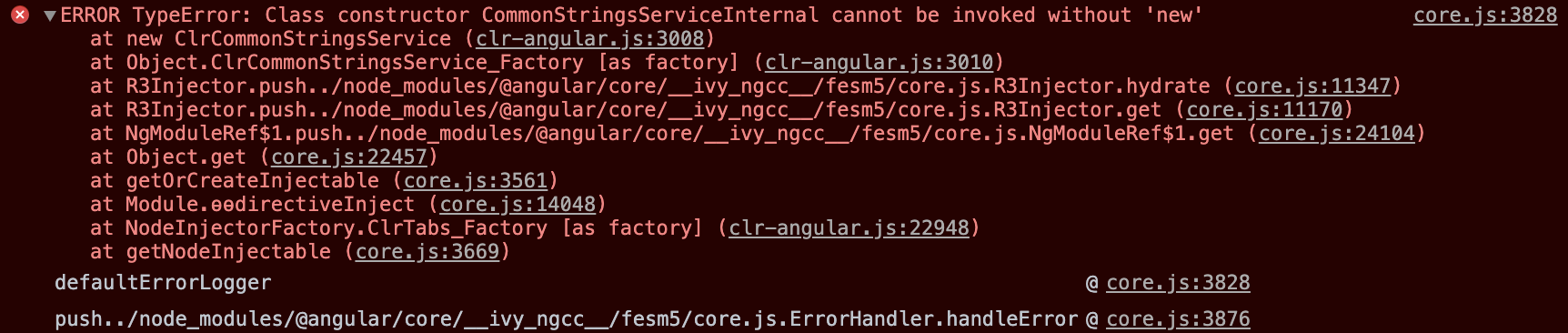
does not occur anymore. And sometimes (with the clr-tabs) I get this error, after I played around with it for a long time:

Idk if this hint is enough for you. For now a workaround for me would be to write an own tabs-component I guess. I saw that there is now an own TabsModule - "ClrTabsModule", using this in addition to "ClarityModule" does not help.
The module where the tx-list is declared looks like this:
import { NgModule } from '@angular/core';
import { CommonModule } from '@angular/common';
import { ClarityModule, ClrTabsModule } from '@clr/angular';
import { ReactiveFormsModule } from '@angular/forms';
import { RouterModule } from '@angular/router';
import { TransactionListComponent } from '@app/features/transactions/list/transaction-list.component';

@NgModule({
  declarations: [TransactionListComponent],
  imports: [CommonModule, RouterModule, ClarityModule, ClrTabsModule, ReactiveFormsModule],
  exports: [TransactionListComponent]
})
export class TransactionListModule {}
@alexej-strelzow fantastic! I'll be leaving this open and continue to closely monitor for similar issues.
coryrylan
on 14 Feb 2020
Hi,
i had a same problem "core.js:6014 ERROR TypeError: Class constructor DataWindowControlComponent cannot be invoked without 'new'
at new DbaBspAdmsFreeForm (eval at
DbaBspAdmsFreeForm inherits from DataWindowControlComponent
//Transpiled code of "class DbaBspAdmsFreeForm extends DataWindowControlComponent {... }"
var DbaBspAdmsFreeForm = /** @class */ (function (_super) {
__extends(DbaBspAdmsFreeForm, _super);
function DbaBspAdmsFreeForm(_builder, dbaBspAdmsService, host) {
//Transpiled code of 'class DataWindowControlComponent extends DataStoreControlComponent { .. } '
class DataWindowControlComponent extends DataStoreControlComponent {
constructor() {
super();
}
}
 adrua
on 19 Feb 2020
adrua
on 19 Feb 2020
@coryrylan this issue comes from upgrading from 8 to 9, it doesn't update the "target" property in the tsconfig.json. Maybe it would be helpful to add a note on the 3.0 upgrade page to verify this setting.
 rogerfar
on 2 Mar 2020
rogerfar
on 2 Mar 2020
@coryrylan I'm stuck at the same problem.
After upgrading Angular & Clarity in Nx workspace the Jest tests were failing according to #4196.
The workaround provided by @alexej-strelzow worked, but then the error message of this issue came up:
 TypeError: Class constructor CommonStringsServiceInternal cannot be invoked without 'new'

      at new apply (../../node_modules/@clr/angular/bundles/clr-angular.umd.js:1425:46)
      ...
All my targets are already configured for es2015, can you provide another hint for a solution?
 twittwer
on 12 Mar 2020
twittwer
on 12 Mar 2020
Have you checked to see if the angular bundle is included in your transformIgnorePatterns?
 mathisscott
on 12 Mar 2020
mathisscott
on 12 Mar 2020
I ignored clarity completely:
module.exports = {
    testMatch: ['**/+(*.)+(spec).+(ts|js)?(x)'],
    transform: {
        '^.+\\.(ts|html)$': 'ts-jest',
        '^.+\\.js$': 'babel-jest',
    },
    transformIgnorePatterns: ['node_modules/?!(@clr)'],
    moduleNameMapper: {
        'base.element.css': '@clr/core/common/base/base.element.css.js',
    },
    resolver: '@nrwl/jest/plugins/resolver',
    moduleFileExtensions: ['ts', 'js', 'html'],
    collectCoverage: true,
    coverageReporters: ['json', 'lcov'],
    watchPlugins: ['jest-watch-typeahead/filename', 'jest-watch-typeahead/testname'],
};
As already described in #4196 the error can be repoduced here by running the tests the library (npm run test lib)
twittwer
on 13 Mar 2020
Getting the same error when trying to add datepicket to my angular+electron app
Using
"@clr/angular": "^3.0.1",
"@clr/core": "^3.0.1",
"@clr/icons": "^3.0.1",
"@clr/ui": "^3.0.1",
"@angular/core": "^9.0.7"
target is configured to es2015

Any workaround?
 YanaKrivitskaya
on 19 Mar 2020
YanaKrivitskaya
on 19 Mar 2020
Getting the same error when trying to add datepicket to my angular+electron app
Using
"@clr/angular": "^3.0.1",
"@clr/core": "^3.0.1",
"@clr/icons": "^3.0.1",
"@clr/ui": "^3.0.1","@angular/core": "^9.0.7"
target is configured to es2015
Any workaround?
I was with the same problem when trying to use the datepicker.
I have changed the target of my tsconfig.json from es5 to es2015 and now its working.
 portothree
on 20 Mar 2020
portothree
on 20 Mar 2020

Getting this same error.
    "@angular/core": "^9.0.6",
    "@clr/angular": "^3.0.1",
    "@clr/core": "^3.0.0",
    "@clr/icons": "^3.0.1",
    "@clr/ui": "^3.0.1",
tsConfig.json's target is set to es6.
we have temporarily switched off ivy compiler (enableIvy: false in tsConfig). is the reason why we get this error?
Can anyone please help?
 aravindh-nagarajan
on 24 Mar 2020
aravindh-nagarajan
on 24 Mar 2020
@aravindh-nagarajan
Depending on the other settings you have active in your tsconfig there are a couple more compiler options you may need for typescript. Can you share your tsconfig settings?
I may be able to point you in the right direction if I have a better understanding of what shape you're in.
mathisscott
on 24 Mar 2020
@mathisscott Thank you, Here it is.
{
    "compilerOptions": {
        "allowJs": true,
        "declaration": false,
        "emitDecoratorMetadata": true,
        "esModuleInterop": true,
        "experimentalDecorators": true,
        "importHelpers": true,
        "lib": [
            "es2018",
            "dom"
        ],
        "module": "esnext",
        "moduleResolution": "node",
        "noImplicitAny": true,
        "sourceMap": true,
        "suppressImplicitAnyIndexErrors": true,
        "target": "es6",
        "baseUrl": ".",
        "paths": {
        }
    },
    "angularCompilerOptions": {
        "enableIvy": false,
        "fullTemplateTypeCheck": true,
    }
}
Some more details: ours is a hybrid application (AngularV9 and AngularJS 1.7) and we dont use angular cli.
aravindh-nagarajan
on 24 Mar 2020
@aravindh-nagarajan
I have a project I've been testing with that compiles. I replaced its tsconfig with yours and it still compiles and runs just fine – no error. Do you have any configuration in your app that might be overriding what you are showing here?
mathisscott
on 24 Mar 2020
go to tsconfig.json file and change your target to es5 (ECMAScript 5) like this :
{
"compileOnSave": false,
"compilerOptions": {
"baseUrl": "./",
"outDir": "./dist/out-tsc",
"sourceMap": true,
"declaration": false,
"module": "esnext",
"moduleResolution": "node",
"emitDecoratorMetadata": true,
"experimentalDecorators": true,
"importHelpers": true,
"target": "es5",
"typeRoots": ["node_modules/@types"],
"lib": ["es2018", "dom"]
}
}
 Ukmandal
on 25 Jun 2020
Ukmandal
on 25 Jun 2020
hey, i have the same issue here.
i tried to add material MatSliderModule and then this happend:
Uncaught TypeError: Class constructor MatCommonModule cannot be invoked without 'new'
at Module../node_modules/@angular/material/__ivy_ngcc__/fesm2015/core.js (core.js:183)
at __webpack_require__ (bootstrap:79)
at Module../node_modules/@angular/material/__ivy_ngcc__/fesm2015/slider.js (slider.js:1)
at __webpack_require__ (bootstrap:79)
at Module../src/app/app.component.ts (app.component.ts:1)
at __webpack_require__ (bootstrap:79)
at Module../src/app/app.module.ts (app.module.ts:1)
at __webpack_require__ (bootstrap:79)
at Module../src/main.ts (main.ts:1)
at __webpack_require__ (bootstrap:79)
of course i tried all the above solutions and nothing worked for me.
this is my tsconfig.json:
{
"compileOnSave": false,
"compilerOptions": {
"baseUrl": "./",
"outDir": "./dist/out-tsc",
"sourceMap": true,
"declaration": false,
"downlevelIteration": true,
"experimentalDecorators": true,
"module": "esnext",
"moduleResolution": "node",
"importHelpers": true,
"target": "es2015",
"lib": [
"es2018",
"dom"
]
},
"angularCompilerOptions": {
"fullTemplateTypeCheck": true,
"strictInjectionParameters": true
}
}
my app.module.ts:

and my dependencies:
"dependencies": {
"@angular/animations": "^9.1.11",
"@angular/cdk": "^9.2.4",
"@angular/common": "~9.1.11",
"@angular/compiler": "~9.1.11",
"@angular/core": "~9.1.11",
"@angular/forms": "~9.1.11",
"@angular/material": "^9.2.4",
"@angular/platform-browser": "~9.1.11",
"@angular/platform-browser-dynamic": "~9.1.11",
"@angular/router": "~9.1.11",
"jQuery": "^1.7.4",
"jquery": "^3.5.1",
"rxjs": "~6.5.4",
"tslib": "^1.10.0",
"zone.js": "~0.10.2"
}
 Hila1
on 1 Jul 2020
Hila1
on 1 Jul 2020
since my error started when i first install Material, i have relized that the fix should be somewhere around material.
so i managed to fix this issue by doing the following steps:
ng add @angular/material(again).- delete
node_modulesfolder. npm install.
after compilation the issue got fixed!
Hila1
on 1 Jul 2020
Related issues
 beaker1977
·
3Comments
beaker1977
·
3Comments
 srikanthps
·
3Comments
srikanthps
·
3Comments
 BugsyFTW
·
3Comments
BugsyFTW
·
3Comments
 thojo
·
3Comments
thojo
·
3Comments
 ph55
·
3Comments
ph55
·
3Comments
Most helpful comment
After investigation the latest CLI/Angular works with the latest 3.x Clarity but the error can occur in scenarios for misconfigured older projects. Make sure in the
tsconfig.jsonthe target is set to"target":"es2015",if set toes5you will get the error above. In Angular 8 and CLI version 8 this was changed and the CLI automatically creates two builds one for IE11 with ES5 JavaScript and another with ES2015 for modern browsers.https://blog.angular.io/version-8-of-angular-smaller-bundles-cli-apis-and-alignment-with-the-ecosystem-af0261112a27