Clarity: Tree view is not considering the states when collapsed state
Select one ... (check one with "x")
[ X] bug
[ ] feature request
[ ] enhancement
Expected behavior
In collpased state, if i uncheck or check that state will be consider.
Actual behavior
In collpse mode, if we change the state that state is not considering , it holds the previous ste only(it means, in expand mode what we selected i.e)
Reproduction of behavior
- Include a link to the reproduction scenario you created by forking one of the Clarity Plunker Templates:
Environment details
Angular version: 2.0.X
Clarity version:
OS and version:
Browser: [all | Chrome XX | Firefox XX | IE XX | Safari XX | Mobile Chrome XX | Android X.X Web Browser | iOS XX Safari | iOS XX UIWebView | iOS XX WKWebView ]
 girijaa
All 29 comments
@girijaa: Could you please provide a plnkr to replicate this issue? Without a plnkr it is difficult for us to reproduce the issue and investigate it.
 adityarb88
on 31 Aug 2017
adityarb88
on 31 Aug 2017
Actually, I don't want us to lose time investigating a potential bug from a one-line description that I have a very hard time understanding.
So before we investigate, @girijaa, could you please post a plunker reproducing the issue you have? Thank you.
 youdz
on 31 Aug 2017
youdz
on 31 Aug 2017
Hi,
Directly you can see in your website, tree view with checkboxes
On Aug 31, 2017 7:38 PM, "Eudes Petonnet-Vincent" notifications@github.com
wrote:
Actually, I don't want us to lose time investigating a potential bug from
a one-line description that I have a very hard time understanding.So before we investigate, @girijaa https://github.com/girijaa, could
you please post a plunker reproducing the issue you have? Thank you.—
You are receiving this because you were mentioned.
Reply to this email directly, view it on GitHub
https://github.com/vmware/clarity/issues/1400#issuecomment-326306687,
or mute the thread
https://github.com/notifications/unsubscribe-auth/AFH7Gs8lJE2JrW6Gzg1foweeNhKluJp5ks5sdr5pgaJpZM4PIwPh
.
girijaa
on 31 Aug 2017
@girijaa: This does look like a bug. We will take a look and get back to you.
adityarb88
on 31 Aug 2017
Hi,
May i know, did you people resolve this issue.
girijaa
on 4 Sep 2017
@girijaa
It's in our backlog but is not currently being worked. Thanks for checking in!
 mathisscott
on 4 Sep 2017
mathisscott
on 4 Sep 2017
I'm facing a variant of this bug two:
https://plnkr.co/edit/HsXrzOkJ49tIy9EEvKew?p=preview
when outer is expanded it works as expected
when it's not, checking inner (that is outside) doesn't change the checkbox of outer.
PS: the initial bug is much worse than this (ie: if outer is selected when collapsed, inner is not selected).
 yelhouti
on 23 Sep 2017
yelhouti
on 23 Sep 2017
When this will be fixed?
Is there any workaround for this?
Component should expose events/emit the events for checkbox changes and collapse/expand events with the object to handle it by ourselfs which is not the case.
Please prioritize this! It has been hanging in open state from more than 5 months :-(
We are blocked here. :(
 shravansofts
on 14 Dec 2017
shravansofts
on 14 Dec 2017
@adityarb88 @youdz @jeeyun
Are there any details you can share on this item?
mathisscott
on 14 Dec 2017
Any update on this?
shravansofts
on 1 Jan 2018
@shravansofts: Apologies for the late reply. I was on vacation. We haven't gotten time to take a look at this yet because of other priorities. I will try and get an update on what can be done for this from the team this week.
adityarb88
on 2 Jan 2018
Any ETA on this fix?
shravansofts
on 18 Jan 2018
Hi @shravansofts. No ETA yet. We will get to this when someone from the team is available to work on this. As of now everyone is tied up working on other components/issues.
Also, if you want to investigate this and submit a PR, we would be happy to review it and merge in the fix. Thanks!
adityarb88
on 18 Jan 2018
Is this issue still on the radar? I love all the Clarity components and would prefer using something built-in if I could, but unfortunately the app I'm writing requires that the treeview allows children to be selected even if the parent is collapsed.
 DeadlyBrad42
on 7 May 2018
DeadlyBrad42
on 7 May 2018
Any update on this?
shravansofts
on 1 Jun 2018
@DeadlyBrad42 @shravansofts: Apologies for the late reply. Missed the earlier comments. We still haven't gotten to this ticket. We do not have an ETA of when someone will start working on this. All members of our team are working on other components/issues. You can take a look at whats in progress right now here: https://github.com/vmware/clarity/issues?q=is%3Aopen+is%3Aissue+label%3A%22In+Progress%22
adityarb88
on 6 Jun 2018
In my opinion this issue makes the Checkbox Tree not safe to use - it leads to big errors from the user input side unless you force the dropdown to always stay expanded. It is easy for the developers to oversee this bug and I think there should at least be a note about it somewhere. We've learned the hard way...
 petrtravnik
on 21 Jun 2018
petrtravnik
on 21 Jun 2018
Hi @mathisscott
Any news about this bug fix?
Thanks in advance.
 Itay777
on 8 Jul 2018
Itay777
on 8 Jul 2018
Hi @Itay777
We're currently working on it. Please subscribe to the issue for updates. You should be able to see the labels. It will receive the label "In Review" when it is being peer reviewed and getting ready for release.
thanks.
mathisscott
on 9 Jul 2018
Hi @mathisscott,
I can see this bug is still on hold, do you know when it will be fixed?
this component has stopped working as expected since our last clarity upgrade,
and we need it to work before our incoming release.
Thanks in advance.
Itay777
on 16 Jul 2018
I will ask @jeeyun to leave a comment on the progress on this issue. It seems like it's really important for your project. When is the release you're talking about?
mathisscott
on 16 Jul 2018
Yes, this component is very useful in our project, we are using it to filter documents by status.
The release is scheduled to beginning of august, we will really appreciate your help by fixing this bug soon.
Thanks @mathisscott & @jeeyun !
Itay777
on 17 Jul 2018
@Itay777 Until Clarity worked on this bug - I use
https://github.com/leovo2708/ngx-treeview/tree/master/src/lib
 KANekT
on 17 Jul 2018
KANekT
on 17 Jul 2018
Hi @jeeyun,
any update on this bug fix progress?
Itay777
on 24 Jul 2018
Hi @Itay777, we want to provide solution for two use cases - 1. a simpler use case where all the tree nodes are already defined and populated in the DOM (which allows Clarity component to provide comprehensive state management out of the box) and 2. a more complex use case where we want to allow the component to fetch and destroy the children nodes on demand (e.g. when a user clicks to expand and collapse a node) which means that the component cannot know all the information about the states of the children ahead of time and the application-side would have to manage state. Thinking about both use cases requires a more thorough examination (and possible refactoring) of our API so it's taking a bit longer. I will provide another update here when we have a more concrete timeline for projected completion. Thank you for checking in and asking. Also, feel free to share your use case and what is the typical size and depth of the treeviews in your application. Knowing concrete example helps us to make sure we build something that's useful!
 jeeyun
on 24 Jul 2018
jeeyun
on 24 Jul 2018
Hi @jeeyun here is an example of our usecase on stackblitz.
We are using the tree component to filter items by state from the data grid:
- we are using 3 level depth tree.
- we initialize the tree from json\ code.
- by default all nodes are selected.
- when any selection change happens, we are sending an ajax request to the server, with updated list of selected nodes.
- when we want to select\ unselect a group of nodes, then we check \uncheck the parent node, and any child node gets selected\ unselected.
- when we want to select one or more specific nodes, then we unselect all nodes by unchecking the root node, then select the required nodes.
Hope it is clear enough, please don't be afraid to ask if something is unclear.
Itay777
on 25 Jul 2018
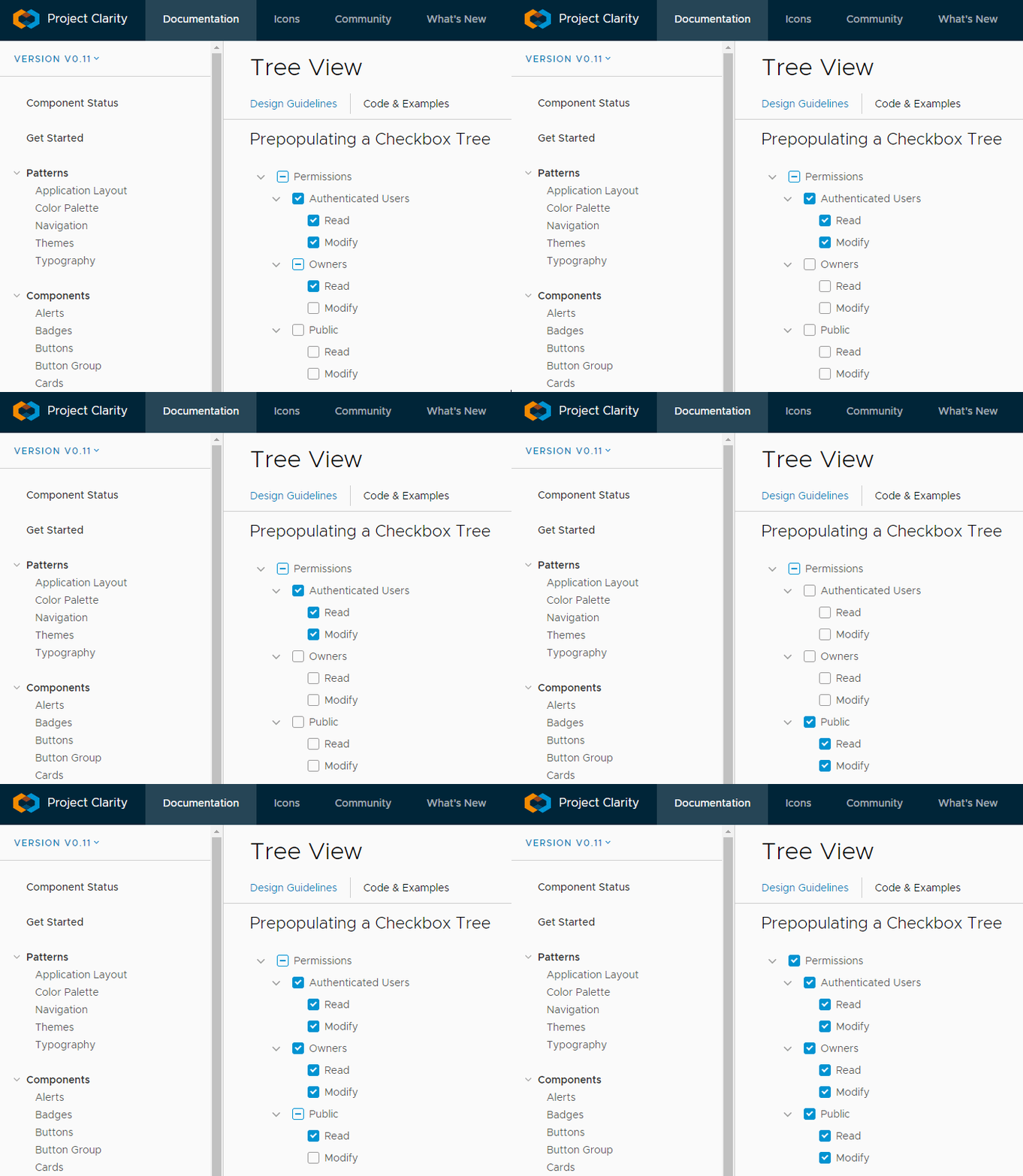
You mess with it long enough you get a nice light show...
*1 Clicking the same checkbox way to fast
*2 Some combination of expanding/collapsing with intermediate states (or maybe i clicked to fast and invoked it with *1)
 deniszholob
on 2 Aug 2018
deniszholob
on 2 Aug 2018
Hi @jeeyun,
any ETA?
Itay777
on 2 Oct 2018
Hi there 👋, this is an automated message. To help Clarity keep track of discussions, we automatically lock closed issues after 14 days. Please look for another open issue or open a new issue with updated details and reference this one as necessary.
![github-actions[bot] picture](https://avatars.githubusercontent.com/in/15368?v=4&s=40) github-actions[bot]
on 15 Sep 2020
github-actions[bot]
on 15 Sep 2020
Related issues
 yandong01
·
3Comments
yandong01
·
3Comments
 clane
·
3Comments
clane
·
3Comments
 mayesgr
·
3Comments
mayesgr
·
3Comments
 reddolan
·
3Comments
reddolan
·
3Comments
 elesueur
·
3Comments
elesueur
·
3Comments
Most helpful comment
You mess with it long enough you get a nice light show...

*1 Clicking the same checkbox way to fast
*2 Some combination of expanding/collapsing with intermediate states (or maybe i clicked to fast and invoked it with *1)