Clarity: Tree View Drag and Drop (design spec)
Description
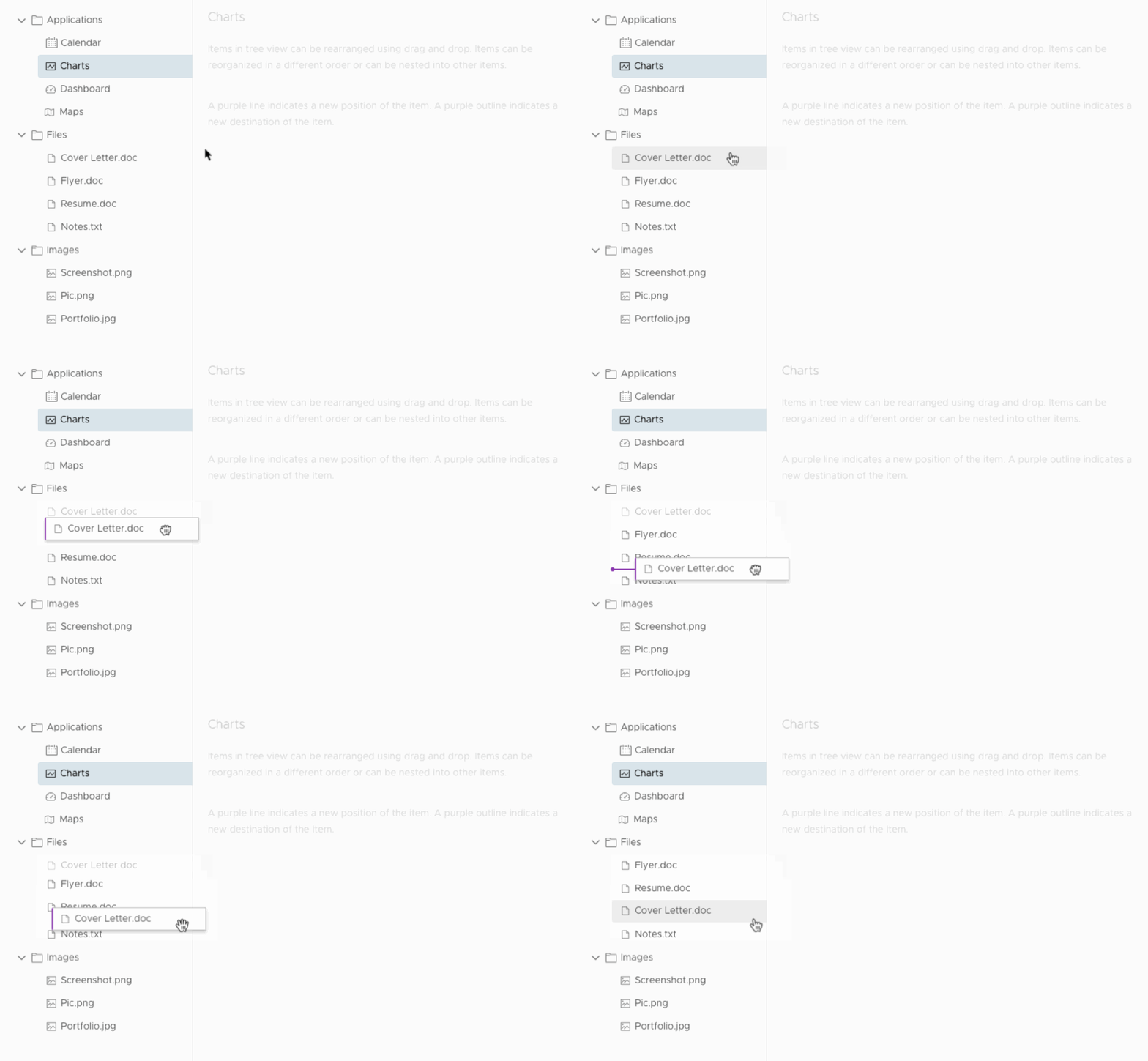
Items in tree view can be rearranged using drag and drop
Usage
To reorder and rearrange nodes in a tree view, resulting in a change in arrangement or nesting
Behavior
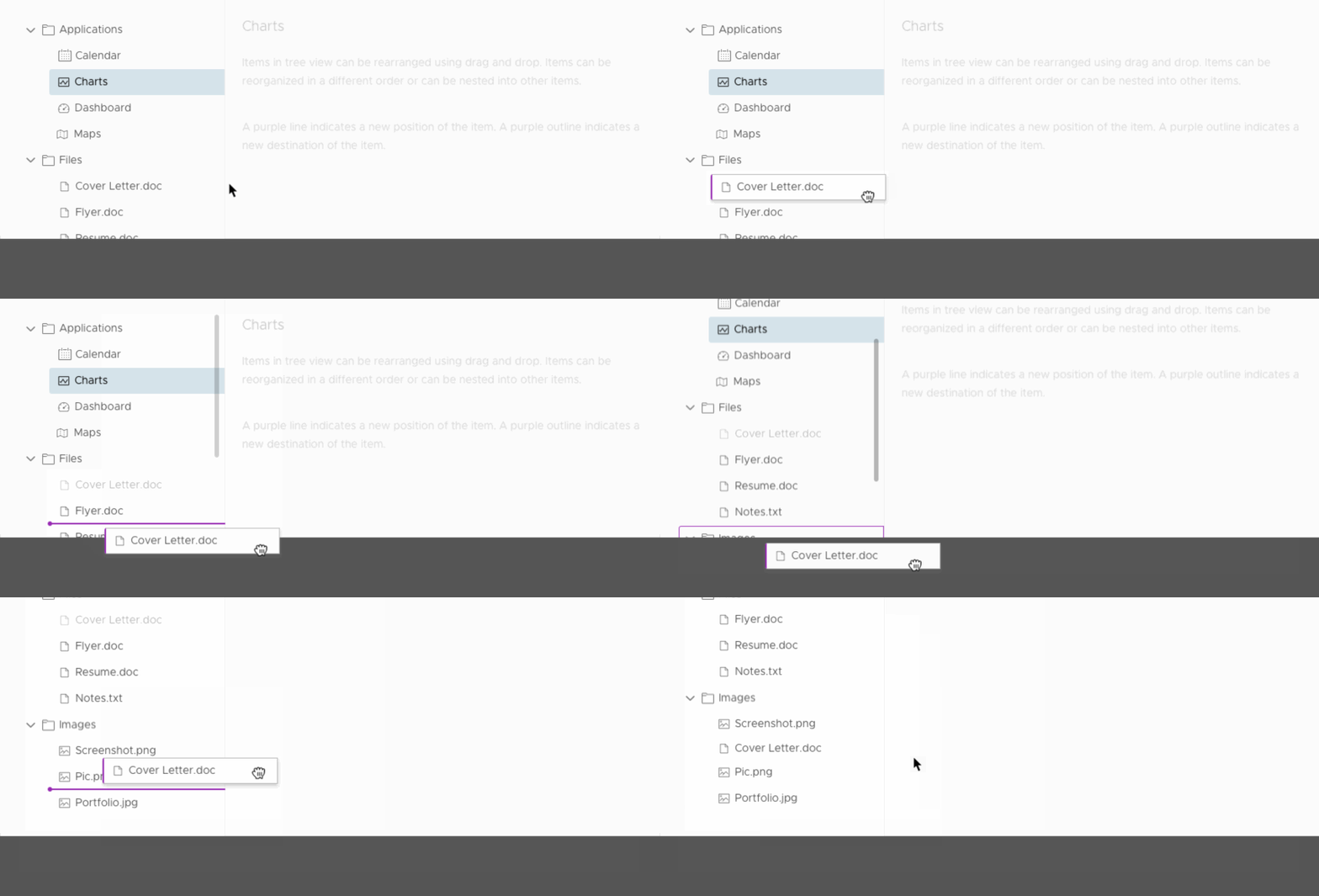
When a tree node is dragged, a “copy” of the tree node will be dragged with the cursor. The original node will be greyed out, indicating its previous position.

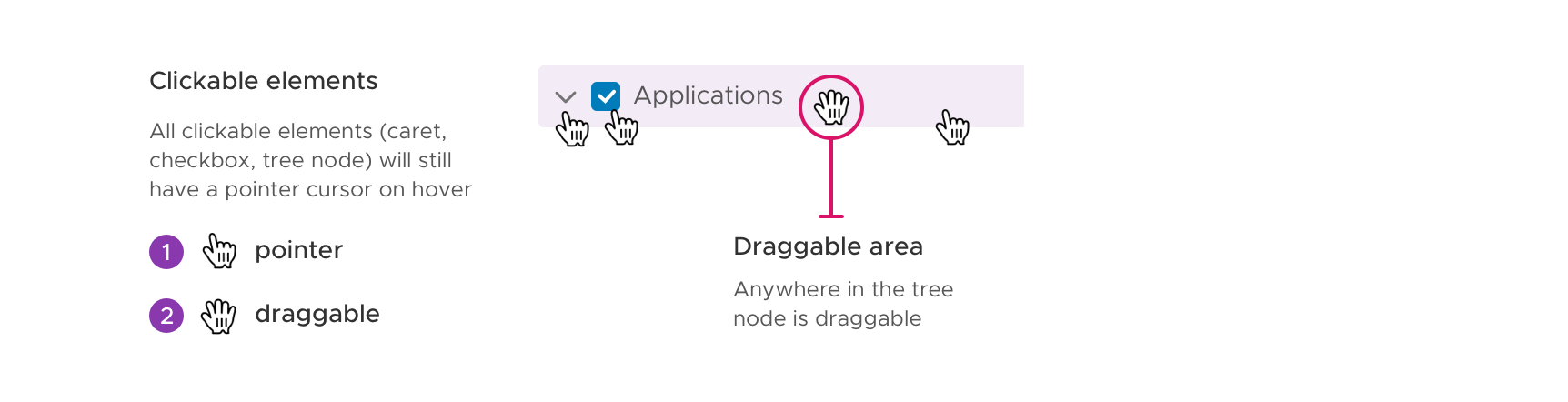
A tree node is draggable from anywhere inside of its container. If the tree node can be expanded/collapsed, selected or checked, those elements remain clickable but are also draggable.
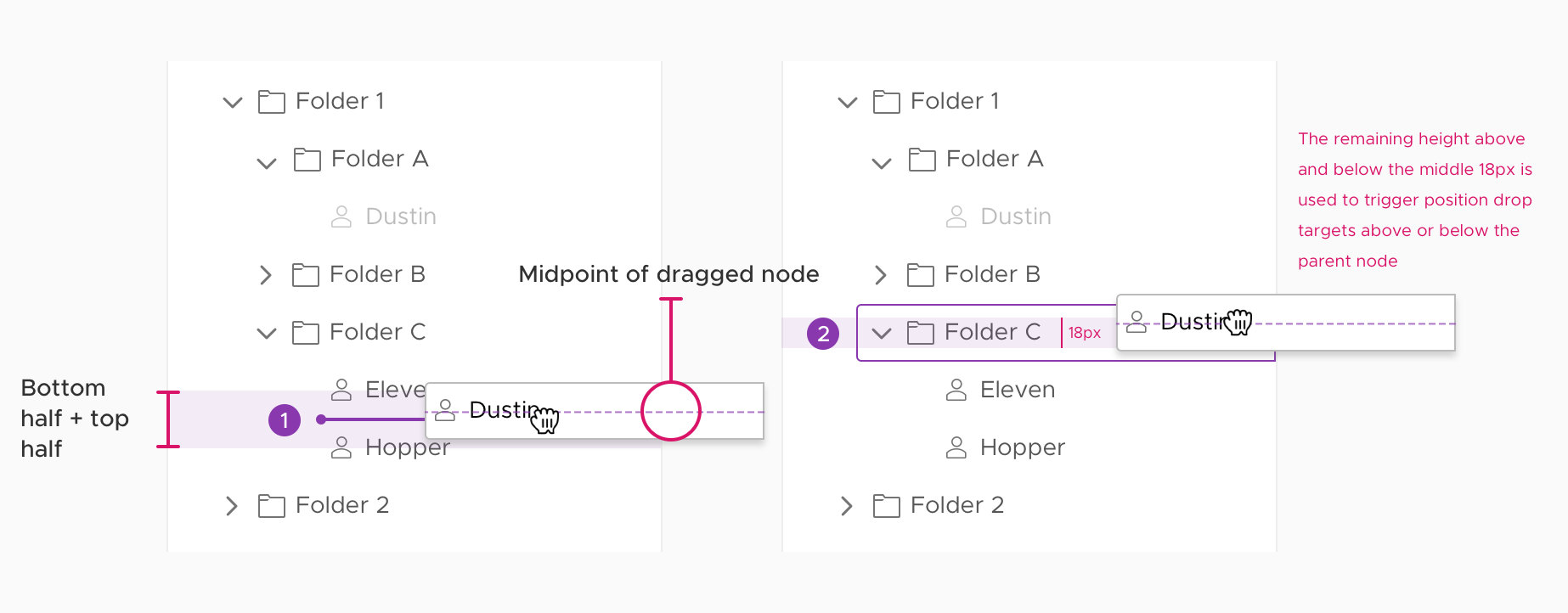
There are two types of drop targets: position and parent targets. When the midpoint of the dragged node enters the bottom or top half of a node, a position drop target will be triggered in between. However, when the midpoint enters the middle 18px of a parent node, a parent drop target will be triggered.
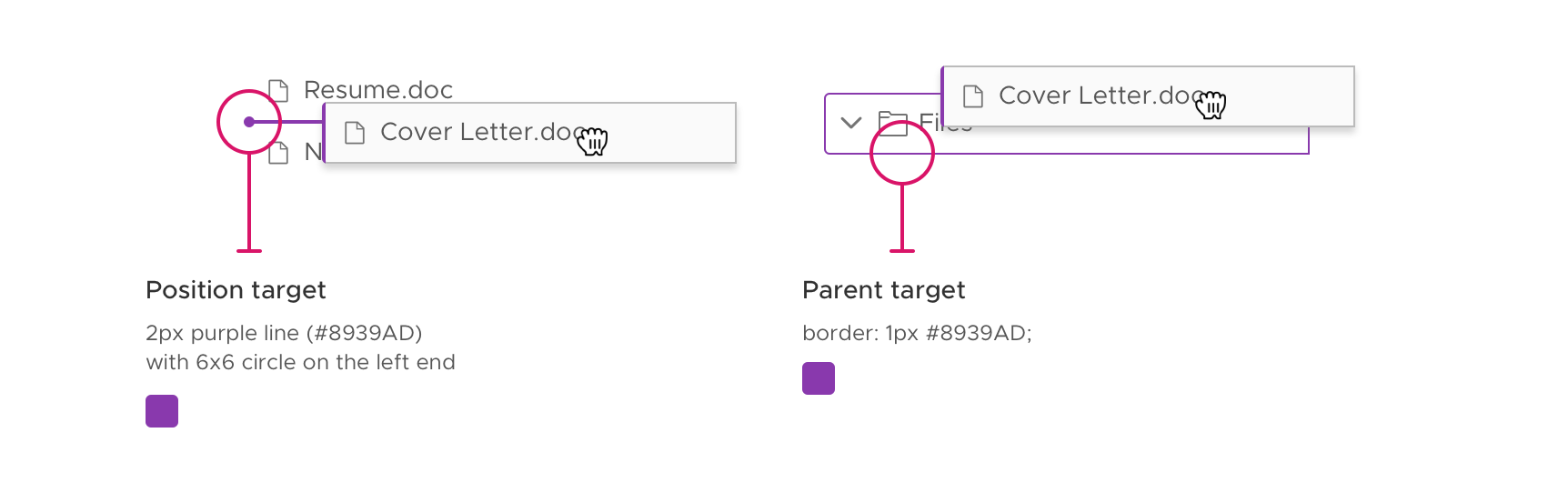
- Position targets are lines with a circle end that indicate the new position of the node. The
result is a change in the order of nodes. - Parent targets are outlined with a border that indicate the new parent of the node.
The result is a node is nested in another node.
Nesting nodes
When a tree node is dropped inside of a parent node, the node is automatically the last child node inside of the parent node.
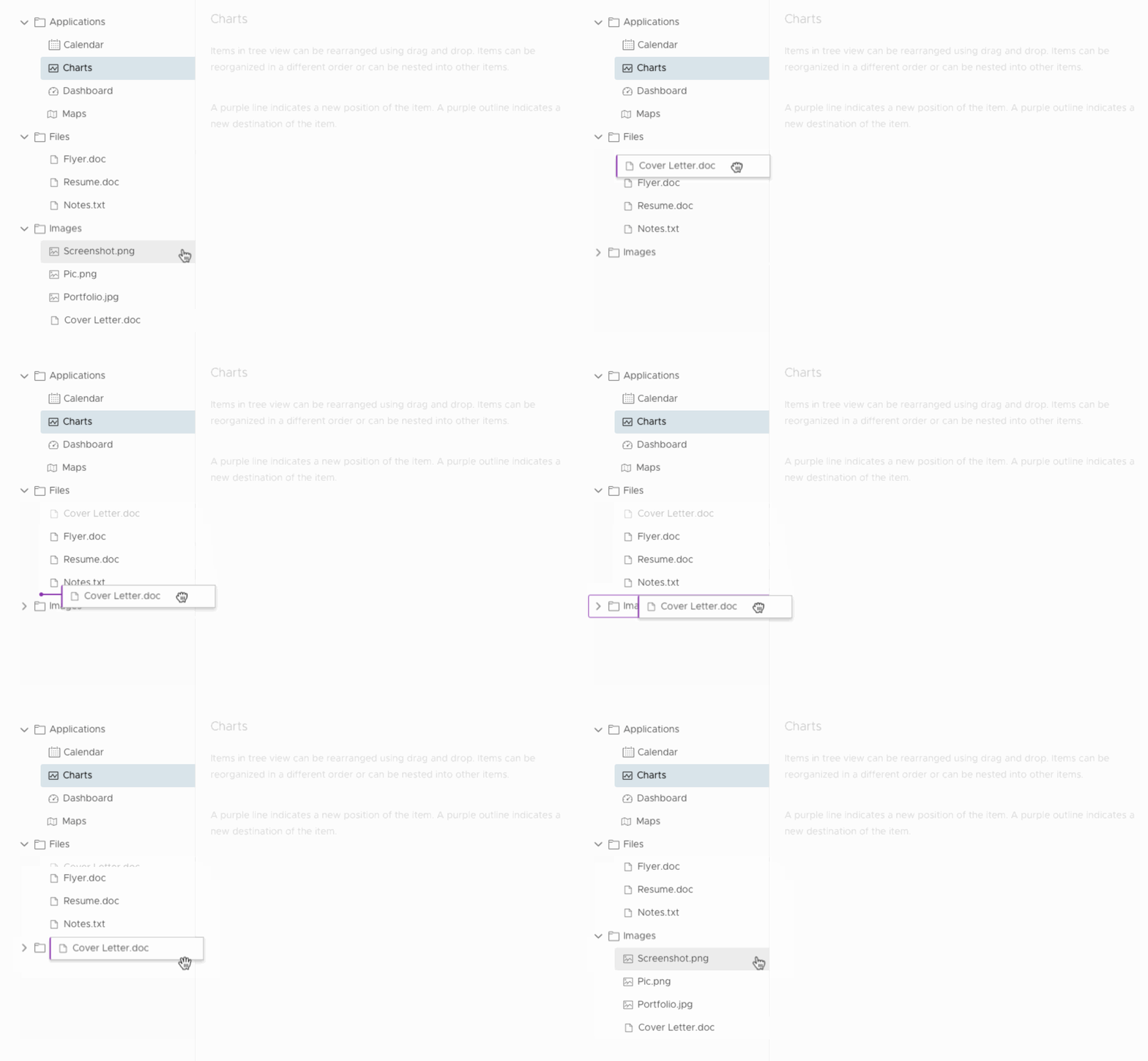
When users hover a dragged node over a closed parent node for at least 2 seconds, the parent node will open automatically to reveal its child nodes. This allows the user to specify the position of the dragged node among the child nodes.
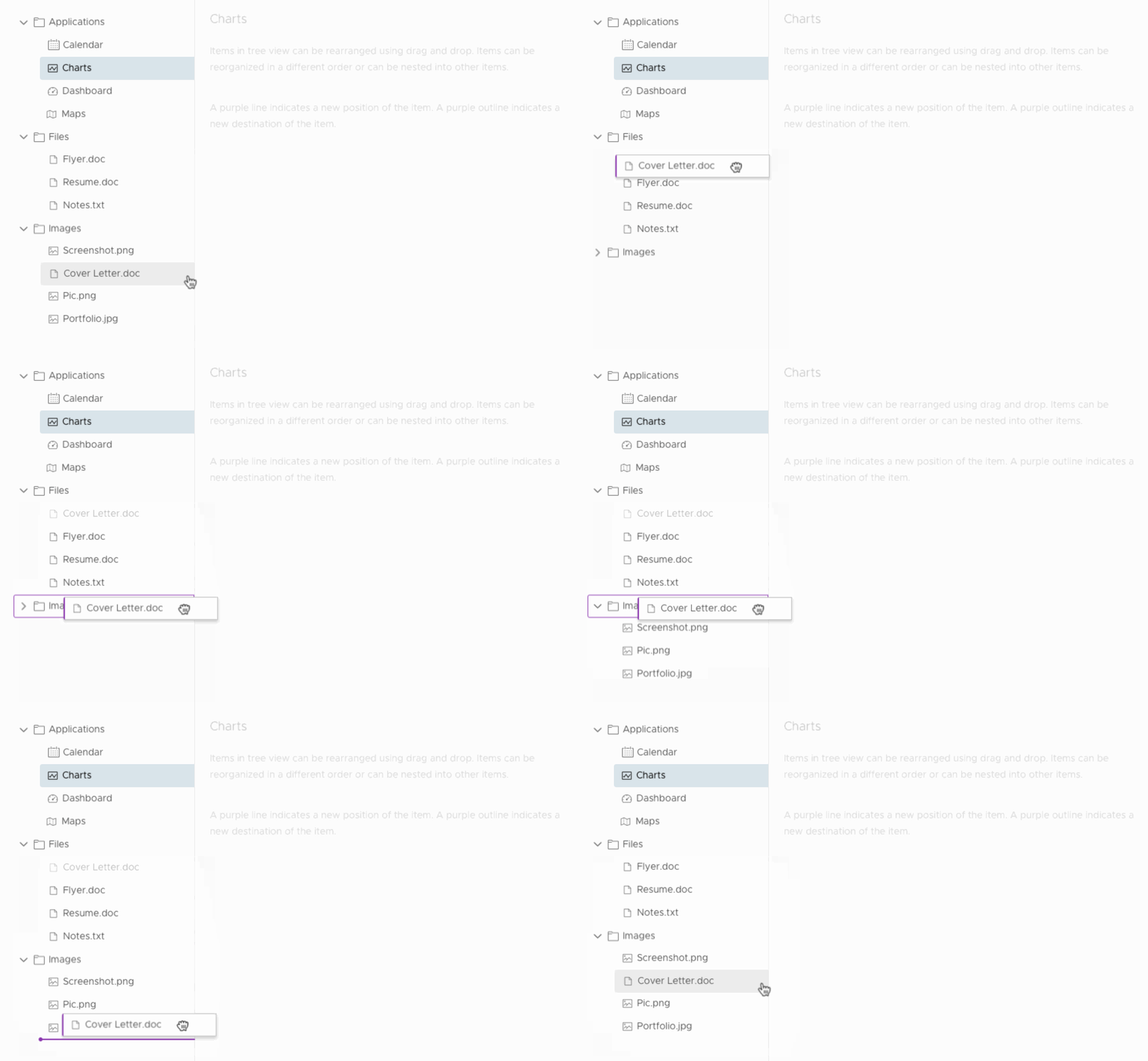
If lazy loading is enabled on a tree node, the loading indicator will appear when users hover a dragged node over the lazy loading parent node. The same behavior will occur for asynchronous calls. When complete, the child nodes will expand or update to reflect the additional child node.

Heavily nested tree example
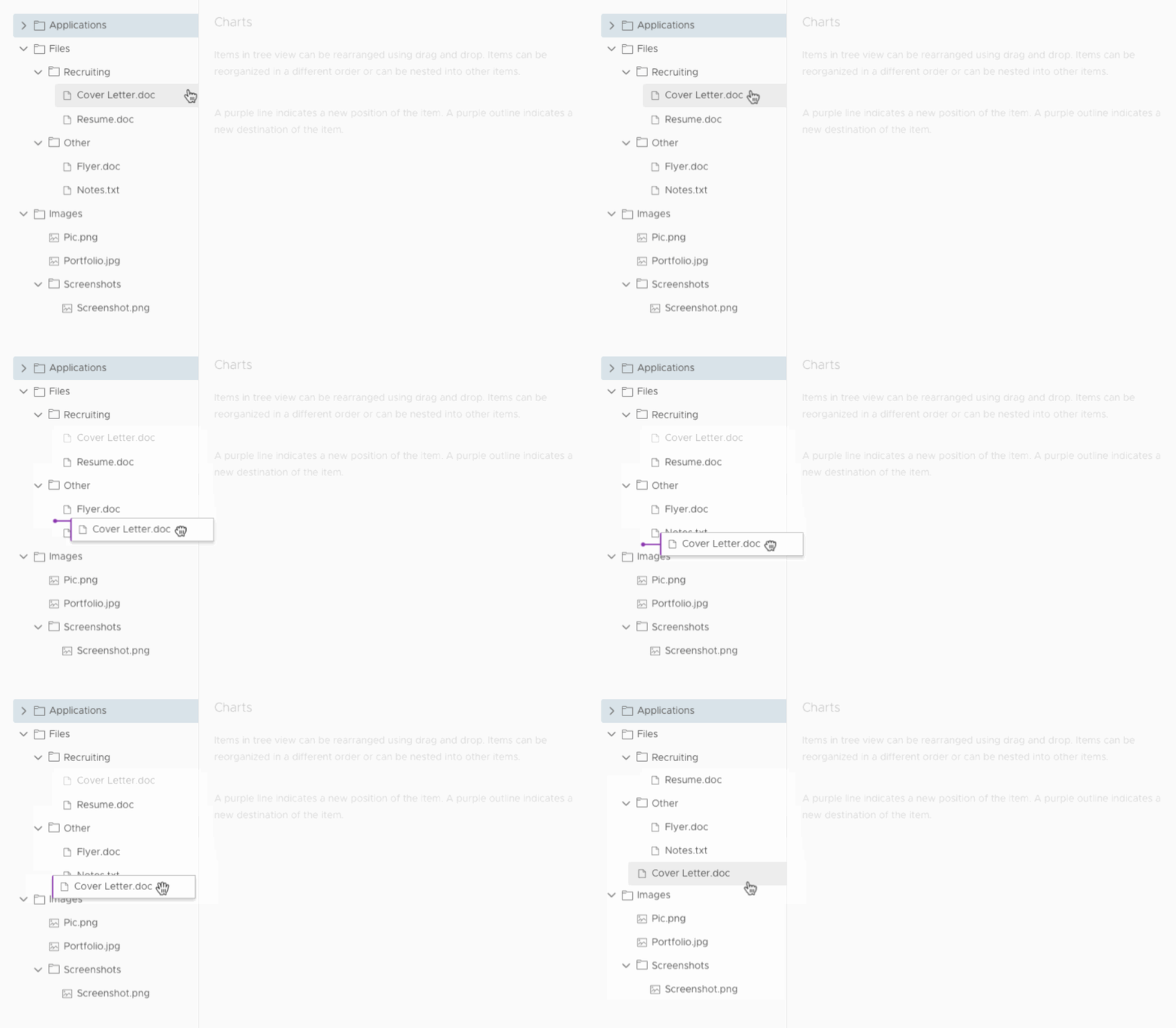
If there are multiple levels of nesting in a tree view, dragging a node to different node levels can be accomplished by dragging left or right on a position target. This will trigger a horizontal shift of the node length to denote which node level the user wishes to drop the dragged node into.
Checkbox tree example
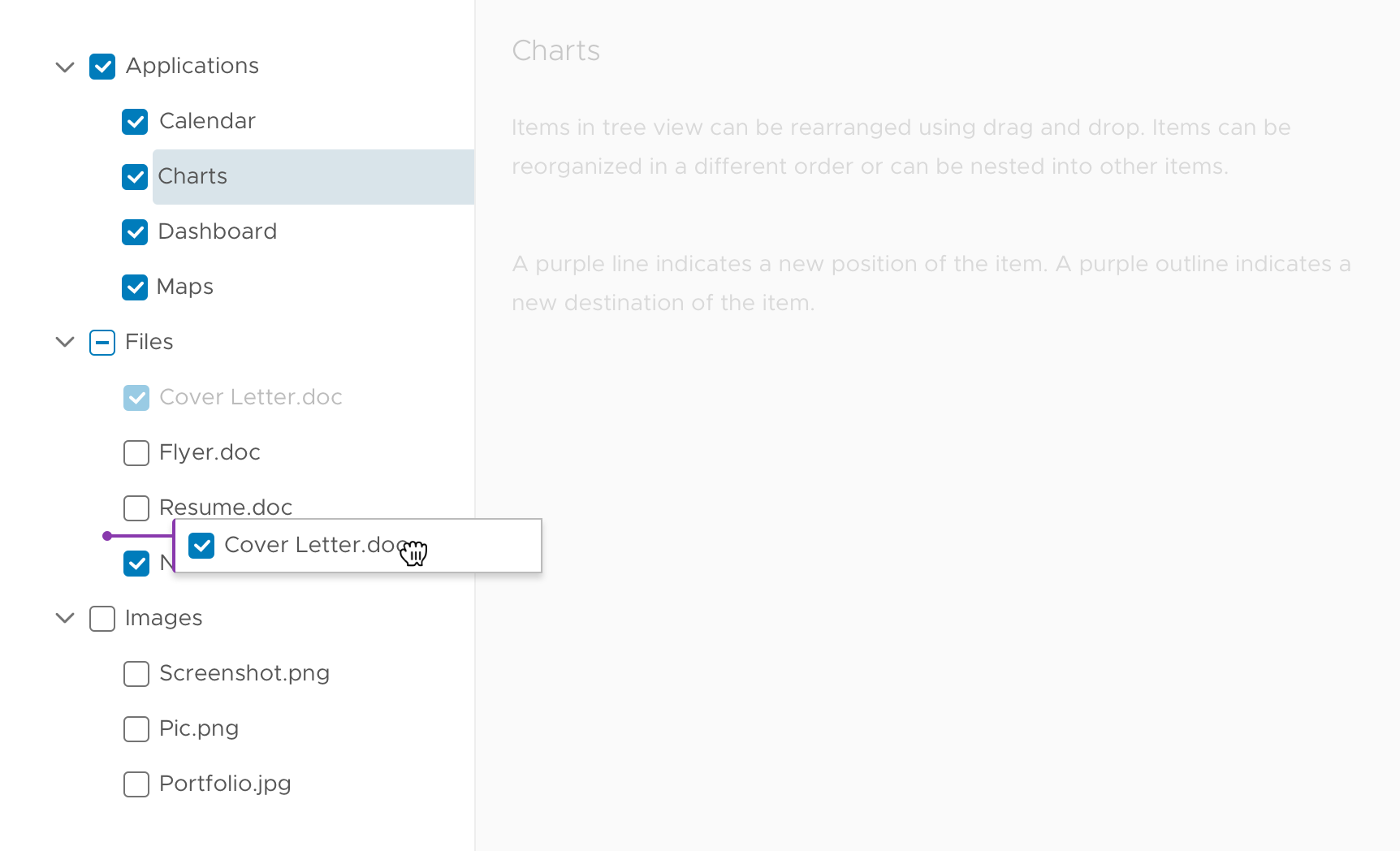
In a checkbox tree, the checkbox will drag along with the tree node. The parent node changes according to the child node. For example, if “Cover Letter.doc” (a checked node) is dropped into “Images” (an unchecked parent node), “Images” check would change to indeterminate to reflect mixed checked and unchecked child nodes.
Scrolling
When the tree view is scrollable, dragging a tree node over the edge of the window will automatically scroll the tree view to reveal nodes. The farther away from the tree view the object is dragged, the faster it will scroll. Using a scroll wheel will also scroll the view and maintain the drag action.
Invalid drop
When a node is dragged out of range (ex: outside of the tree view), the cursor will become disabled. If a node is dropped out of range or anywhere without a drop target, the dragged node “copy” will return to the node’s original position and fade to opacity: 0.
The original node that was greyed out will change back to opacity: 1 once the dragged node “copy” returns to its original position.

Keyboard accessibility
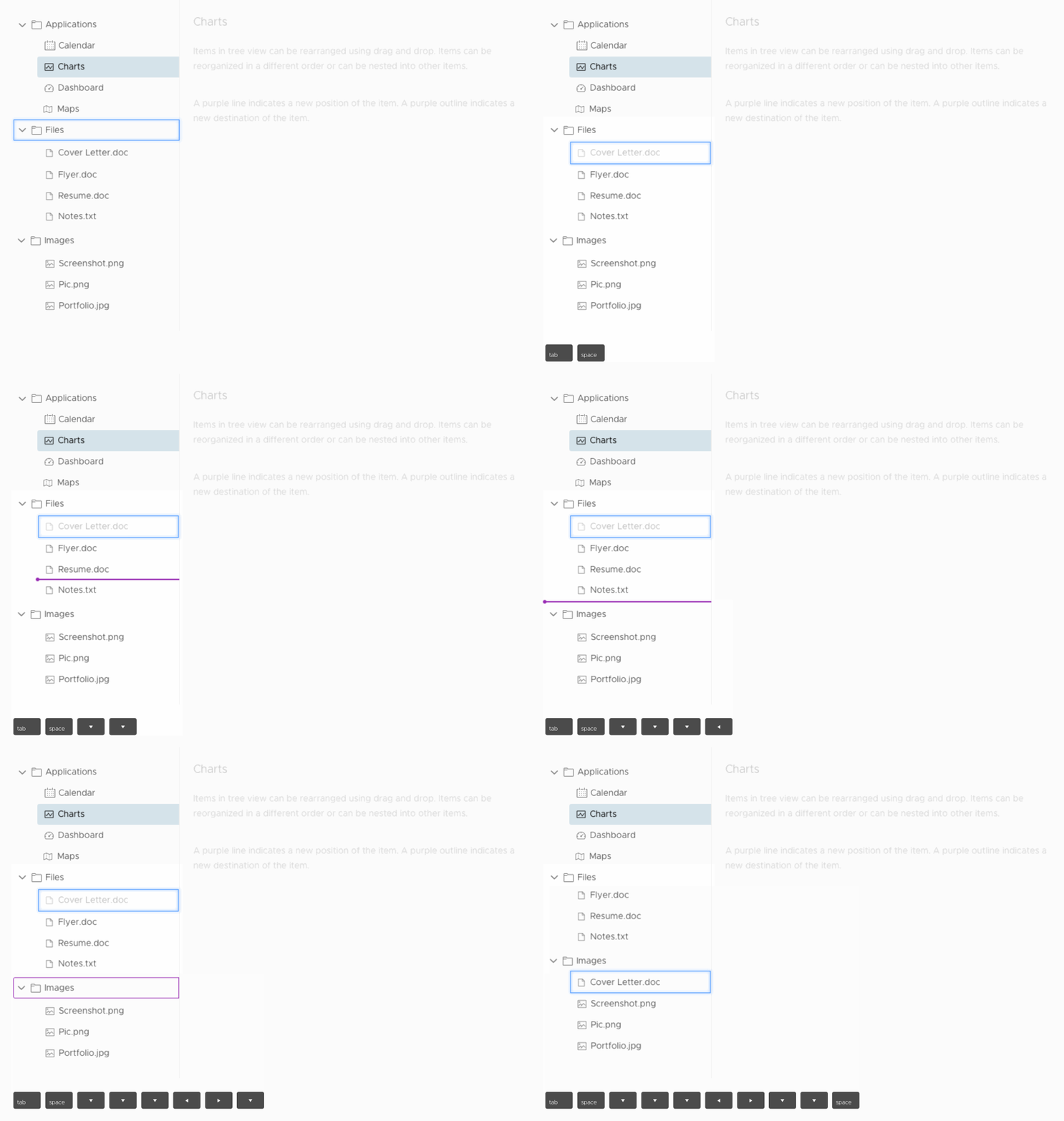
Users can drag and drop nodes in a tree view using keyboard controls. Tabbing to a node and pressing space bar will activate drag and drop mode.
Users can then use the arrow keys to move the drop target up and down. Pressing space bar again will confirm the action and drop the node in its new position or destination.
Related Issues: #406 and #620
 gracesnoh
All 22 comments
Great work! Any ideas for a milestone?
 adestis-ds
on 7 Mar 2018
adestis-ds
on 7 Mar 2018
@adestis-ds
This isn't on our roadmap for the near term. What is your use case for it and when were you looking for it to land?
 mathisscott
on 7 Mar 2018
mathisscott
on 7 Mar 2018
See comment in #1825
adestis-ds
on 8 Mar 2018
See comment here
mathisscott
on 8 Mar 2018
Any update regarding the new roadmap for version 1.0? I have checked the milestones at https://github.com/vmware/clarity/milestones but could not find this issue there. Would be nice if you could provide the new release timeframe.
adestis-ds
on 26 Jun 2018
This is a really useful feature for us as well. Will you schedule this in near future?
 v-erena
on 11 Dec 2018
v-erena
on 11 Dec 2018
Any updates on this feature? we could definitely use this in a few of our NSX projects.
 mattbogado
on 6 Jun 2019
mattbogado
on 6 Jun 2019
We have the DnD primitives in our project, but haven't prioritized the work currently to enable this specific feature. When asking for the feature, it helps to include more details about your use cases for us to understand priority and impact.
 gnomeontherun
on 6 Jun 2019
gnomeontherun
on 6 Jun 2019
Hi @gnomeontherun, @mathisscott
we're planning to use the drag and drop in one of our projects - therefore we'll implement the component as described in the design spec here, and would look forward to contribute!
Do you have some advice for us prior to start development?
 d-m-s
on 20 Sep 2019
d-m-s
on 20 Sep 2019
Hey @d-m-s glad to hear it and if you're interested in contributing we should align on a few things before you get too far. We also need to double check the design aligns with our current understanding since its almost 2 years old now.
@Shijir is the mastermind behind our DnD utilities, and I have many thoughts and questions before we'd dig into a technical solution.
Things we need to review
1) Accessibility - In Clarity, we need to have a path forward for the functionality to be used with keyboards, as well as ensuring it updates all appropriate aria attributes.
2) Design - We might have to think through some of the design and interaction details, but generally it is likely in a good place.
3) API - I haven't thought through what the API would look like to turn this feature on, or how it needs to be handled on the app side. There is some real potential complexity in how this is handled because sometimes we have lazy loaded tree views. We need to come to an agreement how this ought to be handled.
Overall, this is likely a huge implementation to build to get it fully into Clarity. We need to ensure it is sufficiently tested, generalized, and bulletproof, which might go above and beyond what your application is doing. If you're able/willing to dig into this with us, we can talk about how to address some of the questions above to give us direction.
Ultimately, the best first step in my mind is to setup an isolated demo (using Stackblitz probably) that approximates some of the basics. That helps to identify some of the foundational pieces and direction we want to go before major investment. If you can help in this first step, then we can see where to go next?
gnomeontherun
on 23 Sep 2019
Hi @gnomeontherun,
thanks for your quick answer - we already started and have a first demo at stackblitz.
Stackblitz Demo
https://stackblitz.com/edit/clarity-tree-drag-n-drop-7cb7mk
Feature set: 1st implementation
We would start with the following featureset from the design spec above ...
in scope:
- Checkbox tree example
- Scrolling
- Invalid drop
- Keyboard accessibility
not in focus:
- Nesting nodes
- Heavily nested tree example
For the
- API topics, one of my colleges will contact you
- UI/UX- and functional topics, I would be glad to hear from @Shijir
Contribution
It would be great if we manage to make a contribute directly to Clarity from the start, else we plan to implement it in the clarity-addons project.
d-m-s
on 23 Sep 2019
@gnomeontherun
One thought about the Contribution:
- What do you think about setting up an own branch for this in Clarity repo?
- so we can contribute against that branch (PRs) and you guys can review the code and make improvement suggestion upfront?
As mentioned we're really willed to deep dive into contribution here!
d-m-s
on 26 Sep 2019
Thanks for the demo @d-m-s, and we're going to discuss tomorrow. The complexity is quite high, and I want to ensure we can all be successful to see it through. We'll need to think about how to break it down into smaller chunks as well, and let me get back to you shortly.
gnomeontherun
on 26 Sep 2019
@d-m-s Alright, so here is what we can do to get started.
1) I have created a feature branch for us to work on. https://github.com/vmware/clarity/tree/topic/tree-view-dnd-1821 We should use this to submit smaller PRs against so we can build it up.
2) I think the first thing to do is the minimum to achieve the invalid drop scenario. That shows the basic drag behaviors without the complexities of implementing the resulting. This will help us identify the architecture and API before we get too far as well.
3) Then we'll need to review the accessibility implementation and design since it is easier to do with a real implementation in progress.
We're stretched thin and will be able to act in an advisory and review capacity. We can adjust as we go, but this seems like the best path forward and gives us a chance. Let me know and we can proceed!
gnomeontherun
on 1 Oct 2019
@d-m-s please be aware of the PR https://github.com/vmware/clarity/pull/3851 which makes some accessibility improvements to tree view.
gnomeontherun
on 2 Oct 2019
@gracesnoh is this on the roadmap? Your design looks AMAZING!!
 robntracts
on 13 Jul 2020
robntracts
on 13 Jul 2020
@robntracts
I agree about the design. An external contributor (@d-m-s ) took this up a while back. I'm not sure where it's at right now. But it is not currently on our near-term roadmap.
mathisscott
on 13 Jul 2020
@derkoe can you give us a brief status-reminder, where we currently standing/left with the dnd-topic?
As far as i recall it's not an own component, certainly not a treeview supporting all dnd features ... but you sure know some more details. thx!
d-m-s
on 9 Oct 2020
We have just used the clr-tree with clrDroppable with some custom styles in our application.
Code looks like this:
<clr-tree>
  <div
    clrDroppable
    (clrDrop)="onDrop($event.dragDataTransfer)"
    [ngClass]="currentDraggedItem !== null && currentDraggedItem.parentId ? 'not-visible' : ''"
  ></div>
  <clr-tree-node
    *clrRecursiveFor="let item of sortingItem.items; getChildren: getItemChildren"
    [clrDraggable]="item"
    tabIndex="1"
    [id]="item.id"
    [(clrExpanded)]="expandedStates[item.id]"
    (clrDragStart)="dragStart(item)"
    (clrDragEnd)="dragEnd()"
  >
    <div class="treenode-inner">
      <clr-icon class="treenode-icon" [attr.shape]="getIcon(item)"></clr-icon>
      <div class="treenode-text">{{ item.description }}</div>
    </div>
    <div
      [id]="item.id"
      tabIndex="-1"
      [ngClass]="
        currentDraggedItem === null ||
        currentDraggedItem.id === item.id ||
        (currentDraggedItem.parentId !== item.parentId && currentDraggedItem.parentId !== item.id)
          ? 'not-visible'
          : ''
      "
      clrDroppable
      (clrDrop)="onDrop($event.dragDataTransfer, item)"
    ></div>
  </clr-tree-node>
</clr-tree>
Here's the style (some stuff is hardcoded there, but this works for us):
clr-tree .droppable {
  position: relative;
  height: 10px;
  display: block;
  flex-grow: 1;
  flex-basis: 100%;
  margin-top: -5px;
  pointer-events: none;
  &.draggable-match {
    border: none;
    display: inherit;
  }
  &.draggable-over {
    border: none;
  }
  &.draggable-over:before {
    content: '';
    position: absolute;
    width: 6px;
    height: 6px;
    margin-top: 2px;
    background: #8939ad;
    border-radius: 50%;
  }
  &.draggable-over:after {
    content: '';
    position: absolute;
    border-bottom: 2px #8939ad solid;
    height: 100%;
    width: 100%;
    margin-top: 2px;
    transform: translateY(-50%);
  }
}
clr-tree .clr-treenode-content {
  .treenode-inner {
    display: flex;
    flex-direction: row;
    align-items: center;
  }
}
clr-tree .draggable-ghost {
  background: white;
  border: 1px solid #bbbbbb;
  border-left: 2px solid #8939ad;
  border-radius: 3px 0 0 3px;
  box-shadow: 0 3px 4px rgba(116, 116, 116, 0.3);
  max-width: 500px;
}
 derkoe
on 13 Oct 2020
derkoe
on 13 Oct 2020
Hi, I'd like to thank Clarity Team for their work. I was following this issue for a very long time, more than 2 years. This design is amazing.
I don't want to raise expectations of other followers but I tinkered with implementing this design. Code is here: https://github.com/myukselen/clarity/tree/development2 . It is an update of my first attempt from April 2020.
Sample declarative and recursive eager tree demos live here:
- https://myukselen.github.io/clarity-dev/tree-view/dnd-eager-declarative
- https://myukselen.github.io/clarity-dev/tree-view/dnd-eager-recursive
I first coded keyboard interaction and then added mouse interaction.
With your guidance, I would like to polish and complete the implementation to your standards. I have limited experience with Angular ;)
 myukselen
on 16 Dec 2020
myukselen
on 16 Dec 2020
@myukselen dragging not working properly from mobile chrome, but love to see your implementation! (I'm not from clarity team, but also subscribe this issue few years ago)
 pumano
on 17 Dec 2020
pumano
on 17 Dec 2020
The feature request here has been captured into our list and we’re going to take it into consideration as we develop Clarity Core capabilities. In an effort to clean up our backlog and focus our attention, I’m going to close this as captured in our feature requests. Please follow our development and releases to see when we release relevant components to make this possible. Future feature requests can be made in our GitHub Discussions.
gnomeontherun
on 4 Feb 2021
Related issues
 thojo
·
3Comments
thojo
·
3Comments
 Vad1mo
·
3Comments
Vad1mo
·
3Comments
 vzayko
·
3Comments
vzayko
·
3Comments
 aaronfrost
·
3Comments
aaronfrost
·
3Comments
 yandong01
·
3Comments
yandong01
·
3Comments