Clarity: Datagrid doesn't remove item from array
Hi team,
First I'd to say that I recently start to use clarity. And you are awesome!
I have implemented grid which communicate with my API service and I found one issue.
In grid I have added action column which have Delete and Edit operation on row based.
I have implemented click event which works:
- Send delete HTTP request
- Wait for status OK
- When I got OK then I delete item form local array.
But that doesn't work. When I delete item from local array, grid doesn't update rows.
You can see example on https://stackblitz.com/edit/clarity-u714mf?file=app%2Fapp.component.ts
Regards,
Marko
 markofranjic
All 22 comments
Even calling .dataChanged() on the datagrid after updating the data doesn't seem to work, so this is clearly a bug.
@markofranjic: Please note that you are using a link or button inside of a row with [clrDgRowSelection]="true". This produces invalid HTML in the form of nested buttons, which will break in several browsers. We have a warning in our documentation against this, please remove the [clrDgRowSelection]="true" if you intend to have actionable elements in your rows.
This is not related to your bug, but we always try to raise this issue when we see it.
 youdz
on 2 Jan 2019
youdz
on 2 Jan 2019
I've got a version running that does work fine https://stackblitz.com/edit/clarity-light-theme-v1-0-duxf2p?file=src%2Fapp%2Fapp.component.ts. Please use our github issue templates in the future, which helps us organize our tickets better. Also StackOverflow is a good place for questions about your implementation if you aren't reporting a bug or feature request.
Here are a few other issues I see:
- You have rowSelectionMode enabled, which cannot work with inline buttons. Basically this causes you to have two click targets stacked upon one another and that is not accessible or functional. Also, row selection is deprecated #2933 so don't rely upon it.
- You're using NgFor but suggest be using
*clrDgItemsfor your iterator, so it can work correctly with pagination and other features. - You should bind a value to
[clrDgSingleSelected]="selected"for the input. - You've got 2 columns defined in the top, but 3 cells. You should have a 3rd column defined.
- We recommend that you use the action overflow for things rather than buttons in the row (don't want accidental actions) https://vmware.github.io/clarity/documentation/v1.0/datagrid/single-action
EDIT: Didn't see @youdz comment before I posted, I'll keep this open for now.
 gnomeontherun
on 2 Jan 2019
gnomeontherun
on 2 Jan 2019
I looked at dataChanged() as a workaround and realized that it only works for datagrids that use clrDgItems e.g _smart_ datagrids: https://github.com/vmware/clarity/blob/master/src/clr-angular/data/datagrid/providers/items.ts#L100
 hippee-lee
on 3 Jan 2019
hippee-lee
on 3 Jan 2019
@gnomeontherun: Yes, this works fine with *clrDgItems, but there is clearly a bug with server-driven datagrids that have to use *ngFor. Not sure why the elements aren't removed, since changing pages doesn't have the same problem.
EDIT: actually your StackBlitz works fine with *ngFor. So maybe there isn't a bug after all? Let's keep this open until we've properly investigated what's happening in the opening post's StackBlitz.
youdz
on 7 Jan 2019
Apologies if this is the wrong place to ask but what is the difference between the StackBlitz in the first comment (https://github.com/vmware/clarity/issues/2978#issue-395246628): https://stackblitz.com/edit/clarity-u714mf?file=app%2Fapp.component.ts
and the one further down (https://github.com/vmware/clarity/issues/2978#issuecomment-451011233): https://stackblitz.com/edit/clarity-light-theme-v1-0-duxf2p?file=src%2Fapp%2Fapp.component.ts
they look functionally identical to me but the latter one works as expected in my browser and the first is not.
 Tr1gs
on 25 Mar 2019
Tr1gs
on 25 Mar 2019
@Tr1gs I think the first one (the one not working) was created using an old or corrupt StackBlitz starter. The working version has an angular.json file to correctly configure dependencies. The not working one is adding dependencies in index.html in a funky way.
 jeeyun
on 27 Mar 2019
jeeyun
on 27 Mar 2019
@Tr1gs I think the first one (the one not working) was created using an old or corrupt StackBlitz starter. The working version has an
angular.jsonfile to correctly configure dependencies. The not working one is adding dependencies inindex.htmlin a funky way.
Thanks for the reply. I was seeing something similar in my env (clarity v1.1.2, angular v7.2.10, installed via ng add) where any filtered content was being added to the top of the datagrid. Couldn't figure out why. I copy and pasted the working example into a component and saw the same behavior in that datagrid.
I guess it must be a dependency/configuration issue
Tr1gs
on 28 Mar 2019
I experience the same issue in my server side implementation (Version 1.1.2) with the use of *ngFor. My investigations showed that the ClrDatagrid.rows QueryList gets correctly updated and emits (only) the rows to show.
The problem seems that in non-smart mode, the following code gets not triggered as the DisplayMode never changes:
https://github.com/vmware/clarity/blob/master/src/clr-angular/data/datagrid/datagrid.ts#L255
This leaves the previous values in the displayed rows and new rows gets inserted at the end of the list. I was able to work around this by getting the reference to the Datagrid instance and doing this:
this.datagrid.rows.changes.pipe(tap(_ => this.datagrid.resize())).subscribe()
This forces a change in the DisplayMode and triggers the underlying list of rows to populate correctly.
This is clearly not a good solution but fixes the problem at the moment for me. I'm very confused why the server-driven example on the website works without any problem. I don't see any magic going on there.
 rootix
on 4 Apr 2019
rootix
on 4 Apr 2019
I experience the same issue in my server side implementation (Version 1.1.2) with the use of *ngFor. My investigations showed that the
ClrDatagrid.rowsQueryList gets correctly updated and emits (only) the rows to show.The problem seems that in non-smart mode, the following code gets not triggered as the DisplayMode never changes:
https://github.com/vmware/clarity/blob/master/src/clr-angular/data/datagrid/datagrid.ts#L255
This leaves the previous values in the displayed rows and new rows gets inserted at the end of the list. I was able to work around this by getting the reference to the Datagrid instance and doing this:
this.datagrid.rows.changes.pipe(tap(_ => this.datagrid.resize())).subscribe()This forces a change in the DisplayMode and triggers the underlying list of rows to populate correctly.
This is clearly not a good solution but fixes the problem at the moment for me. I'm very confused why the server-driven example on the website works without any problem. I don't see any magic going on there.
I'm glad you found a workaround, I've been using *clrDgItems. I managed to resolve my issues by running ng update for angular cli, clarity and angular core. I'm not sure what happened but without any other changes I was getting the expected behaviour in my code.
Tr1gs
on 5 Apr 2019
I was having a similar problem, where assigning a new value to the bound property for the rows would not cause the data grid to update visually correctly. The data grid was simply appending the new rows, without removing the old ones first. This led to duplicate rows in my case.
Since I setup my demo project manually, I was missing the BrowserAnimationsModule as module import. This fixed it for me.
 amazingfox
on 24 Jun 2019
amazingfox
on 24 Jun 2019
This problem still exists in Clarity v3.0.0-next.5. But workaround from @rootix is still worked.
And I don't find how the grid can work without workaround and it does not depend on smart or not mode of grid.
My code here: https://github.com/Akay7/clarity_grid_refresh_bug . I still have hope about something wrong in my code, and not in clarity.
 Akay7
on 21 Dec 2019
Akay7
on 21 Dec 2019
@Akay7 - I took a look at the repo you linked to and don't see where the user-grid component implements (clrDgRefresh) as is required for server driven datagrids. https://v2.clarity.design/datagrid/server-driven.
Am I missing something or can you point me to that code?
hippee-lee
on 31 Dec 2019
@hippee-lee I don't use (clrDgRefresh) since try to make the simplest grid, without pagination and server-side filtering. Am I make something wrong?
I'm trying to change *ngFor to *clrDgItems but still have the same problem. (branch SmartIterator)
Additionally, find one more problem when I use an integrated filter with a smart iterator.
- Write some text inside the filter for filtering out some rows(rows is not gone)
- Clear filter(some rows appears few times in grid)
- *But if resize column at any time just correct rows appears.
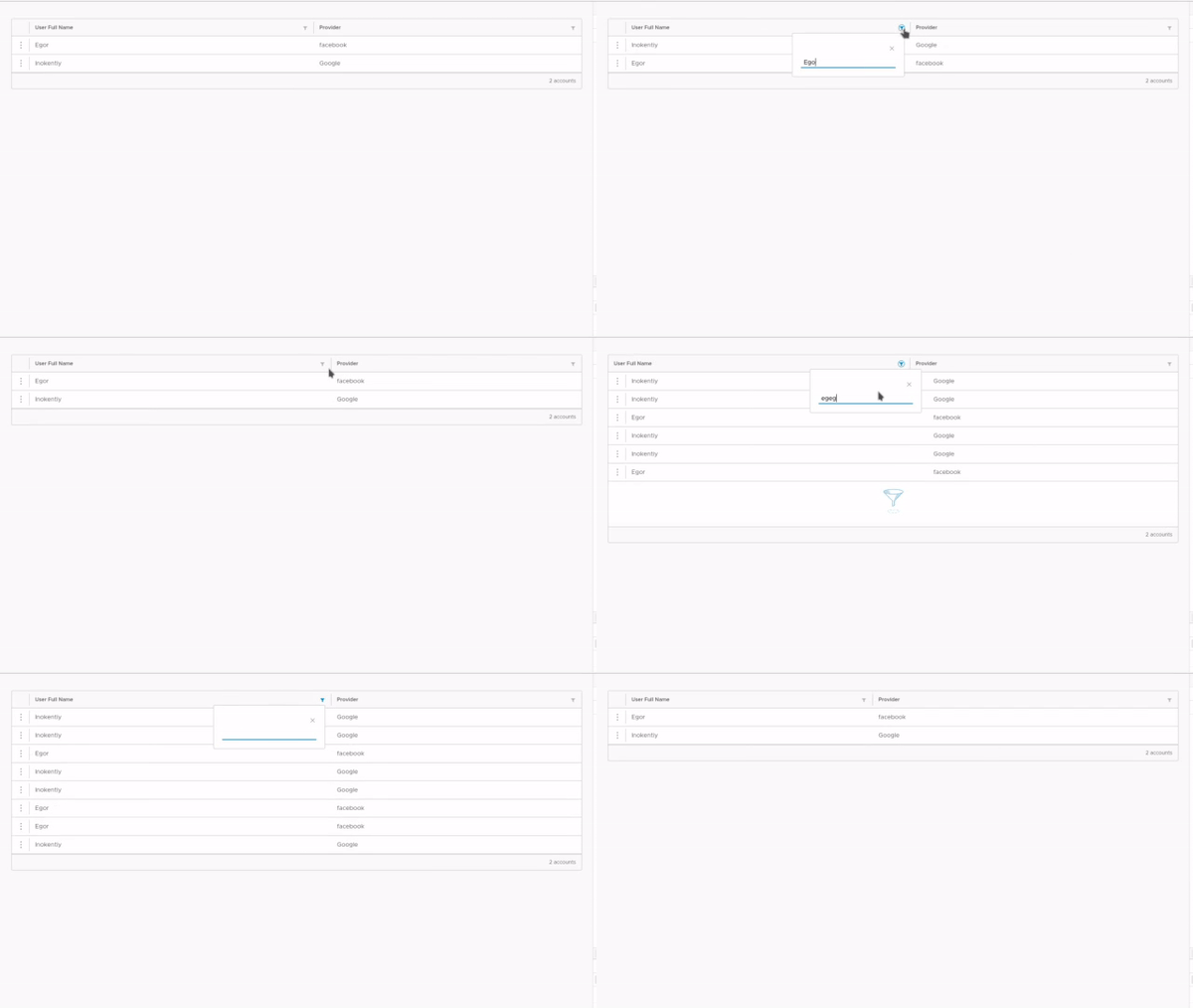
Akay7
on 4 Jan 2020
Server side datagrids need to implement clrDgRfresh and they must to use *ngFor because the datagrid does not have all of the data available and it is expected that the server will handle the filtering before it gives the datagrid the data all at once or per page if pagination is enabled.
If you need help with creating a server driven datagrid, please see the the documentation and demos here.. If you have more questions feel free to post what you have tried on stack overflow and tag it vmware-clarity.
hippee-lee
on 6 Jan 2020
@hippee-lee my example above shows my attempts to make work nonserver provided grid(all data initialized at the time of initialization and not managed at the server).
Right now it seems something broken there(but maybe just on 3rd version).
If that was just my problem and not had an issue at GitHub then I'm asked questions at stack overflow.
Akay7
on 6 Jan 2020
It seems like a stackblitz that isolates and replicates your issue will go a long way to understanding what is going on.
Here is a simple, non server driven datagrid that uses a string filter and *clrDgItems as the iterator:
https://stackblitz.com/edit/gh-2978-datagrid-filter
Please fork it and modify it so that it demonstrates the issue as described. Thanks it will help me to look at running code.
hippee-lee
on 6 Jan 2020
@hippee-lee I'm tried to repeat that problem at slackblitz(earlier) and try to repeat it today with your slackblitz but the problem is not repeated.
I'm also trying to fix my project by using your slackblitz as an example, but the problem still exists.
The problem appears at Chrome and Firefox(I don't have other browsers).
Akay7
on 7 Jan 2020
It seems like something in the project is different from the simple example.
I would suggest troubleshooting in the app by starting with the simplest datagrid possible and see if it works as expected. Then one at a time, add in / declare datagrid behaviors like pagination or filtering and confirm that it stall work as expected.
This is how I troubleshoot issues like this.
hippee-lee
on 7 Jan 2020
@Akay7 It looks like you are confused or unhappy with my last response. I am not able to help you if the issue cannot be re-created in a simple, standalone example. We use stackblitz for this as it helps to isolate components and features so that we can determine if there is a bug in the component or an issue with the consumer implementation. In this case, what we have see so far indicates that something in the apps implementation is causing the issue.
There are two way I would proceed if I was in your shoes.
- Start with a simple working datagrid in stackblitz and one by one layer on the features in the application to find where it breaks the datagrid as described.
- Start with a simple working datagrid in the consuming application and layer on features to finsd where it breaks the datagrid as described.
If option one is used, I can help you - the stackblitz can easily be shared and forked between us and we can easily discuss the implementation code . If option 2 is used its difficult for me to help - I'm really sorry but its very time consuming to clone and learn the application in question for something that is known to work.
hippee-lee
on 7 Jan 2020
If you are using Angular 9, we are still triaging issues from Angular that have broken some behaviors in the Datagrid. We are aware and working on it, but the original issue is different from what @Akay7 is posting about so let's not get things confused.
gnomeontherun
on 10 Jan 2020
I'm glad you found a workaround, I've been using
*clrDgItems. I managed to resolve my issues by runningng updatefor angular cli, clarity and angular core. I'm not sure what happened but without any other changes I was getting the expected behaviour in my code.
I had a similar problem and this was also the solution for me.
 darioscattolini
on 3 Mar 2020
darioscattolini
on 3 Mar 2020
There is a workaround available for this issue, and we recommend using it for Clarity Angular. We would consider a contribution to address this issue if someone is able to work out a solution. As we build Clarity Core implementations, we expect that this issue won’t be an issue or will be configurable on the application side. To help us clean up our backlog, we are going to close this with a functional workaround available and suggest you follow updates for Clarity Core for enhancements that can support your use case with Clarity Core components.
gnomeontherun
on 29 Jan 2021
Related issues
 JohannesRudolph
·
4Comments
JohannesRudolph
·
4Comments
 dennitsa
·
4Comments
dennitsa
·
4Comments
 ph55
·
3Comments
ph55
·
3Comments
 clane
·
3Comments
clane
·
3Comments
 ChrisKaun
·
3Comments
ChrisKaun
·
3Comments
Most helpful comment
I was having a similar problem, where assigning a new value to the bound property for the rows would not cause the data grid to update visually correctly. The data grid was simply appending the new rows, without removing the old ones first. This led to duplicate rows in my case.
Since I setup my demo project manually, I was missing the
BrowserAnimationsModuleas module import. This fixed it for me.