Clarity: Datagrid Single Action no longer goes away when clicked.
Describe the bug
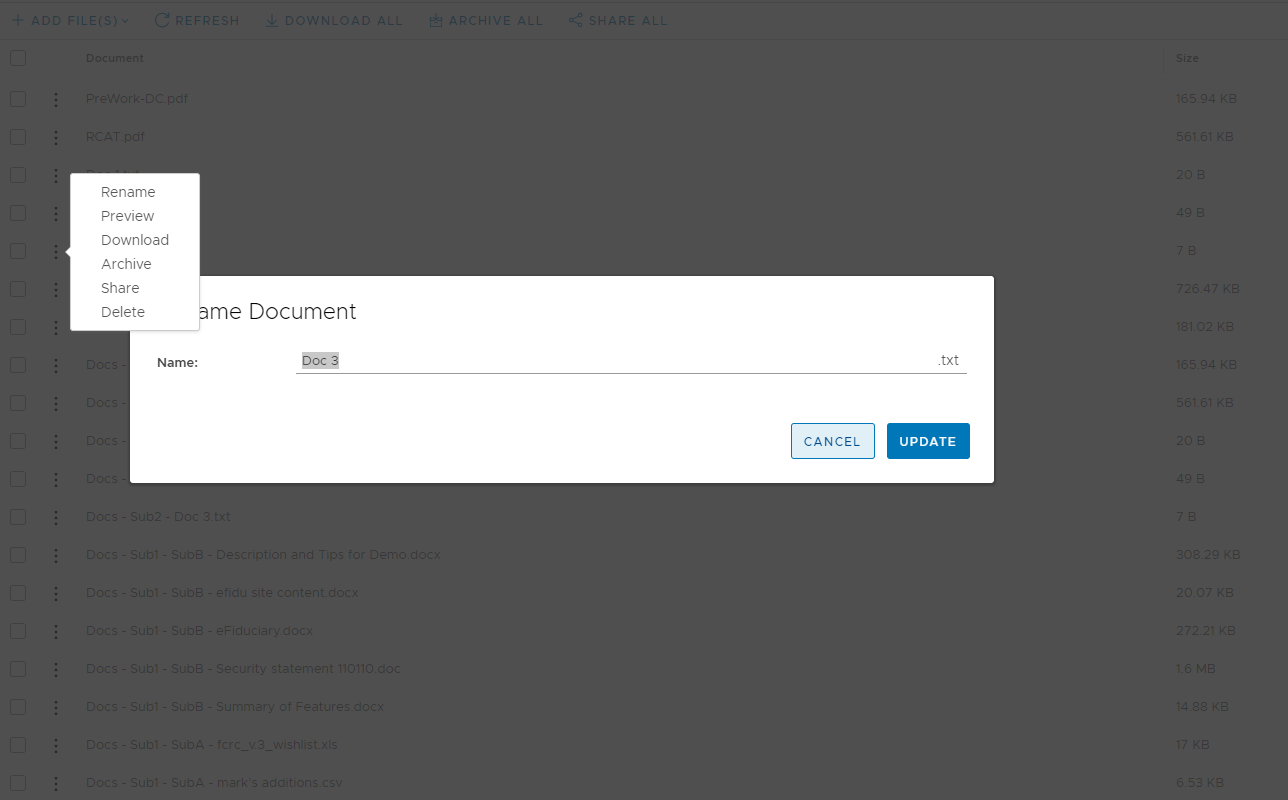
When clicking a menu item in a Datagrid single action the menu stays there instead of going away.
This is related to the changes in how datagrid implements popovers that don't get clipped.
The popover complex ignores the close click if it originates inside the projected content.
Expected behavior
When projected content opens a modal the popover should be dismissed ane the single action popover should disappear.
Reproduction:
https://stackblitz.com/edit/issue3796-single-action-broken
Versions
App
- Angular: 2.2.0
 jacobbutton
All 18 comments
It would greatly help us review and triage this issue if you add a stackblitz represenation.
Here are the required templates:
https://stackblitz.com/@clr-team
Thanks!
 Jinnie
on 9 Sep 2019
Jinnie
on 9 Sep 2019
Probably this will also work as example:
https://clarity.design/documentation/datagrid/single-action
Still, I recommend using the issue template that's auto-generated when opening new bugs.
Jinnie
on 9 Sep 2019
jacobbutton
on 9 Sep 2019
This is related to the changes in how datagrid implements popovers that don't get clipped.
The popover complex ignores the close click if it originates inside the projected content.
Thanks for the stackblitz. I'll look into it.
 hippee-lee
on 9 Sep 2019
hippee-lee
on 9 Sep 2019
There is probably a much more elegant way of achieving this, but this was really bothering me so here's the work-a-round I was able to come up with.
import { Directive,  Renderer } from "@angular/core";
import { ClrDatagridActionOverflow } from "@clr/angular";

@Directive({
    selector: "clr-dg-action-overflow"
})

export class ClrDatagridActionOverflowCloseOnClickDirective {
    changes: MutationObserver;

    constructor(
        private actionOverflow: ClrDatagridActionOverflow,
        private renderer: Renderer,
    ) {
        this.changes = new MutationObserver((mutations: MutationRecord[]) => {
            mutations.forEach((mutation: MutationRecord) => {
                this.wireChildren(document.querySelector('#' + this.actionOverflow.popoverId));
            });
        });

        this.changes.observe(document.getElementsByTagName("body")[0], { childList: true });
    }

    wireChildren(parent) {
        if (parent && parent.children.length) {
            for (var i = 0; i < parent.children.length; i++) {
                this.renderer.listen(parent.children[i], 'click', (event) => { this.actionOverflow.open = false; });
            }
        }
    }

    ngOnDestroy() {
        this.changes.disconnect();
    }
}
@jacobbutton you have a stackblitz of the workaround?
 Vaishak
on 14 Nov 2019
Vaishak
on 14 Nov 2019
@Vaishak
https://stackblitz.com/edit/issue3796-single-action-workaround
Like I said, far from elegant, but it gets the job done for now. This version also works with nested dropdowns in the action menu.
jacobbutton
on 14 Nov 2019
The provided workaround does not work if you have anything else other than buttons and a dropdown in the popover. Also does not work if a button in the popover should NOT close the popover.
We have thought about this behavior and arrived at the following conclusion:
The popover does not have any way of knowing whether the button in its content should or should not close it. We think that can be defined by using the "clrPopoverCloseButton" on the button, which should close the popover. Buttons which should not close the popover work fine with the current behavior.
@hippee-lee Is this an accepted way of using the directive? If so, then that should probably be noted in the documentation.
 martinbrom
on 26 Nov 2019
martinbrom
on 26 Nov 2019
Adding clrPopoverCloseButton to the button did fix the issue for me.
 jerone
on 28 Nov 2019
jerone
on 28 Nov 2019
Adding
clrPopoverCloseButtonto the button did fix the issue for me.
Do you have a stackblitz sample?
Please share.
 shravansofts
on 4 Dec 2019
martinbrom
on 4 Dec 2019
shravansofts
on 4 Dec 2019
martinbrom
on 4 Dec 2019
Adding clrPopoverCloseButton indeed fixes the issue.
However, we have another use case, where we have a wrapper component on top of the data-grid and we take action menu template from the consumer to override the default action menu.
Something like this: https://stackblitz.com/edit/datagrid-overflow-action-menu-close-trp81z
In this case, if we try to use clrPopoverCloseButton directive, it doesn't work and gives static injection error as shown below.
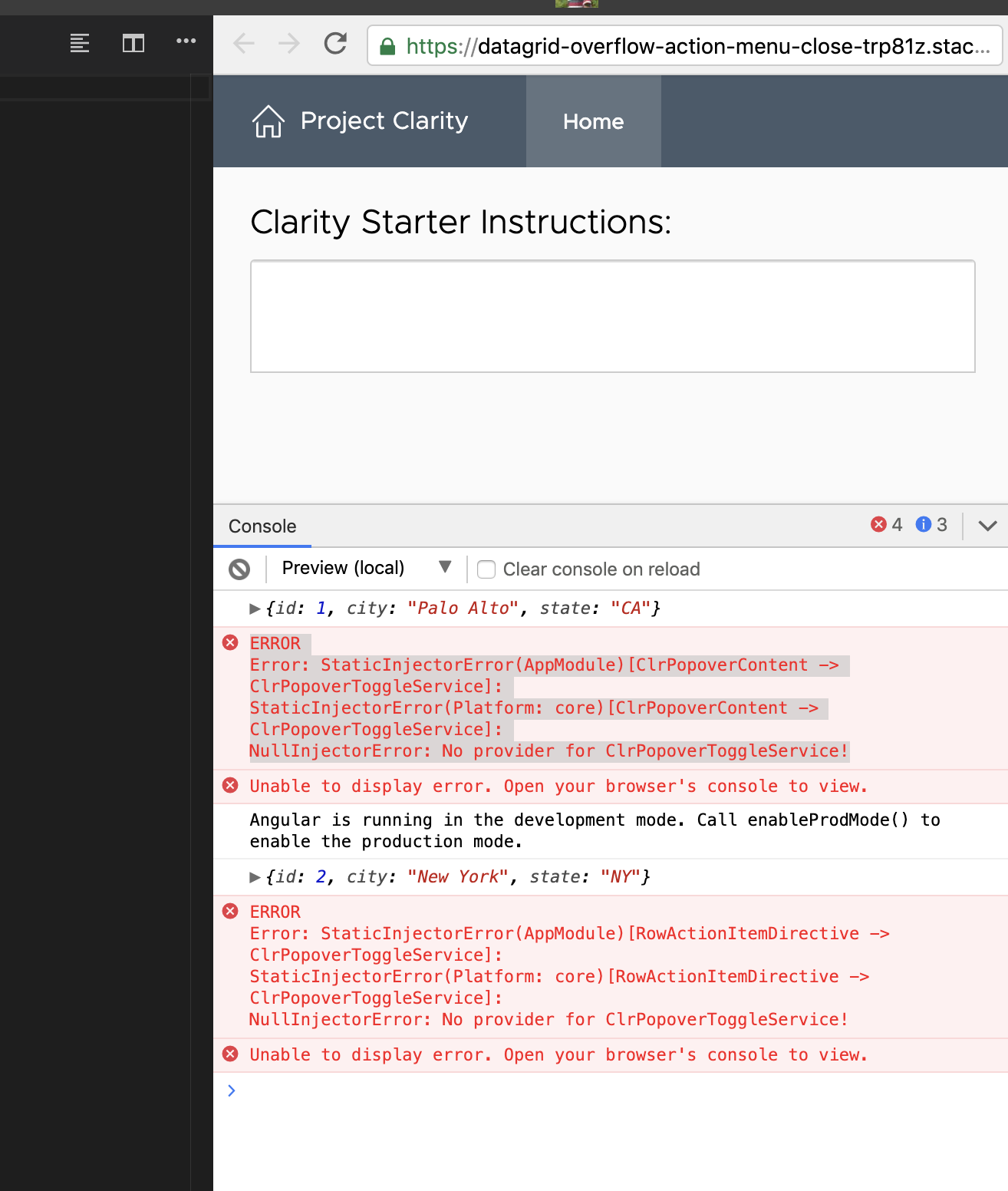
Any workaround of how this can be solved?
Thanks
 kalpeshhpatel
on 31 Dec 2019
kalpeshhpatel
on 31 Dec 2019
@kalpeshhpatel This is happening because you are injecting a service that hasn't been provided yet. The problem here is that the popover is internalized with the Datagrid, so the provider chain can't resolve the toggle service. I haven't dug deep, but I believe the templates you have are being instantiated too early on the action buttons and the action row directive hasn't attached yet.
As a side note, heavy wrapping of a Datagrid has usually confused to me as to what the value is because you're mixing in a lot of code to just generate a Datagrid instead of just defining the Datagrid. I think the benefit of abstraction is more likely to get in the way (like here) than to help in most cases, so the workaround is to not over abstract your Datagrids as well.
 gnomeontherun
on 31 Dec 2019
gnomeontherun
on 31 Dec 2019
Following up on the original issue as it was posted.
The original issue was related to the change in datagrid when a better popover utility was implemented for action overflow components. This change requires adding the clrPopoverCloseButton directive to anything projected into the action overflow when the click action should also close the menu.
I'll be submitting an update to the documentation to better explain this.
For the heavily wrapped datagrid I'm not sure what the answer is, we don't export the provider for ClrPopoverToggleService. If the wrapped datagrid is a common use case we should open a separate issue so that we understand why the datagrid (which is intended to be generated as a single entity) needs to be broken up. This will inform how that use case is addressed in the context of providing access to the internal providers if needed.
hippee-lee
on 8 Jan 2020
I'm still seeing this issue at
https://v2.clarity.design/datagrid/single-action
https://stackblitz.com/edit/clarity-light-theme-v2-byye8x
Is this got fixed or not?
shravansofts
on 17 Feb 2020
The fix is on master. If you can upgrade to `@_next you can get it there. I just backported it to the v2 branch. If you can wait for it, v2 wil have a release this week.
hippee-lee
on 18 Feb 2020
thanks.
I can wait for that 2.x patch release.
shravansofts
on 19 Feb 2020
Hi there 👋, this is an automated message. To help Clarity keep track of discussions, we automatically lock closed issues after 14 days. Please look for another open issue or open a new issue with updated details and reference this one as necessary.
![github-actions[bot] picture](https://avatars.githubusercontent.com/in/15368?v=4&s=40) github-actions[bot]
on 29 Aug 2020
github-actions[bot]
on 29 Aug 2020
Related issues
 reddolan
·
3Comments
reddolan
·
3Comments
 elesueur
·
3Comments
elesueur
·
3Comments
 mayesgr
·
3Comments
mayesgr
·
3Comments
 Vad1mo
·
3Comments
Vad1mo
·
3Comments
 aaronfrost
·
3Comments
aaronfrost
·
3Comments
Most helpful comment
The fix is on master. If you can upgrade to `@_next you can get it there. I just backported it to the v2 branch. If you can wait for it, v2 wil have a release this week.