Clarity: Stack View async loading not announced by screen reader
Describe the bug
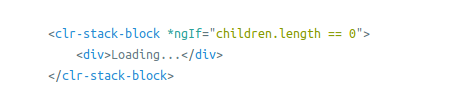
The "Loading..." message in the Lazy loading stack views example is not announced by screen readers.
How to reproduce
https://stackblitz.com/github/clane/clarityTest2/tree/master/clarity-test-app
Steps to reproduce the behavior:
- Using a screen reader find the 'Lazy Loading of Children' example and activate one of the 'stack-block-label' buttons.
- Observe that the text 'Loading...' appears
- Observe that the screen reader does not announce this text
Expected behavior
It should announce loading.
Versions
App
- Angular: [e.g. 6]
- Node: [e.g. 8.10.0]
- Clarity: [e.g. 0.12.5]
Device:
- Type: [e.g. MacBook]
- OS: [e.g. iOS]
- Browser [e.g. chrome, safari]
- Version [e.g. 22]
Additional notes
See https://github.com/vmware/clarity/issues/3423 and the solutions applied elsewhere.
 gnomeontherun
All 27 comments
I've looked into this and adding aria-label on the 'Loading...' div should fix this one. Can I be assigned to this one?
 andreiconstantinbytex
on 3 Sep 2019
andreiconstantinbytex
on 3 Sep 2019
You are welcome :)
 Jinnie
on 3 Sep 2019
Jinnie
on 3 Sep 2019
Thank you!
andreiconstantinbytex
on 3 Sep 2019
My opinion is that the lazily loaded stack view code example shouldn't have the aria-label set but I might be mistaken. Should it?
andreiconstantinbytex
on 9 Sep 2019
@chlane can you comment on this, please?
Jinnie
on 9 Sep 2019
aria-label is necessary for cases where a UI component does not have a visible textual name. In this case we are talking about visible text i.e.
Recommendation:
Use an empty and polite live region with aria-busy set to false like as seen below.
Loading ...
This should be repeated for long wait times.
 chlane
on 9 Sep 2019
chlane
on 9 Sep 2019
The aria-live region is a tricky thing for us from an API perspective, we need to be careful how this gets implemented. We have our new spinner component that handles the aria-live, which should be the recommendation for anything loading like this.
gnomeontherun
on 9 Sep 2019
As discussed with @gnomeontherun the 'Loading...' label will be replaced with the spinner.
andreiconstantinbytex
on 11 Sep 2019
I've tried replacing the 'Loading...' label with the spinner but the screen reader still doesn't announce the fact that the list is loading. It says 'loading' only after you hover over the spinner. This is the exact same behavior even without the spinner. I've tried two different screen readers on two different OSs.
andreiconstantinbytex
on 11 Sep 2019
Hi Andrei,
What screen reader browser combinations are you using?
And are you using a mouse?
With the screen reader on, can you try using the Tab key to focus the desired button and the Enter key to activate it?
Chris
From: Andrei Constantin notifications@github.com
Reply-To: vmware/clarity reply@reply.github.com
Date: Wednesday, September 11, 2019 at 1:47 AM
To: vmware/clarity clarity@noreply.github.com
Cc: Chris Lane chlane@vmware.com, Mention mention@noreply.github.com
Subject: Re: [vmware/clarity] Stack View async loading not announced by screen reader (#3565)
I've tried replacing the 'Loading...' label with the spinner but the screen reader still doesn't announce the fact that the list is loading. It says 'loading' only after you hover over the spinner. This is the exact same behavior even without the spinner. I've tried two different screen readers on two different OSs.
—
You are receiving this because you were mentioned.
Reply to this email directly, view it on GitHubhttps://nam04.safelinks.protection.outlook.com/?url=https%3A%2F%2Fgithub.com%2Fvmware%2Fclarity%2Fissues%2F3565%3Femail_source%3Dnotifications%26email_token%3DALPARJTUTK5GISQXL6FGZ6LQJCWDDA5CNFSM4H47XYDKYY3PNVWWK3TUL52HS4DFVREXG43VMVBW63LNMVXHJKTDN5WW2ZLOORPWSZGOD6NYD2Q%23issuecomment-530285034&data=02%7C01%7Cchlane%40vmware.com%7C71cd059871d14e6ccee108d73694b7c8%7Cb39138ca3cee4b4aa4d6cd83d9dd62f0%7C0%7C0%7C637037884673337953&sdata=dACPGQLkZxizfagTDcFUcSu3sGRKvRlTzOr0cpP3CGM%3D&reserved=0, or mute the threadhttps://nam04.safelinks.protection.outlook.com/?url=https%3A%2F%2Fgithub.com%2Fnotifications%2Funsubscribe-auth%2FALPARJWMPVNH3SYARQXQRTDQJCWDDANCNFSM4H47XYDA&data=02%7C01%7Cchlane%40vmware.com%7C71cd059871d14e6ccee108d73694b7c8%7Cb39138ca3cee4b4aa4d6cd83d9dd62f0%7C0%7C0%7C637037884673347944&sdata=gbF01Jhh5JWM8JxeQnq8zMilqbzfhZuXcEnMj5kI6IE%3D&reserved=0.
chlane
on 11 Sep 2019
So I used the following screen readers: Ubuntu 18.04 OS default screen reader, Win 10 OS Narrator + NVDAccess. No solution worked even with the keyboard approach.
andreiconstantinbytex
on 11 Sep 2019
Hi Andrei,
Clarity supports the Windows and macOS screen reader/browser combinations below.
• Internet Explorer 10 or 11 and the latest version of JAWS or NVDA
• Latest versions of Chrome, Firefox or Edge with the latest version of JAWS or NVDA
• Latest version of Safari with the latest or previous version of VoiceOver
Can you try any of these screen reader/browser combinations?
Chris
From: Andrei Constantin notifications@github.com
Reply-To: vmware/clarity reply@reply.github.com
Date: Wednesday, September 11, 2019 at 7:12 AM
To: vmware/clarity clarity@noreply.github.com
Cc: Chris Lane chlane@vmware.com, Mention mention@noreply.github.com
Subject: Re: [vmware/clarity] Stack View async loading not announced by screen reader (#3565)
So I used the following screen readers: Ubuntu 18.04 OS default screen reader, Win 10 OS Narrator + NVDAccess. No solution worked even with the keyboard approach.
—
You are receiving this because you were mentioned.
Reply to this email directly, view it on GitHubhttps://nam04.safelinks.protection.outlook.com/?url=https%3A%2F%2Fgithub.com%2Fvmware%2Fclarity%2Fissues%2F3565%3Femail_source%3Dnotifications%26email_token%3DALPARJTVK5LLKBTJ4TAIOCTQJD4EPA5CNFSM4H47XYDKYY3PNVWWK3TUL52HS4DFVREXG43VMVBW63LNMVXHJKTDN5WW2ZLOORPWSZGOD6OT6OY%23issuecomment-530399035&data=02%7C01%7Cchlane%40vmware.com%7C04bb19613869462d086608d736c2111a%7Cb39138ca3cee4b4aa4d6cd83d9dd62f0%7C0%7C0%7C637038079451590057&sdata=2E6kVGV8OM5tUsC4iChDwqNg265Epvb3x392Ubys628%3D&reserved=0, or mute the threadhttps://nam04.safelinks.protection.outlook.com/?url=https%3A%2F%2Fgithub.com%2Fnotifications%2Funsubscribe-auth%2FALPARJQIRRHPGWF3A2XWXV3QJD4EPANCNFSM4H47XYDA&data=02%7C01%7Cchlane%40vmware.com%7C04bb19613869462d086608d736c2111a%7Cb39138ca3cee4b4aa4d6cd83d9dd62f0%7C0%7C0%7C637038079451590057&sdata=es8tTuQWl8h0PF0Wtd2JXriOmZ%2BiZWlqMVG5GcjW4M4%3D&reserved=0.
chlane
on 11 Sep 2019
For now I can only test on Win 10 using the NVDA screen reader and this is what I found out:
- IE 11 + NVDA, doesn't announce loading spinner
- Chrome 76.0.3809.132 + NVDA, cannot expand stack-view with keyboard
- Mozilla 69.0 + NVDA, doesn't work
- Edge + NVDA, doesn't work
I've tested with the use of keyboard as you've described. The loading is announced only when the mouse hovers the spinner.
andreiconstantinbytex
on 11 Sep 2019
@gnomeontherun I noticed our current spinner implementation adds the live region dynamically. The WCAG approach would be to populate the live region dynamically rather than add it to the page dynamically.
Could we use *ngif to populate the live region rather than add it as a whole as seen below?
<clr-spinner clrMedium clrAssertive>
<span *ngIf="downloadinInvoice">
Downloading
</span>
</clr-spinner>
 clane
on 11 Sep 2019
clane
on 11 Sep 2019
By default the clrSpinner will set aria-live="polite" if no other option is set to true for example clrAssrtive or clrOff.
So placing clrSpinner without *ngIf will make the screen reader announce it when the page renders finish in general case this will be when everything on the page is loaded. So we use the *ngIf directive to control when this happens and also to display the loaders animation.
@andreiconstantinbytex is there any demo page that I could take a look - the stackblitz from the first comment is a bit general and have to make some changes to it to test it - so I could make something different than you.
 bdryanovski
on 11 Sep 2019
bdryanovski
on 11 Sep 2019
Can we place an empty live region on the page like this
<div role="status" clrAssrtive></div>
then populate it with the Loading icon and text?
<div role="status" clrAssrtive><clr-spinner>...</clr-spinner></div>
*I'm updating my recommendation to use role="status" on the element that has the aria-live attribute
clane
on 11 Sep 2019
Thanks @andreiconstantinbytex! I also see the issue with Firefox/NVDA. The live region content is not announced. This is why I recommend an implementation that has an empty live region on the page before the spinner and loading message appears, then when necessary the spinner and loading message should be added within the previously empty live region. I've have tested both scenarios in the past and the results support this recommendation. See my examples and test results at http://www.chrislane.info/aria_examples/liveRegions/insertedVsOnPage.php.
clane
on 11 Sep 2019
The spinner needs to have *ngIf on it as well, or it won't announce. We decided against trying to setup a general purpose aria-live region.
gnomeontherun
on 11 Sep 2019
Our current approach doesn't work with NVDA as @andreiconstantinbytex has pointed out. Can we create a live region component that we can put spinners and status messages inside of as seen in https://stackblitz.com/github/clane/ClarityExamples/tree/master/clr-examples?
clane
on 12 Sep 2019
Back when we discussed this originally we settled on not having a global live region (and the complexities that occur with trying to manage that). We aren't going to make that change in v1/v2, because applications could handle this on their end without Clarity doing anything directly.
So there is a bug in our spinner (seems to me that any PC combination isn't working, but VO on MacOS is), so I still stand by the solution is to use the spinner here and then we need a separate bug report about spinner component.
gnomeontherun
on 13 Sep 2019
I’m not proposing a global live region, but rather that we change our technique from insertion of a live region to population of a live region.
chlane
on 13 Sep 2019
Ok, that is a separate bug that should be filed and should be done with the spinner everywhere. This can proceed as planned then and the other bug will fix the limited support issue.
gnomeontherun
on 18 Sep 2019
So inserting the spinner should suffice for now and then the bug with the screen reader will be handled separately, correct?
andreiconstantinbytex
on 18 Sep 2019
@andreiconstantinbytex correct!
gnomeontherun
on 23 Sep 2019
Thank you for the update.
andreiconstantinbytex
on 24 Sep 2019
Seems this was merged.
Jinnie
on 30 Sep 2019
Hi there 👋, this is an automated message. To help Clarity keep track of discussions, we automatically lock closed issues after 14 days. Please look for another open issue or open a new issue with updated details and reference this one as necessary.
![github-actions[bot] picture](https://avatars.githubusercontent.com/in/15368?v=4&s=40) github-actions[bot]
on 3 Sep 2020
github-actions[bot]
on 3 Sep 2020
Related issues
 ChrisKaun
·
3Comments
ChrisKaun
·
3Comments
 elesueur
·
3Comments
clane
·
3Comments
elesueur
·
3Comments
clane
·
3Comments
 amellnik
·
3Comments
amellnik
·
3Comments
 ph55
·
3Comments
ph55
·
3Comments
Most helpful comment
Back when we discussed this originally we settled on not having a global live region (and the complexities that occur with trying to manage that). We aren't going to make that change in v1/v2, because applications could handle this on their end without Clarity doing anything directly.
So there is a bug in our spinner (seems to me that any PC combination isn't working, but VO on MacOS is), so I still stand by the solution is to use the spinner here and then we need a separate bug report about spinner component.