Clarity: Test for custom text spacing support - Accessibility
Describe the bug
The spec states that our application should not have any rendering issues or loss of content when these styles are applied by the user via a plugin or a11y tool. We should test Clarity to make sure the there is no clipping or overflow issues when the styles are applied. Bug example screenshots are in the spec. https://www.w3.org/WAI/WCAG21/Understanding/text-spacing.html (updated by Cory)
Success Criterion 1.4.12 Text Spacing (Level AA)
In content implemented using markup languages that support the following text style properties, no loss of content or functionality occurs by setting all of the following and by changing no other style property:
- Line height (line spacing) to at least 1.5 times the font size;
- Spacing following paragraphs to at least 2 times the font size;
- Letter spacing (tracking) to at least 0.12 times the font size;
- Word spacing to at least 0.16 times the font size.
 gnomeontherun
All 11 comments
Making a note, if there is a good tool that can quickly assess this please share it, or we may want to try and build one.
gnomeontherun
on 17 May 2019
Spec for H and P classes.
Colors are not specified - please retain the current values.

 colinreedmiller
on 18 May 2019
colinreedmiller
on 18 May 2019
Reference Spec:
https://www.w3.org/WAI/WCAG21/Understanding/text-spacing.html
 coryrylan
on 21 May 2019
coryrylan
on 21 May 2019
After some additional research and reading into the spec it looks like these changes are not necessary to Clarity directly. The spec states that our application should not have any rendering issues or loss of content when these styles are applied by the user not us applying these styles directly. https://www.w3.org/WAI/WCAG21/Understanding/text-spacing.html
"This SC does not dictate that authors must set all their content to the specified metrics. Rather, it specifies that an author's content has the ability to be set to those metrics without loss of content or functionality. The author requirement is both to not interfere with a user's ability to override the author settings, and to ensure that content thus modified does not break content in the manners shown in figures 1 through 4 in Effects of Not Allowing for Spacing Override."
Example typography with applied styles from the spec:
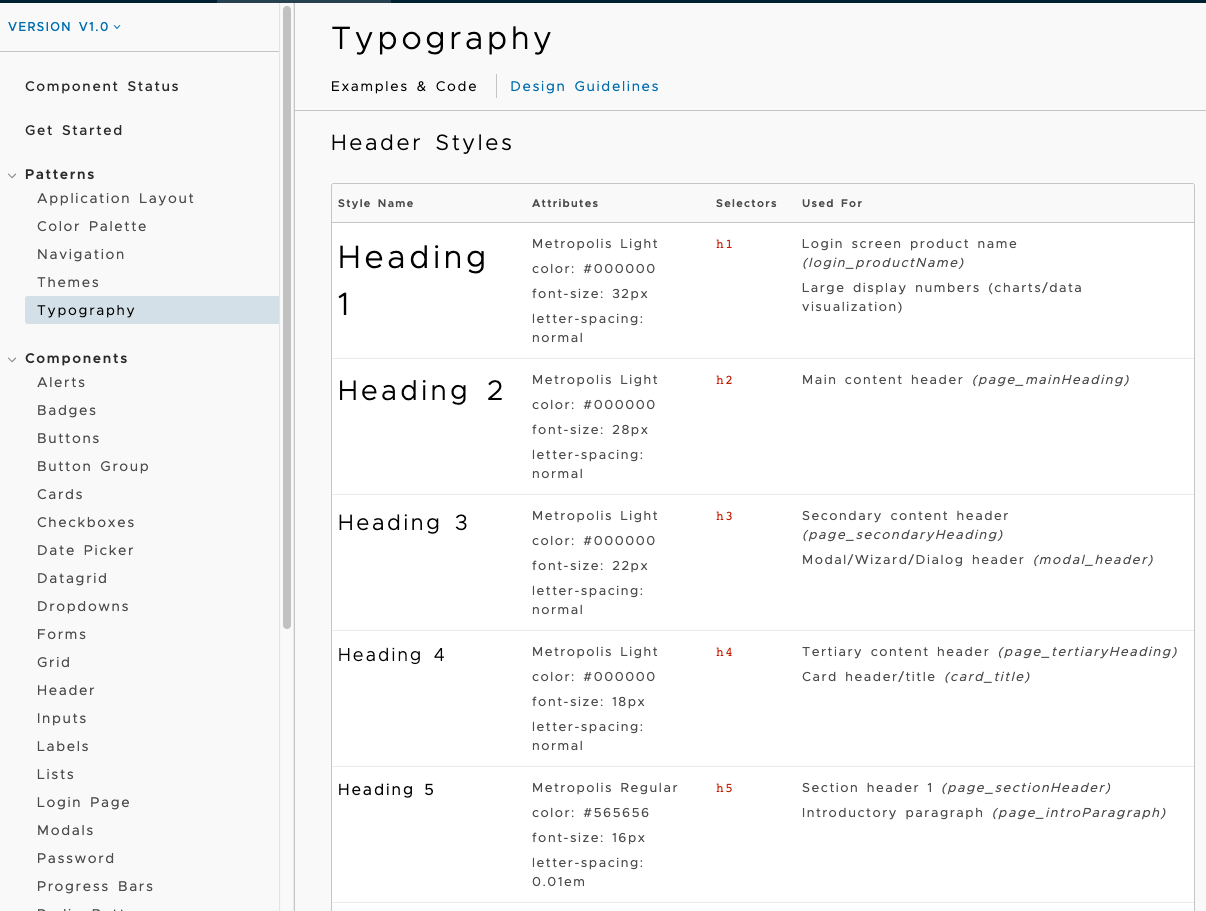
Increasing the word and letter spacing to the values in the spec makes it difficult to read for most users, but readable for users with visual/cognitive disabilities.
After doing some more research it looks like there are no automated tools to detect this. We have to manually override the styles with the styles from the spec and then manually check for any broken content. There are images of examples in the spec. Doing manual testing I don't see any major issues of content loss with the font spacing applied. I found a bookmarklet example here https://codepen.io/anon/pen/NVyYev that allows you to create a bookmarklet that applies those styles to any site.
https://diginclusion.com/industry-updates/wcag-2-1-what-is-text-spacing/
coryrylan
on 23 May 2019
The increased spacing values certainly do make things difficult to read for some users, yet in the WCAG 2.1 compliant spec the spacing has actually been decreased in some classes. In other classes the spacing has been increased to move it to a more standard line height as opposed to one that would be considered excessively tight.
e.g.
Clarity: H3 22px / 24px
WCAG 2.1 spec: H3 22px / 36px
Clarity P3: 13px / 24px
WCAG 2.1 spec: 13px / 20px
In both cases the WCAG 2.1 line height has been adjusted to be closer to standard leading (expressed as line height between 1.2 - 1.5 times the type size) while conforming to WCAG 2.1 thus as close to 1.5 as possible without going under.
The option to forego shifting the Clarity default classes to WCAG 2.1 compliance is good because as mentioned, the spacing is excessively broad and not ideal as default. However, since we are addressing type classes, perhaps it is wise to continue with this process by adjusting the classes to be optimal at default. There are line heights that are actually much larger than WCAG 2.1 requires (more difficult to read), and some that are so tight that applying the required styles directly may have unintended consequences.
colinreedmiller
on 23 May 2019
After discussion this case will be open to make sure we comply with the user being able to apply/override these styles without content becoming unavailable (see examples in spec). By adding the bookmarklet from this demo we can easily test components https://codepen.io/anon/pen/NVyYev
Unfortunately this is a very manual process and does not have an easy automated way to check and find these kind of issues.
coryrylan
on 23 May 2019
As I read the original request from a11y, the ideal solution is to include functionality similar to the Codepen bookmarklet as a user option that could be selected upon login:
"Our recommendation is to provide the default compact solution that we are currently using with the option for the user to expand to the more spacious version upon request. Preferably this would be integrated as a permanent login profile item, but I’ll take what I can get out of the gate."
colinreedmiller
on 23 May 2019
@coryrylan + @colinreedmiller
Can we discuss at leads meeting tomorrow?
 mathisscott
on 23 May 2019
mathisscott
on 23 May 2019
Finished testing dev app for any loss of content with defined CSS overrides. No content is clipped or lost. When we update our visual screen diff system we should revisit this and how we could potentially automate this testing.
coryrylan
on 29 May 2019
Keeping open as a main item to attach more issues found.
- Issue with website heading links (uses line height should us padding?)
coryrylan
on 31 May 2019
Hi there 👋, this is an automated message. To help Clarity keep track of discussions, we automatically lock closed issues after 14 days. Please look for another open issue or open a new issue with updated details and reference this one as necessary.
![github-actions[bot] picture](https://avatars.githubusercontent.com/in/15368?v=4&s=40) github-actions[bot]
on 8 Sep 2020
github-actions[bot]
on 8 Sep 2020
Related issues
 reddolan
·
3Comments
reddolan
·
3Comments
 elesueur
·
3Comments
elesueur
·
3Comments
 aaronfrost
·
3Comments
aaronfrost
·
3Comments
 BugsyFTW
·
3Comments
BugsyFTW
·
3Comments
 dennitsa
·
4Comments
dennitsa
·
4Comments
Most helpful comment
@coryrylan + @colinreedmiller
Can we discuss at leads meeting tomorrow?