Clarity: Datagrid: Various popovers get cut off depending on datagrid size and placement
Describe the bug
This is a list of datagrid issues related to the lack of smart popovers in the datagrid:
- Filters: When the datagrid is to short, the filter popover overflows with the rest of the header/table content underneath the footer. This can be worked around by setting a min height on the datagrid.
- Hideable Column Toggle: Depending on the height of the datagrid, the list of hideable columns can be shown above the fold
- signposts / tooltips in rows can be
clippeddepending on the location and need to be manually set by the consumer to ensure onscreen and visible placement.
Expected behavior
After development of https://github.com/vmware/clarity/issues/1262#issuecomment-320699953 the issues with these popovers in datagrid should not occur.
 hippee-lee
All 17 comments
One other issue that may already be solved: opening a filter on the first column can fall off the screen if the column is narrow.
Edit: I see that this issue is already tracked in #1262
 amellnik
on 12 Oct 2018
amellnik
on 12 Oct 2018
Hey Alex, I don't think the issue you describe is already fixed. But, it should be fixed once I develop the fix for this issue.
hippee-lee
on 12 Oct 2018
@hippee-lee do you have it planned for release anytime soon?
 sdurnov
on 15 Oct 2018
sdurnov
on 15 Oct 2018
Hi @sdurnov - I have one more item that needs to be done for the upcoming v1.0 release and then I will start on the smart popover enhancement that will address these issues.
I hope to start on it by end of this week or early next week.
hippee-lee
on 15 Oct 2018
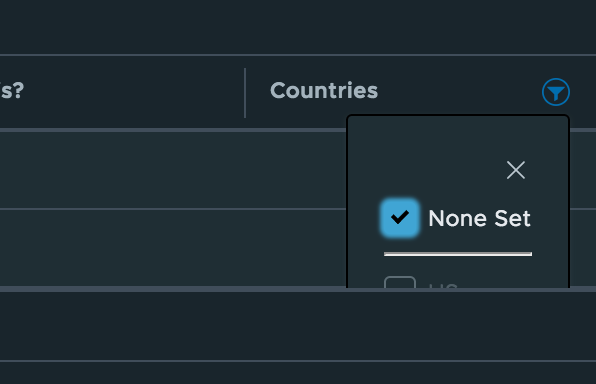
I'm still seeing this in the 1.0 beta with a custom filter. I didn't notice a problem in 13.7, but it could have been i never did a search with only one result.
 JoshuaNitschke
on 1 Nov 2018
JoshuaNitschke
on 1 Nov 2018
Hey @JoshuaNitschke - thats one of the things the smart popover fix needs to address. For now, your best bet is to set a min height on the datagrid so that the filter popover doesn't overflow.
hippee-lee
on 1 Nov 2018
@hippee-lee but that won't help with 1st columns filter popup. Btw, this issue is for 2.0 now? Meaning it is planned to be released in half a year? This is bad news :(
sdurnov
on 6 Dec 2018
- Filters: When the datagrid is to short, the filter popover overflows with the rest of the header/table content underneath the footer. This can be worked around by setting a min height on the datagrid.
I don't agree this should be part of an enhancement ticket. I think it should be a bug because it worked in the previous version. You can test this in the Custom Filtering documentation page of v.0.13:
https://vmware.github.io/clarity/documentation/v0.13/datagrid/custom-filtering
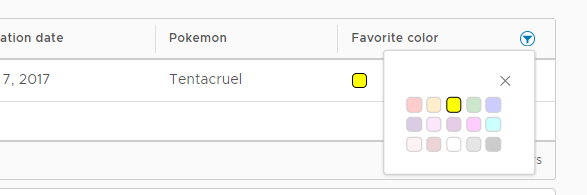
The workaround of setting a min-height is not a feasible option for us, because we have filters that contain a datepicker. This means that we'd need a min-height of about 400px.
But another workaround is to set the overflow of the datagrid to visible:
.datagrid {
   overflow: visible;
}
 BramMeerten
on 9 Jan 2019
BramMeerten
on 9 Jan 2019
If any of the columns have been widened then the .datagrid element will be wider than its container (.datagrid-host). Setting overflow: visible will show the columns outside of the host container.
hippee-lee
on 9 Jan 2019
- Filters: When the datagrid is to short, the filter popover overflows with the rest of the header/table content underneath the footer. This can be worked around by setting a min height on the datagrid.
I don't agree this should be part of an enhancement ticket. I think it should be a bug because it worked in the previous version. You can test this in the Custom Filtering documentation page of v.0.13:
https://vmware.github.io/clarity/documentation/v0.13/datagrid/custom-filtering
The workaround of setting a min-height is not a feasible option for us, because we have filters that contain a datepicker. This means that we'd need a min-height of about 400px.
But another workaround is to set the overflow of the datagrid to
visible:.datagrid { overflow: visible; }
This breaks lot of other things in grid. Like no scrolling.
 jkjha
on 9 Apr 2019
jkjha
on 9 Apr 2019
@jkjha - whatever we call it, the fix for this issue is #2923 which I am working on right now.
I have a prototype that mostly works but I need to refactor a few things, clean up the solution so its ready for production and write the tests. I expect to update the pull request for smart popovers soon.
hippee-lee
on 9 Apr 2019
this was nearly three months ago. has there been any updates on this?
 hachadwick
on 25 Jun 2019
hachadwick
on 25 Jun 2019
@hachadwick please follow #3374 for the updates
hippee-lee
on 25 Jun 2019
We're having same problem in Clarity v1.1.0 and here's our workaround fix:
_Update on July 4, 2019:
We have to remove the overflow style set on clr-datagrid since this will still cover the filter popups. After removing this, the filter popups and row action popups are now working as expected. The only thing is that the datagrid columns will exceeds its boundary if its width is smaller than the value set in ClrDgMinWidth directive. But comparing to these problems, we think the problem that the popups are hidden is more serious. Also since we already set the min width of the datagrid so even it's a 10-column datagrid, it's min width will be 1000px which will be enough on desktops/laptops and most of tablet devices. To be responsive for even smaller screens, we'll come up with the solution that will hide some less important columns, maybe just display 1 or 2 most important columns for small screens._
```// Fixed the horizontal scrolling problem of datagrid
clr-datagrid {
overflow: auto; // This is NOT ok and will still cover the filter popups (Updated on July 4, 2019)
}
// To make sure the filter can be fully displayed
.datagrid {
   overflow: visible;
}
.datagrid-table {
position: static;
}
// Also we added a directive to calculate min width of datagrid:
@Directive({
selector: 'clr-datagrid',
})
export class ClrDgMinWidth implements AfertViewInit {
constructor (
@Self() private readonly clrDatagrid: ClrDatagrid,
private readonly elRef: ElementRef
private readonly renderer: Renderer2,
) { }
ngAfterViewInit () {
const columns = this.clrDatagrid.columns.toArray();
const minWidth = columns.length * 100;
[ '.datagrid', '.datagrid-footer' ].map( selector =>
this.elRef.nativeElement.querySelector(selector),
)
.filter(el => !!el)
.forEach(el => this.renderer.setStyle(el, 'min-widht', ${minWidth}px);
}
}
 windsonic
on 2 Jul 2019
windsonic
on 2 Jul 2019
@windsonic is it working as you expect it to do? I see you are setting 'min-widht' on the last line
 Jinnie
on 2 Jul 2019
Jinnie
on 2 Jul 2019
@windsonic is it working as you expect it to do? I see you are setting 'min-widht' on the last line
Hi Jinnie, I updated my comments. Please take a look.
windsonic
on 4 Jul 2019
Hi there 👋, this is an automated message. To help Clarity keep track of discussions, we automatically lock closed issues after 14 days. Please look for another open issue or open a new issue with updated details and reference this one as necessary.
![github-actions[bot] picture](https://avatars.githubusercontent.com/in/15368?v=4&s=40) github-actions[bot]
on 5 Sep 2020
github-actions[bot]
on 5 Sep 2020
Related issues
 gperdomor
·
3Comments
gperdomor
·
3Comments
 ph55
·
3Comments
ph55
·
3Comments
 ChrisKaun
·
3Comments
amellnik
·
3Comments
ChrisKaun
·
3Comments
amellnik
·
3Comments
 vzayko
·
3Comments
vzayko
·
3Comments
Most helpful comment
I don't agree this should be part of an enhancement ticket. I think it should be a bug because it worked in the previous version. You can test this in the Custom Filtering documentation page of v.0.13:

https://vmware.github.io/clarity/documentation/v0.13/datagrid/custom-filtering
The workaround of setting a min-height is not a feasible option for us, because we have filters that contain a datepicker. This means that we'd need a min-height of about 400px.
But another workaround is to set the overflow of the datagrid to
visible: