Clarity: Content of tooltip might be cut off if not enough space left in the content area of modal with specified size
Select one ... (check one with "x")
[X] bug
[ ] feature request
[ ] enhancement
Expected behavior
The content of tooltip should display with full content, not part of.
Actual behavior
Some content will be cut off.

Reproduction of behavior
Environment details
Angular version: 4.0.X
Clarity version: 0.9.X
OS and version: Mac 10.11.4
Browser: [all | Chrome XX | Firefox XX | IE XX | Safari XX | Mobile Chrome XX | Android X.X Web Browser | iOS XX Safari | iOS XX UIWebView | iOS XX WKWebView ]
 steven-zou
All 24 comments
@steven-zou: pure css tooltips will definitely get clipped off. you will have to use our angular tooltip component. but this will still not work for the case (tooltips inside of forms) you mentioned above because of a bug we just identified. i will keep this issue open so that we can track it for that fix.
 adityarb88
on 16 May 2017
adityarb88
on 16 May 2017
Whatever happened to using tether library? wasn't that recommended before? Wouldn't that help deal with all the layout issues that are recurring? The clipping is happening in modals because the modal body doesn't want to allow anything the render outside of it. Clarity doesn't want to position the tooltip absolutely, which would fix it from a UI perspective. If there are accessibility concerns, that may be solved separately. Fact is, today, using Clarity Tooltip Angular component inside a modal are going to be encased within the modal's body.
 mattmutt
on 17 May 2017
mattmutt
on 17 May 2017
@mattmutt: We already implemented a feature (similar to tether) which would avoid tooltips from getting clipped off. There is just a bug in the forms component that is causing an issue with just this instance. you can try using the angular tooltip component inside of a modal body and it wont clip. here is a plnkr which demos that: https://plnkr.co/edit/0ctGoim5phiIf4FExmbi?p=preview
we are looking into fixing the issue with forms and tooltips.
adityarb88
on 17 May 2017
as long as the form layouts continue to mix relative with absolutes this problem with clipping will continue . Unsure why that approach was used for layout when there are cleaner ways with flexbox
mattmutt
on 19 May 2017
@mattmutt
The reason it is the way it is is because of label wrapping and form field alignment.
We are investigating the best avenue to fix this issue without introducing breaking changes across all forms. If you have suggestions, the floor is open. The Clarity plunkr is likely the best place to post examples if needed.
 mathisscott
on 19 May 2017
mathisscott
on 19 May 2017
Hi Team,
Any ETA for this bug?
Regards,
Pavan
 vkpavan26
on 24 May 2017
vkpavan26
on 24 May 2017
It is currently being worked on.
mathisscott
on 24 May 2017
@vkpavan26, @steven-zou: With 0.9.6 we released a fix to the forms with grid layout which will fix the use case you are looking for. Please note that you have to use forms in grids and the angular tooltip component. There are still a couple of other fixes that we want to handle but I think the issue you described should be fixed now. Still keeping this issue open to track the other issues.
adityarb88
on 25 May 2017
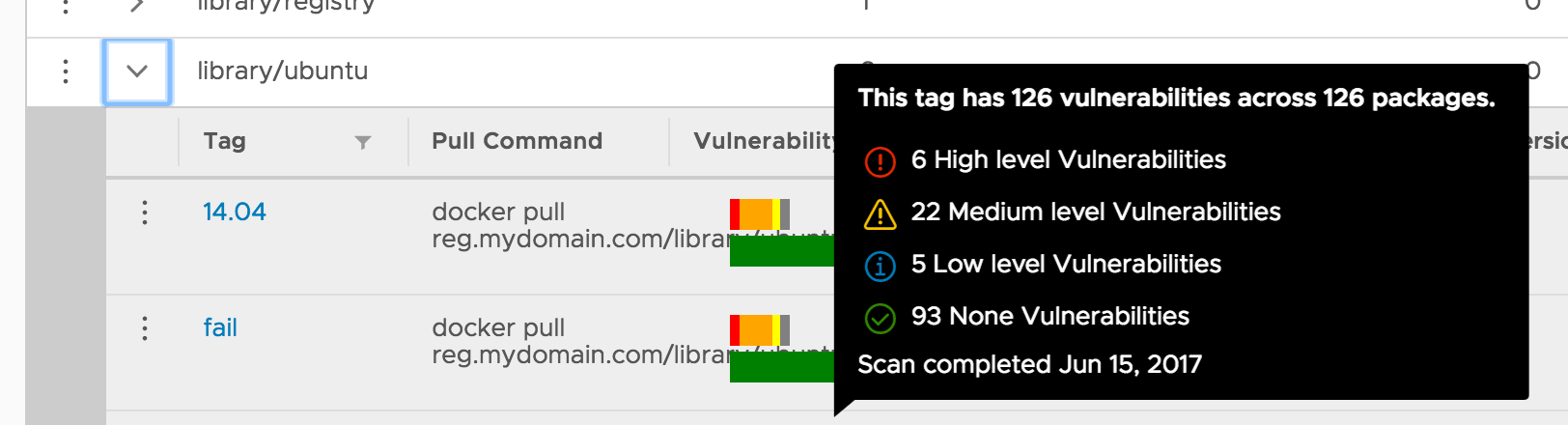
Tooltips will still be cut in datagird (clarity: 0.9.7):


The normal one should be:
@adityarb88
steven-zou
on 19 Jun 2017
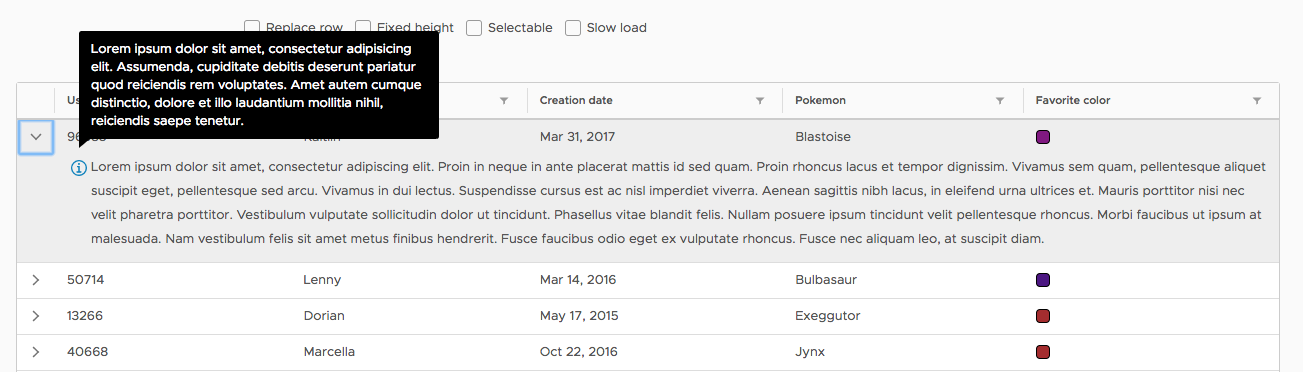
@steven-zou: Without a plnkr we wont be able to replicate this. Please provide one. I am not able to replicate this issue at my end:
adityarb88
on 19 Jun 2017
Hi @adityarb88 , we're using tooltip for input validation as described in documentation. This will be clipped inside a modal as you mentioned since it's pure css. Can tooltip component be used for validating input fields?
Changing the direction of tooltip to avoid it showing near modal border is a workaround that we want to avoid. Because it makes the overall UX look bad.
Plunkr: https://plnkr.co/edit/7wXWgwHbjoOPjaM9gKDj?p=preview
 yaooluu
on 30 Jun 2017
yaooluu
on 30 Jun 2017
Hi,
The issue is still reproducible even when using the tooltip component in modal.
see the plunker for example: https://plnkr.co/edit/S9leQQ2j5BAYZTGlqyhA?p=preview
Is there some workaround or a fix for this.
 pope4e
on 4 Aug 2017
pope4e
on 4 Aug 2017
@pope4e : I can't get your plunkr to work. It complains that you are using an input on the tooltip component that doesn't exist. Was that intentional?
mathisscott
on 4 Aug 2017
@pope4e: Plnkr was using the latest version which has breaking change https://plnkr.co/edit/Rxk80G2SFlZeoMO0z1p5?p=preview. I specified 0.9.16 in config.js to make it work.
Regarding the tooltip issue, for now you will need to make sure that the tooltip is outside of the .radio button as shown in the above plnkr. This is because position: relative and overflow: hidden in CSS cause the tooltip to clip off. Our angular component finds the nearest element with position: relative and removes the overflow: hidden from that. In this case, the expectation is to remove the overflow: hidden from .modal-body but since the .radio button has position: relative the check does not bubble up to the .modal-body. We will check if we can get rid of position: relative for .radio and .checkbox and get back to you but an alternative right now is to use the .tooltip outside of the .radio
adityarb88
on 4 Aug 2017
@yaooluu: Sorry I missed your earlier message. I will also pass your feedback to our UX team.
Validation tooltips to work properly require that we create angular components for form fields for them to not clip off. We have an issue (https://github.com/vmware/clarity/issues/1024) filed for that and we will take a look at it as soon as possible.
cc: @reddolan, @lil-kim
adityarb88
on 4 Aug 2017
@yaooluu @adityarb88 I may be misunderstanding the question.
Can tooltip component be used for validating input fields?
It is recommended to use tooltips to show error messages related to input fields.
You can see an example of this on our Input Fields documentation
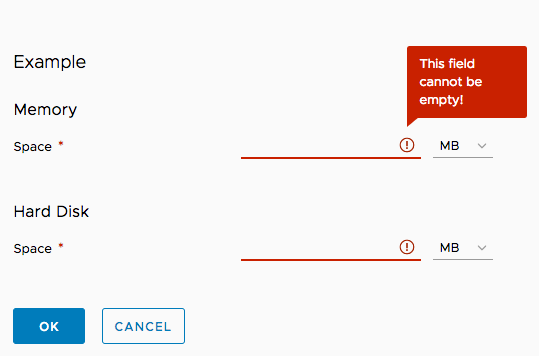
Or were you asking something else?
 reddolan
on 9 Aug 2017
reddolan
on 9 Aug 2017
Could someone clarify: would this issue cause tooltips in the column headers of a datagrid to be clipped? I saw one mention of a datagrid in an earlier comment but almost everything here seems to revolve around input elements and not specify Clarity displays (ie. datagrid).
 raijinsetsu
on 16 Aug 2017
raijinsetsu
on 16 Aug 2017
I believe this only applies to input elements. To my knowledge, tooltips in the datagrid headers should be fine.
mathisscott
on 18 Aug 2017
Is this issue planed to be fixed any time soon?
 choutkoa
on 1 Feb 2018
choutkoa
on 1 Feb 2018
This is being addressed in the forms refactor work currently underway, so yes it is being worked on but its going to be solved in the refactoring and not as a bugfix (cannot be done without breaking changes currently).
 gnomeontherun
on 1 Feb 2018
gnomeontherun
on 1 Feb 2018
do you have any timeline on this refactoring?
choutkoa
on 27 Feb 2018
Well using tooltips for validation will no longer be the recommendation, so that will fix the issue indirectly by changing the UX. However it will be a bit longer for us to build up all of the form changes needed for people to migrate to the improved forms experience.
gnomeontherun
on 27 Feb 2018
The tooltips are no longer in forms, so this specific case should not be an issue. Also the new grid no longer clips tooltips. I'm going to close this unless there is a reproduction on a current version.
gnomeontherun
on 8 Nov 2018
Hi there 👋, this is an automated message. To help Clarity keep track of discussions, we automatically lock closed issues after 14 days. Please look for another open issue or open a new issue with updated details and reference this one as necessary.
![github-actions[bot] picture](https://avatars.githubusercontent.com/in/15368?v=4&s=40) github-actions[bot]
on 18 Sep 2020
github-actions[bot]
on 18 Sep 2020
Related issues
 amellnik
·
3Comments
amellnik
·
3Comments
 elesueur
·
3Comments
elesueur
·
3Comments
 ph55
·
3Comments
ph55
·
3Comments
 beaker1977
·
3Comments
beaker1977
·
3Comments
 mayesgr
·
3Comments
mayesgr
·
3Comments
Most helpful comment
Hi @adityarb88 , we're using tooltip for input validation as described in documentation. This will be clipped inside a modal as you mentioned since it's pure css. Can tooltip component be used for validating input fields?
Changing the direction of tooltip to avoid it showing near modal border is a workaround that we want to avoid. Because it makes the overall UX look bad.
Plunkr: https://plnkr.co/edit/7wXWgwHbjoOPjaM9gKDj?p=preview