Clarity: clr-dropdown should support a dynamic clrPosition
Select one ... (check one with "x")
[ ] bug
[ ] feature request
[X] enhancement
Expected behavior
When a clrDropdownToggle is not positioned so that the associated clr-dropdown-menu's position ([clrPosition]) will not be visible in the page, the menu should draw in a direction that _will_ show fully on the page.
Actual behavior
The dropdown will draw in the specified direction no matter where the menu is going to end up on the page.
This is especially tricky when iterating over a list as the main content of the page, with dropdowns included in the list items. In this case the dropdown menus for the last few items cause layout issues as they try to gain space for the menu.
Reproduction of behavior
https://plnkr.co/edit/Jlmxcqe9419Nvgpxhkny?p=preview
Environment details
Angular version: 2.0.X
4.xClarity version:
0.10.0-rcOS and version:
Browser:
all
 justindsmith
All 16 comments
This is what we've been categorizing as "collision detection" or "smart popovers" for our dropdowns, tooltips, signposts aand any other kind of popovers.
It has not been considered a priority so far. The amount of work required to handle collision detection for every possible use case out there, while integrating with Angular _and_ not slowing down performances, is gigantic. Knowing that this can be solved in all cases by adding minimal extra work on the app side (in your case, keep track of the index in your list's *ngFor, and position the last few dropdowns to the top rather than the bottom), the (work required / value provided) ratio is pretty low at the moment.
Thanks for filing this, I will raise it during our next planning session to see if anything has changed.
 youdz
on 7 Aug 2017
youdz
on 7 Aug 2017
is there a workaround possible?
 timvl
on 6 Sep 2017
timvl
on 6 Sep 2017
We are running into this problem by having a lot of options in the menu. Using the ngFor index to decide the position is not really feasible, you have to combine it with offsetTop, screen height to get decent results that don't scroll off the top. At the very least, Clarity should make a suggestion as to how long menus from cards should work. Isn't there a fix like the one suggested at https://github.com/vmware/clarity/issues/1213? We were able to create a directive that implemented the suggested workaround.
 juanmendes
on 9 Nov 2017
juanmendes
on 9 Nov 2017
A similar issue occurs when a signpost is at the end of a paragraph that can flow to different positions on the screen.
 KevinABoucher
on 14 Nov 2017
KevinABoucher
on 14 Nov 2017
is there any progress on this issue ? Or maybe a dirty workaround for the moment ?
 marvinosswald
on 20 Jan 2018
marvinosswald
on 20 Jan 2018
Hi all, I just found a workaround for the datagrid filter issue (https://github.com/vmware/clarity/issues/1412)
In your template add a template variable on the clr-dg-filter component (#leftFilter):
<clr-datagrid>
      <clr-dg-column [clrDgField]="'myField'">
        My Field
        <clr-dg-filter #leftFilter>
          ...
        </clr-dg-filter>
      </clr-dg-column>
...
In you component, override the popoverOptions of the datagrid filter with offsetX:
@ViewChild('leftFilter') leftFilter: ClrDatagridFilter;

 ngOnInit(): void {
    this.leftFilter.popoverOptions = {
      offsetX: 100
    } as PopoverOptions;
  }
Now the left filter in the datagrid is moved a bit to the right so that is completely visible
timvl
on 1 Mar 2018
@youdz any update on this?
 jayrungta
on 9 May 2018
jayrungta
on 9 May 2018
There is currently no work planned on this, it is not one of our short-term priorities.
We are all working on higher impact new components and features at the moment.
youdz
on 9 May 2018
@youdz any work around you can suggest for the time being?
jayrungta
on 25 May 2018
As usual, the recommended workaround until we address this is to simply position the dropdown in a direction that is "safe" for your application, since it's entirely dependent on where the dropdown is used within your layout.
youdz
on 29 May 2018
I found a work around in case anybody needs (works for my use case):
overview:
In my use case, I have a data grid (ag grid, not clarity grid) and each column header of this grid can open a filter dropdown. Inside this filter dropdown, there is a clarity dropdown that opens on the right, kind of like this:
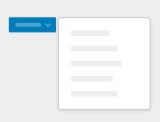
The problem I was facing was that the clarity dropdown did not understand when there was no more window space remaining on the right (such as for the last column on the screen), and still opened to the right. After this workaround, the dropdown opens to the left when there is no space remaining to the right.
html:
<div class="parentDiv" id="parentDiv">
  <clr-dropdown>
          <span clrDropdownToggle>
            Open Dropdown
          </span>
    <clr-dropdown-menu class="dropdown-menu" clrPosition="{{dropdownSide}}">
      <div>
        <a class="dropdown-item">Option 1</a>
        <a class="dropdown-item">Option 2</a>
        <a class="dropdown-item">Option 3</a>
      </div>
    </clr-dropdown-menu>
  </clr-dropdown>
</div>
ts (inside a function like ngOnInit, which gets called every time the component is rendered):
const elem = document.getElementById('parentDiv');
const rect = elem.getBoundingClientRect();
const left = rect.left + WIDTH_OF_PARENT_DIV + WIDTH_OF_SIDE_MENU;
const width = window.innerWidth;
if (left > width) {
  this.dropdownSide = 'left-top';
} else {
  this.dropdownSide = 'right-top';
}
Not sure about other use cases, but this workaround will work in cases where the problem is deciding when to open the dropdown to the left, or to the right.
jayrungta
on 30 May 2018
I hate to just +1 and run...but...
+1
This is a big deal for dynamic screens - we can't always control how the user is going to arrange things.
Thx.
 mann-david
on 16 Aug 2018
mann-david
on 16 Aug 2018
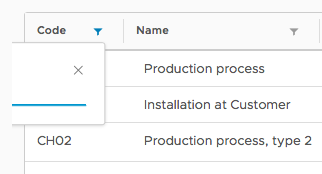
We have the same issue, as our grids are placed on the left side of the screen and the first column is quite thin (product code). The popup is half cut off. Any kind of workaround is appreciated (@timvl 's solution doesn't seem to work in our case).
 vlanz
on 11 Sep 2018
vlanz
on 11 Sep 2018
Does anyone have a workaround for this using DataStringFilter? I tried @timvl suggested workaround, but have had no such luck
 dpcamp
on 11 Dec 2018
dpcamp
on 11 Dec 2018
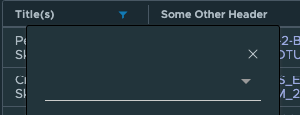
I used @timvl 's solution as well for my datagrid filter, and it worked for me. This is an annoying work around, though.
 JoshuaNitschke
on 9 Apr 2019
JoshuaNitschke
on 9 Apr 2019
When we implemented the smart popovers for dropdowns, we fixed the issues for the datagrid filter. However, the solution is forthcoming with our Clarity Core implementation of dropdowns which will have this capability.
The feature request here has been captured into our list and we’re going to take it into consideration as we develop Clarity Core capabilities. In an effort to clean up our backlog and focus our attention, I’m going to close this as captured in our feature requests. Please follow our development and releases to see when we release relevant components to make this possible. Future feature requests can be made in our GitHub Discussions.
 gnomeontherun
on 5 Feb 2021
gnomeontherun
on 5 Feb 2021
Related issues
 BugsyFTW
·
3Comments
BugsyFTW
·
3Comments
 aaronfrost
·
3Comments
aaronfrost
·
3Comments
 dennitsa
·
4Comments
dennitsa
·
4Comments
 ChrisKaun
·
3Comments
ChrisKaun
·
3Comments
 beaker1977
·
3Comments
beaker1977
·
3Comments
Most helpful comment
Hi all, I just found a workaround for the datagrid filter issue (https://github.com/vmware/clarity/issues/1412)
In your template add a template variable on the clr-dg-filter component (#leftFilter):
In you component, override the popoverOptions of the datagrid filter with offsetX:
Now the left filter in the datagrid is moved a bit to the right so that is completely visible