Description
A masked input is a set of characters that shows the intended format of an input. It helps make sure user inputs are formatted the same way every time.
Use cases under consideration
- REGEX and IPv4 (built-in) for MVP
- additional mask types such as phone, date, IPv6, time, credit card, zip code (future releases)
- error handling
- help text
Documentation
Masked input consists of helpful alphanumeric characters and other formatting characters like period, parentheses, dashes, and spaces. When the user starts typing, mask formatters will stay visible while the mask helpers will disappear. This helps users remember the formatting without being confused by additional characters in the input.

Usage
Masked inputs can be used on form fields, table cells or search/filter fields. Use a masked input when it is important to have consistent format of inputs. Common cases of masked input are phone numbers and dates as there are many different location-based formats or each.
To determine the best cases of when to use masked inputs, discuss with a designer and/or developer to understand if it will be helpful for your users or if the stored format is important.
Regex
- This is the foundation of how the masked input format is created. It can be used to create many different formats to meet whatever need you may have.
- IPv4 Address: This will be a built-in option used to format IPv4 addresses. It is recommended to pair helper text with this type as it helps users remember the format.
Interactions
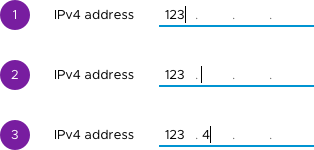
Typing mask formatters: Users can type in entries with mask formatters, in this case periods. When a user types a formatter, the cursor will move to the next mask area. Users have one of a few choices to use while typing. Typing mask formatters will advance the cursor forward. In the IP address example, a user can type a period to advance to the next section. Users can also type entries without having to type formatters. The cursor will advance after the mask area is filled. Users will also still be able to move around in the field using the arrow keys.
Helper Text
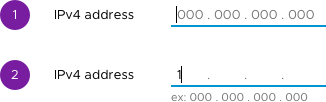
Helper text is text that shows below the input field. For masked inputs, the help text can show when the user starts typing. We recommend using text similar to what was in the mask before typing started. Helper text can be useful for users when the format may be unfamiliar or complex. It can also be used in situations where the format may change based on a users location.
Error Handling
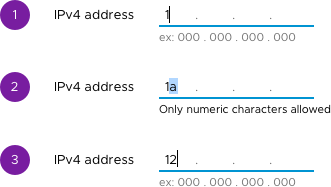
When a user types in any character not allowed, we show the character and also highlight it. You also have the option of displaying a helper message below the input which will show upon error.
The user can then type right over the incorrect character without having to hit delete. If the user continues to type invalid characters, it will stay in this error state and continue to display the helper message.
Once a valid character is typed, the helper message will disappear
We recommend that you test your helper messages and be sure to reserve space for them. Not doing can cause page jiggle when a message appears and disappears.
Documentation is subject to change
 reddolan
All 10 comments
Original request - #335
reddolan
on 4 Aug 2017
How will formatters affect pasted text? Will a user be able to paste a full IP address with separating periods into the mask helper and have it translated so it's displayed correctly in the formatter?
 joshjohnsonux
on 4 Aug 2017
joshjohnsonux
on 4 Aug 2017
@joshjohnson72 yeah, we will allow users to paste into with or without periods. We also expect to be able to copy the IP out of the field with formatting. @Shijir keep me honest if I am incorrect here
reddolan
on 4 Aug 2017
yeah, we will allow users to paste into with or without periods.
@reddolan, that is correct, our masked input should be able to do that.
But I have a question related to "pasting" as well: Users could try to paste an input that has extra/wrong characters into the masked input field. In that case, should we accept the user's input until the very first wrong/extra character? How would we handle that case?
 Shijir
on 4 Aug 2017
Shijir
on 4 Aug 2017
Other question, probably more for the future...
Will the formatter be able to support multiple regex patterns? For example, if I have an input for subnet, that could be defined as 192.168.1.0 - 192.168.1.255 using two IPs, but that's cumbersome some common alternatives would be to use mask notation like 192.168.1.0/24 or 192.168.1/24. Could you support both of those with the same regex? If so, my question might be moot.
Or maybe there could be such a thing as a format translator, so one format could be entered, but it would be translated to the 'proper' format automatically?
joshjohnsonux
on 4 Aug 2017
@joshjohnson72 Seconding this question, especially in the case of IPv6 addresses, which have very strange formatting rules (omitting zeros and whatnot): https://en.wikipedia.org/wiki/IPv6_address
 ramonaisonline
on 4 Aug 2017
ramonaisonline
on 4 Aug 2017
A wonderful addition to the library!
Can the helpers be internationalized? so that a date field is US is mm / dd / yyyy, but elsewhere is dd / mm / yyyy.
Can formatters be internationalized so that currency in US is $0,000.00 but elsewhere might be €0.000,00.
 dworman
on 4 Aug 2017
dworman
on 4 Aug 2017
@joshjohnson72: As mentioned in the issue's description, we decided MVP was "provide-your-own-regex". To make sure it all works fine and to provide an example for future "built-in" masks, we also included IPv4 as the first built-in mask and part of the MVP.
So from the very first version, you will be able to give us a regular expression (or to be precise, a mask that is written with a subset of the regular expression language) to generate whichever mask you want. So in your case, the IP subnet regex could be something like:
\d\d?\d?\.\d\d?\d?\.\d\d?\d?\.\d\d?\d?/\d\d?\d?
or ideally the shorter version, if we manage to support it:
(\d{1-3}\.){3}\d{1-3}/\d{1-3}
Does that answer your question?
If I misunderstood and what you want is a single input and single mask to support two wildly different formats at the same time, then I think you run into the problem of the placeholder or helper text only describing one and not the other, which leads to a hidden feature. But it would still be possible, you just make a bigger regular expression that is a logical OR between your two patterns.
Also note that popular masks will be added progressively as built-ins, which means you will be able to use a shortcut for them rather than provide your own regular expression. Based on the API we are anticipating, adding a built-in mask should be very easy and we think they make prime candidates for external contributions.
@dworman: Dates are particular, because raw masks do not have "logic", they just match a pattern. In particular, for a date, "99/99/9999" would be a valid date just based on a mask that checks the format. Additional logic like i18n will need to be implemented in the Date input itself, which we indeed plan on doing.
 youdz
on 8 Aug 2017
youdz
on 8 Aug 2017
@Shijir we would enter the string in its entirety. A few things about this.
- we will be allowing other formatters in some cases like
phone number; parens, dashes, periods, spaces. In that case if the user had typed any of those, the masking would still work normally as the other numbers are added. - If a user had some unrecognized character in their pasted string, the next character inputted would be a number which would correct any errors and advance the cursor.
- If the pasted string had too many numbers, like a different locale formatting, the masked input would take as many numbers as allowed, which would leave out any additional characters. The user would also see the intended formatting and would likely see they pasted a bad format.
Does that answer your question?
reddolan
on 9 Aug 2017
The feature request here has been captured into our list and we’re going to take it into consideration as we develop Clarity Core capabilities. In an effort to clean up our backlog and focus our attention, I’m going to close this as captured in our feature requests. Please follow our development and releases to see when we release relevant components to make this possible. Future feature requests can be made in our GitHub Discussions.
 gnomeontherun
on 5 Feb 2021
gnomeontherun
on 5 Feb 2021
Related issues
 srikanthps
·
3Comments
srikanthps
·
3Comments
 mayesgr
·
3Comments
mayesgr
·
3Comments
 gperdomor
·
3Comments
gperdomor
·
3Comments
 ph55
·
3Comments
ph55
·
3Comments
 Thatkookooguy
·
3Comments
Thatkookooguy
·
3Comments
Most helpful comment
How will formatters affect pasted text? Will a user be able to paste a full IP address with separating periods into the mask helper and have it translated so it's displayed correctly in the formatter?