Clarity: Datagrid: if last column is hidden scrollbar is shown under datagrid
Select one ... (check one with "x")
[x] bug
[ ] feature request
[ ] enhancement
Expected behavior
No scrollbar shown.
Actual behavior
The problem is that if the last column is hidden the column width toggl of the column before is still visible (which is the actual bug) which causes the whole problem. Hard to explain, just see plunker for detail.
Reproduction of behavior
https://plnkr.co/edit/mGTsaVbRLAbpRAxBIJis?p=preview
Environment details
Angular version: 4.3.1
Clarity version: 0.10.0-alpha.5
OS and version: macOS 10.11.6
Browser: [all, i guess]
 marvinosswald
All 14 comments
adding a screenshot in addition to the plnkr provided:
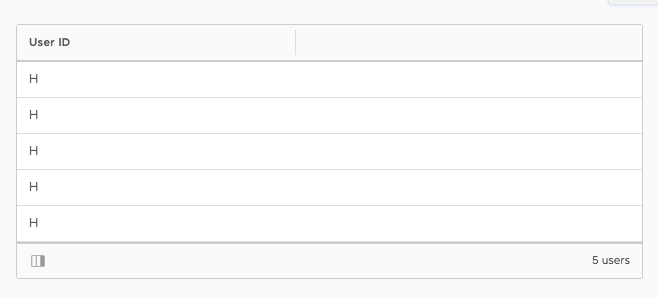
The draggable resize column handle is still visible when the last column is hidden.
 adityarb88
on 3 Aug 2017
adityarb88
on 3 Aug 2017
Investigate and do it if fix is manageable. If not, then we'll move it back to bullpen but ready to fix../
 mathisscott
on 10 Aug 2017
mathisscott
on 10 Aug 2017
Our css selector hides the selector on the last column of a datagrid. In this case, the scrollbar appears because we are still rendering the resize column handle. Though we "hide" the columns, they remain in the dom so the visible column isn't technically the last column.
I investigated possible solutions for this:
- css solution: it isn't possible to use css selectors to find a column that's
:last-childand:not(.datagrid-column--hidden) - I tried refactoring our
HideableColumnServiceto keep track of also the columns that are not hideable. This is needed because a datagrid can have a mixture of columns (both hideable and non-hideable). The idea was that when a column is rendering, it'd ask the service if it was the last visible column in the datagrid and if so, hide the separator. However, we are getting the chocolate error when we dynamically add a column (using*ngIffor example). I suspect that's because a column has rendered with a truth value to show/hide the separator, but something external (in this case the dynamic column) is changing that value before the second check passes.
I had a discussion with the team, and the scope of the fix is bigger than hoped. I'll be moving this back to bullpen for now to be re-evaluated given the notes above.
 jeeyun
on 18 Aug 2017
jeeyun
on 18 Aug 2017
Hello, we are also facing the same issue. I created another plunkr with the issue reproducible here:
https://plnkr.co/dOdp5B
Here is a screenshot too:
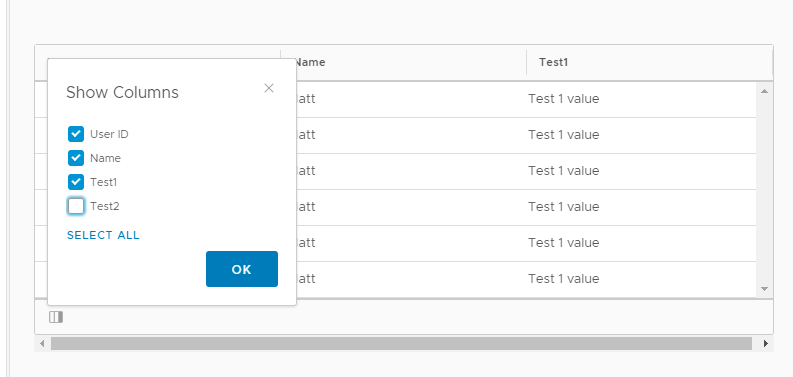
Can you please suggest a workaround, while this is being fixed?
 dennitsa
on 28 Sep 2017
dennitsa
on 28 Sep 2017
@jeeyun + @youdz
Any workarounds possible for this issue?
mathisscott
on 28 Sep 2017
We were not able to find a workaround last time we checked.
Most of our issues came from the fact that CSS doesn't allow you to style an element based on what comes after it, only what comes before it.
And the amount of work required to fix this was surprisingly large, so we didn't prioritize it yet.
 youdz
on 2 Oct 2017
youdz
on 2 Oct 2017
There is no pure-CSS solution, but our workaround is a custom directive bound on clr-dg-column that toggles a last-visible-column CSS class that hides the separator. It injects the ClrDatagrid and re-evaluates the condition for the CSS class whenever the grid's columns or their hidden state changes:
  get shownColumnChanges$() {
    return this.grid.columns.changes.pipe(
      startWith(null),
      switchMap(() => this.hiddenStateChanges$)
    );
  }

  get hiddenStateChanges$() {
    const hiddenChangePerColumn = this.grid.columns.map(c => {
      return c.hideable
        ? c.hideable.hiddenChangeState
        : NEVER;
    });
    return merge(...hiddenChangePerColumn).pipe(startWith(null));
  }
 stefnoten
on 17 Jan 2019
stefnoten
on 17 Jan 2019
Any update about this guys?
 KevinWingi
on 30 Apr 2019
KevinWingi
on 30 Apr 2019
@stefnoten
Can you pass the implementation link if you can please??
KevinWingi
on 30 Apr 2019
.datagrid-overlay-wrapper{
    overflow-x: hidden;
}
this can help
KevinWingi
on 30 Apr 2019
I’m still able to reproduce it with Angular 8 and Clarity 2.1.1. Is there a simple workaround except than disabling the horizontal scrolling or making the hideable column not the last column?
 yuezhizizhang
on 11 Sep 2019
yuezhizizhang
on 11 Sep 2019
This is because we don't correctly show/hide the column resize handle on the last visible column currently. We still need to triage a solution, but our CSS only solution doesn't work because we are only hiding columns and not removing them from the DOM so :last-child doesn't pick up the last visible.
 gnomeontherun
on 13 Sep 2019
gnomeontherun
on 13 Sep 2019
I have a similar problem. My datagrid is inside a card. No hidden column in my case.
I have some custom component in a column (to show different icons based on a state).
It happen to any resolution. I've tried to size the last column with style="width: 44px;" with not success. It is shown on the developer console but the column has another, bigger size.
 insyto
on 23 May 2020
insyto
on 23 May 2020
Ok, found the problem. In my case the problem is the tool tip on the element of the last column.
The tooltip on a column element remain inside the data grid, and if doesn't fit inside it, the scroll bar (horizontal or vertical) are shown.
Here there is a screenshot.
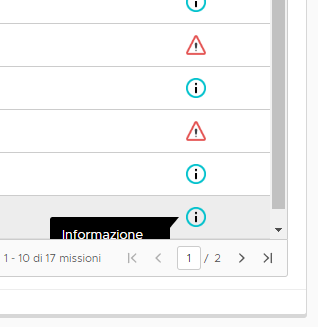
Here you can see the tooltip croped and the scrolbar on the right.
The scrollbar remain even if the tooltip is not shown.
insyto
on 23 May 2020
Related issues
 clane
·
3Comments
clane
·
3Comments
 thojo
·
3Comments
thojo
·
3Comments
 Thatkookooguy
·
3Comments
Thatkookooguy
·
3Comments
 mayesgr
·
3Comments
mayesgr
·
3Comments
 reddolan
·
3Comments
reddolan
·
3Comments