Ckeditor5-react: Cannot set property 'boundaries' of undefined
Anyone experienced this issue?

It is working fine in localhost
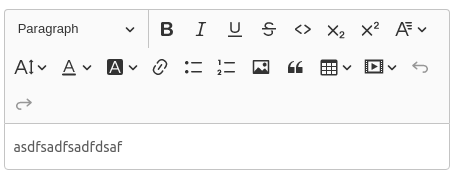
But it is failing in production
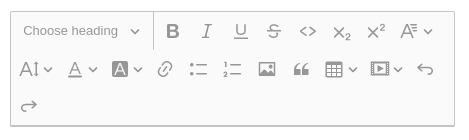
 devlargs
All 26 comments
Hi, thanks for the report. I didn't have any problem with using CKEditor in React production build, so in order to look into this, I need to see your app and editor configuration, list of plugins and detailed steps to reproduce the issue.
 FilipTokarski
on 13 Mar 2020
FilipTokarski
on 13 Mar 2020
Hi, Thanks for the fast response. Im currently using this:
https://www.npmjs.com/package/@ck-classic/ckeditor5-build-classic
https://github.com/devlargs/ckeditor5-build-classic
devlargs
on 13 Mar 2020
When building for production in React, please check if your file build/index.html has proper import paths (there should be a dot at the beginning) for all static assets, for example:
"./static/css/main.d1b05096.chunk.css"
instead of
"/static/css/main.d1b05096.chunk.css"
Apart from that, if you encounter further problems, please make sure that you followed our official React integration guide.
FilipTokarski
on 13 Mar 2020
Experiencing the same issue as @devlargs above.
 matt-heath
on 23 Mar 2020
matt-heath
on 23 Mar 2020
I am experiencing a similar issue:
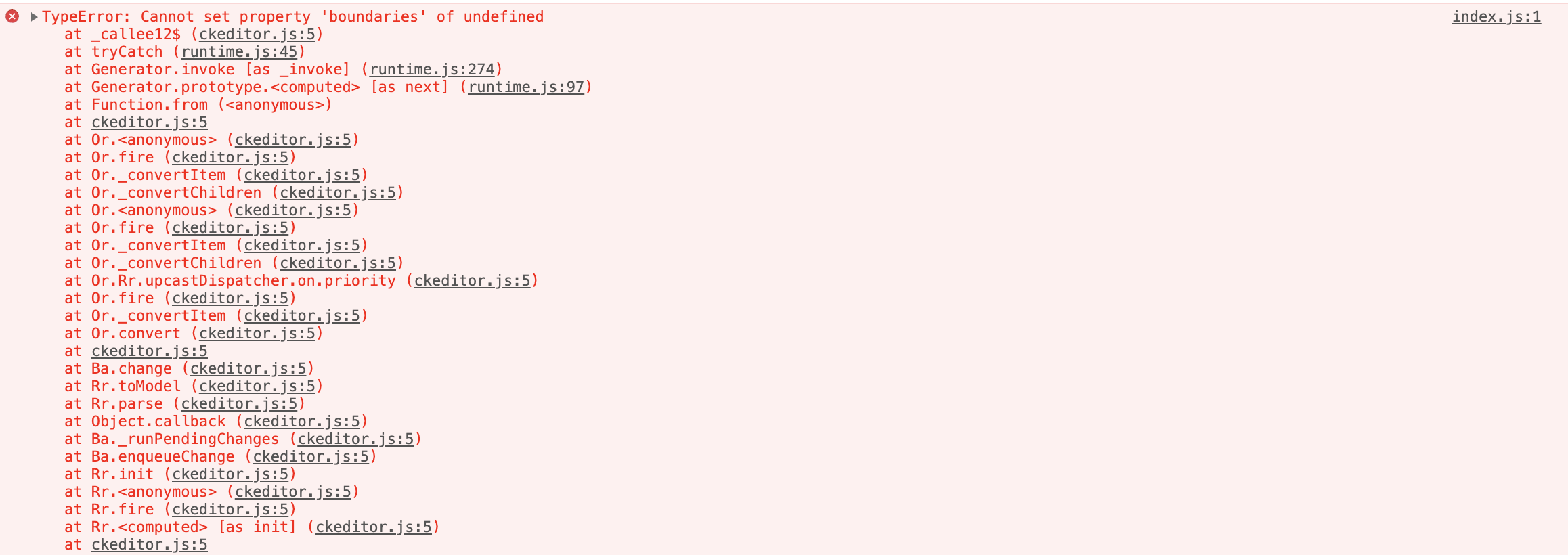
and when I click on the area where the editor is supposed to be:
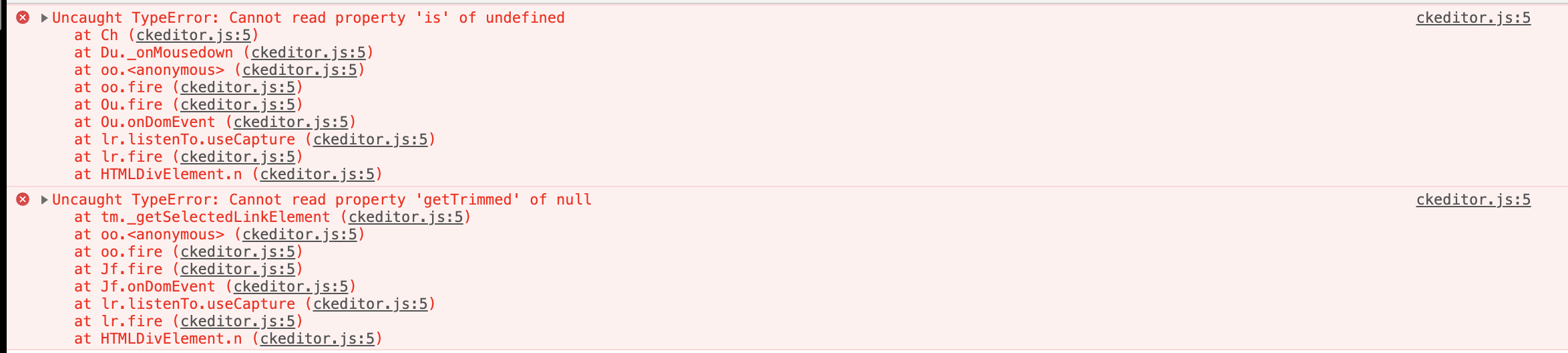
I am using:
@ckeditor/[email protected]
@ckeditor/[email protected]
with [email protected]
 yankustefan
on 23 Mar 2020
yankustefan
on 23 Mar 2020
For everyone experiencing this issue, could you please be so kind to provide detailed steps/create a live demo sample? This will be very helpful for us when looking into this
FilipTokarski
on 23 Mar 2020
Thanks for your feedback Filip. I am experiencing this on an app I can't make public. So I will make a "blank" app, and see if I can reproduce it.
What I can say now is that first I had a custom build. And I replaced it with @ckeditor/[email protected] and removed the config property from
yankustefan
on 23 Mar 2020
Ok, I found the "cause" of the problem:
Upgrading "react-scripts": "1.1.4" to "react-scripts": "3.4.1" causes the symptoms mentioned above.
I assume that some of if the involved dependencies interferes with CKEditor.
yankustefan
on 23 Mar 2020
Thanks @yankustefan for the insight!
cc @pomek
FilipTokarski
on 23 Mar 2020
@FilipTokarski Thanks for your attention!
Well, I removed package-lock.json, cleared the node_modules folder and re-installed all my dependencies. Now it works. Also with react-scripts 3.4.1.
yankustefan
on 24 Mar 2020
@yankustefan did the same but it did not work for me.
 ev3nst
on 24 Mar 2020
ev3nst
on 24 Mar 2020
I tried it once again with react-scripts 3.4.1 and I can't reproduce the error. Running app in dev mode, as well as building for production works fine. So the problem doesn't seem to be caused by Editor and its React integration. I'm afraid you will have to debug this by yourself, and if everything else fails, please provide detailed steps for reproduction - together with contents of your package.json and editor configuration.
FilipTokarski
on 26 Mar 2020
Hi! The problem exists. We have it on the prod and local. I tried to remove package-lock.json, yarn.lock and re-install all libs but it doesn't help. react-scripts 3.4.1 react 16.3.1
CKEditorError: unexpected-error {"originalError":{"message":"Cannot read property 'getTrimmed' of null","stack":"TypeError: Cannot read property 'getTrimmed' of null\n at
 lordlpua
on 30 Mar 2020
lordlpua
on 30 Mar 2020
To everyone experiencing this issue - could you please provide detailed steps to reproduce the problem or prepare a demo with a minimal amount of code required to reproduce it? Without that, we won't be able to debug it and check what's going on.
 Mgsy
on 30 Mar 2020
Mgsy
on 30 Mar 2020
To everyone experiencing this issue - could you please provide detailed steps to reproduce the problem or prepare a demo with a minimal amount of code required to reproduce it? Without that, we won't be able to debug it and check what's going on.
react-scripts 3.4.1 react 16.3.1 react-dom 16.3.1 "@ckeditor/ckeditor5-build-decoupled-document": "15.0.0",
"@ckeditor/ckeditor5-react": "1.1.3", I can send some part of code and maybe video. Do you have email on which I can send information ?
lordlpua
on 30 Mar 2020
For me I found resolve. Not good but... Downgrade react-scripts to 3.00 and it works.
lordlpua
on 30 Mar 2020
for me, upgrading react-scripts from 3.0.0 to 3.4.1 caused this issue.
also must add that I had to update react scripts after doing a "audit fix"
going back to version 3.0.0 of react scripts, solves the issue
 frmendez
on 31 Mar 2020
frmendez
on 31 Mar 2020
@yankustefan can you provide your package.json to compare?
frmendez
on 31 Mar 2020
hi, same issue...
my package.json is:
{
  "name": "test",
  "version": "1.0.0",
  "private": true,
  "dependencies": {
    "@ckeditor/ckeditor5-build-classic": "^12.4.0",
    "@ckeditor/ckeditor5-react": "^1.1.3",
    "react": "^16.13.1",
    "react-dom": "^16.13.1",
    "react-scripts": "^3.4.1"
  },
  "scripts": {
    "start": "react-scripts start"
  }
}
i created a small example where you can see this error, here it is https://github.com/mesija/ckeditor-issue
@Mgsy hope you can solve this error. If you need more details let me know :)
 mesija
on 10 Apr 2020
mesija
on 10 Apr 2020
I found a solution for my case, it was not at all obvious and i am not sure what exactly was the problem. I just opened the root file of the editor (/node_modules/@ckeditor/ckeditor5-build-classic/build/ckeditor.js) in PhpStorm and selected "Code> Reformat Code" from the menu.
I do not know how this solves the problem (I suspect changing the file updated some cache files in the system for this module or something) and after that everything worked for me, even after reinstalling the module in its original form.
mesija
on 10 Apr 2020
I have this issue too and none of the above solutions work. react-scripts is at 3.4.0 and since my dev environment uses Docker it's a fresh environment each time, so the problem can't be caused by stale files.
I've made a minimal test case here which reproduces the issue for me (minus Docker): https://github.com/FraserThompson/ckeditor-minimal-test-case
 FraserThompson
on 11 Jun 2020
FraserThompson
on 11 Jun 2020
Got same issue in production server, but not in local. I've tried to upgrade nodejs, and issue happens. So I decide to downgrade my nodejs to previous version. But issue now still happened in local.
This is second times i got same problem. Previously, I did delete node_modules and run yarn install, but this solution doesn't work anymore for now.
 irvanherz
on 12 Jun 2020
irvanherz
on 12 Jun 2020
Hey everyone, we have encountered the same issue and found out where the problem originated for us.
For us the problem and solution turned out to be inside package.json under the "browserslist" section. We had to remove the "not ie <= 11" part to get it to work.
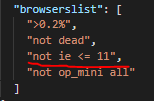
It was really hard to pinpoint where the issue originated from because of this other issue mentioned in the create react app docs.

https://create-react-app.dev/docs/supported-browsers-features/
For @devlargs @irvanherz and others facing differences between your local/dev and prod environments. You may have a different configuration set up inside your browserslist for both development and production or not have cleared your cache on your local/dev or prod which explains the difference in behavior.
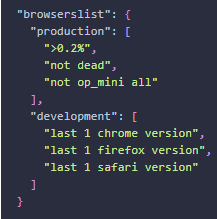
 MasTahFuLL1993
on 16 Jul 2020
MasTahFuLL1993
on 16 Jul 2020
Hey everyone, we have encountered the same issue and found out where the problem originated for us.
For us the problem and solution turned out to be inside package.json under the "browserslist" section. We had to remove the "not ie <= 11" part to get it to work.
It was really hard to pinpoint where the issue originated from because of this other issue mentioned in the create react app docs.
https://create-react-app.dev/docs/supported-browsers-features/
For @devlargs @irvanherz and others facing differences between your local/dev and prod environments. You may have a different configuration set up inside your browserslist for both development and production or not have cleared your cache on your local/dev or prod which explains the difference in behavior.
thanks @MasTahFuLL1993 this is working
devlargs
on 25 Jan 2021
Same problem even with the fix of @MasTahFuLL1993 😢
 pierre-H
on 12 Feb 2021
pierre-H
on 12 Feb 2021
I have the same issue. Did a component as described here: https://ckeditor.com/docs/ckeditor5/latest/builds/guides/integration/frameworks/react.html#quick-start
import React, { Component } from 'react';
import { CKEditor } from '@ckeditor/ckeditor5-react';

import ClassicEditor from '@ckeditor/ckeditor5-build-classic';

class App extends Component {
    render() {
        return (
            <div className="App">
                <h2>Using CKEditor 5 build in React</h2>
                <CKEditor
                    editor={ClassicEditor}
                    data="<p>Hello from CKEditor 5!</p>"
                    onReady={(editor: any) => {
                        // You can store the "editor" and use when it is needed.
                        console.log('Editor is ready to use!', editor);
                    }}
                    onChange={(event: any, editor: { getData: () => any }) => {
                        const data = editor.getData();
                        console.log({ event, editor, data });
                    }}
                    onBlur={(event: any, editor: any) => {
                        console.log('Blur.', editor);
                    }}
                    onFocus={(event: any, editor: any) => {
                        console.log('Focus.', editor);
                    }}
                />
            </div>
        );
    }
}

export default App;
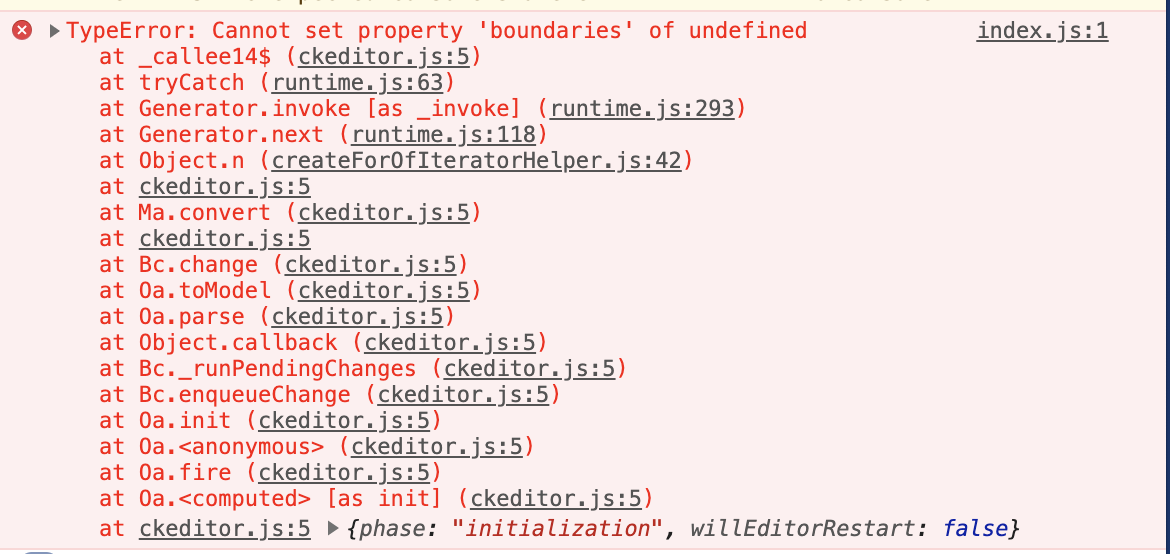
"react": "17.0.1"
"react-scripts": "4.0.1"
 timofeyp
on 26 Feb 2021
timofeyp
on 26 Feb 2021
Related issues
 sirajalam049
·
10Comments
sirajalam049
·
10Comments
 majordesigner
·
8Comments
majordesigner
·
8Comments
 thtg88
·
7Comments
thtg88
·
7Comments
 reeversedev
·
13Comments
reeversedev
·
13Comments
 RaulEscobarRivas
·
4Comments
RaulEscobarRivas
·
4Comments
Most helpful comment
Hey everyone, we have encountered the same issue and found out where the problem originated for us.
For us the problem and solution turned out to be inside package.json under the "browserslist" section. We had to remove the "not ie <= 11" part to get it to work.
It was really hard to pinpoint where the issue originated from because of this other issue mentioned in the create react app docs.

https://create-react-app.dev/docs/supported-browsers-features/
For @devlargs @irvanherz and others facing differences between your local/dev and prod environments. You may have a different configuration set up inside your browserslist for both development and production or not have cleared your cache on your local/dev or prod which explains the difference in behavior.