Ckeditor5-react: Cannot read property 'getAttribute' of null
All 10 comments
Hello, could you paste the entire error message from your console? Additionally, please share with us your webpack config.
 Mgsy
on 25 Mar 2019
Mgsy
on 25 Mar 2019
If you are using CRA@2, try to follow the steps listed in this instruction – https://github.com/ckeditor/ckeditor5/blob/7aaa7241a01f7ff38d19ddb2061c9a60c7b6bc60/docs/builds/guides/frameworks/react.md#create-react-app2.
 pomek
on 25 Mar 2019
pomek
on 25 Mar 2019
Omg, GitHub… Sorry for closing/reopening.
The attached link above is a part of PR (https://github.com/ckeditor/ckeditor5/pull/1605) that improves the React Integration guide in our documentation.
pomek
on 25 Mar 2019
Thank You @pomek , that documentation for CRA@2 helped me, but it is not loading the css.
My editor is looking like this

 sirajalam049
on 25 Mar 2019
sirajalam049
on 25 Mar 2019
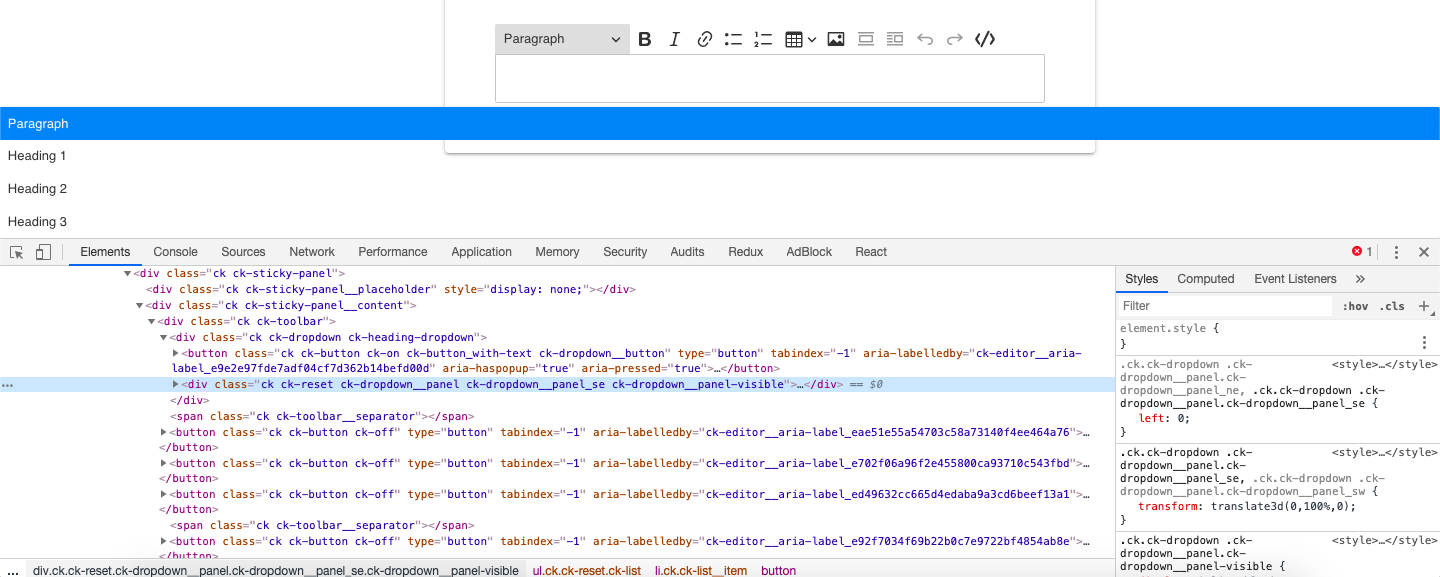
Could you check the style of the dropdown element? You can use the browser's inspector to check it out. It seems like something is overwriting our CSS.
pomek
on 26 Mar 2019
Nothing seems overridden here by something else. All the css are provided by CK.
sirajalam049
on 27 Mar 2019
Weird. Could you write step by step what you did? I'll try to reproduce the issue on our side.
pomek
on 28 Mar 2019
OK, let me create a minimal react app to show what I've done
sirajalam049
on 30 Mar 2019
I have created the app.
Steps that I followed is,
npx create-react-app app-name --typescript- installed the CKEditor packages as given in the package.json
- Added a custom plugin named
CKEditorCodeSnippetPluginin the root directory. - Edited the
webpack.config.jsas per the documentation you mentioned above.
Still getting the results as attached above
https://github.com/sirajalam049/ckeditor-integartion-minimal-project
sirajalam049
on 30 Mar 2019
AFAICS, you try to add the CKEditorCodeSnippetPlugin plugin to ready-to-use build which won't work and is not the correct way how to add plugins to the editor. See: https://github.com/ckeditor/ckeditor5/issues/1047#issuecomment-393068327.
pomek
on 1 Apr 2019
Related issues
 llccrr
·
3Comments
llccrr
·
3Comments
 c1trons
·
7Comments
c1trons
·
7Comments
 abhig02
·
9Comments
abhig02
·
9Comments
 Slasherio
·
8Comments
Slasherio
·
8Comments
 thtg88
·
7Comments
thtg88
·
7Comments
Most helpful comment
If you are using
CRA@2, try to follow the steps listed in this instruction – https://github.com/ckeditor/ckeditor5/blob/7aaa7241a01f7ff38d19ddb2061c9a60c7b6bc60/docs/builds/guides/frameworks/react.md#create-react-app2.