Ckeditor5-react: InlineEditor OnChange problem
Hello
İf I use InlineEditor in React. OnChange event just once update state and then has error in console.
My Code:
import React, { Component } from 'react';
import logo from './logo.svg';
import './App.css';

import CKEditor from '@ckeditor/ckeditor5-react';
import ClassicEditor from '@ckeditor/ckeditor5-build-classic';
import InlineEditor from '@ckeditor/ckeditor5-build-inline';

class App extends Component {
  constructor(props) {
    super(props);

    this.state = {
      content: 'Hello'
    }
  }

  handleEditorChange() {
    return (event, editor) => {
      this.setState({ content: editor.getData() });
      console.log(this.state);
    }
  }

  render() {
    return (
      <div className="App">
        <div>
          <CKEditor
                      editor={ InlineEditor }
                      data={this.state.content}
                      onInit={ editor => {
                          // You can store the "editor" and use when it is needed.
                          console.log( 'Editor is ready to use!', editor );
                      } }
                      onChange={ this.handleEditorChange()}
                      onBlur={ editor => {
                          console.log( 'Blur.', editor );
                      } }
                      onFocus={ editor => {
                          console.log( 'Focus.', editor );
                      } }
                  />

        </div>
      </div>
    );
  }
}

export default App;
and console error:

 majordesigner
All 8 comments
cc @pomek
 Mgsy
on 21 Mar 2019
Mgsy
on 21 Mar 2019
Steps to reproduce:
- Build an example app with InlineEditor (the latest from NPM is enough)
- Use component attached above.
- Type anything to the editor.
- Blur.
- Focus.
- Error.
Nothing throws in the sample from the build repo.
Seems to be related to React itself.
 pomek
on 21 Mar 2019
pomek
on 21 Mar 2019
handleEditorChange() {
    return (event, editor) => {
        // this.setState( { content: editor.getData() } );
        console.log(this.state);
    }
}
For such code, nothing throws.
pomek
on 21 Mar 2019
Not related to reported issue but if you pass as [data] any string, after changing editor's content, you will freeze the app. I guess, we should remove this part of the code: https://github.com/ckeditor/ckeditor5-react/blob/a31de76118130eae1ac8ae82c5c02917f996e211/src/ckeditor.jsx#L25-L27
We shouldn't care about updating editor's content if the state has changed. A user can do it manually just by calling the callback as the second parameter in setState function.
pomek
on 21 Mar 2019
Oh. After removing the code above, mentioned issue also is no longer valid.
pomek
on 21 Mar 2019
Unfortunately, removing this code above does not fix the mentioned issue. I had hardcoded string in [data] property. I am trying to go deeper with the problem.
pomek
on 21 Mar 2019
The same problem with @ckeditor/ckeditor5-build-balloon when I tried to apply bold to the entire content.
Before bold:

After bold:
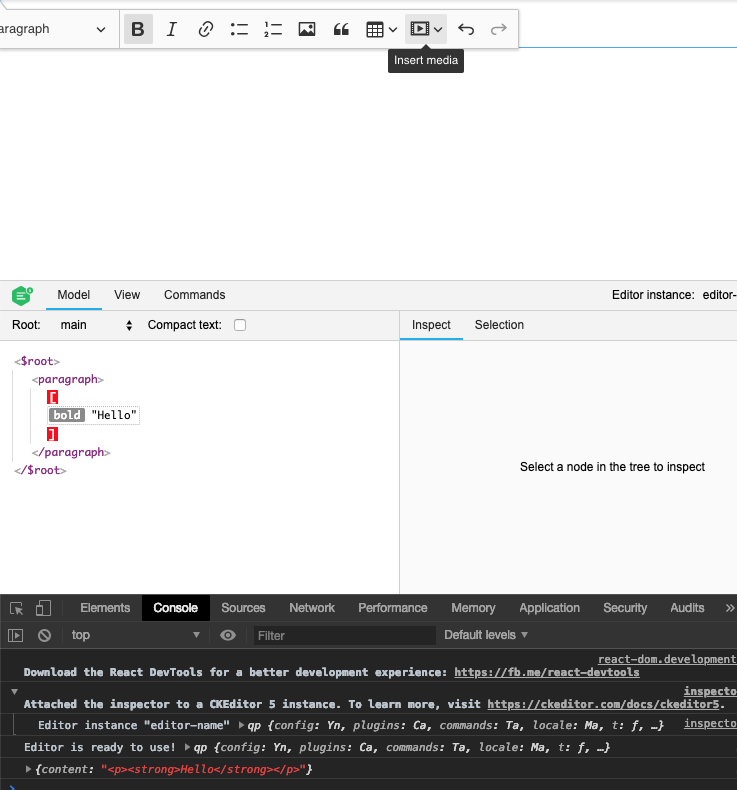
React.Component.setState() breaks something if value from the state is passed directly as component's property ([data]).
pomek
on 21 Mar 2019
After updating the state, the editor component is being rendered again. It causes the problem. We should introduce shouldComponentUpdate() method that should always return false. The component shouldn't be updated itself.
pomek
on 21 Mar 2019
Related issues
 sirajalam049
·
10Comments
sirajalam049
·
10Comments
 bipindubey-technoark
·
7Comments
bipindubey-technoark
·
7Comments
 amanshu-kataria
·
12Comments
amanshu-kataria
·
12Comments
 henok-tesfaye
·
8Comments
henok-tesfaye
·
8Comments
 c1trons
·
7Comments
c1trons
·
7Comments
Most helpful comment
After updating the state, the editor component is being rendered again. It causes the problem. We should introduce
shouldComponentUpdate()method that should always returnfalse. The component shouldn't be updated itself.