Caseflow: AMA Edit | Create appeal edit link and allow for appeal issue updates
We have a URL that directs a user to the edit screen in Caseflow for supplemental claims and higher level reviews, but not for appeals. We need this link so attorneys, and others can properly correct request issues on appeals.
Acceptance Criteria
- For any appeal, there should be a url
/appeals/[appeal_uuid]/editthat takes the user to the edit issues page for that appeal. - When save is clicked, it should properly update the request issues on that appeal, and redirect the user to the claim details page for that appeal
/queue/appeals/[appeal_uuid] - When "Cancel" is clicked, it should redirect the user to the claim details page for that appeal
/queue/appeals/[appeal_uuid]
Notes
- Appeal specific copy changes are out of scope and will be handled with https://github.com/department-of-veterans-affairs/caseflow/issues/7623
- This url will be used in queue to direct attorneys to the edit page, to allow them to correct issues.
- There are 2 appeals right now that need corrections, so this is fairly high priority
Technical Notes
- This will likely require changes to
RequestIssuesUpdatein order to make it work for updates to appeals, which do not have EPs
 shanear
All 15 comments
@laurjpeterson @shanear @amprokop
I went through this Mural of the Intake flow (https://app.mural.co/t/workqueue2001/m/workqueue2001/1540909080413/09248d7c6c7c77d1b5b21867b8573ce503e71e6b) and a sketch file that contains more of the validation scenarios and messaging. Below, I've pulled out screens that I feel we can better tailor to attorneys who will be correcting the issues on appeal. Tweaks include adjustments to copy and removing data from the Change Issues page.
A couple things I'll need:
- Copy review: from the perspective of an attorney, does this copy make sense? What feedback do you have so that we can make things even clearer?
- Did I miss any key screens or scenarios from the Mural or what's in UAT for SC/HLR that will also apply to Board appeals and that should have copy tweaks? If so, please let me know what you think of.
Other notes:
- I did not make copy tweaks for the confirmation screens that appear after Intake/attorney saves an appeal. @laurjpeterson , @shanear and I decided to eliminate them in favor of bringing the attorney directly back to the Case Details screen where they can see the changes they just made.
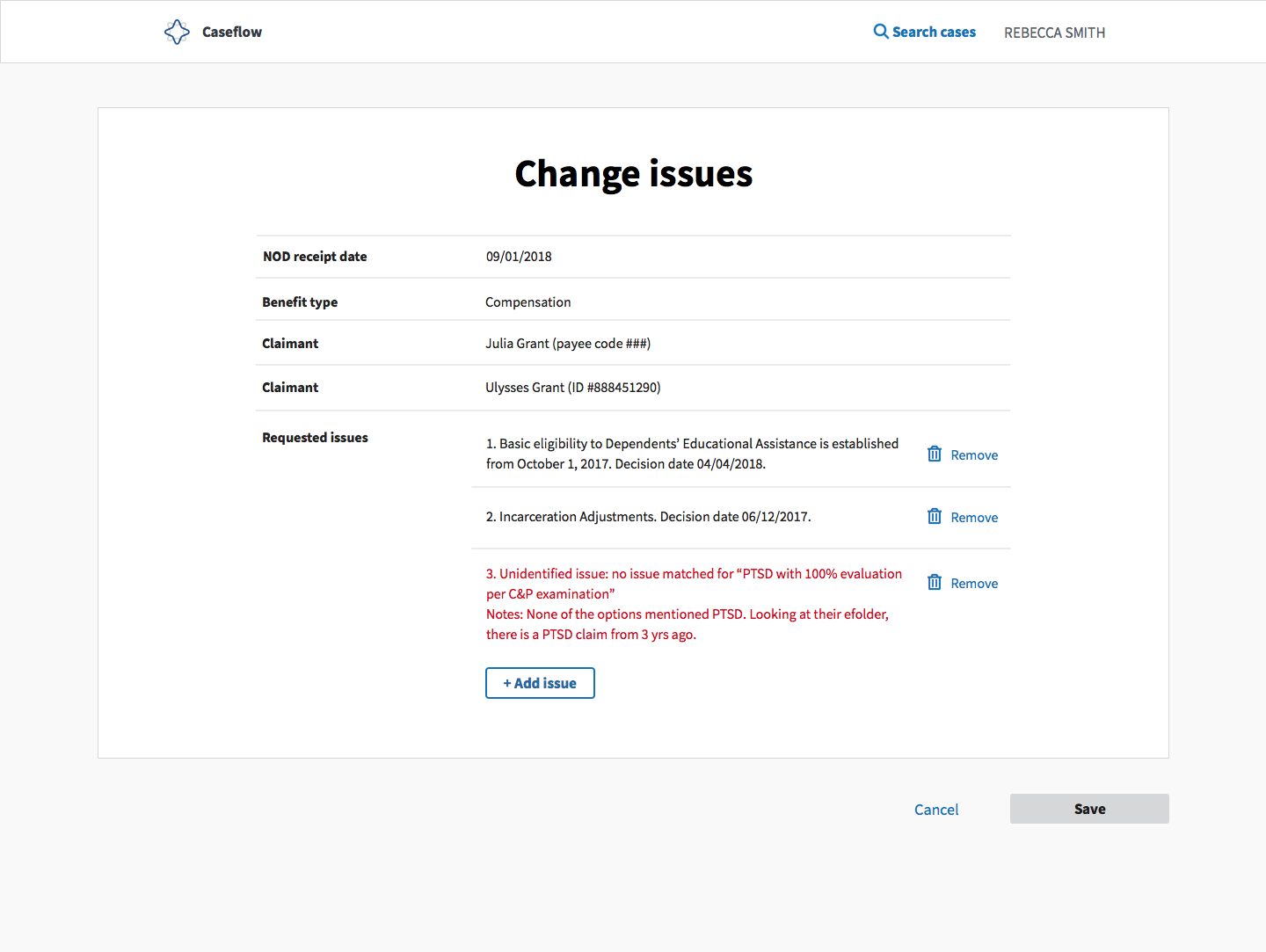
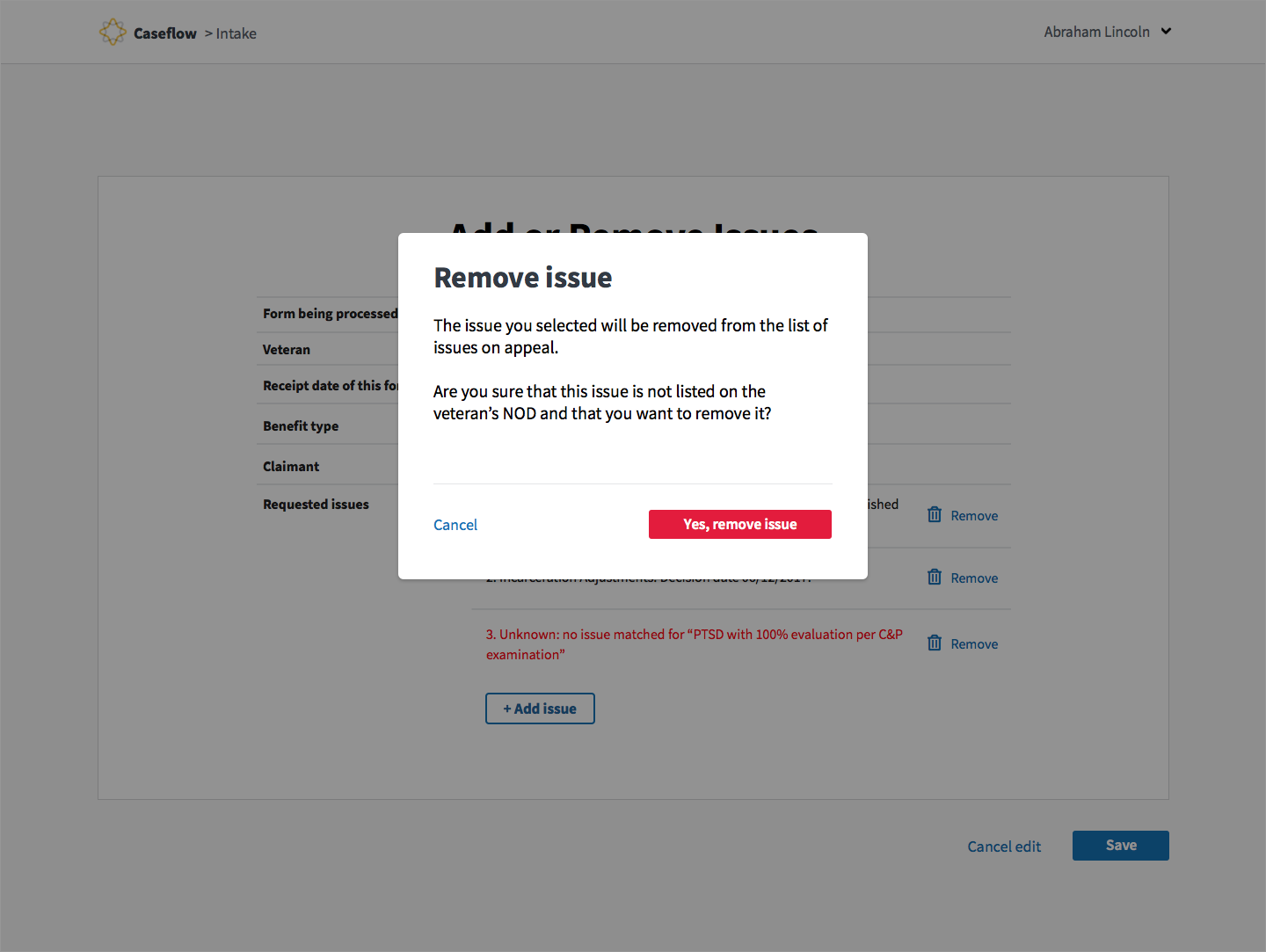
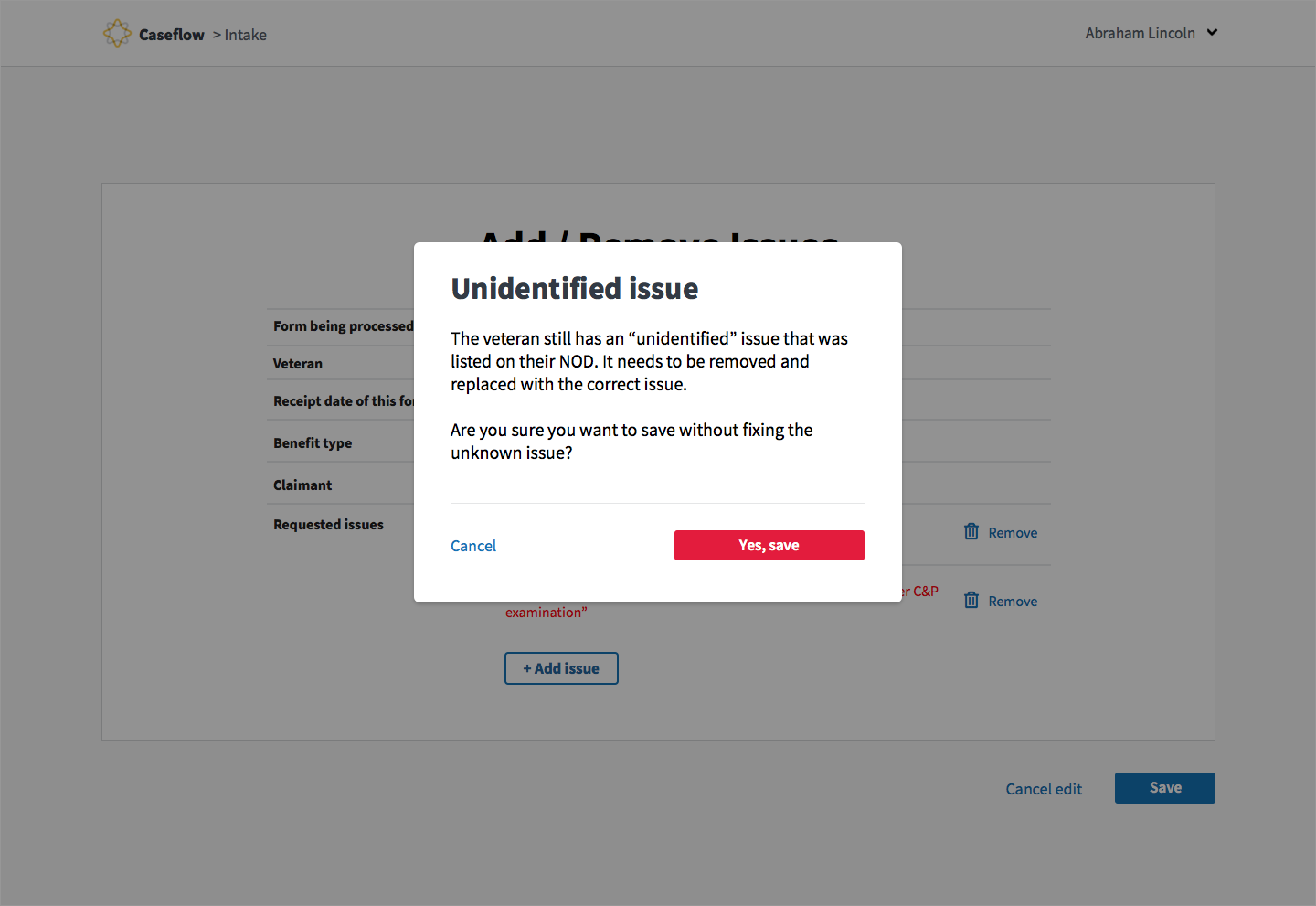
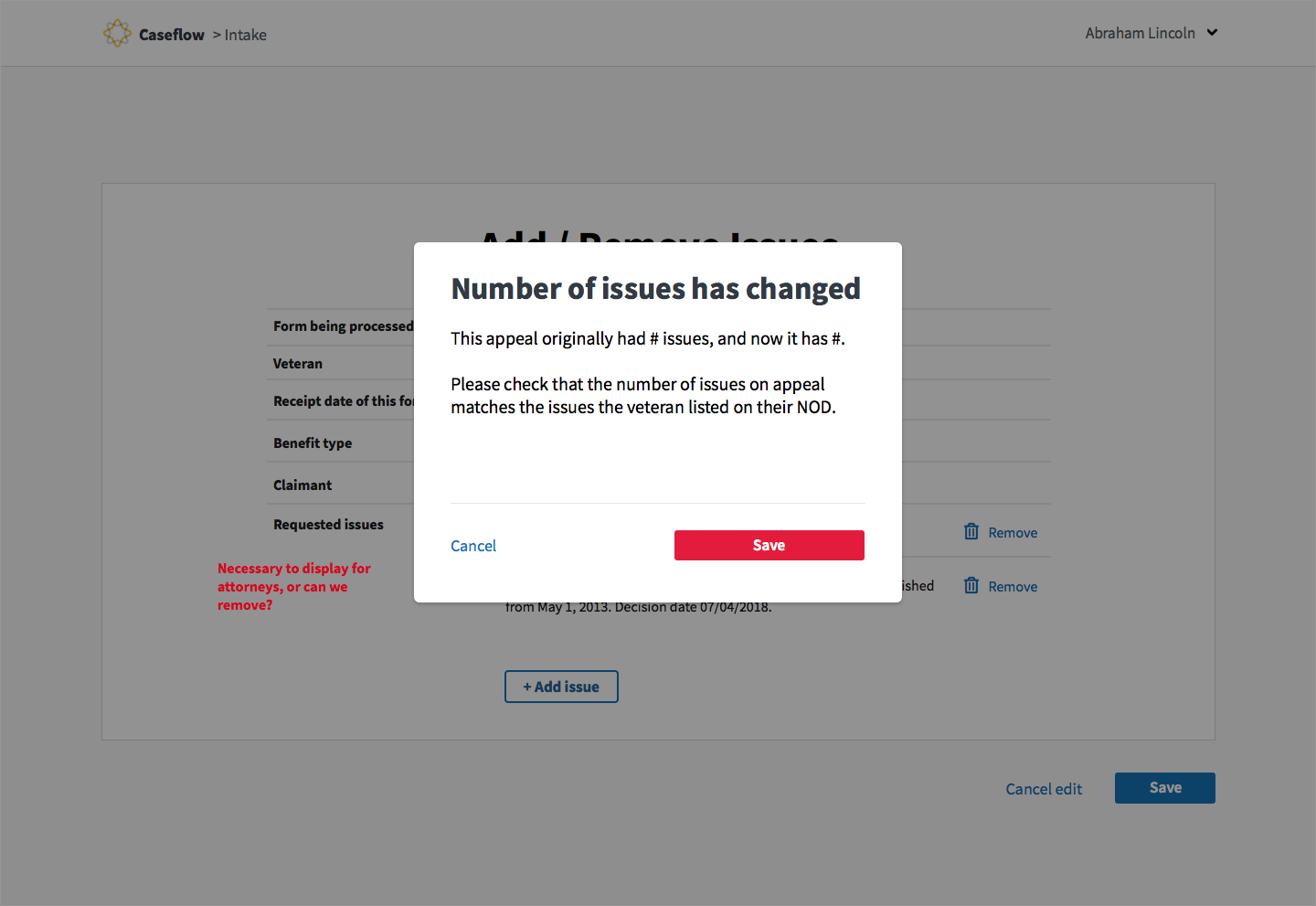
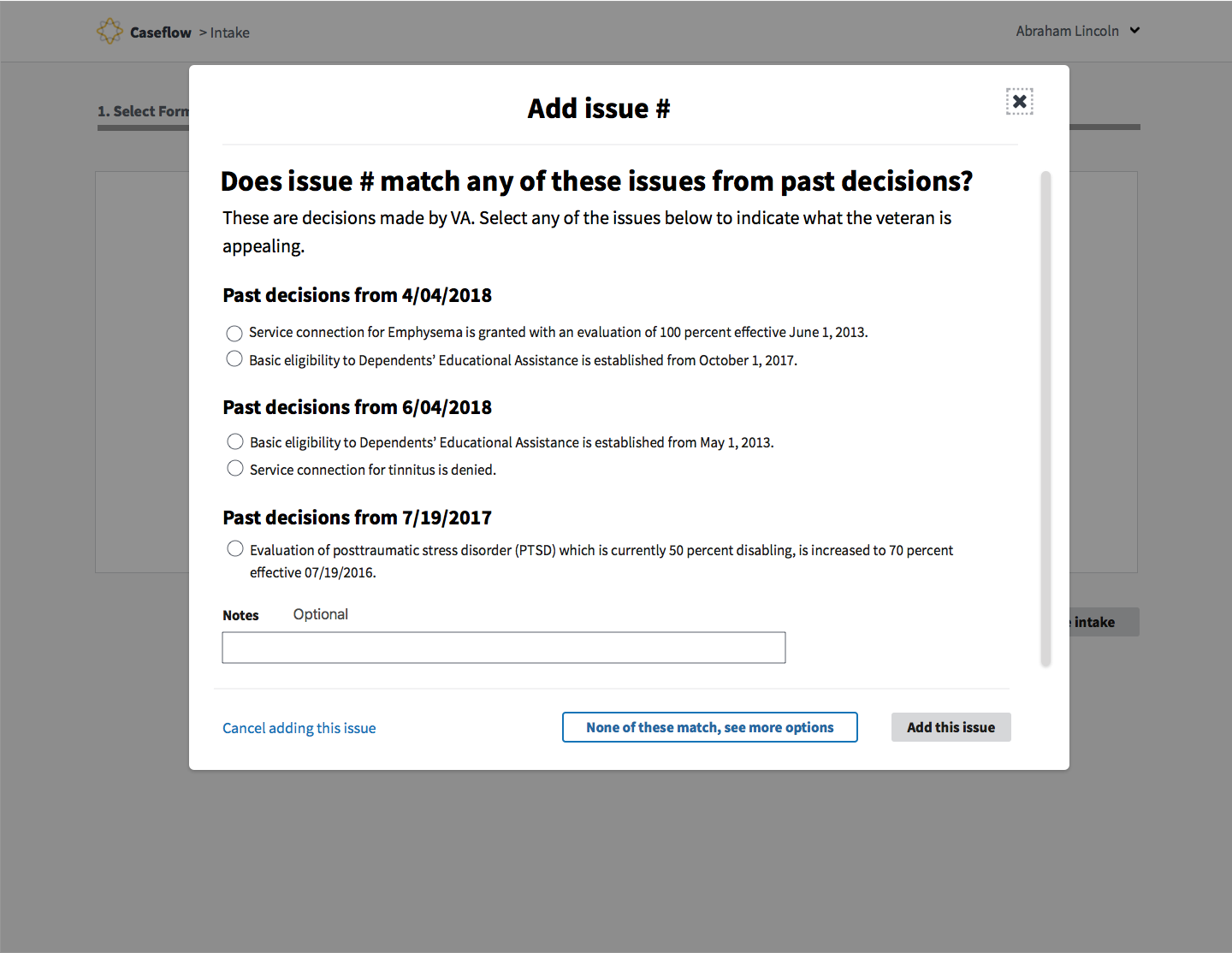
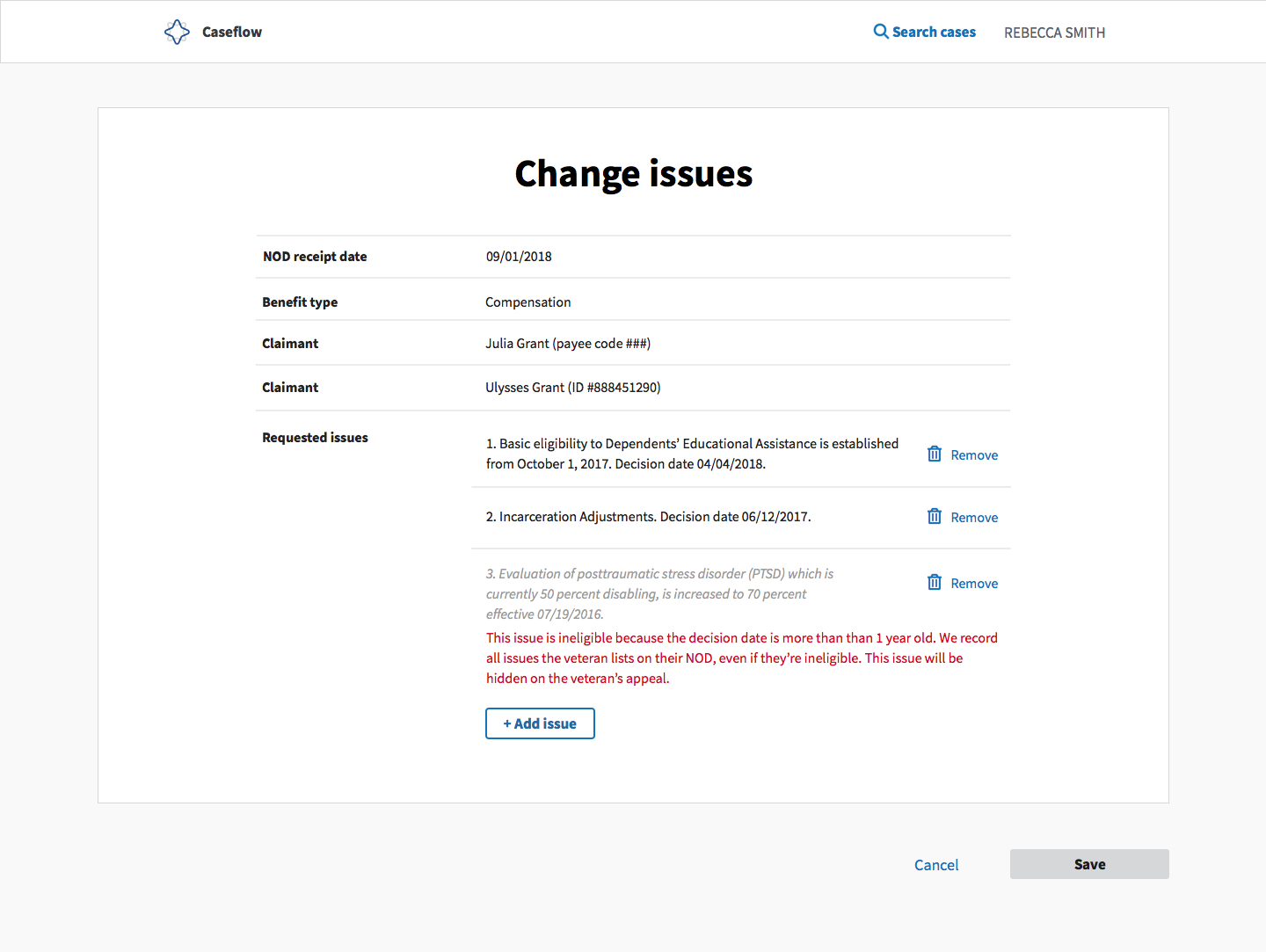
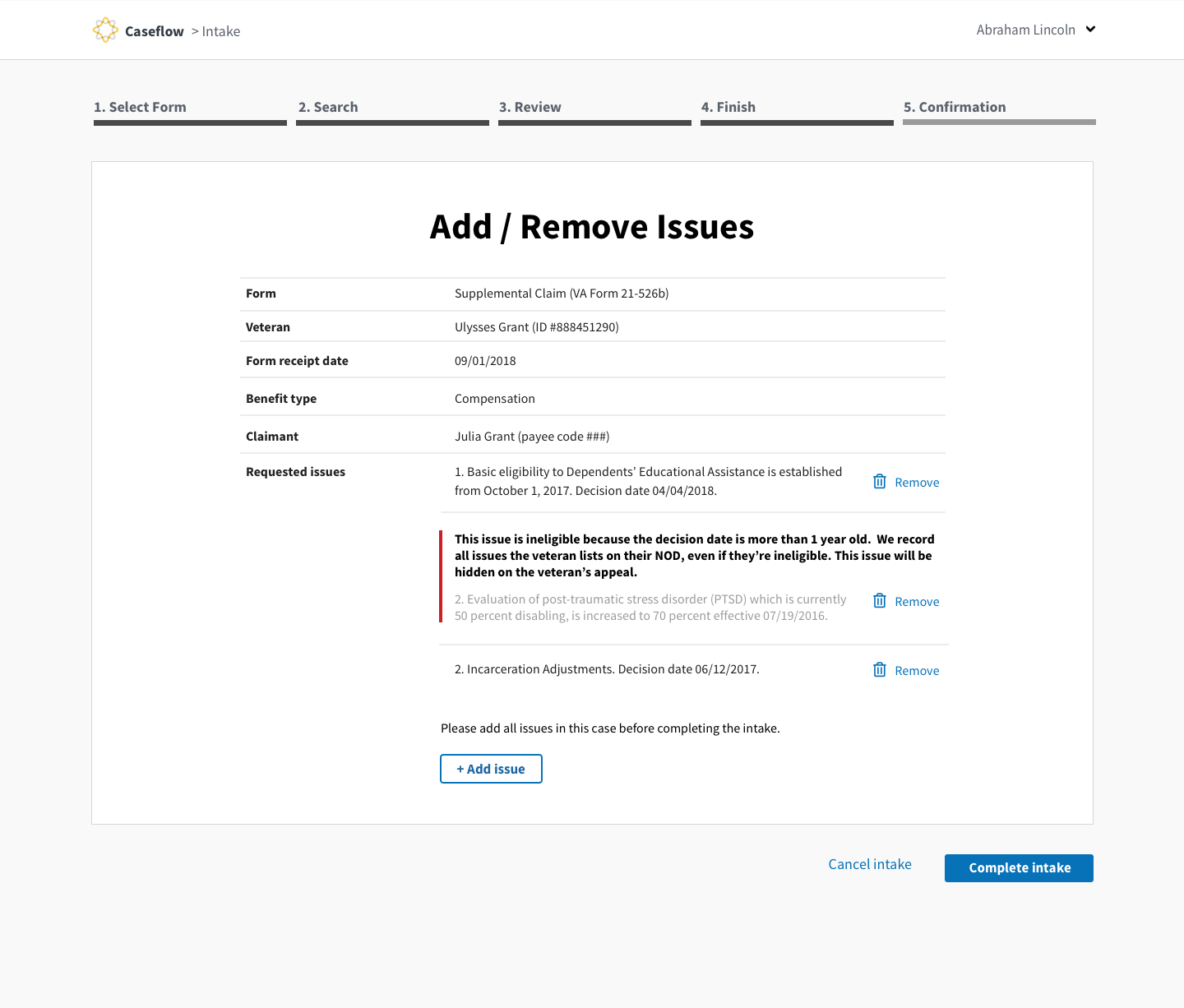
^^Context on this one above. This message in red would display when an attorney adds an ineligible issue. The goal here is to explain that we want to record that the veteran is appealing the issue, but that ultimately it's not eligible and the attorney won't see it when they save their changes and return to Case Details.
 allyceh
on 30 Oct 2018
allyceh
on 30 Oct 2018
Appeal only changes
1) Update copy on "Remove Issue" modal
1) "Receipt date of this form" => "NOD receipt date"
1) Remove "Form being processed
Candidates for copy updates on HLR/SC/Appeals (need to chat with @carolaponce)
1) Copy update to the Add Issue past decisions modal.
1) Copy update to unidentified issue warning modal
1) Styling for ineligible issues
shanear
on 30 Oct 2018
Going to capture these changes in other tickets
shanear
on 30 Oct 2018
shanear
on 30 Oct 2018
mostly good 👍 Just a small nit where the save button is being re-enabled before we redirect to the claim details page. I just showed jia.
shanear
on 5 Nov 2018
@allyceh and I reviewed her UI/copy changes today and the needs of her users. There are a few things we want to clarify:
The same path will be used by all users - so the copy should apply to all.
Issues that are not valid or duplicates will not show up in the case details page of Queue, correct?
Whenever there is an invalid issue, or any issue error, the Intake team (Ivy's team) is responsible for notifying the Veteran. Does anybody know this part of the process? If not I can check with Ivy.
Next steps:
- Clarify questions above.
- I will review our error messages and send @allyceh feedback.
 carolaponce
on 6 Nov 2018
carolaponce
on 6 Nov 2018
@allyceh + @shanear @laurenrussell
My feedback
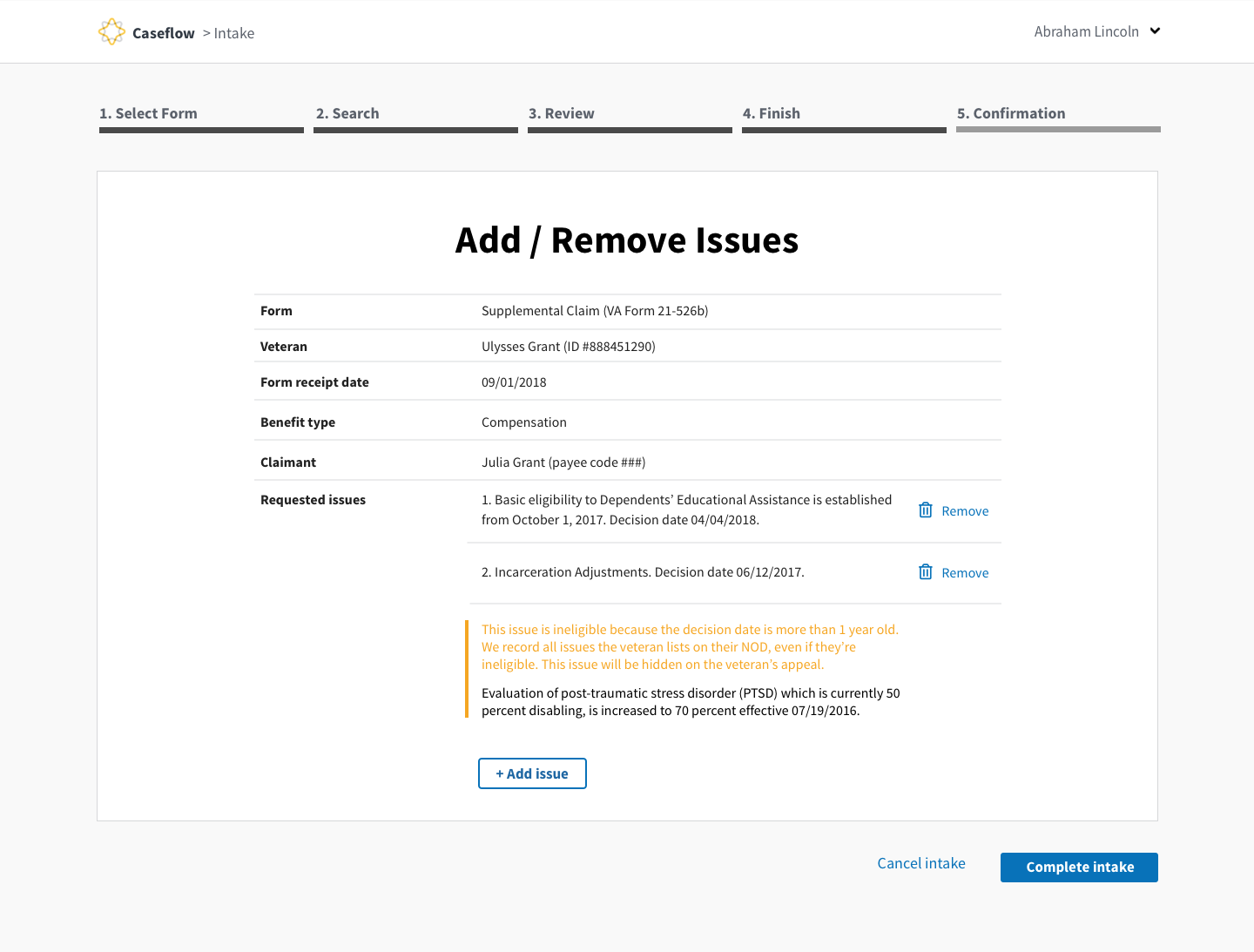
Title: Add/remove issues instead of Change issues
This title is more true to the possible action in this flow
Confirmation page:
Keep the original fields like Form
For intake users it is important to keep this data field since there are confirming their intake in this page.
"Are you sure" messages:
Remove issues | Perfect
Unidentified issue | I believe this works for most cases - any edge cases where this would not work or non-comp cases where this message can be confusing? @shanear
Numbers of issues changed | Works
Add issue page:
Keep the following copy - Tip: sometimes applicants list desired outcome, not what the past decision was – so select the best matching past decision.
Error messages
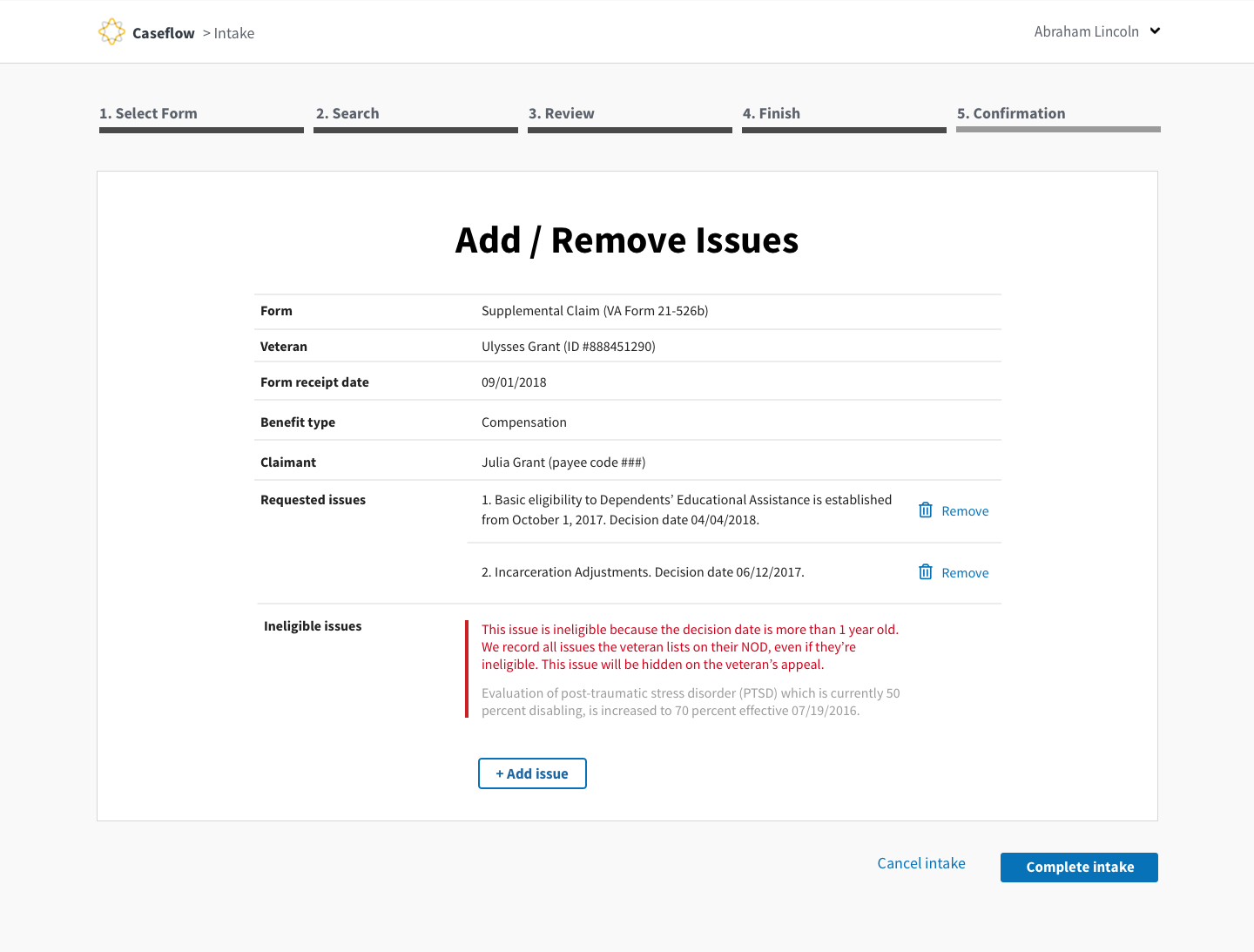
Per our discussion @allyceh - here are some ideas on how to expand the alert messages and categorize them as warning or error.
carolaponce
on 6 Nov 2018
carolaponce
on 6 Nov 2018
@carolaponce I fine with reverting back to Intake's original copy for the areas you mentioned.
I also like how you switched the hierarchy of the error message above + added the bars to make it more clear where the error is. Minor thing, but would "Ineligible Issues" would have a "remove" link next to it? Can Intake/Attornesy remove an ineligible issue if they've added it by mistake?
allyceh
on 6 Nov 2018
@carolaponce Noting here that I will also test the verbiage with attorneys as you test with Intake, and we can compare our notes and iterate on this as needed.
allyceh
on 6 Nov 2018
@allyceh
I reviewed some of the alert strategy with @shanear and here are my updates:
- Keeping the ability to remove the issue.
- The “warning” message is linked to the issue, therefore linked to the number of the issue. It does not go to the bottom of the page under a different category.
- I used the yellow line as a warning but did not stand out as much as the red - let me know what you think.
carolaponce
on 7 Nov 2018
carolaponce
on 7 Nov 2018
this works!
shanear
on 7 Nov 2018
@carolaponce Looks good! I like the red bar. I do feel like the red, unbolded text stands out a little more, but I think that users will still notice the bar.
One other thing I noticed about the copy I wrote: I noticed I said "We record all issues the veteran lists..." Should it be "Caseflow records all issues the Veteran lists..."? Who is doing the recording?
It might be a good point to decide whether Caseflow is "we" or Caseflow is... well, "Caseflow". This ladders up to our larger voice and tone. @amiklik Have you stumbled on this yet? Any recos based on what you've seen?
I also just learned that Veteran should always be capitalized. That's my bad!
allyceh
on 7 Nov 2018
Can we move this convo to https://github.com/department-of-veterans-affairs/caseflow/issues/7623
As this ticket was used to track the link?
shanear
on 7 Nov 2018
Related issues
 marvokdolor-gov
·
3Comments
marvokdolor-gov
·
3Comments
 laurjpeterson
·
4Comments
laurjpeterson
·
4Comments
 gnakm
·
5Comments
laurjpeterson
·
4Comments
gnakm
·
5Comments
laurjpeterson
·
4Comments
 yoomlam
·
5Comments
yoomlam
·
5Comments
Most helpful comment
Can we move this convo to https://github.com/department-of-veterans-affairs/caseflow/issues/7623
As this ticket was used to track the link?