Cascadia-code: Visual Studio 2019 - Arrow operator ligature not working
Environment
Cascadia Code version number:
Application (with version) used to display text: Visual Studio 2019 Professional 16.2.5
OS platform and version: Win 10 x64
Screen resolution (i.e. 220dpi): 1920x1080
Steps to reproduce
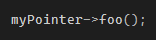
Try to access members through a pointer.
Expected behavior
Screenshot from Terminal

Actual behavior
Screenshot from VS Studio 2019 Prof.
 alexhajdu
All 17 comments
This is a vscode issue (actually upstream : https://github.com/xtermjs/xterm.js/issues/958 )
 fearthecowboy
on 23 Sep 2019
fearthecowboy
on 23 Sep 2019
This is a vscode issue (actually upstream : xtermjs/xterm.js#958 )
It's not. This is in "standard" Visual Studio 2019, not VSCode.
@alexhajdu it's also happening on my side.
 fireyoshiqc
on 23 Sep 2019
fireyoshiqc
on 23 Sep 2019
The same issue for the arrow ligature not properly displaying in VS2019 (and VS2017) using Fira Code was reported earlier this year. Perhaps this is a Visual Studio issue. Reference the following bug report, which is now closed (not fixed).
https://developercommunity.visualstudio.com/idea/591741/font-ligatures-not-working.html
 encladeus
on 23 Sep 2019
encladeus
on 23 Sep 2019
Seems like Visual Studio has some issues with rendering some fonts in general. Look at how nice the font looks in the new Terminal in comparison with VS. IMHO there must be some not so easy replaceable layer not allowing the developers to use some new approach for displaying the fonts. For example, it's a shame we can't just change the line spacing in VS, etc...I hope this will be fixed sooner or later.
alexhajdu
on 23 Sep 2019
The issue seems to have been re-opened and prioritized following user feedback
https://developercommunity.visualstudio.com/comments/744089/view.html
fireyoshiqc
on 24 Sep 2019
Now that the Visual Studio issue with ligatures is reopened and as mentioned in the issue report:
If folks have other feedback or wish to upvote this, it will certainly help.
https://developercommunity.visualstudio.com/idea/591741/font-ligatures-not-working.html
encladeus
on 24 Sep 2019
Closing this issue as it appears to be a VS issue.
 bitcrazed
on 28 Sep 2019
bitcrazed
on 28 Sep 2019
For me it was fixed by simply installing the font again (and restarting the applications)
 iCodeIT
on 15 Oct 2019
iCodeIT
on 15 Oct 2019
For me it was fixed by simply installing the font again (and restarting the applications)
What Visual Studio and Cascadia version are you running?
alexhajdu
on 16 Oct 2019
Actually it didn't work. After rebooting ligature was gone again.
I downloaded newest Cascadia version and I am on newest V2019 version (not preview). Similarly I am on newest VS Code version.
iCodeIT
on 17 Oct 2019
This seems to be an issue with all WPF applications, and given VS is based on WPF, no wonder it doesn't work there. ~Even the new Terminal has an issue with rendering hyphen-based ligatures.~
 MythreyaK
on 4 Dec 2019
MythreyaK
on 4 Dec 2019
even the new Terminal has an issue with
Uh? We haven’t heard anything of the sort- would you mind filing a bug over on our repository about this?
 DHowett-MSFT
on 4 Dec 2019
DHowett-MSFT
on 4 Dec 2019
Done, issue here.
Hope that works!
This seems to be an issue with all WPF applications,
Also, is the rest of my comment above accurate? I just checked with some WPF apps (and a quickly hacked together custom app) and this issue seems to be present. Don't think it's related to the new Terminal, since it uses a custom rendering engine.
MythreyaK
on 4 Dec 2019
This is a known issue with WPF - the VS team are aware and are planning on looking into this issue in a future release. If you're interested in more info, please contact Dante Gagne via Twitter.
bitcrazed
on 4 Dec 2019
If this is being tracked elsewhere, do we need to track it here?
 aaronbell
on 5 Dec 2019
aaronbell
on 5 Dec 2019
Thanks for the info!
It's being tracked here.
MythreyaK
on 5 Dec 2019
Great! Closing :)
aaronbell
on 5 Dec 2019
Related issues
 AndreaPasqualini
·
4Comments
AndreaPasqualini
·
4Comments
 flowchartsman
·
6Comments
flowchartsman
·
6Comments
 dkgreer52
·
4Comments
dkgreer52
·
4Comments
 hansswolfs
·
3Comments
hansswolfs
·
3Comments
 alanbirtles
·
6Comments
alanbirtles
·
6Comments
Most helpful comment
Now that the Visual Studio issue with ligatures is reopened and as mentioned in the issue report:
https://developercommunity.visualstudio.com/idea/591741/font-ligatures-not-working.html