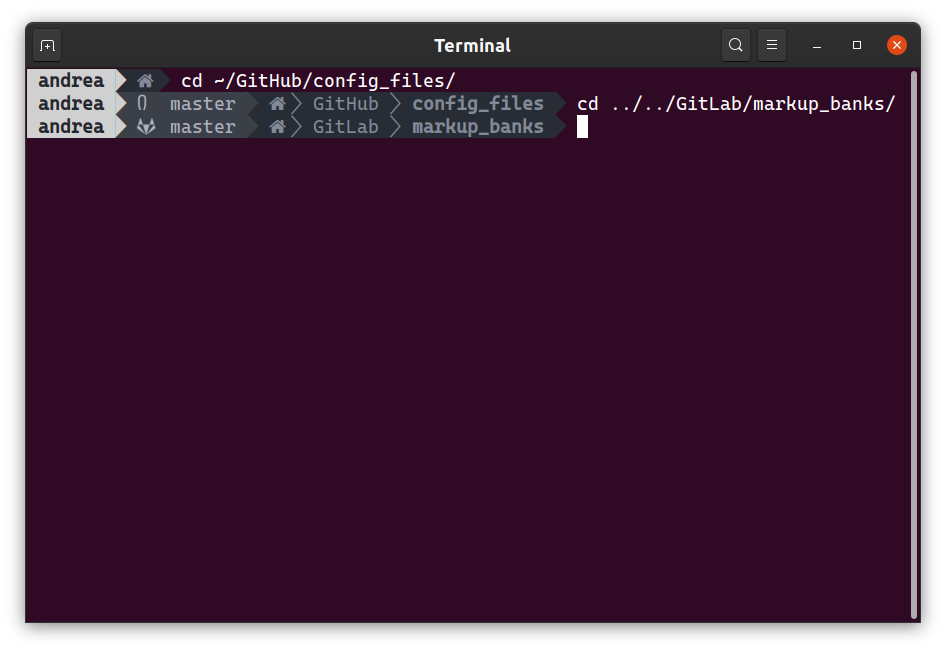
Cascadia-code: Powerline GitHub glyph is incorrect
Environment
Cascadia Code version number: 1911.21
Application (with version) used to display text: GNOME Terminal
OS platform and version: Ubuntu 19.10
Screen resolution (i.e. 220dpi): 96 dpi, text scaled to 1.25 through Gnome Settings -> Universal Access -> Large Text (on)

Any other software?
Steps to reproduce
- Add trueline.sh to ~/.bashrc
- Navigate the terminal to a GitHub repository
Expected behavior
- The GitHub glyph would show up in the trueline prompt
Actual behavior
- Another glyph shows up
Extra info
- The GitLab glyph instead shows up as expected
 AndreaPasqualini
All 4 comments
Powerline contains neither a GitHub nor a GitLab glyph, so neither does Cascadia Code PL...
 DHowett-MSFT
on 13 Dec 2019
DHowett-MSFT
on 13 Dec 2019
But then I have another question. Why am I seeing the GitLab glyph? Am I getting everything wrong? I clean-installed Ubuntu 19.10 right this morning, so I did not mess around too much with fonts and/or the terminal. In particular, I have no Nerd Font installed.
Anyway, I'm sorry I did not look closer into powerline glyphs and thank you for your reply. Feel free to close the issue. I guess I'll look forward to future developments of #194!
AndreaPasqualini
on 13 Dec 2019
just guessing: a fallback font maybe?
 tuananh
on 25 Dec 2019
tuananh
on 25 Dec 2019
Hello! I'm going through old bugs. It appears that this issue is not specifically related to Cascadia Code as none of these glyphs is present in the font, so there must be some sort of fallback happening external to the font. As such, I am closing this. If there is reason to re-open, please feel free.
 aaronbell
on 29 Nov 2020
aaronbell
on 29 Nov 2020
Related issues
 flowchartsman
·
6Comments
flowchartsman
·
6Comments
 GustavBrock
·
6Comments
GustavBrock
·
6Comments
 rivy
·
5Comments
rivy
·
5Comments
 pmartin-brierley
·
5Comments
pmartin-brierley
·
5Comments
 dkgreer52
·
4Comments
dkgreer52
·
4Comments
Most helpful comment
just guessing: a fallback font maybe?