Cascadia-code: Cascadia Code Font must be reinstalled after reboot
I've been enjoying the new Cascadia font in Visual Studio 2017 and 2019, but I've discovered that each time I reboot Windows 10 (v1903), I have to reinstall the font to get it to work. When I reinstall it, Windows says the font is already installed and asks me to confirm the reinstall. After the reinstall, the font works fine again.
 dkgreer52
All 4 comments
I face the same problem, but the font sometimes disappears even without rebooting. Re-installation and reloading VSCode or VS solves the problem, but WTF?
 DanielKOcean
on 6 Nov 2019
DanielKOcean
on 6 Nov 2019
I've been enjoying the new Cascadia font in Visual Studio 2017 and 2019, but I've discovered that each time I reboot Windows 10 (v1903), I have to reinstall the font to get it to work. When I reinstall it, Windows says the font is already installed and asks me to confirm the reinstall. After the reinstall, the font works fine again.
Hi, seems that I solved the problem.
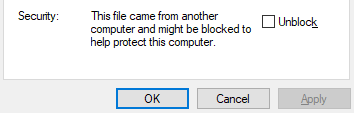
1) (Not sure, that this action is needed) In "Properties" -> check "Unblock" checkbox, click "Apply" or "Ok" button, it will remove security mark from a font file;
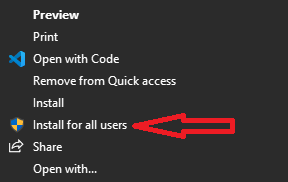
2) In file drop down menu click "Install for all users" (see attached pic).
DanielKOcean
on 7 Nov 2019
Sounds like this issue has been resolved. If you still have troubles, please feel free to re-open!
 aaronbell
on 12 Nov 2019
aaronbell
on 12 Nov 2019
This is issue is still happening for me with "Cascadia Code PL". The PL version keeps being removed at reboot.
I have Windows build 19041.329
 mick-d
on 11 Jun 2020
mick-d
on 11 Jun 2020
Related issues
 xmha97
·
3Comments
xmha97
·
3Comments
 Quppa
·
4Comments
Quppa
·
4Comments
 flowchartsman
·
6Comments
flowchartsman
·
6Comments
 DoubleDeez
·
5Comments
DoubleDeez
·
5Comments
 tabatkins
·
6Comments
tabatkins
·
6Comments
Most helpful comment
This is issue is still happening for me with "Cascadia Code PL". The PL version keeps being removed at reboot.
I have Windows build 19041.329