Calcite-components: Bug: calcite-shell-panel - header slot messes up fab button
Summary
Might have started with beta.51.
The "header" in the calcite-shell-panel that the layerSwitcher is in, it pushes everything down.
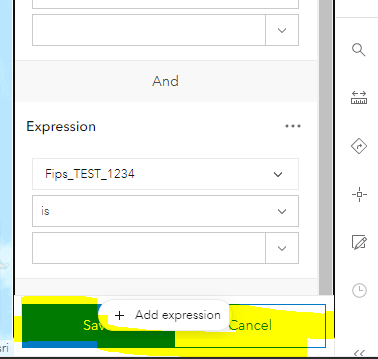
Actual Behavior
Expected Behavior
Reproduction Steps
1.
Relevant Info
 AdelheidF
All 7 comments
@AdelheidF A simple fix I found was to set overflow:hidden on your component, e.g. on arcgis-filter.
I can add a style for a slotted calcite-panel or calcite-flow, but I would be reluctant to do a wildcard * selector.
I could maybe do a [class^="arcgis-"] to target our micro apps...?
cc @driskull @jcfranco @paulcpederson
 asangma
on 17 Mar 2021
asangma
on 17 Mar 2021
I could maybe do a [class^="arcgis-"] to target our micro apps...?
Probably not a good idea.
 driskull
on 17 Mar 2021
driskull
on 17 Mar 2021
~I think apply overflow:hidden to any of the arcgis-[your component name] elements.
This would apply to Popup config, etc. as well. (Can't seem to get Dhrumil's handle to appear here).~
~Charts would need to do something similar, but there seems to be other things happening with that mico-app.~
asangma
on 17 Mar 2021
I'll keep trying other things in the meantime.
asangma
on 17 Mar 2021
Update: hold off on adding the overflow:hidden. I'll try to find another way that doesn't require that. If I can't soon, you'll have to add it.
asangma
on 17 Mar 2021
@AdelheidF Installed.
You can ignore the overflow suggestion earlier.
If you see a lack of a scrollbar where there should be one, try setting height:100% on things.
If a Panel or Flow is placed directly into the default slot, it should work as-is.
For anything else, you'll probably need to put height: 100% on it.
This includes a Panel inside something else, e.g. arcgis-[some thing] > calcite-panel.
asangma
on 18 Mar 2021
looks good with next.123
AdelheidF
on 19 Mar 2021
Related issues
AdelheidF
·
4Comments
 joeyHarig
·
5Comments
driskull
·
3Comments
joeyHarig
·
5Comments
driskull
·
3Comments
 capeoples
·
5Comments
capeoples
·
5Comments
 bstifle
·
5Comments
bstifle
·
5Comments