Calcite-components: Bug: calcite-label and calcite-tooltip-manager cause a blank panel
Summary

A calcite-label with a switch inside a calcite-block-section in a calcite-block within a calcite-panel and calcite -flow is causing this.
If I only change the calcite-label to a native label all is good.
I see the same thing happening under the Rotation block where calcite-label is used inside the calcite-radio-button-group. If I toggle on the calcite-block-section but remove the calcite-radio-button-group I also don't see this issue.
Locally I stripped it down to a calcite-flow, calcite-panel, clickable div, calcite-block, calcite-block-section and calcite-label and I can still reproduce this.


Reproduction Steps
- https://devext.arcgis.com/apps/mapviewer/index.html?webmap=838bef37971f405b8c3c82be957f8918
click Layers tool on left
click layer name on left to make active
click Styles tool on right
Click on Type and Size tile
Open Transparency block and notice the Include in legend toggle. This calcite-label is causing the issue.
Now click on either Type or Size tile and you'll notice a blank panel.
If you toggle off the Transparency calcite-block-section it's fine.
If you toggle on the Rotation calcite-block-section you see the same issue because of the radio buttons.
Relevant Info
From Matt...
My guess is that if the component isn't using shadow: true and it has a default
<slot />then this error occurs.
 AdelheidF
All 41 comments
I see the same thing happening under the Rotation block where calcite-label is used inside the calcite-radio-button-group.
Any suggestions for a work-around? We have our release in a week.
AdelheidF
on 1 Dec 2020
I see the same thing happening under the Rotation block where calcite-label is used inside the calcite-radio-button-group.
Any suggestions for a work-around? We have our release in a week.
@AdelheidF @jcfranco
I'd suggest at this point using a plain <label> in place of calcite-label. I noticed that when I sub in a plain label, the styling looks good because there are already CSS styles applied to them.
So far what I've discovered is that when I put in a <slot> tag inside calcite-radio-button's render function, it causes the whole panel to error out just like this bug has described, with or without a calcite-label in there, so this doesn't appear to be directly related to the calcite-label element, ~but likely from a containing element,~ so my plan is to reconstruct the hierarchy in some way so that I can diagnose which component is causing the issue.
UPDATE: It appears to be a Stencil issue related to our legacy browser config opt-ins (not sure which ones) that are only enabled when running Calcite in production mode, which explains why this behavior does not occur in the calcite dev server. I'm going to explore repro'ing this issue to file a Stencil bug and will report back as details emerge.
Here is the related Stencil issue: https://github.com/ionic-team/stencil/issues/2758
 eriklharper
on 1 Dec 2020
eriklharper
on 1 Dec 2020
I'd suggest at this point using a plain
I'm fine with this.
AdelheidF
on 1 Dec 2020
re-opening. This is still happening with the latest 1.0.0-next.50 and 1.0.0-beta.48
AdelheidF
on 4 Dec 2020
New Stencil bug affecting this issue! https://github.com/ionic-team/stencil/issues/2801
eriklharper
on 14 Jan 2021
Just verified latest Stencil release 2.4.0 is still causing this issue.
eriklharper
on 2 Feb 2021
This is a real problem in the map viewer. User get into a state where the panel is completely broken and they need to refresh the page.
I'd suggest at this point using a plain
Could we please change <calcite-radio-button-group>/<calcite-radio-button> to use only <label> instead of <calcite-label> until this is fixed? The Stencil fix doesn't seem to happen soon.

AdelheidF
on 6 May 2021
We're going to instead remove labels entirely from both checkbox and radio and leave it up to the user to provide these. This is more in keeping with native HTML form elements. https://github.com/Esri/calcite-components/issues/1740
eriklharper
on 6 May 2021
I came another case with the same issue. It worked with beta.54 and no longer works with beta.55 and later.
If I use calcite-tooltip-manager around a basic div I can already reproduce the same issue as above. calcite-tooltip-manager is used inside a calcite-block-section with a toggle switch, which is inside a calcite-block and that is inside a calcite-panel.
When clicking on a style tile to open the next panel the next panel is completely blank.
basic div test case
<calcite-block-section toggle-display="switch" ...>
  <div>
    <calcite-tooltip-manager>
      <div>Hi</div>
    </calcite-tooltip-manager>
  </div>
</calcite-block-section>

full panel before and after clicking the top tile.


If I remove just the calcite-tooltip-manager element from the code I do not run into this issue. I also don't get any tooltips in this case, of course.
AdelheidF
on 26 Jun 2021
This is causing the issue too. If I don't use calcite-label it's OK.
       <calcite-radio-button-group
          name="rotationType"
          scale="s"
        >
         <calcite-label layout="inline">
            <calcite-radio-button
              checked={true}
              value="geographic"
            ></calcite-radio-button>
            {i18n.ui.geographic}
          </calcite-label>
          <calcite-label layout="inline">
            <calcite-radio-button
              checked={false}
              value="arithmetic"
            ></calcite-radio-button>
            {i18n.ui.arithmetic}
          </calcite-label>
        </calcite-radio-button-group>

AdelheidF
on 26 Jun 2021
Interesting, I'm curious to see a screenshot of the Elements panel to see what the DOM structure looks like and if there is any improperly relocated slotted content anywhere. In regards to this repro, @AdelheidF, I'm wondering at any place in the tree that replicates that bug is a calcite-label or any other scoped: true component being used? (the only other scoped ones besides label that even exist are inline-editable, input and radio-button).
If not, then this is introduces another wrinkle in the story because so far I have understood the issue to be isolated to only Stencil components that use scoped: true and also have a default unnamed <slot /> tag (label and inline-editable are the only two components that satisfy this combination).
We're planning on dropping all scoped components eventually, but if this issue is happening outside of this known repro case, then this problem is bigger than I originally thought it was.
eriklharper
on 26 Jun 2021
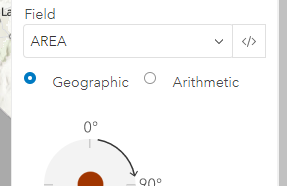
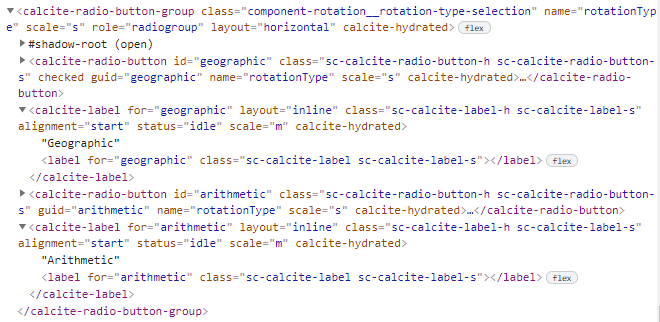
Tried a new way (Erik suggested) for calcite-radio-button-group (https://github.com/Esri/calcite-components/issues/1317#issuecomment-868868393) but that caused a blank panel as well.
Side note: Should I be worried about the labels and radio buttons not being aligned properly?
AdelheidF
on 28 Jun 2021
I looked more into the issue with calcite-tooltip-manager https://github.com/Esri/calcite-components/issues/1317#issuecomment-868862956. I reduced my panel contents to basically nothing except that it still contains calcite-tooltip-manager and I run into this issue. I do not create any tooltips, blocks, or toggles, only a basic div.
It worked with beta.54 and no longer works with beta.55 and later...
AdelheidF
on 29 Jun 2021
This bug in in triage since mid Jan, could we get them to look at this faster? https://github.com/ionic-team/stencil/issues/2801
I can't use tooltips in those panels now. Or we go back to how things were with beta.54.
AdelheidF
on 30 Jun 2021
The bug has to do with textContent and that wouldn't apply to the calcite-tooltip-manager right @eriklharper ?
The tooltip manager isn't a scoped or shadow component so maybe that has to do with it?
We might want to have separate issues since they may not be related.
 driskull
on 30 Jun 2021
driskull
on 30 Jun 2021
@AdelheidF regarding the tooltip one: Can you send the raw output HTML in the browser that is problematic?
driskull
on 30 Jun 2021
Can you send the raw output HTML in the browser that is problematic?
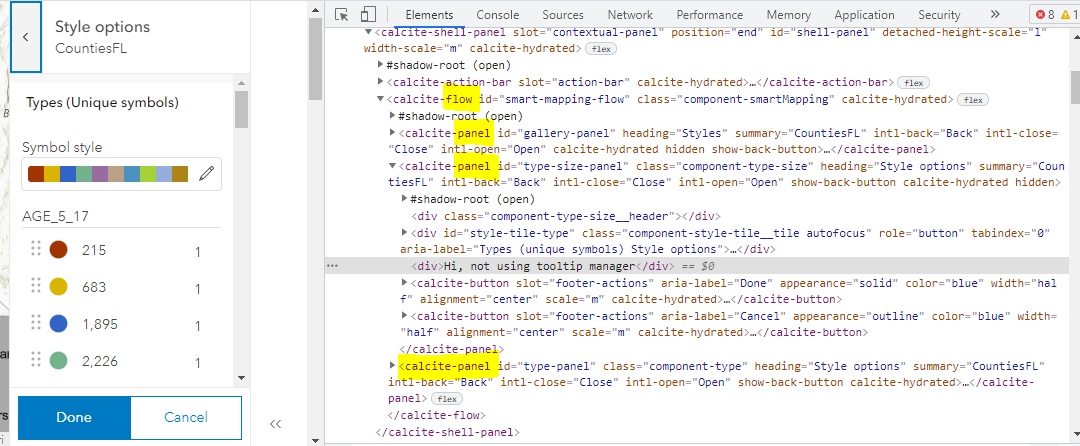
I removed all my content from inside tooltip-manager here to simplify.
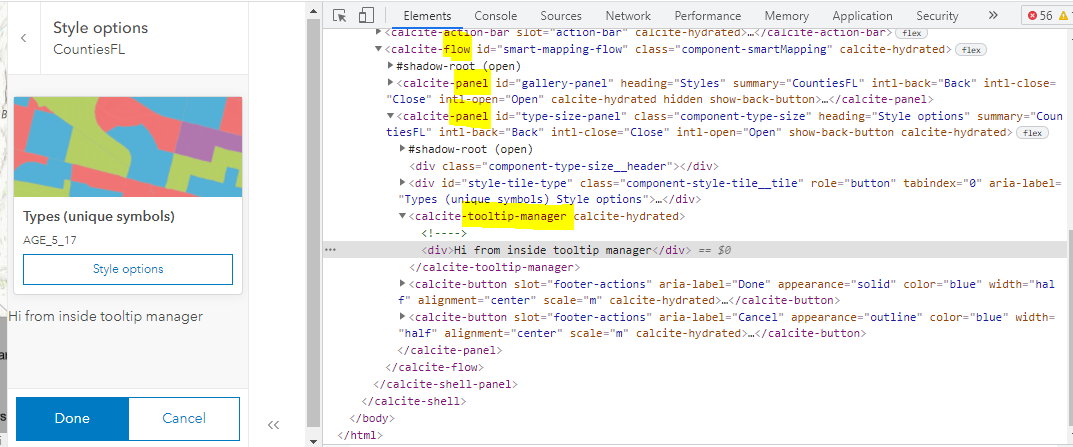
After the click on the Types tile you can see that the new panel is in the wrong place in the dom.
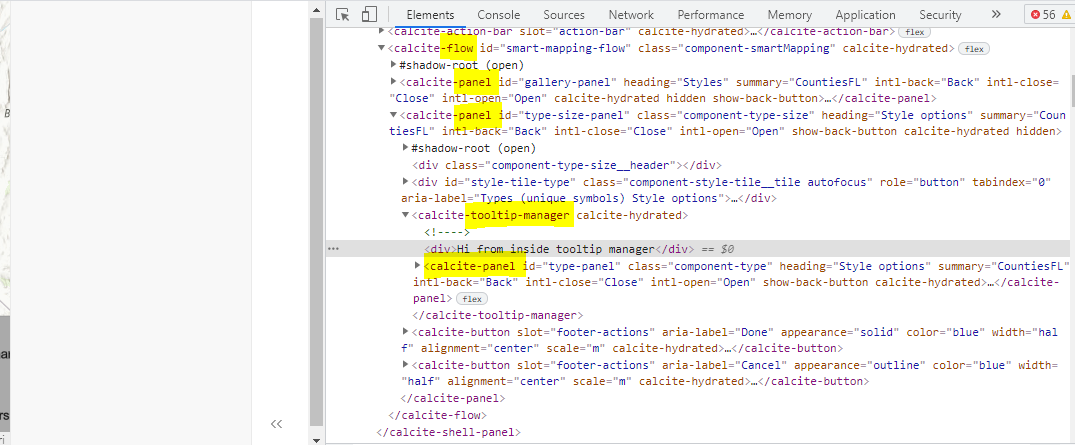
If I remove tooltip-manager, don't use it at all, it looks like this (all correct) after clicking on the Types tile.
AdelheidF
on 30 Jun 2021
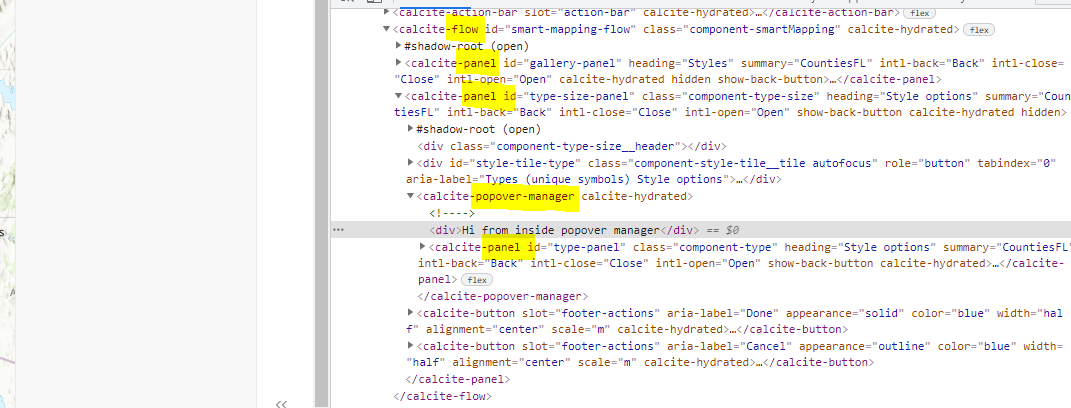
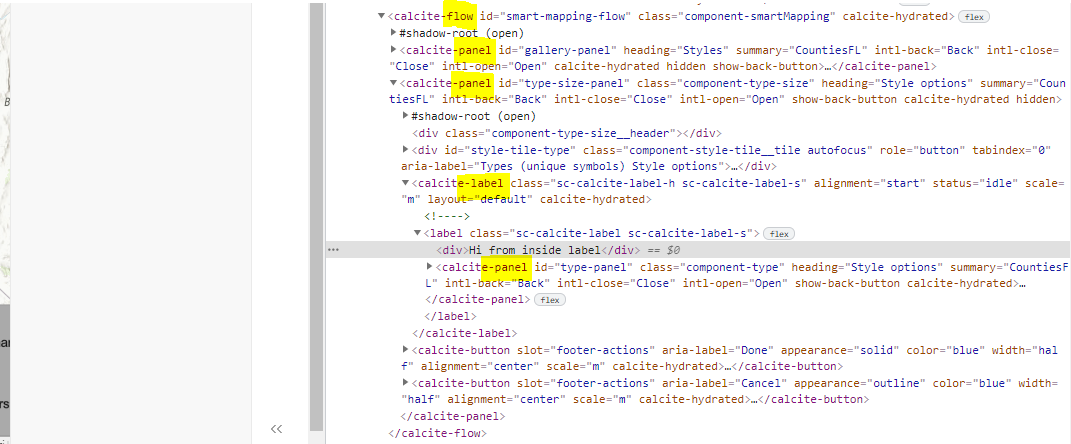
So the panel is inside the tooltip manager inside the other panel? That seems very wrong.
driskull
on 30 Jun 2021
Same is happening with calcite-popover-manager.
And same with calcite-label (as mentioned before)
It works correctly when I use a non-existing dummy tag.
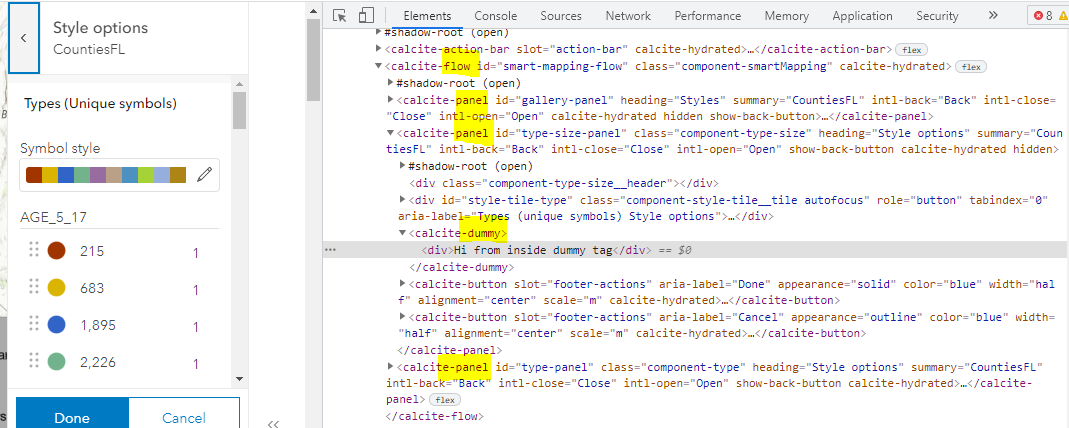
It also works correctly when I use calcite-block or calcite-block-section.
AdelheidF
on 30 Jun 2021
My guess is that if the component isn't using shadow: true and it has a default <slot /> then this error occurs.
We can probably verify by adding shadow: true to the calcite-tooltip-manager or removing the <slot /> from it.
What do you think @eriklharper?
driskull
on 1 Jul 2021
The bug has to do with textContent and that wouldn't apply to the calcite-tooltip-manager right @eriklharper ?
I'm convinced more than ever that this is definitely a problem with the dom relocation logic that Stencil does to try and "polyfill" slot behavior without using shadow DOM. Even though calcite-tooltip-manager and calcite-popover-manager aren't scoped components, they're still not using shadow, so that tells me that the same logic Stencil applies to scoped components applies to these components as well. I can probably guarantee that if you convert tooltip-manager and popover-manager to be shadow: true this behavior will stop, which is why Adelheid is not seeing this same problem in block or block-section because both of those use shadow DOM.
Unless we're serious about ditching Maquette (although this could be a problem with other vdom libs too), we should definitely try to move away as quickly as possible from non-shadow Stencil components that render a default unnamed <slot />, because that is the common thread with all these problematic components. Because popover-manager and tooltip-manager just render a <slot /> without any wrapping tags, I wonder if just removing the render() method would fix this problem without having to convert it to shadow DOM. I'll try and build off this repro repo (lol) to see if I can both replicate the bug with these other components and see if removing the render method makes it go away.
eriklharper
on 1 Jul 2021
Previously, i was just rendering <Host /> so I could go back to that as shown here: https://github.com/Esri/calcite-components/commit/5974e7359a4bb406bcc1a7a4337c235224faf6ba#diff-a2f85c5f1a5b52a5a99d59322f5e298c7bb507a724df36bb2ab7dc6235e63701
I guess an empty div would probably work too.
driskull
on 1 Jul 2021
Previously, i was just rendering
<Host />so I could go back to that as shown here: 5974e73#diff-a2f85c5f1a5b52a5a99d59322f5e298c7bb507a724df36bb2ab7dc6235e63701I guess an empty div would probably work too.
I would try <Host /> if Stencil requires you to have a render() method. My guess is that an empty <div> won't resolve it because Stencil still needs to relocate the slotted content you provide the component to be within the empty div.
eriklharper
on 1 Jul 2021
Yeah try removing the render method first.
driskull
on 1 Jul 2021
For the label, its a bit more complicated. You either have to use shadow or get stencil to fix it.
driskull
on 1 Jul 2021
For the label, its a bit more complicated. You either have to use shadow or get stencil to fix it.
Exactly, label is the tricky one because we want the slotted content to be inside the actual <label> element that calcite-label renders. We're gonna have to convert it to shadow I think ultimately. This bug doesn't seem to affect any other Stencil customers for some reason which is why they've been dragging their feet on even providing an update or triaging it. It also could be maquette that is doing something odd to trigger this. The ultimate test to see if that's the case would be to try and replicate this in as many other vdom libs we can.
If we can rule out that the problem is not just with maquette which is a very obscure library, then that gives Ionic more incentive to fix this issue.
eriklharper
on 1 Jul 2021
This change happened for tooltip-manager between beta.54 and beta.55:
https://github.com/Esri/calcite-components/commit/f5ea968dc25b4700c2f08e528d7d5b3ee8f07768#diff-7c65d6e65fa48582a890403c6e1a4db9100c331566ef8aa034d2bd01e4717c1e
AdelheidF
on 1 Jul 2021
To me, it does seem like its maquette since the HTML that is in the DOM is incorrect. It's not like Stencil is rendering that part.
driskull
on 1 Jul 2021
@AdelheidF are you sure that adding a vnode key doesn't solve this with maquette? https://maquettejs.org/typedoc/interfaces/vnodeproperties.html#key
driskull
on 1 Jul 2021
To me, it does seem like its maquette since the HTML that is in the DOM is incorrect. It's not like Stencil is rendering that part.
One thing I haven't tried is reaching out to the maintainers of maquette to see what they think of this strange bug.
eriklharper
on 1 Jul 2021
Looking at the calcite-panel example screenshot, the panel is going inside the other panel. Which leads me to beleive it can't distinguish between the two?

driskull
on 1 Jul 2021
Maybe maquette just doesn't know how to deal with custom elements that don't have shadow dom?
The ordering problem is due to maquette though since it is placing the nodes, not Stencil.
driskull
on 1 Jul 2021
are you sure that adding a vnode key doesn't solve this with maquette?
I do. Each panel is its own component.
first panel:
      <calcite-panel
        key="gallery"
        id="gallery-panel"
second panel:
      <calcite-panel
        key="type-size"
        id="type-size-panel"
third panel:
      <calcite-panel
        key="type"
        id="type-panel"
For the tooltip-manager, the render method does need to be there. I'll just make it a shadowed component.
driskull
on 1 Jul 2021
Just tooltip-manager and not popover-manager?
eriklharper
on 1 Jul 2021
Same, they both need a render method
driskull
on 1 Jul 2021
The PR above will make tooltip-manager and popover-manager shadowed components which should fix this.
@eriklharper maybe you can just do the same for the other components. Even if stencil fixes this, it seems like all our components should be shadowed.
driskull
on 1 Jul 2021
Yes, that is definitely the plan. Might be a bit involved to convert radio to shadow since it relies so much on the native radio behavior, but should be worth it.
eriklharper
on 1 Jul 2021
@AdelheidF @eriklharper Just curious, could you check if there's an error thrown in the console when this happens (including caught exceptions)? I wrote the this maquette (out-of-the-box) + scoped calcite-component repro case, but in this sample it doesn't re-render after throwing an exception. If there's no error thrown, can either of you walk me through it? There could be another issue going on.
Interestingly, this https://github.com/ionic-team/stencil/pull/2938 was submitted recently and references Erik's issue and would also fix my repro case above. @eriklharper could you help test the fix to make sure it addresses these issues?
This bug in in triage since mid Jan, could we get them to look at this faster? ionic-team/stencil#2801
I can ping them to escalate and to possibly look at the above PR.
One thing I haven't tried is reaching out to the maintainers of maquette to see what they think of this strange bug.
FWIW, this doesn't seem like a maquette issue since they're dealing with DOM APIs.
 jcfranco
on 1 Jul 2021
jcfranco
on 1 Jul 2021
Trying to test the fix now with the author's temporary package, but I'm having install issues trying to pull it down. Hopefully he can remedy it so I can try soon.
eriklharper
on 1 Jul 2021
Using next.237, calcite-tooltip-manager no longer causes a blank panel. Thanks!
test case (once devext has latest calcite):
https://devext.arcgis.com/apps/mapviewer/index.html?webmap=e30a38146b7a4644bc4c699e6b2b1e01
AdelheidF
on 6 Jul 2021
Related issues
jcfranco
·
4Comments
AdelheidF
·
4Comments
 capeoples
·
5Comments
jcfranco
·
3Comments
AdelheidF
·
4Comments
capeoples
·
5Comments
jcfranco
·
3Comments
AdelheidF
·
4Comments
Most helpful comment
Using next.237,
calcite-tooltip-managerno longer causes a blank panel. Thanks!test case (once devext has latest calcite):
https://devext.arcgis.com/apps/mapviewer/index.html?webmap=e30a38146b7a4644bc4c699e6b2b1e01