Calcite-components: Bug: calcite-pick-list - can't enter list via keyboard after search if nothing is selected
Summary
Initially nothing is selected in my list
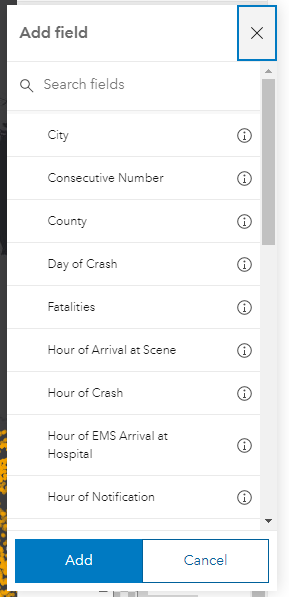
Then I start a search
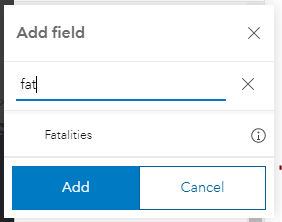
Now I can't use the keyboard to get to the only visible pick-list-item. When using the tab key it jumps from the 'delete search' icon to the 'Add' button.
(2) A second issue I just noticed is that if I only use the keyboard and click on the 'delete search' x button I lose the focus from the pick-list.
Actual Behavior
Expected Behavior
Reproduction Steps
1.
Relevant Info
 AdelheidF
All 4 comments
Installed. @AdelheidF could you help verify in the upcoming @next update? 🙇♂️
 jcfranco
on 11 Mar 2021
jcfranco
on 11 Mar 2021
The first issue is fixed, but the second isn't.
(2) A second issue I just noticed is that if I only use the keyboard and click on the 'delete search' x button I lose the focus from the pick-list
AdelheidF
on 22 Mar 2021
@AdelheidF (2) should be fixed now.
Could you help verify w/ @next when you get a chance? Thanks!
jcfranco
on 25 Mar 2021
This works fine now, tested locally with next.129. Thanks.
AdelheidF
on 25 Mar 2021
Related issues
 driskull
·
4Comments
driskull
·
4Comments
 kMcPherson1
·
4Comments
jcfranco
·
4Comments
kMcPherson1
·
4Comments
jcfranco
·
4Comments
 ethanbdev
·
4Comments
ethanbdev
·
4Comments
 capeoples
·
5Comments
capeoples
·
5Comments