Calcite-components: Bug: Text in Select control does not appear in dropdown menu on iOS device
Summary
When operating the Select control within Chrome browser on an iOS device, text does not appear as expected.
https://esri.github.io/calcite-components/?path=/story/components-controls-select--basic
Actual Behavior
Text does not appear in the dropdown list on iOS device
Expected Behavior
Text should appear as it does on the desktop browser
Reproduction Steps
- Navigate to basic select component sample in Chrome browser on iOS device: https://esri.github.io/calcite-components/?path=/story/components-controls-select--basic
- Click on the component to activate the dropdown
- Text will not appear in the list as it does on a desktop browser
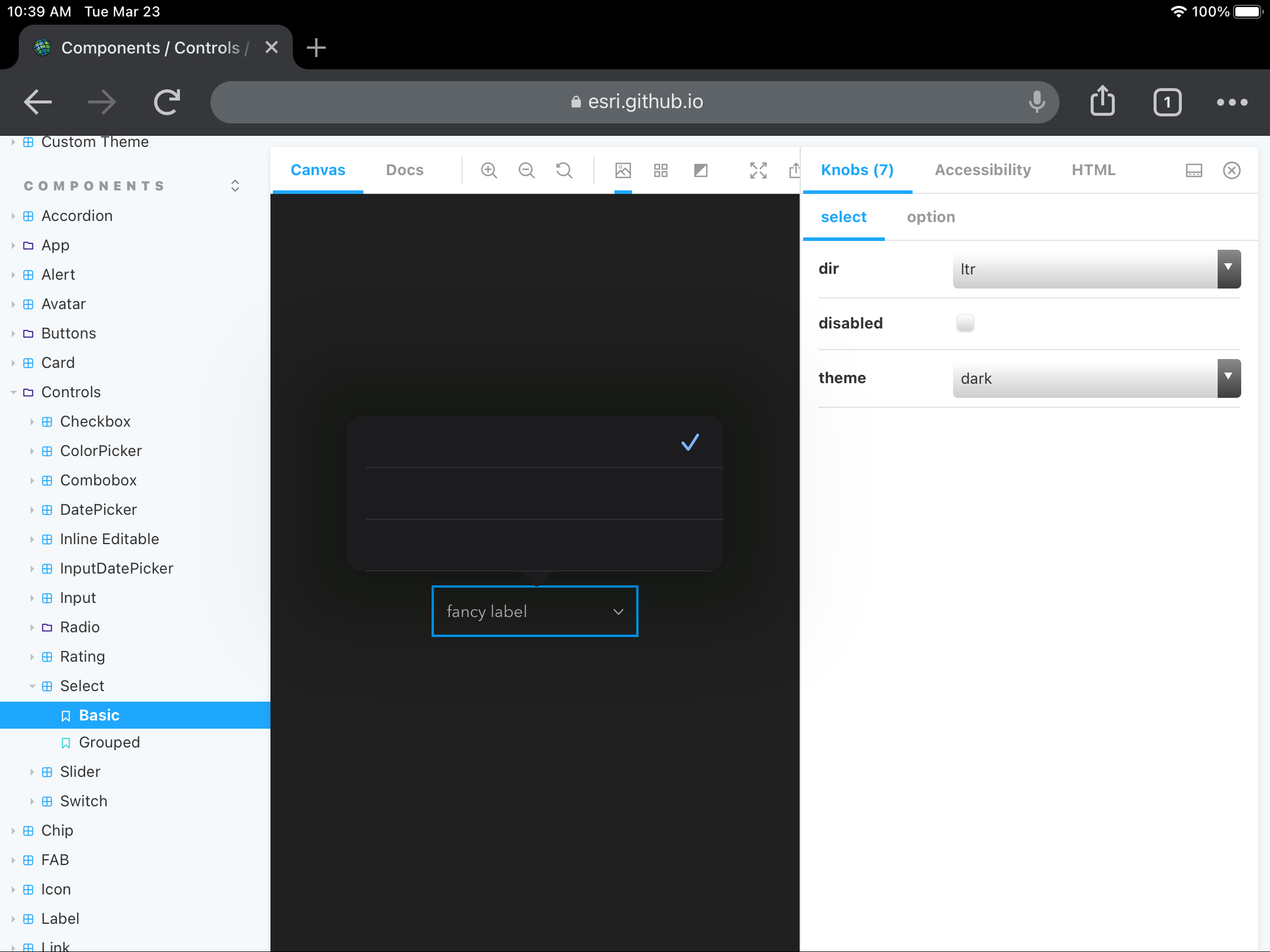
Relevant Info
Only reproduced on mobile device. Reproduced with both light and dark theme. Tested with Chrome browser on iOS device.
Related issue: https://devtopia.esri.com/WebGIS/arcgis-template-landing/issues/113
 kMcPherson1
All 4 comments
This appears to be an issue that arises from the html select and option native elements. The solution is to not only populate the option's label attribute, but also put the text nested into the option: https://stackoverflow.com/questions/35021620/ios-safari-not-showing-all-options-for-select-menu/41749701
I feel like a solution could be created in the calcite-option where if only the label is assigned, then the calcite-option populates both the label attribute and the nested text for the native option element. This would permanently get around this issue for all users of the calcite-option.
 Csmith246
on 23 Mar 2021
Csmith246
on 23 Mar 2021
@Csmith246 Thanks for the extremely useful info. PR coming up!
 jcfranco
on 30 Mar 2021
jcfranco
on 30 Mar 2021
Installed. @kMcPherson1 Can you help verify this w/ @next (should update in ~15 mins)?
jcfranco
on 31 Mar 2021
Verified with Chrome (iOS) + the latest doc update: https://esri.github.io/calcite-components/?path=/story/components-controls-select--basic.
jcfranco
on 5 Apr 2021
Related issues
 bstifle
·
5Comments
jcfranco
·
3Comments
bstifle
·
5Comments
jcfranco
·
3Comments
 asangma
·
4Comments
asangma
·
4Comments
 eriklharper
·
5Comments
eriklharper
·
5Comments
 joeyHarig
·
4Comments
joeyHarig
·
4Comments
Most helpful comment
This appears to be an issue that arises from the html
selectandoptionnative elements. The solution is to not only populate the option'slabelattribute, but also put the text nested into the option: https://stackoverflow.com/questions/35021620/ios-safari-not-showing-all-options-for-select-menu/41749701I feel like a solution could be created in the
calcite-optionwhere if only thelabelis assigned, then thecalcite-optionpopulates both thelabelattribute and the nested text for the nativeoptionelement. This would permanently get around this issue for all users of thecalcite-option.