Calcite-components: Improve focus/navigation of dropdown with multiple groups
I have a dropdown
<calcite-dropdown alignment="center" {{did-insert this.updateLinkUrl}} ...attributes>
  <calcite-button appearance="clear" scale="s" icon="ellipsis" slot="dropdown-trigger">
    <calcite-icon icon="caretDown" scale="s"/>
  </calcite-button>

  <calcite-dropdown-group selection-mode="none">
    <calcite-dropdown-item icon-start="premiumContentUserCredit" {{on "click" this.configureProxies}}>
      {{t "subscriber-content"}}
    </calcite-dropdown-item>
  </calcite-dropdown-group>
  <calcite-dropdown-group group-title={{t "theme"}} selection-mode="single">
    {{#each (array "light" "dark") as |theme|}}
      <calcite-dropdown-item active={{eq this.dashboard.theme theme}} {{on "calciteDropdownItemSelected" (fn this.dashboard.setTheme theme)}}>
        {{t (concat "config.theme-enum." theme)}}
      </calcite-dropdown-item>
    {{/each}}
  </calcite-dropdown-group>
</calcite-dropdown>
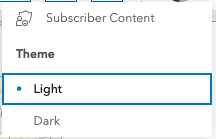
When the dropdown is opened, the focus is not on the first top element from the first group but the first element from the second group:
 ffaubry
All 7 comments
I think this was an intentional update to focus the first active item in a dropdown (any group), if present. cc @jcfranco
 macandcheese
on 9 Jun 2020
macandcheese
on 9 Jun 2020
☝️ Correct, similar to <select>.
 jcfranco
on 9 Jun 2020
jcfranco
on 9 Jun 2020
Dropdown are not <select>.
That should be a mode that we should be able to control then.
I think this is getting related to #656
I don't think users think this way.
They see a list of items, the first item should be focused. That notion that an item is more focusable because it's selectable is counter intuitive IMO.
ffaubry
on 9 Jun 2020
I don't think users think this way.
They see a list of items, the first item should be focused.
I disagree, especially if you favor the keyboard. Once you open the dropdown, navigation should be from the first selected item and not the start of the list, unless there is no selected item.
jcfranco
on 9 Jun 2020
In Fred's example, the dropdown contains two instances of calcite-dropdown-group - one list of a single item, and another list of two items. The item in the first list is a link, whereas the items in the second list are selectable.
I think the behavior that is built into the dropdown makes a ton of sense when your dropdown has a single calcite-dropdown-group. But, in our case, the behavior breaks down a bit.
I think a more robust behavior would be to focus an item from the _first instance_ of calcite-dropdown-group. If it's a selectable list, then focus on the selected item.
 bpatterson88
on 9 Jun 2020
bpatterson88
on 9 Jun 2020
@bpatterson88 Thanks for the breakdown. I was focusing too much on the single group workflow (pun most definitely intended).
I think a more robust behavior would be to focus an item from the first instance of calcite-dropdown-group. If it's a selectable list, then focus on the selected item.
This would be a great enhancement. The built-in focus/navigation behavior is lacking in the multiple group scenario.
jcfranco
on 9 Jun 2020
Is this still relevant after dropdown changes?
macandcheese
on 19 Nov 2020
Related issues
 driskull
·
4Comments
driskull
·
4Comments
 AdelheidF
·
4Comments
AdelheidF
·
4Comments
AdelheidF
·
4Comments
AdelheidF
·
4Comments
 joeyHarig
·
5Comments
joeyHarig
·
5Comments
 ethanbdev
·
4Comments
ethanbdev
·
4Comments
Most helpful comment
@bpatterson88 Thanks for the breakdown. I was focusing too much on the single group workflow (pun most definitely intended).
This would be a great enhancement. The built-in focus/navigation behavior is lacking in the multiple group scenario.