Botframework-composer: The actions performed during a trigger for "Message Received Activity" are not processed asynchronously
Describe the bug
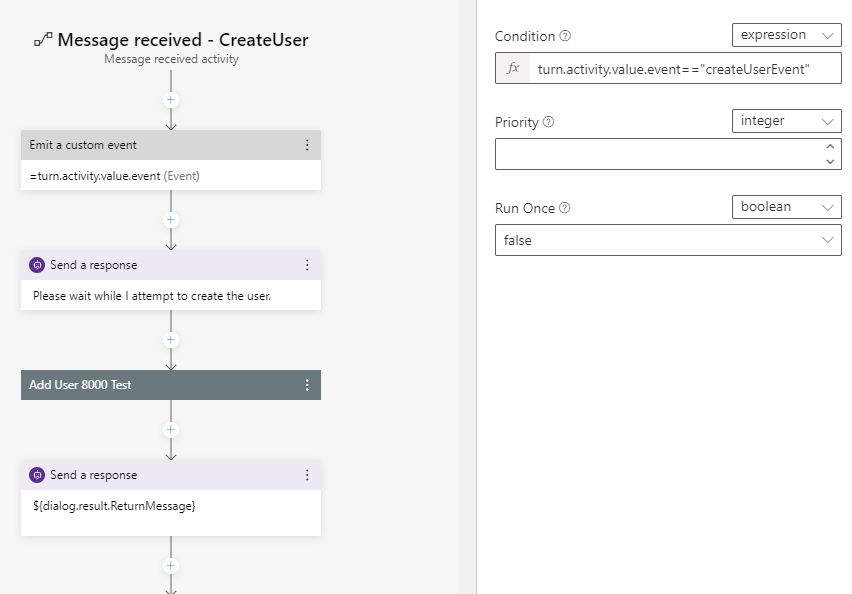
I have created an adaptive card with a submit button. I am handling the button click by subscribing to a named event that I learned to do as a workaround for Composer not supporting what the OP here wanted to do (myself included) in here:
3875
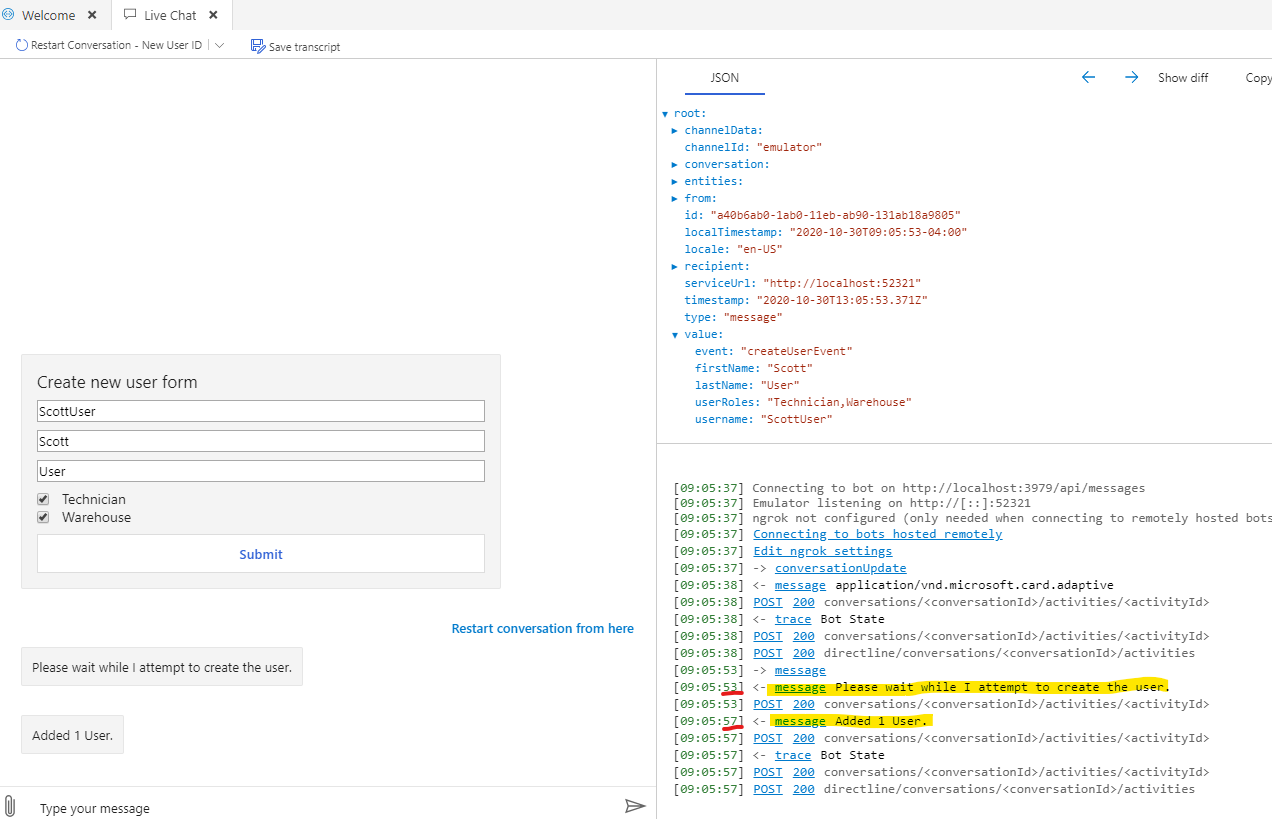
My flow is simple. After the button is clicked I have a "Message Received Activity" trigger that should show a message then run the custom action then show the result. The custom action usually takes about 4 seconds to run. I'll post the screen shot from the emulator showing the message is being logged immediately, but the UI is blocked from updating until the CustomAction completes. At that point the UI is updated and both messages are displayed on screen.
Version
v1.1.1
Browser
- [x ] Edge
OS
- [x ] Windows
Expected behavior
I expect the UI to not be blocked while a CustomAction is running.
Screenshots
Additional context
I just need someway to tell the user that the bot is working on creating the requested user.
I've also tried handling the event two different ways (it seems to be only allowed to run once and it apparently doesn't matter what you call it, ('event' or 'event2' in this example) as long as you reference it correctly i.e. turn.activity.value.event2:
        "data" : {
                "event": "createUserEvent"
                }
and
        "data" : {
                "event": "createUserEvent",
                "event2:" "createUserMessageEvent"
                }
I also tried showing a message from within BeginDialogAsync.
 nitewulf
All 13 comments
I've also tried to combine an intent and an event hoping to show a message with an intent then run my custom action with the event. I specified an intent like so:
        "data" : {
                "intent" : "createUserMessage",
                "event" : "createUserEvent"
                }
And ran into the same problem when i tried to use multiple "Message Received Activities". It just seems that the framework is not capable of subscribing to more than 1 handler for an event. Which I just don't understand. event+=handler1 and event+=handler2 should be allowed.
But more importantly I feel there is a bug somewhere in the Pipeline blocking the UI from being updated until everything in a flow (not sure if that's the correct term) is completed.
nitewulf
on 30 Oct 2020
@jwiley84 can you or someone from the support team reproduce & investigate the scenario of creating a custom action that needs to be synchronous/blocking?
 cwhitten
on 3 Nov 2020
cwhitten
on 3 Nov 2020
@cwhitten - Perhaps I'm misunderstanding, but I am reading the issue as being about trying to keep a custom action from being blocking rather than trying to make a custom action blocking.
@nitewulf - Sorry for the confusion, but does your custom action need to be synchronous/blocking, or does it need to not be synchronous/blocking?
I want to make sure we're using the right terminology here. When you say you want your actions to be performed asynchronously, what you want is for your message to be sent to the user before your long-running task starts. Is that correct?
I also want to make sure I understand what you mean when you say the UI is blocked. Ordinarily when someone says the UI is blocked, they mean a task is running on the main UI thread, which would prevent all UI interactivity. Are you saying you are unable to interact with Emulator (typing text into the box, clicking on menu buttons, etc.) while your bot's task is running? It would be extremely surprising to me if your bot logic could affect the Emulator like that. When you say the UI is blocked, do you perhaps mean instead that the bot is blocked from sending messages to the Emulator?
It's unclear why your message-received handler is both emitting a custom event and performing the "add user" action itself. Could you show us the actions that get triggered by the custom event? If you are performing some long-running actions in response to that custom event, why not just send your message to the user before you emit the custom event?
 v-kydela
on 3 Nov 2020
v-kydela
on 3 Nov 2020
@v-kydela Yes, that's correct. I misspoke earlier saying the UI is blocked. That was a bad word choice. The UI thread is still accepting input. It is responsive while the custom action is running on some other thread.
I'm not sure how the threads are set up. Maybe the custom action isn't running on a separate thread from the activity? In this example my custom action takes usually 4 seconds to finish it's work talking to a webservice and while it's running, the end user is going to be wondering, "I hit the submit button, what's happening?" because the UI doesn't get updated with other messages that were sent before invoking the custom action.
To further debug I got rid of the actual webservice calls that are happening and just did this in the custom event:

nitewulf
on 4 Nov 2020
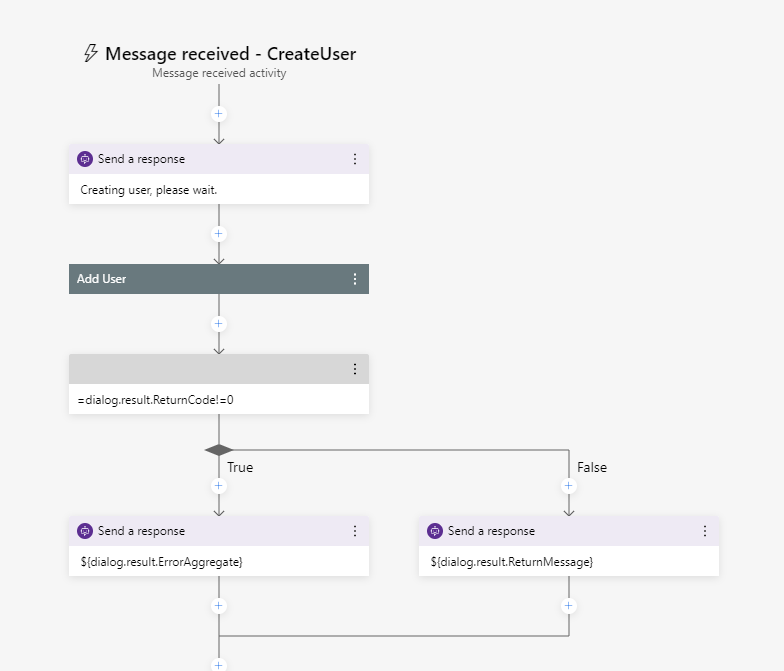
@v-kydela I understand "emit a custom event" a little better now. That was redundant, the message-received handler I have is already responding to the submit button being clicked from my adaptive dialog. There was no need to throw the event out again for something else to try and handle it - I deleted it.
So now my message-received handler just calls the custom action. The same issue remains - the UI is not updated until the custom action finishes. Only then are any prior prior "send a response" messages displayed.
nitewulf
on 4 Nov 2020
Have you tried this outside of the Emulator?
I've noticed different behavior with long running processes and responses when a bot is called from the emulator.
 EricDahlvang
on 4 Nov 2020
EricDahlvang
on 4 Nov 2020
Have you tried this outside of the Emulator?
I've noticed different behavior with long running processes and responses when a bot is called from the emulator.
No I haven't yet. Publishing things in general to Azure is not the most straightforward process in the world IMO. I'll try again. Really looking forward to the planned update this month to PVA that will easily integrate with skills built in Composer.
nitewulf
on 5 Nov 2020
@nitewulf - There's a lot going on with this issue, and I believe you can help us narrow down the cause of the problem. Take Adaptive Cards out of the equation and take the message-received handler out of the equation as well. Just put three steps in an ordinary unknown-intent handler:
- Send a message
- Perform some long-running task
- Send another message
My prediction is that you will still get the same behavior. I suspect what's going on is that when Emulator sends a message to the bot it waits to update its UI until it gets a response from the bot. By "response" I don't mean the replies that the bot sends to Emulator as new messages, since those are requests. I mean an HTTP response to the request that Emulator sent, which the bot only sends at the end of the turn after all of its processing has completed, including all new messages it sends as replies. If that's the case, then this problem has nothing to do with Composer and should be reproducible in an ordinary bot that doesn't even use dialogs. It should probably be raised as an Emulator bug.
That said, regardless of how well Emulator handles long-running turns it's still a bad idea to have long-running turns in the first place. This is because a web app like a bot is expected to provide an HTTP response quickly, and a timeout error will occur if it takes too long (generally 15 seconds). If a bot needs to perform a long-running task then it's expected to start that task to be processed on its own thread outside of the turn, so that any replies sent by the task are sent as proactive messages. I don't think Composer has a built-in way of doing this, but you can access any sort of functionality outside of Composer by sending an HTTP request or calling a skill. You can also extend Composer by ejecting the runtime, etc.
v-kydela
on 5 Nov 2020
I think you are correct @v-kydela
Also, @nitewulf it is not necessary to publish the bot to try channels other than Emulator. Using proxy software such as ngrok: https://docs.microsoft.com/en-us/azure/bot-service/bot-service-debug-channel-ngrok
Hope this helps!
EricDahlvang
on 5 Nov 2020
@v-kydela I started an empty project and did as you suggested. I also then published to azure to test in the Web Chat. Your prediction was correct. I still experienced a delay in seeing responses from the bot in the emulator until the custom action (just an await Task.Delay for a few seconds) finished. The Web Chat test in azure worked as expected.
The goal of this AddUser bot was to make it a skill and call it from a larger HelpDesk PVA bot. Wouldn't a skill built with Composer still be subject to the ~15 second timeout? My first attempt was to build a REST API (the stuff I'm working with is a old dumb SOAP webservice) hosted in azure but I wanted to use an adaptive dialog form to collect the information in a more user friendly way.
I'm aware of ejecting runtime for bots (that's how I made the custom actions), are you saying I can mess with composer itself and alter a Timeout value somewhere?
@ericchansen I'd love to be able to try other channels without publishing for debug purposes if that is possible... however that article really sounds like you already have to have the bot published and in a channel and then use ngrok to intercept communications to debug locally - which is still bad ass.
nitewulf
on 6 Nov 2020
@nitewulf - Yes, a skill built in Composer would still be subject to the ~15 second timeout. If you're using skills to get around the limitations of Composer, building those skills with Composer would defeat the purpose.
If you've already ejected the runtime in order to make your custom actions, you can modify your custom actions so that they offload their tasks to other threads and your bot can respond to Emulator immediately. Even if you could alter a timeout value somewhere, that would be a very bad idea and it wouldn't fix the problem of Emulator not updating its conversation history.
I suspect you meant to @ mention Eric Dahlvang and not Eric Hansen. It sounds like it would help to clarify what you mean when you say "publishing." Words like publishing and deployment tend to be ambiguous, especially when it comes to bots. Sometimes they refer to actually uploading your bot to a server and sometimes they mean provisioning the Azure resources your bot will use. I'll use "publishing" to mean just the uploading part and I'll use "deployment" to mean both publishing and provisioning resources.
There are several tunneling services available for you to use, and the most popular are ngrok and Azure relays. Every bot developer should be using a tunneling service. If publishing means uploading your bot to a server then no, you don't need to publish a bot in order to use a tunneling service. The entire point is that you can run your bot locally and have server-based channels send messages to your locally-running bot.
v-kydela
on 6 Nov 2020
@v-kydela Thanks Kyle. I'm for sure going to learn more about tunneling for debugging these bad boys. And I'll raise an issue for the emulator since this has nothing to do with composer. Not a big deal I guess and I would have realized that once I got the bot deployed to an actual channel. Sorry.
nitewulf
on 6 Nov 2020
This experimental sample might be helpful in this scenario:
This doc as well: https://docs.microsoft.com/en-us/azure/bot-service/bot-builder-howto-long-operations-guidance?view=azure-bot-service-4.0
EricDahlvang
on 9 Nov 2020
Related issues
 cxbuilders
·
16Comments
cxbuilders
·
16Comments
 selmi5
·
17Comments
selmi5
·
17Comments
 sujeongHeo
·
24Comments
sujeongHeo
·
24Comments
 philip-mc
·
14Comments
philip-mc
·
14Comments
 hraz-msft
·
21Comments
hraz-msft
·
21Comments