Botframework-composer: Failed to publish bot with LUIS from behind a firewall
Describe the bug
I use the Bot Framework Composer on the Windows PC with a corporate firewall.
I already set up proxy configuration as environmental variables below:
HTTPS_PROXY=http://11.22.33.44:3128
HTTP_PROXY=http://11.22.33.44:3128
NO_PROXY=localhost
So most communication has no problem, but publishing the bot with LUIS is always failed with getaddrinfo EAI_AGAIN error. The error message is below:
Sorry, something went wrong with publishing. Try again or exit out of this task.
request to https://westus.api.cognitive.microsoft.com/luis/authoring/v3.0-preview/apps/import?appName=ToDoBotWithLuisSample-0(composer)-additem.en-us.lu failed, reason: getaddrinfo EAI_AGAIN westus.api.cognitive.microsoft.com
I think the cause is not to go through the proxy when communicating with the LUIS API.
I think getaddrinfo should not be called on the environment behind a proxy.
Version
Bot Framework Composer

Version:  1.0.2
Electron: 8.2.4
Chrome: 80.0.3987.165
NodeJS: 12.13.0
V8: 8.0.426.27-electron.0
Browser
- [x] Electron distribution
- [ ] Chrome
- [ ] Safari
- [ ] Firefox
- [ ] Edge
OS
- [ ] macOS
- [x] Windows
- [ ] Ubuntu
To Reproduce
Steps to reproduce the behavior:
- Set up proxy configuration as environmental variables on the PC with a corporate firewall
- Run the Bot Framework Composer on the PC
- Create bot from "Todo with LUIS" template
- Click [Start Bot]
- Set valid LUIS Authoring key (or any dummy string) on the [Publish LUIS models] dialog, then click [OK]
- See error
Expected behavior
The publish will succeed.
(or failed due to the dummy Authoring key)
Screenshots

Additional context
 soappp
All 13 comments
@v-kydela can you or someone from support engage on this please?
 cwhitten
on 15 Sep 2020
cwhitten
on 15 Sep 2020
I'll try and see if I can reproduce. Can you please run the following from a shell on the Windows machine and share the results?
netsh winhttp show proxy
 dmvtech
on 16 Sep 2020
dmvtech
on 16 Sep 2020
I'm sorry for my late reply (due to some trouble with my account).
Here is the result:
>netsh winhttp show proxy

Current WinHTTP proxy settings:

Proxy Server(s) : 11.22.33.44:3128
Bypass List : <local>;xxxxxx;yyyyy
The same proxy server is also set in Internet Options.
soappp
on 17 Sep 2020
Ok, thanks. I'm investigating further.
dmvtech
on 17 Sep 2020
Hi @soappp Sorry for the delay in response on this.
Can you please see if this reproduces with the stable version 1.1.1.?
When I setup a proxy, then supply a dummy string, I get:
Sorry, something went wrong with publishing. Try again or exit out of this task.
Access denied due to invalid subscription key or wrong API endpoint. Make sure to provide a valid key for an active subscription and use a correct regional API endpoint for your resource.
With a valid LUIS auth endpoint key, I have no failure and can see the traffic in my proxy:

dmvtech
on 7 Oct 2020
@dmvtech Thank you for your reply.
I updated my Bot Framework Composer to v1.1.1 and tried to publish the sample bot with LUIS.
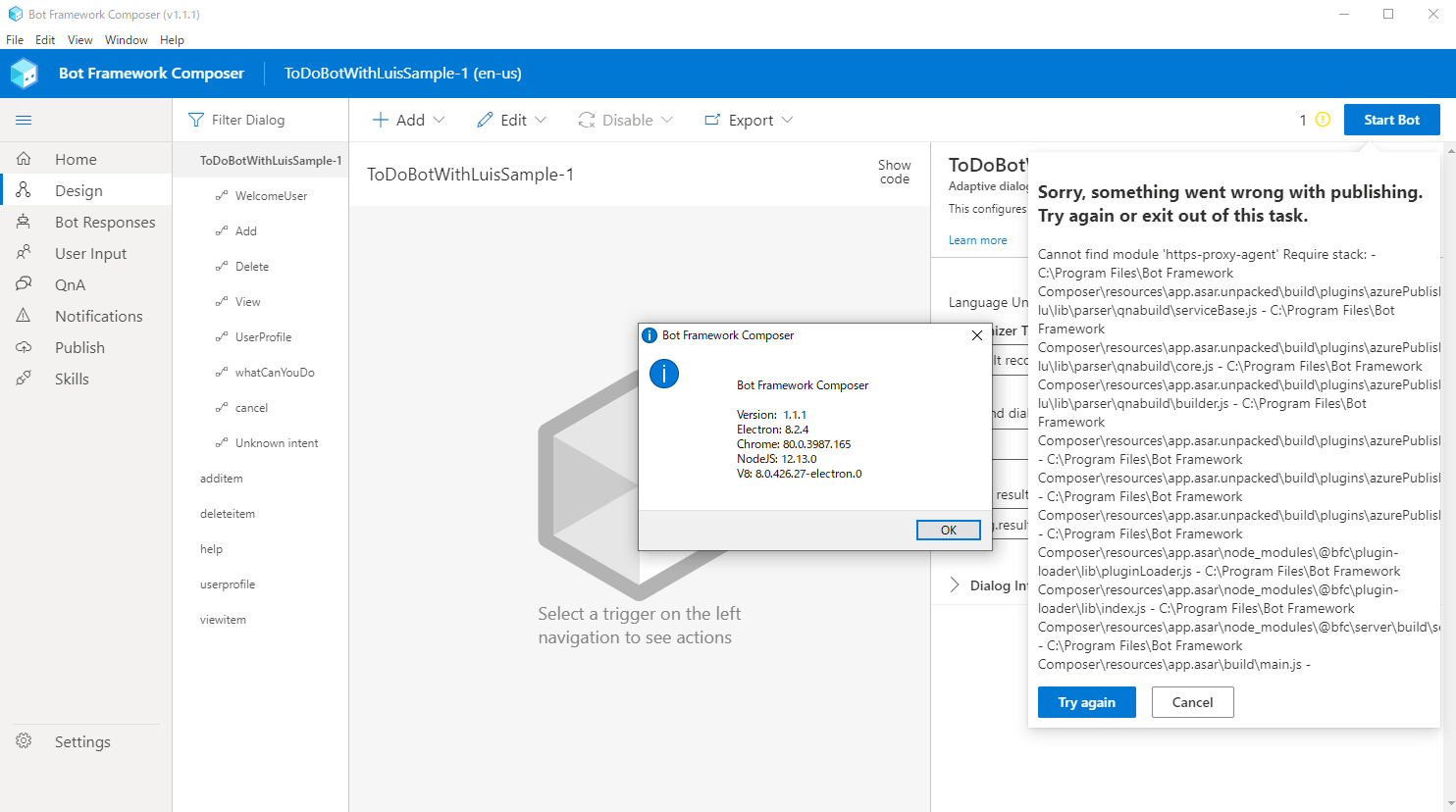
I got another error message and the publishing task was aborted.
Sorry, something went wrong with publishing. Try again or exit out of this task.
Cannot find module 'https-proxy-agent' Require stack: - C:Program FilesBot Framework Composerresourcesapp.asar.unpackedbuildpluginsazurePublishnode_modules@microsoftbf-lulibparserqnabuildserviceBase.js - C:Program FilesBot Framework Composerresourcesapp.asar.unpackedbuildpluginsazurePublishnode_modules@microsoftbf-lulibparserqnabuildcore.js - C:Program FilesBot Framework Composerresourcesapp.asar.unpackedbuildpluginsazurePublishnode_modules@microsoftbf-lulibparserqnabuildbuilder.js - C:Program FilesBot Framework Composerresourcesapp.asar.unpackedbuildpluginsazurePublishlibluisAndQnA.js - C:Program FilesBot Framework Composerresourcesapp.asar.unpackedbuildpluginsazurePublishlibdeploy.js - C:Program FilesBot Framework Composerresourcesapp.asar.unpackedbuildpluginsazurePublishlibindex.js - C:Program FilesBot Framework Composerresourcesapp.[email protected] - C:Program FilesBot Framework Composerresourcesapp.[email protected] - C:Program FilesBot Framework Composerresourcesapp.[email protected] - C:Program FilesBot Framework Composerresourcesapp.asarbuildmain.js -
soappp
on 7 Oct 2020
@soappp Thank you. I realized, that in my test, if something (for some reason) doesn't go through my proxy, it will still work (since I don't have a firewall/etc shutting that request down). I'm going to have to try and figure out how to test/handle for that.
Thank you for trying v1.1.1. I'll keep investigating.
dmvtech
on 8 Oct 2020
@dmvtech do you have any post-investigation updates? Thanks!
 stevengum
on 20 Oct 2020
stevengum
on 20 Oct 2020
So, I have a bit more info, but no smoking gun.
I thought again about my previous attempt, and while I didn't see any errors, I realized I wasn't seeing any calls in Fiddler to LUIS/cognative endpoints.
I fixed some configuration issues on my end and confirmed that _both_ the wininet and winhttp proxies were set to use Fiddler (more info here):
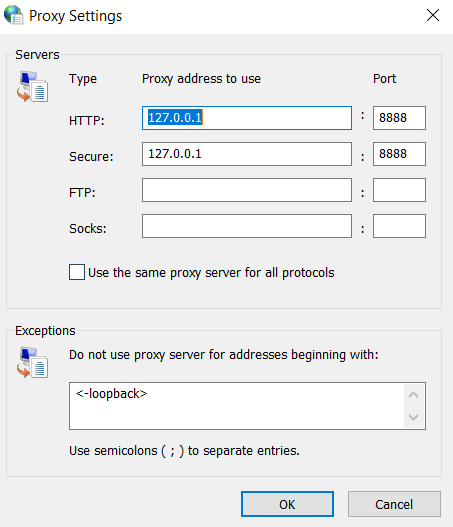
Current WinHTTP proxy settings:

    Proxy Server(s) :  http=127.0.0.1:8888;https=127.0.0.1:8888
    Bypass List     :  <-loopback>
After getting this all set up, what witness is that I _do not_ see (what I would expect or assume to), any calls to the authoring endpoint. Nothing for the publishing to *.api.cognitive.microsoft.com. But I do see them once the bot is published and I am testing in Emulator to make calls to the _prediction_ endpoint:

So, my _assumption_ is that the bit of code that does the publishing is making calls to do so, that is not utilizing either wininet or winhttp proxy. The calls to the prediction endpoints is being done by the webapp runtime and that is using those proxies.
I think this is the reason it works for me and not for @soappp. Ok...it _should_ work for me even if I did see it in Fiddler. But since @soappp has an environment that blocks anything that doesn't go through the proxy, then he's going to see a failure. I tried playing with options to try and give myself a similar failure, but was unable to do so.
@cwhitten Who might be a good resource to involve who might know about this area of composer to see if we can narrow this down further?
dmvtech
on 22 Oct 2020
@luhan2017 let's take an item to investigate network activity to LUIS when _publishing_ the models from Composer when a proxy is configured.
cwhitten
on 30 Oct 2020
@cwhitten This is a nodejs proxy issue, I was investigating a similar proxy issue with credit-suisse recently, we sent a private electron to them to verify if the solution works, once verified, we will submit a PR in composer to support the nodejs proxy feature.
@soappp , please let me know if you want to try out our private electron, I can send you the exe and the steps to enable proxy for composer. Thanks.
 luhan2017
on 2 Nov 2020
luhan2017
on 2 Nov 2020
@soappp , the customer helped verify the proxy setting worked for luis publish, but we still have some issue when retrieve the azure publish status, still working with them, please let me know if you want to try out our private exe, since it will take some time for the PR.
luhan2017
on 5 Nov 2020
@luhan2017 I'm sorry I didn't notice your previous mention.
Thank you very much for your work and kind suggestion.
I'm not in a hurry about this issue, so I think I can wait until this issue is officially fixed.
soappp
on 5 Nov 2020
Related issues
 rudrasingh21
·
34Comments
rudrasingh21
·
34Comments
 cxbuilders
·
16Comments
cxbuilders
·
16Comments
 yochay
·
15Comments
yochay
·
15Comments
 selmi5
·
17Comments
selmi5
·
17Comments
 Laxmi30
·
16Comments
Laxmi30
·
16Comments
Most helpful comment
@cwhitten This is a nodejs proxy issue, I was investigating a similar proxy issue with credit-suisse recently, we sent a private electron to them to verify if the solution works, once verified, we will submit a PR in composer to support the nodejs proxy feature.
@soappp , please let me know if you want to try out our private electron, I can send you the exe and the steps to enable proxy for composer. Thanks.