Botframework-composer: Action - Ask Question: String validation Expression - Doesn't appear to work
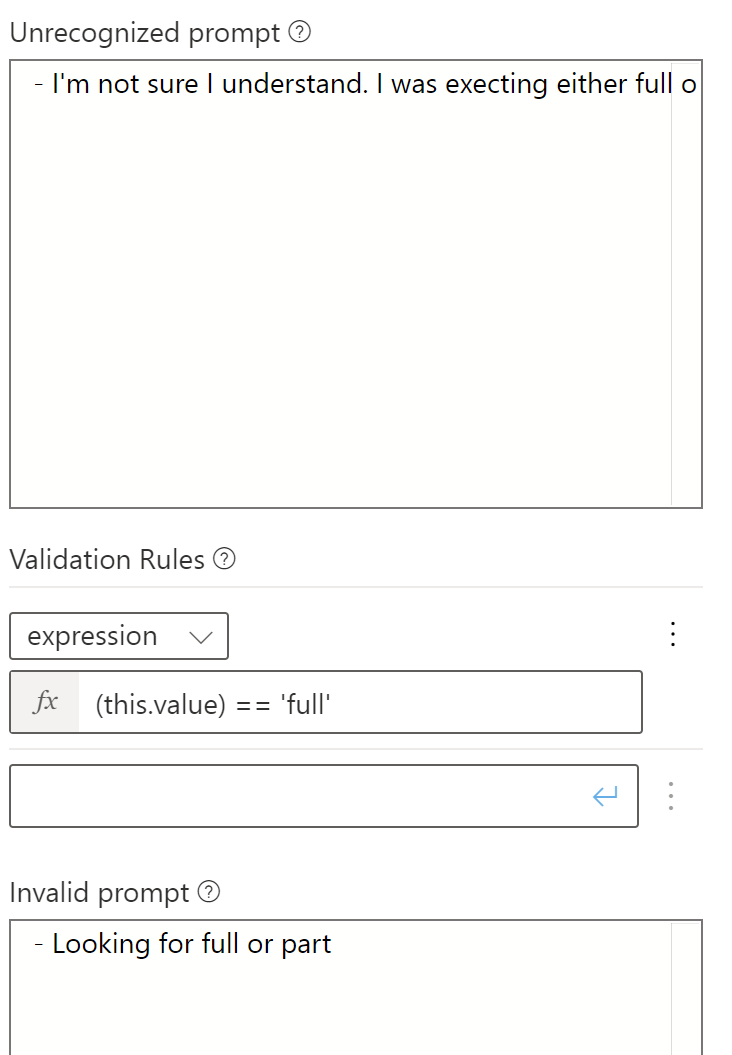
There doesn't appear to be a way to validate a sting value enter in the "Ask Question" action.
The weather sample uses a "length(this.value) == 5" expression to validate the users entered value.
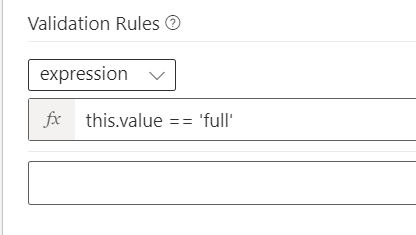
What if you need to actually do a string comparison "this.value == 'full'" as an example.
I have tried using 'string(this.value) == 'full'"
I can confirm this works if I use any fuction that processes "this.value" and returns a numeric value.
Its only string compare that doesn't seem to work (or is it not supported"
 Todd442
All 7 comments
@Todd442 this should work.
 hibrenda
on 2 Jun 2020
hibrenda
on 2 Jun 2020
@hibrenda - Confirmed this does not work. I have others also confirm this is an issue
Todd442
on 2 Jun 2020
@hibrenda - BTW: Thanks for responding. Further clarification, we tried the above as well as about 15 different permutations and as long as you include a built in function like "length" the content of "this.value" is evaluated.
The simple string comparison above just doesn't work.
Todd442
on 2 Jun 2020
could you attache the bot you are using so we can further debug?
hibrenda
on 2 Jun 2020
Here's the code. @hibrenda
Todd442
on 2 Jun 2020
@Todd442 In the "User Input" tab on the Text Input component, you have the 'Output format' property set to =toUpper(this.value) which is causing the validation to fail. I recommend that you either remove the 'Output format' or change the validation to match that logic - this.value == 'FULL'.
 tdurnford
on 2 Jun 2020
tdurnford
on 2 Jun 2020
Hey @Todd442 thanks for reporting the issue. Please try again as suggested by @tdurnford and @hibrenda.
Closing this issue at this moment since it's been answered.
Feel free to reopen it when you feel necessary. We appreciate your feedback.
 zxyanliu
on 23 Jul 2020
zxyanliu
on 23 Jul 2020
Related issues
 yochay
·
15Comments
yochay
·
15Comments
 gbelenky
·
22Comments
gbelenky
·
22Comments
 sujeongHeo
·
15Comments
sujeongHeo
·
15Comments
 stephanbisser
·
21Comments
stephanbisser
·
21Comments
 rudrasingh21
·
34Comments
rudrasingh21
·
34Comments