Botbuilder-samples: Cannot read property 'isChannelConversation' of undefined
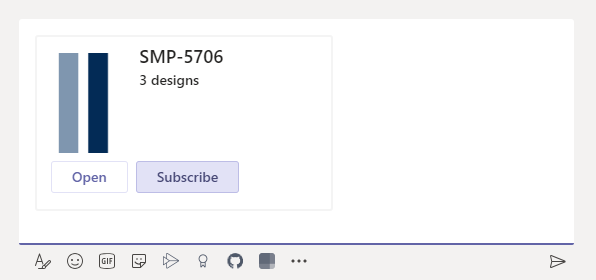
Hello! I'm trying to use ActionTypes.PostBack on card returned from OnTeamsMessagingExtensionSelectItemAsync of my Teams bot with following code:
var card = new ThumbnailCard
  {
    Title = project.Name,
    Buttons = new List<CardAction>
      {
        new CardAction { Type = ActionTypes.PostBack, Title = "Subscribe", Value = query },
      },
  };
var attachment = new MessagingExtensionAttachment { ContentType = ThumbnailCard.ContentType, Content = card, };
return Task.FromResult(new MessagingExtensionResponse
  {
    ComposeExtension = new MessagingExtensionResult
      {
        Type = "result",
        AttachmentLayout = "list",
        Attachments = new List<MessagingExtensionAttachment> { attachment }
      }
  });
but when I press the button in browser I'm getting following error and nothing happens:
TypeError: Cannot read property 'isChannelConversation' of undefined
    at t.getAppDefinitionFromCard (https://statics.teams.cdn.office.net/hashedjs/3.2-app.min-c7c53b37.js:3:308254)
    at t.logTelementryForCardAction (https://statics.teams.cdn.office.net/hashedjs/3.2-app.min-c7c53b37.js:3:276083)
    at _.debounce.trailing (https://statics.teams.cdn.office.net/hashedjs/3.2-app.min-c7c53b37.js:3:148902)
    at e (https://statics.teams.cdn.office.net/hashedjs/2-vendor.min-68b363d0.js:64:245)
    at f (https://statics.teams.cdn.office.net/hashedjs/2-vendor.min-68b363d0.js:65:49)
    at t.e.buttonClicked (https://statics.teams.cdn.office.net/hashedjs/3.2-app.min-c7c53b37.js:3:148400)
Am I sending the card wrong? Is it supported flow? MessageBack and ImBack cause slightly different errors but anyway none of them work for me.
It's duplicate of https://github.com/microsoft/botframework-sdk/issues/5811 but I'm not sure what is the better place to ask the question.
 GDreyV
All 23 comments
The flow I'm trying to implement is:
- user lookup the project using compose extension query command
- bot provides option to subscribe to the project or open it
- user subscribes to the project
As I understand the Card should be sent in order to enable buttons. But is it possible to use buttons without sending the card (while it's in compose message area)? Or can I show prompt instead of sending card into compose area?
GDreyV
on 21 Apr 2020
BTW it looks like Value of CardAction can be only JObject but not regular object. In case of plain object value will be set to null.
GDreyV
on 22 Apr 2020
Hello @GDreyV - I would like to help but I have a few questions.
- "I'm getting following error" doesn't tell us what you're seeing. Where are you seeing that error/stack trace (browser console, App Insights, etc.)?
- You say you're getting the error in a browser. Does the same thing happen on the Teams desktop client and mobile clients?
- Are you getting the error when you try to send the card or when you try to click on the card?
- Does the card work normally when your bot tries sending the card to the conversation in response to a user message instead of through a messaging extension?
- When you say "BTW it looks like
ValueofCardActioncan be only JObject but not regular object. In case of plain object value will be set to null." what do you mean by a regular object/plain object?JObjectderives fromobjectjust like all other C# classes.
Also, please post a screenshot/gif of the Teams client so we can better understand what's happening
 v-kydela
on 22 Apr 2020
v-kydela
on 22 Apr 2020
- Error stack is in browser's console window when I run Teams in browser (Edge).
- I didn't try it in desktop client. On mobile client it was impossible to reproduce as card doesn't have any buttons at all (either in compose window or when it's submitted)
- The errors occur when I click on buttons when card is in compose area.
- Yes, it works, also it works when card is submitted.
Openbutton works in all scenarios.

GDreyV
on 22 Apr 2020
@GDreyV - Thank you for the screenshot, that helps. Would you go ahead and try it in the desktop client and answer question 5?
v-kydela
on 22 Apr 2020
in the app when I press the button it doesn't do anything. And after couple clicks button kind of hangs:
GDreyV
on 22 Apr 2020
@GDreyV - What is your answer to question 5?
v-kydela
on 22 Apr 2020
Oh, sorry, I missed it.
- This code doesn't work, value will be null when user press the button
new CardAction {
  Type = ActionTypes.MessageBack,
  Title = "Subscribe",
  Value = new { project.Id }
}
and this code works
new CardAction {
  Type = ActionTypes.MessageBack,
  Title = "Subscribe",
  Value = JObject.FromObject(new { project.Id })
}
@GDreyV - Since you posted in the sample repo, are you following a specific sample? Sample 50 perhaps? https://github.com/microsoft/BotBuilder-Samples/tree/master/samples/csharp_dotnetcore/50.teams-messaging-extensions-search
v-kydela
on 23 Apr 2020
really 52.teams-messaging-extensions-search-auth-config, 50 looks pretty the same.
GDreyV
on 23 Apr 2020
Hi @GDreyV, can you give example data for what you are sending in the card, namely the project.Name and project.Id? Knowing the kinds of data you are sending will be useful. Also, what is expected to happen when "Subscribe" is pressed? Is it supposed to open a link, begin some process by the bot, or something else?
 stevkan
on 28 Apr 2020
stevkan
on 28 Apr 2020
Hello @stevkan project.Name and project.Id are just simple string values. Specifically Name is just something like "New project" and Value is converted to string mongo id. Subscribe button is represented by the action:
new CardAction { Type = ActionTypes.PostBack, Title = "Subscribe", Value = query }
where query is { project.Id }. So I suppose when card is in the message composing area buttons should be either disabled (if it not supposed to be pressed) or should work correctly. Right now nothing happens except errors in console.
GDreyV
on 28 Apr 2020
@GDreyV, thank you for your patience. I am working on this and hope to have some response to you shortly.
stevkan
on 5 May 2020
@stevkan, I'm not sure if it's related issue but here the case. I sent card into the General channel with Subscribe button as in the example above. User who is not authorized in the bot is pressing that button and nothing happens. The error in the console says:
angular.min.js:113 2020-05-06T00:10:28.848Z AppsService: getInstalledAppForTeam - Invalid teamId and/or appId specified
(anonymous) @ angular.min.js:113
e.logMessage @ msteams-web-ng1-services.min.js:1
e.error @ msteams-web-ng1-services.min.js:1
t.getInstalledAppForTeam @ msteams-web-ng1-services.min.js:1
(anonymous) @ msteams-web-ng1-services.min.js:1
f @ angular.min.js:126
(anonymous) @ angular.min.js:126
$eval @ angular.min.js:141
$digest @ angular.min.js:138
f.$digest @ msteams-web-ng1-services.min.js:1
$apply @ angular.min.js:141
(anonymous) @ angular.min.js:269
dispatch @ jquery.min.js:1
v.handle @ jquery.min.js:1
msteams-web-common.min.js:1 Uncaught (in promise) Invalid teamId and/or appId specified
(anonymous) @ msteams-web-common.min.js:1
f @ angular.min.js:126
(anonymous) @ angular.min.js:126
$eval @ angular.min.js:141
$digest @ angular.min.js:138
f.$digest @ msteams-web-ng1-services.min.js:1
$apply @ angular.min.js:141
(anonymous) @ angular.min.js:269
dispatch @ jquery.min.js:1
v.handle @ jquery.min.js:1
Should I create separate issue for that?
GDreyV
on 6 May 2020
@GDreyV, to clarify, is the error occurring in 1:1, channel, or both? And, as you mentioned unauthorized bot users, is it occurring for both authorized and unauthorized users?
Also, if you wouldn't mind, can you post your bot's manifest? It might be a red herring, but I'd like to see all applicable parts.
stevkan
on 20 May 2020
We didn't test these issues in 1:1 conversation, so it was channel and multiusers conversation. The last error I sent was just for not authorized user.
{
  "$schema": "https://developer.microsoft.com/en-us/json-schemas/teams/v1.5/MicrosoftTeams.schema.json",
  "manifestVersion": "1.5",
  "version": "1.0",
  "bots": [
    {
      "botId": "",
      "scopes": [ "personal", "team" ],
      "supportsFiles": false,
      "isNotificationOnly": false,
      "commandLists": [
        {
          "scopes": [ "personal" ],
          "commands": [
            { "title": "Help", "description": "Show help info" },
            { "title": "Sign In", "description": "Sign in into account for links unfurling and notifications" },
            { "title": "Sign Out", "description": "Sign out from the account" },
            { "title": "Subscribe to {url}", "description": "Subscribe for updates" },
            { "title": "Unsubscribe from {url}", "description": "Unsubscribe from updates" }
          ]
        }
      ]
    }
  ],
  "composeExtensions": [
    {
      "botId": "",
      "commands": [
        {
          "id": "searchQuery",
          "type": "query",
          "title": "Search",
          "description": "Perform a projects search",
          "initialRun": false,
          "fetchTask": false,
          "context": [ "commandBox", "compose", "message" ],
          "parameters": [ { "name": "searchQuery", "title": "Search", "description": "Project's name", "inputType": "text" } ]
        }
      ],
      "messageHandlers": [
        {
          "type": "link",
          "value": {
            "domains": [ "*.domain.com" ]
          }
        }
      ]
    }
  ],
  "permissions": [
    "identity",
    "messageTeamMembers"
  ],
  "validDomains": [ "*.domain.com", "*.botframework.com" ]
}
@stevkan Can you update the status of this for the customer?
 tracyboehrer
on 5 Jun 2020
tracyboehrer
on 5 Jun 2020
@GDreyV, I just noticed you are trying to send a "postBack" action type which is not supported in Teams. If you are trying to send a message back to the bot that is not intended to be displayed to the user, you will want to use the "invoke" action type, referenced here. A response should look something similar to this.
Please try with one of the supported action types and let me know if the issue resolves itself or persists.
stevkan
on 15 Jun 2020
Sorry, it was incorrect code pasted, really the code is:
new CardAction { Type = ActionTypes.MessageBack, Title = "Subscribe", Value = JObject.FromObject(new { project.Id }) }
Can you show me the method in your bot that you are using to handle the incoming MessageBack?
stevkan
on 18 Jun 2020
Sorry, it might be wrong but as I recall this one:
protected async override Task OnTeamsMessagingExtensionCardButtonClickedAsync(
            ITurnContext<IInvokeActivity> turnContext,
            JObject cardData,
            CancellationToken cancellationToken)
        {
            if (cardData != null && cardData.ContainsKey("Id"))
            {
                await this.subscribeFlow.SubscribeToProject(cardData["Id"].Value<string>(), turnContext, cancellationToken);
            }
        }
but really in the cases we faced this method was not called. We were just facing numerous exceptions in the browser.
GDreyV
on 18 Jun 2020
Hi @GDreyV, on April 21st (when you posted the issue), you stated
But is it possible to use buttons without sending the card (while it's in compose message area)?
In subsequent readings, I missed the "in compose message area" of that question. Unfortunately, the answer is no. While the card is in the compose message state, the actions associated with any buttons are outside the context of the bot as the card, itself, hasn't entered the message thread, yet. This means that any action you would wish the bot to respond to cannot occur because it can't reach the bot until the card is sent by the user.
As you can see in this doc, all the card actions mention interacting with the bot in some way. It's not surprising that openUrl is the only action that _does_ work because the context of that action is separate from the bot and Teams.
stevkan
on 1 Jul 2020
Ah, thank a lot for the details. I got it. Thank you for your time and investigation!
GDreyV
on 4 Jul 2020
Related issues
 wonboyn
·
7Comments
wonboyn
·
7Comments
 daveRendon
·
6Comments
daveRendon
·
6Comments
 JoshBello
·
6Comments
JoshBello
·
6Comments
 jackiebecker
·
5Comments
jackiebecker
·
5Comments
 HesselWellema
·
9Comments
HesselWellema
·
9Comments