Botbuilder-samples: Incorrect port number for 81.skills-skilldialog dotnetcore root bot
Sample information
- Sample type: \samples\
- Sample language: dotnetcore
- Sample name: 81.skills-skilldialog
Describe the bug
The instructions for 81.skills-skilldialog advise to open the emulator & connect on http://localhost:3978/api/messages
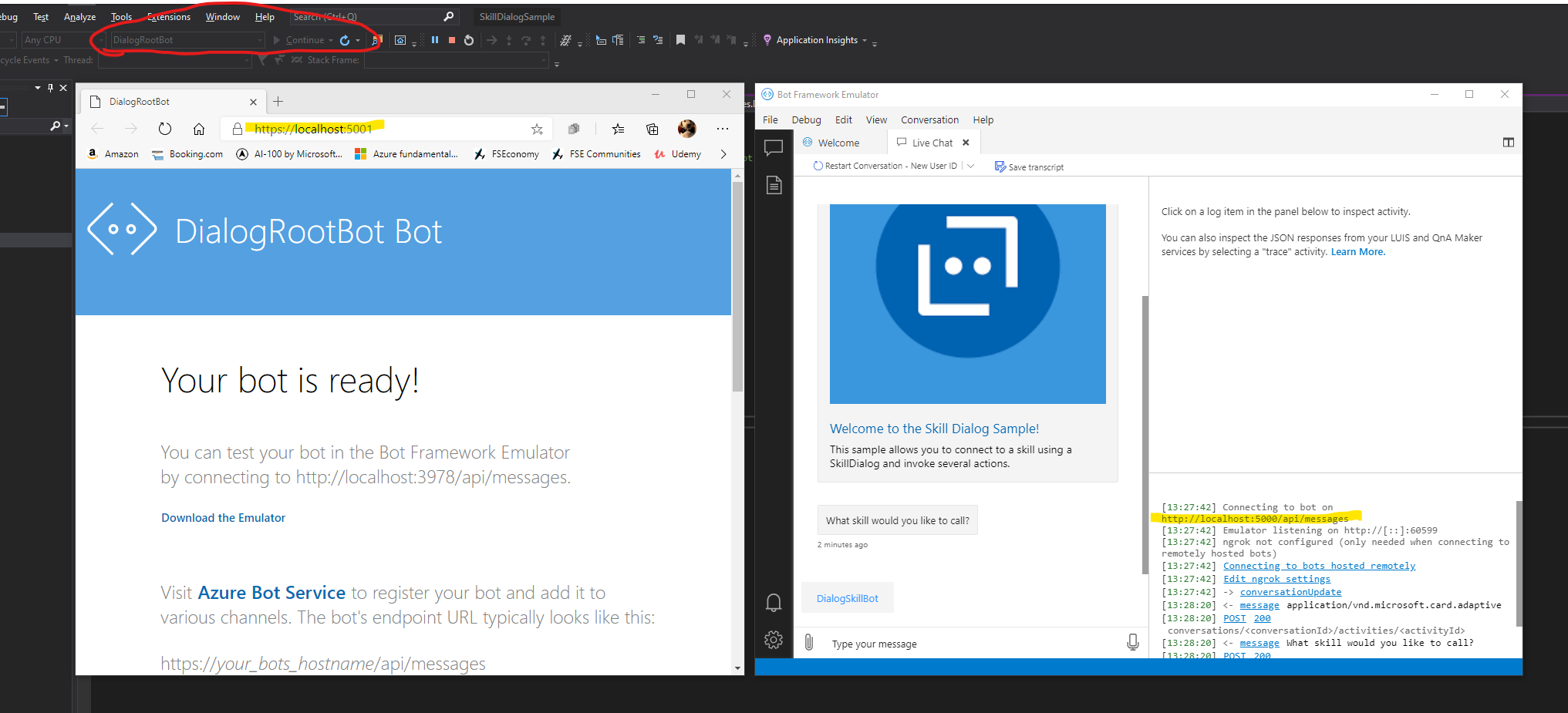
The url for the dotnetcore root bot is actually http://localhost:5000/api/messages
The url needs to be updated in the readme & also in defualt.htm in the sample wwwroot folder
To Reproduce
Steps to reproduce the behavior:
- Follow the instructions under "To try this sample"
- Launch the bot framework emulator & try to connect to the root bot
Expected behavior
Instructions provided allow you to launch the bot & connect via the emulator
 wonboyn
All 7 comments
Thanks, I'll review and address it in the next release.
 gabog
on 4 Jan 2021
gabog
on 4 Jan 2021
Hi everyone!
@wonboyn what IDE your using? Visual Studio, VS Code?
I tried to replicate this issue today using Visual Studio Community 2019 v16.8.3 and it work fine with both ports.
Using port 5000
Using port 3978
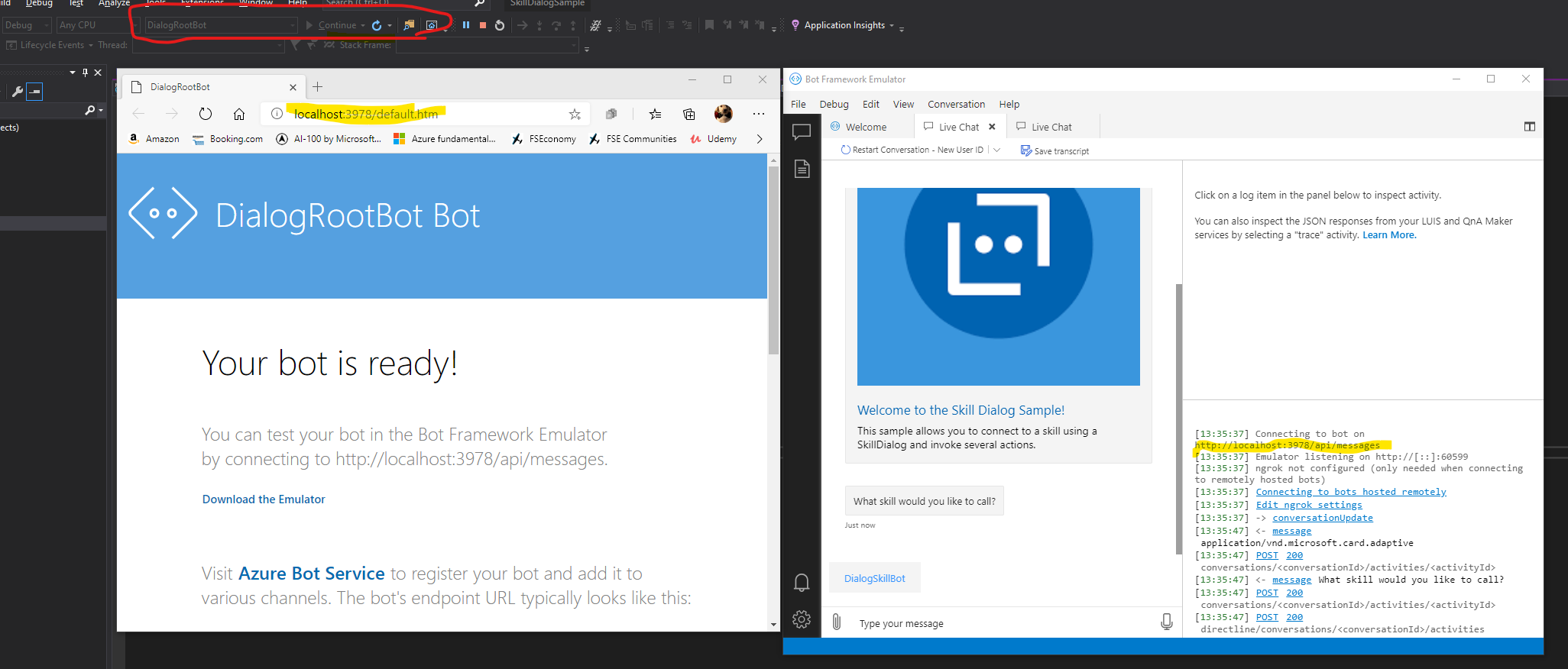
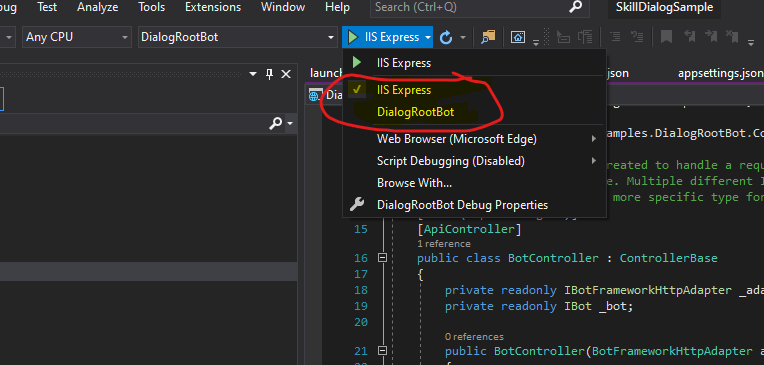
Port 3978 work when you run your code using IIS Express profile. If you set the profile to DialogRootBot then port 5000 will work. You can find this profile settings here. Also you can change this profile by right click on the project and going to the Debug section. See image below.
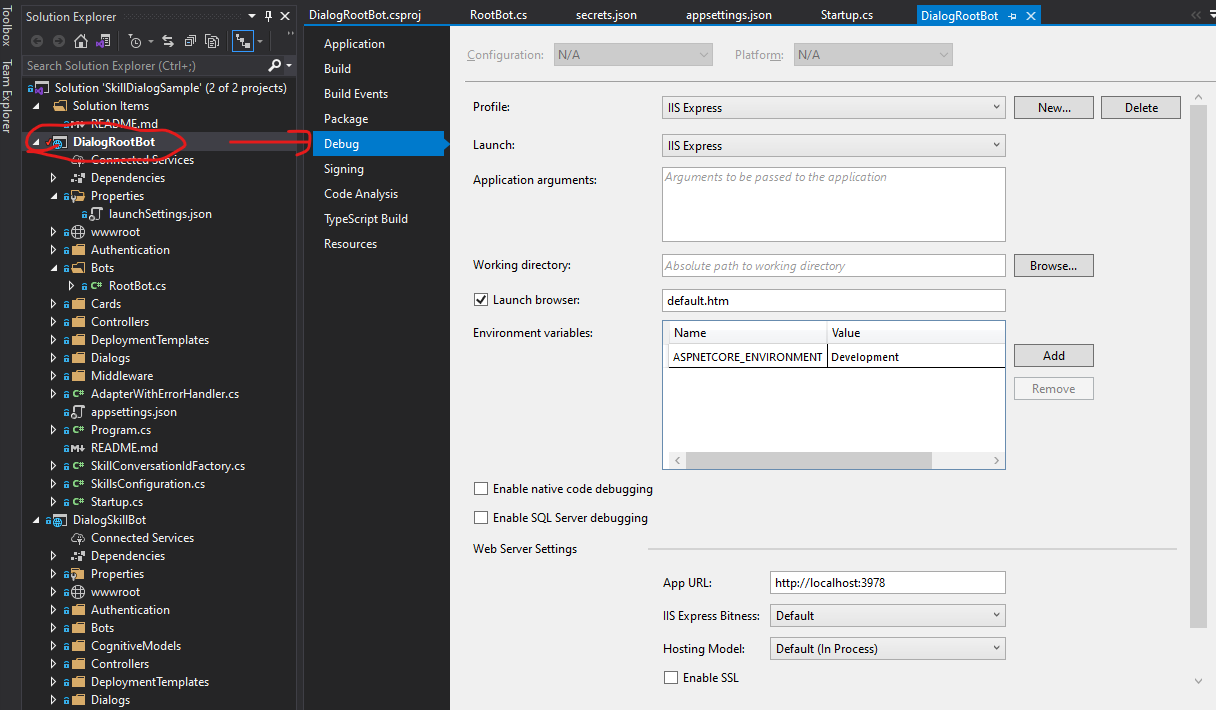
In both case you need to specify what port you expect the bot will be running on Emulator. I think documentation assume you will use the IIS Express profile.
Hope this help you!
 sempjc
on 6 Jan 2021
sempjc
on 6 Jan 2021
Hi @sempjc
I'm running this in VS Code.
When debugging this I launch the root & skill bots separately from the same VS Code instance - but didn't see any option to configure the web server port.
Thanks
wonboyn
on 6 Jan 2021
In that case you can use the following command:
dotnet run --urls=http://localhost:3978
If you use dotnet run command alone, will default to port 5000, but you can specify your desired URL by appending --urls=http://localhost:<port>.
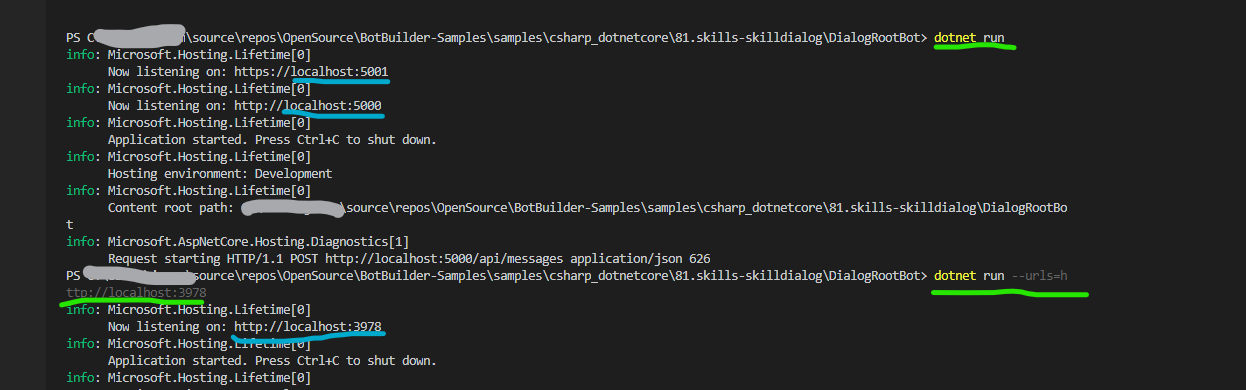
Glad to help you :)
sempjc
on 6 Jan 2021
Hi again @sempjc
I'm very new to dotnet - so a big thanks for the info - it's helped to fill in a few gaps.
A couple more related questions:
1) In the sample there's a file: BotBuilderSamples/samples/csharp_dotnetcore/81.skills-skilldialog/DialogRootBot/Properties/launchSettings.json This file refers to the IIS Express profile you mentioned earlier as well as the url's for port 5000, 5001 & 3978
Does this not get used by VS Code during debugging?
2) To run the samples I'm using the VS Code debugging which I believe is launching the two bots via a VS Code launch.json file. Is it possible to specify the url via the launch.json file?
Thanks again
wonboyn
on 6 Jan 2021
I'm happy to know I was helpful to you 😄
For running a specific profile from CLI you can use:
dotnet run --launch-profile <Profile Name>.
Right know you can run dotnet run --launch-profile DialogRootBot and should run your bot on port 5000.
I'm not sure about this, but apparently IIS Express is not supported by dotnet. You can follow the discussion here.
If you plan to run your bot on port 3978, you can create a new profile based on DialogRootBot and change the port to 3978.
Something similar to this:
{
      "MyProfile": {
      "commandName": "Project",
      "launchBrowser": true,
      "applicationUrl": "http://localhost:3978;https://localhost:39783",
      "environmentVariables": {
        "ASPNETCORE_ENVIRONMENT": "Development"
      }
}
There is an IIS Express extension for VS Code, but don't know if this help on running the IIS Express profile from launchSetting.json.
sempjc
on 6 Jan 2021
Hi @sempjc
Thanks for that.
I just found that launchSettings.json does get called by VS Code during debugging from the VS Code launch.json settings. I then modified the applicatURL value in each bot's launchSettings.json & now have the sample all working.
Thanks so much for all your help.
wonboyn
on 6 Jan 2021
Related issues
 daveRendon
·
6Comments
daveRendon
·
6Comments
 cleemullins
·
5Comments
gabog
·
9Comments
cleemullins
·
5Comments
gabog
·
9Comments
 WashingtonKayaker
·
9Comments
WashingtonKayaker
·
9Comments
 stevengum
·
3Comments
stevengum
·
3Comments