Botbuilder-samples: Experimental Node EchoBot doesn't work with DLS Channel/Client
Sample information
- Sample type: [experimental]
- Sample language: [javascript_nodejs]
- Sample name: 02.echo-bot
Describe the bug
We are integrating the WebSocket functionality of botbuilder-streaming-extensions in the Virtual Assistant in TypeScript in microsoft/botframework-solutions#2402.
We are exposing a GET endpoint to be managed by WebSockets as it is in the index.js of the experimental echo_bot.
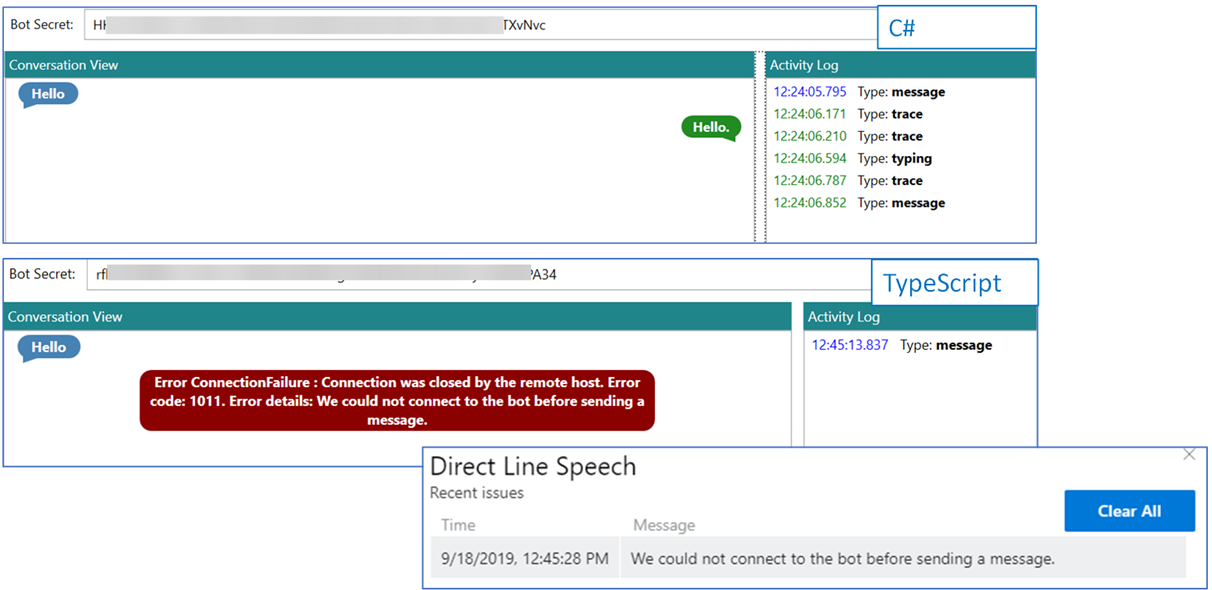
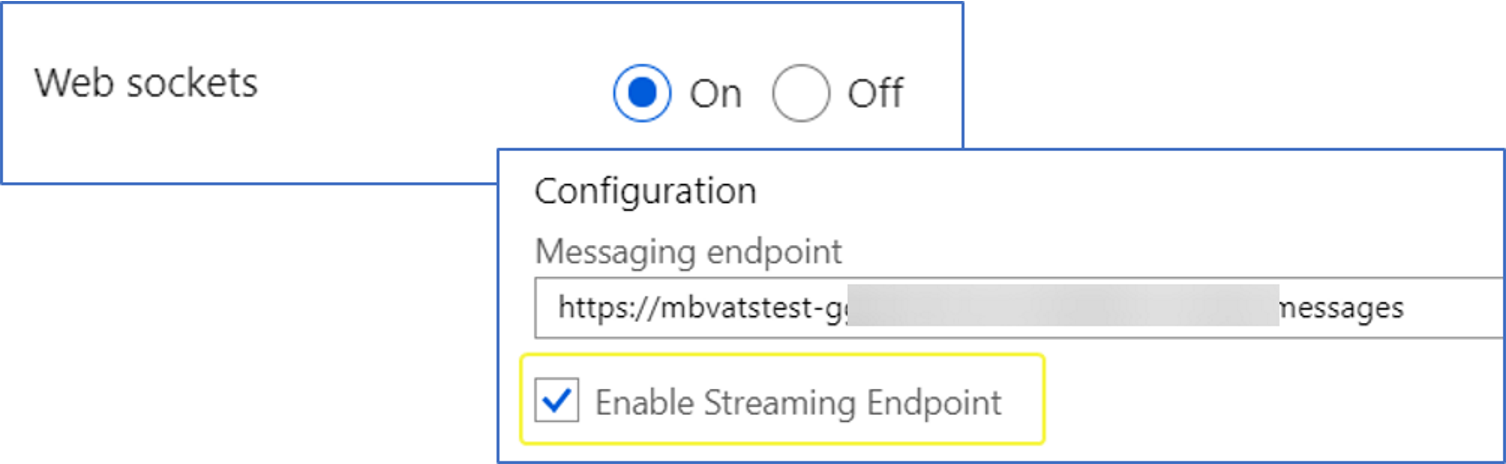
To test this functionality, we decided to use the Direct Line Speech Client. Having the Enable Streaming Endpoint checked and WebSockets On, the result was the following:
_Comparison between Virtual Assistant in C# and in TypeScript using WebSocket functionality_
After reviewing #1731, we noticed that was closed by #1779 adding the experimental echo bot with DLS. So we started to test it, taking into account that it's an experimental one, in order to validate the implementation of WebSockets as we mentioned above.
We added the .npmrc file in order to be able to download botbuilder-streaming-extensions from myget during npm install.
Then we followed the Deploy steps and tried again using the DLS Client.
The result was the same for the experimental echo bot:

To Reproduce
Using the experimental 02.echo_bot
- Install the dependencies using
npm install - Deploy the echo_bot, using this guide
- Configure the Direct Line Speech for the deployed bot, following these steps
- Add the Direct Line Speech Channel
- Initiate the
DLS Clientusing the respectively keys - Check that the connection of the channel to the bot fails
Expected behavior
Use the communication via WebSockets using DLS successfully.
Screenshots
_.npmrc file_

_Configuration for DLS in Azure_
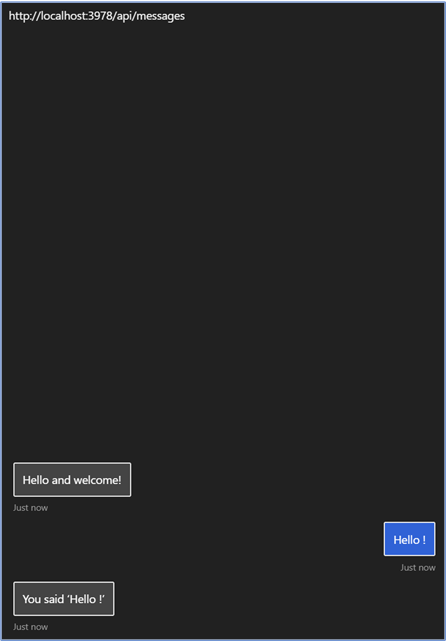
_experimental nodejs echo bot using Bot Framework Emulator_
Additional context
We found the issue microsoftdocs/bot-docs#1275 which explains that the DLS endpoint in JavaScript is missing.
We rechecked the configuration, restarting the AppServices as explains in microsoftdocs/bot-docs#1310, but nothing has changed.
[bug]
 Batta32
All 9 comments
Hi @Batta32
I'm still working on repro-ing this bug and will have more information soon, but so far I've noticed when using the Azure CLI tool to run az bot prepare-deploy --code-dir "." --lang Typescript a web.config file is generated in the root dir of the bot and includes the line <webSocket enabled="false" /> which may be overriding the 'Enable WebSockets' setting in the Azure portal. I've attempted toggling the value from the UI inside the portal and the web.config is never updated.
Can you confirm if this setting is set to false in your bot's web.config? You can view it by going to the App Service for your bot in the Azure portal, choosing Advanced Tools, clicking Go to launch Kudu, selecting Debug Console from the top menu, then navigating to site\wwwroot and either opening the file web.config in the editor or using cat web.config from the command line.
 DDEfromOR
on 23 Sep 2019
DDEfromOR
on 23 Sep 2019
I've been able to reproduce this bug and pull logs from the app service that show an odd wrapping of a 404 response by a 500 response. I was also able to reproduce this by following the same guides using the Typescript echo bot sample in master and keeping my npm registry feed set to https://botbuilder.myget.org/F/botbuilder-v4-js-daily/npm as the instructions for using the streaming-extensions library requires. When switching my feed back to npm I was able to re-run npm install on the same bot, redeploy, and immediately see HTTP calls working.
This leads me to believe there is an issue in one of the daily builds being pulled from MyGet that causes the TypeScript samples to not work. Since the streaming-extensions libraries are only available this way I do not believe they can currently be used via the feed.
As a workaround you can clone the streaming-extensions code from botbuilder-js master and run npm link in the libraries/botbuilder-streaming-extensions and libraries/botframework-streaming-extensions directories, then from the root directory of your bot run npm link botframework-streaming-extensions and npm link botbuilder-streaming-extensions. (You may also need to link botframework-streaming-extensions inside the directory of botbuilder-streaming-extensions depending on if the project has been built yet or not). This is definitely less than ideal, but should only be a temporary measure until the libraries are available on npm.
DDEfromOR
on 24 Sep 2019
Thanks @DDEfromOR! We will test the workaround that you suggested and we will back to you later!
Batta32
on 24 Sep 2019
@DDEfromOR, we tested the workaround that you suggested but nothing changed 😞.
We followed these steps:
- Clone botbuilder-js repo
- Open
botbuilder-js\libraries\botframework-streaming-extensions - Execute
npm installandnpm run build - Execute
npm packand copy the absolute path of the created.tgz - Open
botbuilder-js\libraries\botbuilder-streaming-extensions - Replace the value of
botframework-streaming-extensionswithfile:<PATH_TO_BOTFRAMEWORK_TGZ>, inside thepackage.json - Execute
npm installandnpm run build - Execute
npm packand copy the absolute path of the created.tgz - Open
BotBuilder-Samples\experimental\directline-speech\javascript_nodejs\02.echo-bot - Replace the value of
botbuilder-streaming-extensionswithfile:<PATH_TO_BOTBUILDER_TGZ>, inside thepackage.json - Execute
npm install - Deploy and publish the
echo_bot - Configure the
Direct Line Speechfor the bot - Add the
Direct Line Speech Channel - Initiate the
DLS Clientusing the respectively keys - Check that the connection of the channel to the bot
Did I miss any step? Do you think that the published version of botbuilder-streaming-extensions and botframework-streaming-extensions does not contain what it is in master?
Also, we used a WebSocket Echo Test passing the location wss:<BOT_NAME>.azurewebsites.net/api/messages
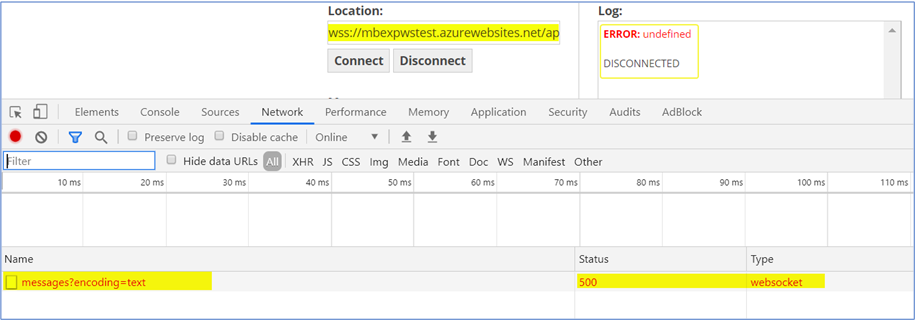
Do you have any clue where is the problem? Is it about the connection of the Direct Line Speech Channel to the Bot? Does the botbuilder-streaming-extensions library contemplate this scenario?
Batta32
on 24 Sep 2019
@Batta32 Sorry for the late response! If I ever take too long to answer you here please feel free to email directly and give me a nudge. My email is in my profile.
Can you confirm if you are able to open a WebSocket session with your bot locally? Or more specifically, just a test WebSocket connection that returns anything other than a 500.
Also, are you using the Azure CLI tool to prepare and deploy your bot? A common thread recently seems to be related to some of the settings in the generated Web.Config that gets created as part of the CLI process. The easiest way to narrow this down is if the bot is able to respond correctly to WebSocket upgrade requests locally but returns 500s once deployed to Azure. A workaround is to create the Web App via the Azure portal and then manually deploy your bot to it.
Also, is the emulator able to connect to your deployed bot and get responses over HTTP? I've seen instances lately where it appears the entire Node.js server fails to run after the deployment.
DDEfromOR
on 2 Oct 2019
@Batta32 I have news! It appears for the WebSocket upgrade to go through reliably with a Node.js bot the App Service must have the Always On option toggled to true. I'm investigating why this hasn't come up until recently.
DDEfromOR
on 3 Oct 2019
Hey @DDEfromOR ! Thanks for the response, we will check the different alternatives that you suggested and get back to you later 😊
Batta32
on 3 Oct 2019
@DDEfromOR, the information of below is for the Experimental Echo Bot and Virtual Assistant Sample too (that we are working on).
- I'm using Azure CLI to prepare an deploy the bots, following these steps.
- Yes! Using the emulator I'm able to connect to the published bot and get responses over HTTP.
- I have
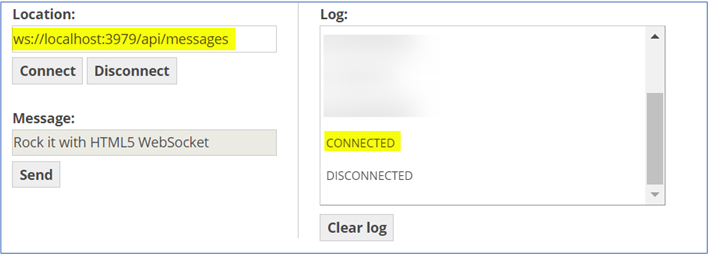
Enable Streaming Endpointchecked,WebSocketsandAlways Ontoggled toTrue. - Using the browser which supports WebSocket we had to make some changes in the
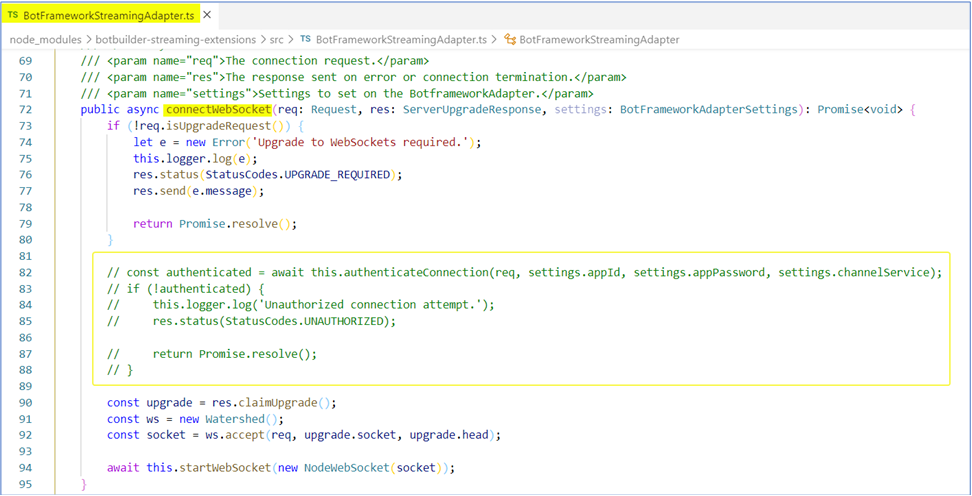
connectWebSocketmethod in order to have a successful WebSocket connection! These changes were implemented because we couldn't authenticate in the browser so for testing the connection, we dismissed the authentication part.
_Changes of BotFrameworkStreamingAdapter_
_WebSocket Connection using the browser_
However, we deployed, published and configured both bots in Azure, and created a tunnel with NGROK to debug it locally using DLSC, but we had another issue (though seems to be connected correctly).
_Error after sending a message_

Also, checking the hits in the NGROK terminal caught my attention that for each connection/message sends two HTTPs GET. Is this correct?
_Duplicated requests_

Batta32
on 4 Oct 2019
This ended up turning into an email thread and discussed in a couple of meetings, the fix was merged with https://github.com/microsoft/botbuilder-js/pull/1294 The root cause was null GUIDs causing the Node.js bots to reject activities.
DDEfromOR
on 11 Nov 2019
Related issues
 WashingtonKayaker
·
9Comments
WashingtonKayaker
·
9Comments
 pesarkhobeee
·
9Comments
pesarkhobeee
·
9Comments
 wonboyn
·
7Comments
wonboyn
·
7Comments
 EricDahlvang
·
9Comments
EricDahlvang
·
9Comments
 HesselWellema
·
9Comments
HesselWellema
·
9Comments