Botbuilder-samples: [Python][Teams] Provide a sample that shows how to send a message to a channel
I was trying to send a message to one Microsoft teams channel with help of below example:
https://github.com/microsoft/BotBuilder-Samples/tree/master/samples/python/16.proactive-messages
I added this code to the example in order to initiate a message:
    connectorClient = await ADAPTER.create_connector_client(service_url=SERVICE_URL)
    parameters = ConversationParameters(
            is_group=True,
            channel_data=CHANNEL_ID,
            activity=Activity(type=ActivityTypes.message,
            text='Hello World!'),
            bot=ChannelAccount(id=BOT_ID),
            tenant_id=TENANT_ID)
    response = await connectorClient.conversations.create_conversation(parameters)
    response.send()
But it didn't work, and I tried many different ways and none of them worked too, always the error is:
Traceback (most recent call last):
File "/home/farid/works/16.proactive-messages/venv/lib/python3.7/site-packages/aiohttp/web_protocol.py", line 418, in start
resp = await task
File "/home/farid/works/16.proactive-messages/venv/lib/python3.7/site-packages/aiohttp/web_app.py", line 458, in _handle
resp = await handler(request)
File "/home/farid/works/16.proactive-messages/app.py", line 103, in notify
raise exception
File "/home/farid/works/16.proactive-messages/app.py", line 100, in notify
await _send_proactive_message()
File "/home/farid/works/16.proactive-messages/app.py", line 152, in _send_proactive_message
response = await connectorClient.conversations.create_conversation(parameters)
File "/home/farid/works/16.proactive-messages/venv/lib/python3.7/site-packages/botframework/connector/aio/operations_async/_conversations_operations_async.py", line 176, in create_conversation
raise models.ErrorResponseException(self._deserialize, response)
botbuilder.schema._models_py3.ErrorResponseException: (BadSyntax) Incorrect conversation creation parameters
So I think we really need a real example of this topic
 pesarkhobeee
All 9 comments
Hi @pesarkhobeee
The sample you're looking for currently does not exist. It's on the schedule to do this cycle so we'll get it out relatively soon. In the mean time here's the code (in C#) you need to send a message directly to a channel. I'll look to see if I can find this code in Python:
            var teamsChannelId = turnContext.Activity.TeamsGetChannelId();
            var message = MessageFactory.Text("good morning");

            var serviceUrl = turnContext.Activity.ServiceUrl;
            var credentials = new MicrosoftAppCredentials(_appId, _appPassword);

            var conversationParameters = new ConversationParameters
            {
                IsGroup = true,
                ChannelData = new { channel = new { id = teamsChannelId } },
                Activity = (Activity)message,
            };

            ConversationReference conversationReference = null;

            await ((BotFrameworkAdapter)turnContext.Adapter).CreateConversationAsync(
                teamsChannelId,
                serviceUrl,
                credentials,
                conversationParameters,
                (t, ct) =>
                {
                    conversationReference = t.Activity.GetConversationReference();
                    return Task.CompletedTask;
                },
                cancellationToken);
 Virtual-Josh
on 14 Jan 2020
Virtual-Josh
on 14 Jan 2020
Hi @Virtual-Josh , today I even tried NodeJS (I am not a C# developer) and I tried to send a message to a MS teams channel as you said, it didn't work, with different parameters, it is working when I am sending a message to a user but it is not when I am sending to a channel like yours, you can see my code and the output:
    // sending a message to a user is working: https://stackoverflow.com/questions/57496329/proactive-messaging-bot-in-teams-without-mentioning-the-bot-beforehand/57499608#57499608
    // const parameters = {
    //     members: [
    //         {id: RECIPIENT_ID} // Replace with appropriate user
    //     ],
    //     channelData: {
    //         tenant: {
    //             id: TENANT_ID
    //         }
    //     }
    // };
    // But sending a message to a channel is not working:
    const parameters = {
        isGroup: true,
        channelData: {
            channel: {
                id: CHANNEL_ID
            }
        }
    };
    console.log("test1");
    AppCredentials.trustServiceUrl(SERVICE_URL);
    var connector = adapter.createConnectorClient(SERVICE_URL);
    var conversationResource = await connector.conversations.createConversation(parameters)
    const message = MessageFactory.text('This is a proactive message');

    var response = await connector.conversations.sendToConversation(conversationResource.id, message);

    console.log("test2");
(node:26649) UnhandledPromiseRejectionWarning: Error: Incorrect conversation creation parameters
    at new RestError (/home/farid/works/review/BotBuilder-Samples/samples/javascript_nodejs/16.proactive-messages/node_modules/@azure/ms-rest-js/dist/msRest.node.js:1397:28)
    at /home/farid/works/review/BotBuilder-Samples/samples/javascript_nodejs/16.proactive-messages/node_modules/@azure/ms-rest-js/dist/msRest.node.js:1849:37
    at processTicksAndRejections (internal/process/task_queues.js:94:5)
    at async /home/farid/works/review/BotBuilder-Samples/samples/javascript_nodejs/16.proactive-messages/index.js:127:32
(node:26649) UnhandledPromiseRejectionWarning: Unhandled promise rejection. This error originated either by throwing inside of an async function without a catch block, or by rejecting a promise which was not handled with .catch(). (rejection id: 3)
(node:26649) [DEP0018] DeprecationWarning: Unhandled promise rejections are deprecated. In the future, promise rejections that are not handled will terminate the Node.js process with a non-zero exit code.
@Virtual-Josh
I am also having the same issue when trying to proactively send a message to MS team channels in NodeJS.
With Botkit, I am able to proactively reply to a message previously sent in the channel (Similar to the javascript sample given here) but I couldn't find how to proactively send messages anywhere in the documentation.
 kevinyang372
on 22 Jan 2020
kevinyang372
on 22 Jan 2020
@pesarkhobeee
I'm working on writing a Python version of the above linked code. I'll send it over once I finish it.
@kevinyang372
You can view the JS version here:
If that doesn't work for you let me know.
Virtual-Josh
on 22 Jan 2020
@pesarkhobeee
Here's the Python code needed to send a message to a channel. I've also included code if you wanted to reply to that new thread you made.
class TeamsConversationBot(TeamsActivityHandler):
    def __init__(self, app_id: str):
        self._app_id = app_id
        self._app_password = app_password

    async def on_message_activity(self, turn_context: TurnContext):
        teams_channel_id = teams_get_channel_id(turn_context.activity)
        message = MessageFactory.text("This will be the start of a new thread")
        new_conversation = await self.teams_create_conversation(turn_context, teams_channel_id, message)

        # If you care to reply to your new thread this is how
        await turn_context.adapter.continue_conversation(
                                                        new_conversation[0],
                                                        self.continue_conversation_callback,
                                                        self._app_id
                                                        )

    async def teams_create_conversation(self, turn_context: TurnContext, teams_channel_id: str, message):
        params = ConversationParameters(
                                        is_group=True,
                                        channel_data={"channel": {"id": teams_channel_id}},
                                        activity=message
                                        )

        adapter = turn_context.adapter
        connector_client = await adapter.create_connector_client(turn_context.activity.service_url)
        conversation_resource_response = await connector_client.conversations.create_conversation(params)
        conversation_reference = TurnContext.get_conversation_reference(turn_context.activity)
        conversation_reference.conversation.id = conversation_resource_response.id
        return [conversation_reference, conversation_resource_response.activity_id]

    async def continue_conversation_callback(self, t):
        await t.send_activity(MessageFactory.text("This will be the first reply to my new thread"))
You will need to pass in the app_id into the bot since that's needed. My app.py file has that 1 update.
BOT = TeamsConversationBot(CONFIG.APP_ID)
Let me know if either of you have any additional questions/concerns.
Virtual-Josh
on 22 Jan 2020
Thanks @Virtual-Josh
I saw you added a new complete sample here too:
https://github.com/microsoft/BotBuilder-Samples/tree/master/samples/python/58.teams-start-thread-in-channel
I was soo waiting for this, let me dive into that to investigate the possibilities ;)
pesarkhobeee
on 23 Jan 2020
@Virtual-Josh I tested it, It is really good, thank you, just two feedback and personal opinion:
- First it could be great if we can trigger the creation of a conversation programmatically in your sample code without passing weird arguments, something like:
sendMessageToChannel(channelID,messageContent)
some straight forward example like this:
https://github.com/microsoft/botbuilder-python/tree/5c1169c1a14191a22c4f7d125fc5f540b0ba4594/libraries/botframework-connector - Second, I saw your sample have a perfect and full detailed readme and just to make it better for people who may use App Studio in the MS Teams there may be a misunderstanding because they should use Bot ID and not APP ID in order to make it work:

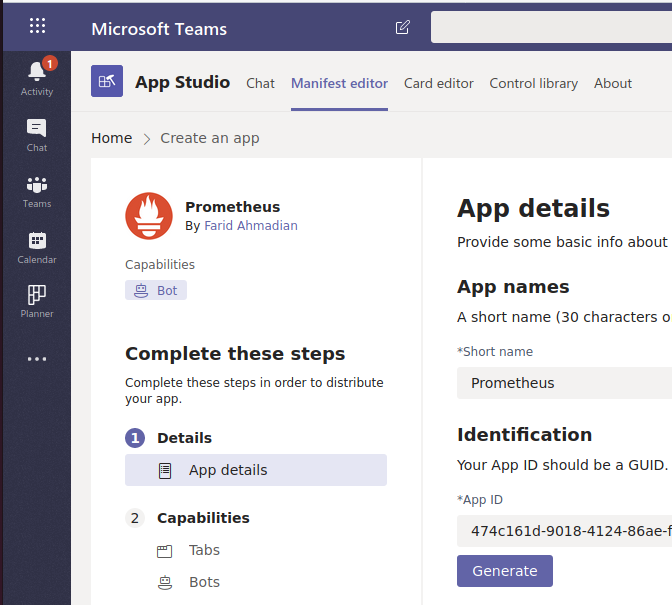
All in all, I really appreciate everything that happened here :)
pesarkhobeee
on 23 Jan 2020
@pesarkhobeee
I'm glad I was able to get you sorted out. I know there's some deltas between specific verbiage in Teams vs the framework. I'll see about updating the read me to make that distinction. I'll also give some thought to your suggestion about adding a helper for starting a new thread in a channel.
I'm going to close this ticket. If you have any other questions feel free to reach back out.
Virtual-Josh
on 23 Jan 2020
This is great. Connector fixes two issues for me with core:
- The bot I wrote had to do a bunch of weird stuff with
async_to_syncand the likes. - The bot I wrote gave an Authentication error that I couldn't debug
I threw in the id and secret in the connector and I can send messages to Teams no problem.
 alper
on 11 Jul 2020
alper
on 11 Jul 2020
Related issues
 clearab
·
4Comments
clearab
·
4Comments
 Batta32
·
9Comments
Batta32
·
9Comments
 jackiebecker
·
5Comments
jackiebecker
·
5Comments
 ashutoshpith
·
8Comments
ashutoshpith
·
8Comments
 gabog
·
9Comments
gabog
·
9Comments