Botbuilder-samples: EchoBot file from Bots directory not accessible at startup page
Sample information
- Sample type: echobot
- Sample language: dotnetcore or webapi
- Sample name: echobot1
Describe the bug
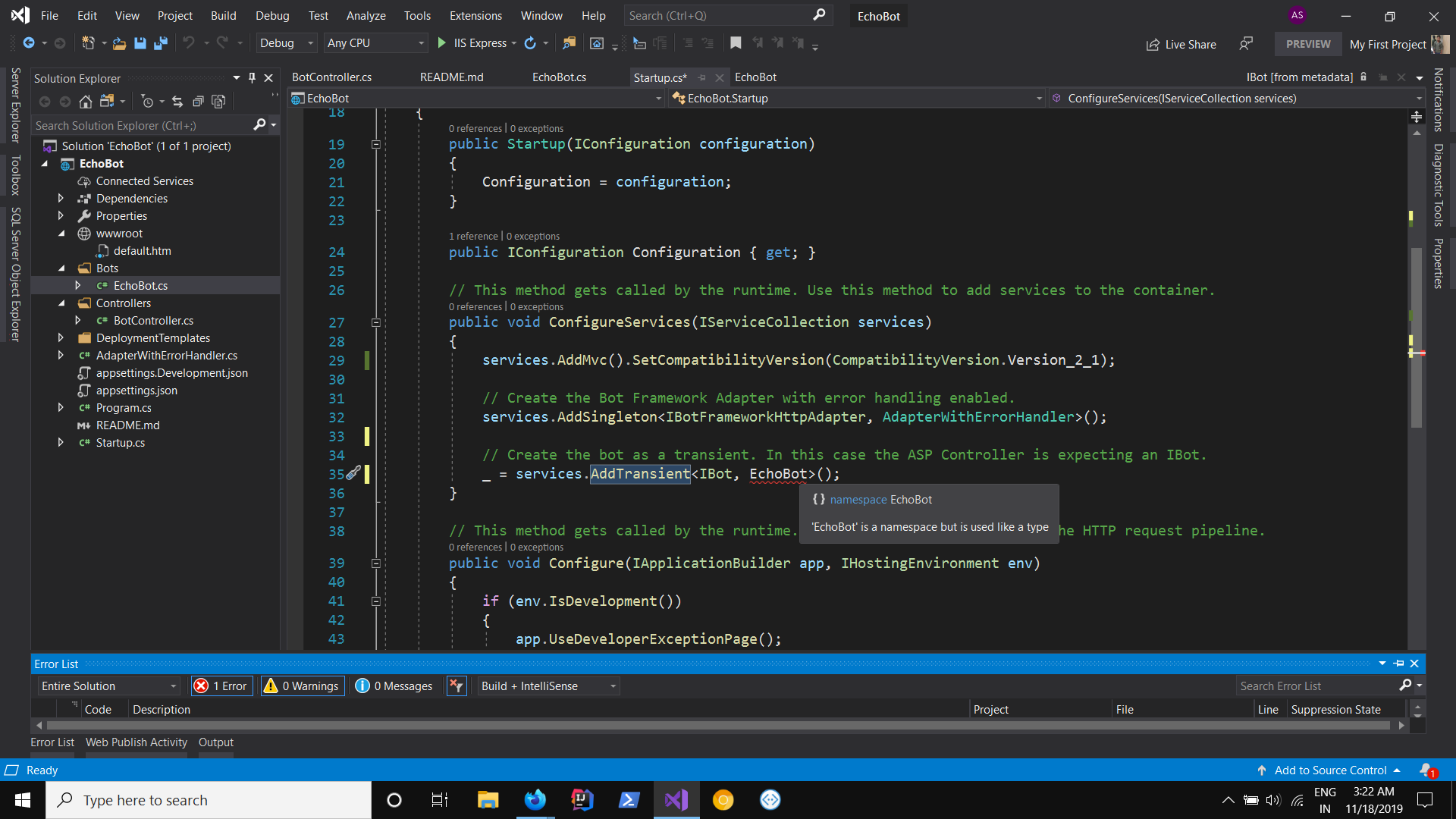
startup page can't able to access the bots directory files into method ConfigureServices for property AddTransient to get type. the error shows
- Error CS0118 'EchoBot' is a namespace but is used like a type
Expected behavior
It expects to acquire all the properties of the referred directory and can be utilized in startup page.
Screenshots
screenshots to help explain the problem.
[bug]
 ashutoshpith
All 8 comments
Hi @ashutoshpith My apologies, I'm a little confused on what you are trying to do here. Are you _trying_ to use a discard? If you remove the _ = from line 35 does it work?
 dmvtech
on 18 Nov 2019
dmvtech
on 18 Nov 2019
with and without discard it's not going work. The main issue here is that the EchoBot class which is in directory Bots cannot be able to read even after the importing via 'using' .
This issue appears in 1 out of 3 times on new project creation . startup class can't able to access the other dir, in this case, the Bots/EchoBot.cs class even after it belongs in same namespace.
ashutoshpith
on 23 Nov 2019
@EricDahlvang @cleemullins @johnataylor @stevengum Any ideas here? I am not able to reproduce.
dmvtech
on 25 Nov 2019
I'm working on it.I'll get back to you when it's done.
ashutoshpith
on 26 Nov 2019
Hi @ashutoshpith Just curious; can you still reproduce this?
dmvtech
on 3 Dec 2019
Closing this as doesn't seem to be an issue that we can reproduce. If you are still exhibiting this issue, and need assistance, please reopen.
dmvtech
on 5 Dec 2019
I was able to repro this. When you are prompted for a project name while creating an EchoBot, it will give you EchoBot1 as the default name. I changed this to EchoBot and received the same error. The error is correct, as it has now used EchoBot as both the namespace for the project as well as the class name within Bots\EchoBot.cs... public class EchoBot : ActivityHandler.
Creating a new project and modifying the name to something other than EchoBot resolved it for me. I hope this helps someone else, and if I am off base with my conclusion, please provide me with an explanation so I'm not muddying the waters.
 johnkellyjr
on 5 Oct 2020
johnkellyjr
on 5 Oct 2020
Ah! Thank you @johnkellyjr
Sorry I missed that earlier. Good find, that is absolutely the cause (I didn't test thoroughly enough before). @ashutoshpith As John said; just rename either your namespace or your class.
dmvtech
on 6 Oct 2020
Related issues
 daveRendon
·
6Comments
daveRendon
·
6Comments
 v-kydela
·
4Comments
v-kydela
·
4Comments
 stevengum
·
3Comments
stevengum
·
3Comments
 clearab
·
4Comments
clearab
·
4Comments
 MariaMendietaSpur
·
7Comments
MariaMendietaSpur
·
7Comments
Most helpful comment
Ah! Thank you @johnkellyjr
Sorry I missed that earlier. Good find, that is absolutely the cause (I didn't test thoroughly enough before). @ashutoshpith As John said; just rename either your namespace or your class.