Bookmarks: API /rest/v2/bookmark - "weird" folders array
Describe the bug
Bookmark objects contain an array of "folders" and this array is behaving a little bit odd.
- Why is this an array?
- Array size seems to be the very same size as "tags" e.g. when you add a tag to a bookmark, it will automatically add a folderId to the array. The folderId is just then just duplicated e.g. 4 tags -->
"folders": [9,9,9,9]... adding another tag.... 5 tags -->"folders": [9,9,9,9,9] - This array may contain different folderIds. E.g. a Bookmark created at root and then moved into a sub-folder might (not always) will have this array:
"folders": [9,-1]Why?
Expected behavior
In your fronted it seems to be that you are always using folders[0]. At least this is my observation for my weird bookmarks with folders like "folders": [9,-1]
Either have 'folders' only being one 'folder' int or maybe add a short explaination to the API documentation on why this is an array and what its intentions are. Currently I'm confused :)
Screenshots
Lenght of tags ==> Lenght of folders
{
            "id": 3,
            "url": "URL",
            "title": "TITLE,
            "description": "",
            "lastmodified": 1603990654,
            "added": 1590846079,
            "clickcount": 0,
            "lastPreview": 0,
            "available": true,
            "archivedFile": null,
            "userId": "USER",
            "tags": [
                "coredata",
                "fun",
                "later",
                "swift",
                "youtube"
            ],
            "folders": [
                9,
                9,
                9,
                9,
                9
            ]
        }
Only appears in the root folder (in the fronted)
{
            "id": 2253,
            "url": "https://levelup.gitconnected.com/building-an-ios-app-using-swiftui-combine-mvvm-architecture-part-1-7e5a1683a7aa",
            "title": "https://levelup.gitconnected.com/building-an-ios-app-using-swiftui-combine-mvvm-architecture-part-1-7e5a1683a7aa",
            "description": "",
            "lastmodified": 1603296556,
            "added": 1590613485,
            "clickcount": 0,
            "lastPreview": 0,
            "available": true,
            "archivedFile": null,
            "userId": "USER",
            "tags": [
                ""
            ],
            "folders": [
                -1,
                15,
                -1,
                15
            ]
        }
Only appears in a sub folder (in the fronted)
{
            "id": 9,
            "url": "https://swiftwithmajid.com/2020/02/26/textfield-in-swiftui/",
            "title": "TextField in SwiftUI | Majid’s blog about Swift development",
            "description": "",
            "lastmodified": 1603296539,
            "added": 1589714609,
            "clickcount": 0,
            "lastPreview": 0,
            "available": true,
            "archivedFile": null,
            "userId": "USER",
            "tags": [
                ""
            ],
            "folders": [
                15,
                -1
            ]
        }
Desktop (please complete the following information):
- OS: MacOS X
- Browser: Firefox
- Version: 82.0.1 (64-Bit)
Server (please complete the following information):
- Database: MySQL 10.3.25
- PHP version: 7.4.11
- Nextcloud version: 19.0.3
- Bookmarks app version: 3.4.6
- Nextcloud external user backend: none
Do you need any additional information?
 altepizza
All 8 comments
Ahoy @altepizza! Good to hear from you! :+1:
Why is this an array?
It's an array because the same bookmark (identified by URL) may be present in multiple
Array size seems to be the very same size as "tags" e.g. when you add a tag to a bookmark, it will automatically add a folderId to the array. The folderId is just then just duplicated e.g. 4 tags --> "folders": [9,9,9,9]... adding another tag.... 5 tags --> "folders": [9,9,9,9,9]
That would be a bug.
This array may contain different folderIds. E.g. a Bookmark created at root and then moved into a sub-folder might (not always) will have this array: "folders": [9,-1] Why?
see above.
PS: Feel free to get an account for the dev community talk and swing by the boomarks app talk ;)
 marcelklehr
on 30 Oct 2020
marcelklehr
on 30 Oct 2020
Thx for the reply. That makes the intented behaviour very clear.
Unfortunately usage still seems inconsistent (which drives my users mad :P). See this example:
When I simply ask to get all bookmarks via /bookmarks/public/rest/v2/bookmark?page=-1, I'll get all my bookmarks including this one back: {
"id": 9,
"url": "https://swiftwithmajid.com/2020/02/26/textfield-in-swiftui/",
"title": "TextField in SwiftUI | Majid’s blog about Swift development",
"description": "",
"lastmodified": 1603296539,
"added": 1589714609,
"clickcount": 0,
"lastPreview": 0,
"available": true,
"archivedFile": null,
"userId": "USER",
"tags": [
""
],
"folders": [
                15,
                -1
            ]
}
Which I would then choose to display in root als well as whatever folder has id 15.
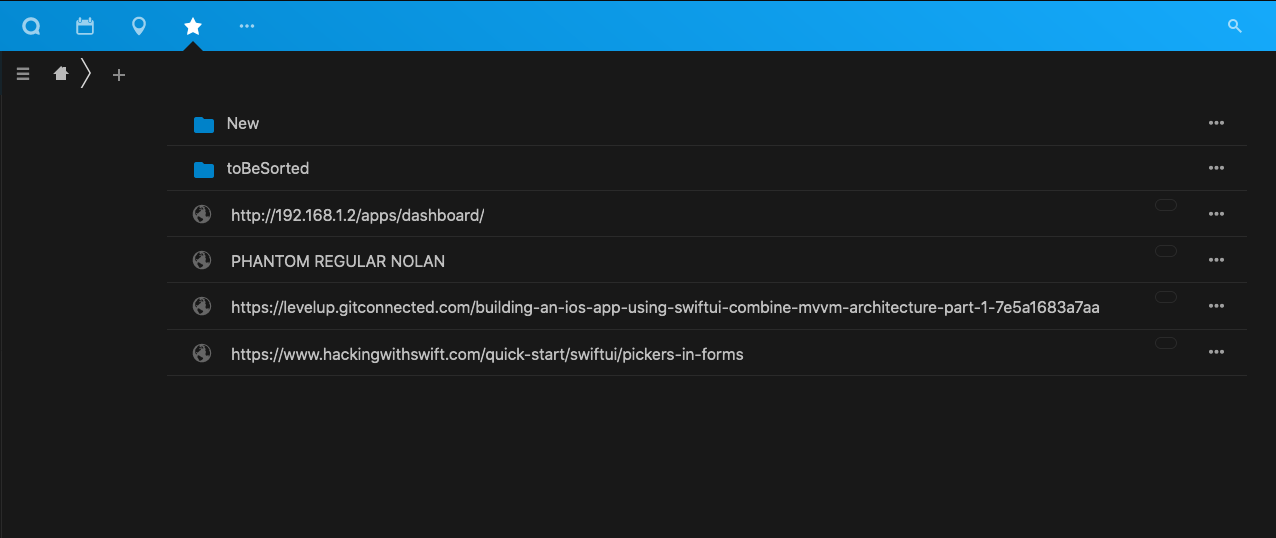
Unfortunately this one is still only being shown in folder 15 in your official frontend and therefore starts confusing users of the API like the ones using my iOS client. They only expect the bookmark to come up in 15.
Screenshot of my -1 which is missing TextField in SwiftUI | Majid’s blog about Swift development" even though the API says I would find it there.
altepizza
on 30 Oct 2020
How can I reproduce this? Moving bookmarks in the UI seems to work. Also, the frontend uses the same API that third party apps use.
marcelklehr
on 31 Oct 2020
Moving bookmarks around and for some reason they still retain an old folderId additionally to the new one is something I can hardly reproduce. It's just something that I can see in my PROD environment and that I suspect is happening to some of the users of my iOS client. It may even be some odd obsolete behaviour from longer running instances. I don't know. My JS skills are not that advanced at the moment to figure out if there is some unexpected behaviour going on :)
But looking at the GETs the frontend is performing I found something.
The frontend uses the folder query parameter ...folder=-1, while I stupidly only used page=-1.
Adding the folder=-1 parameter for root will filter out the undesired object or will actually show the object when folder=15. But once I get the object it will still contain "folders": [
15,
-1
]... even though when filtered for -1it was not part of the GET response.
Well at that moment I can think of a workaround in my client but that would mean that I'm not going to trust the folders attribute but rather query every folder and build up this array myself.
altepizza
on 2 Nov 2020
Well at that moment I can think of a workaround in my client but that would mean that I'm not going to trust the folders attribute but rather query every folder and build up this array myself.
I wouldn't implement that workaround just yet.
marcelklehr
on 2 Nov 2020
Alright. Thanks for taking a look :P
altepizza
on 2 Nov 2020
There's some b0rked SQL join magic going on, joining bookmark IDs with folder IDs if there are matching ones.
marcelklehr
on 2 Nov 2020
This should be fixed with v3.4.7
marcelklehr
on 3 Nov 2020
Related issues
 bspire
·
4Comments
bspire
·
4Comments
 skoelzow
·
4Comments
skoelzow
·
4Comments
 sunjam
·
5Comments
sunjam
·
5Comments
 paulcalabro
·
5Comments
marcelklehr
·
6Comments
paulcalabro
·
5Comments
marcelklehr
·
6Comments